AI Mode on Google: Why Clicks Are Dropping and What Drives Searches Now
Your rankings are fine, but clicks are dropping—even for the No. 1 spot: We’ll use screenshots to show how Google’s AI mode and the AI overview explain this. We’ll also cover the new “Generative AI in Google Search” setting, the AI report in Search Console, and five strategies that still drive traffic.
Date
Category
Author

"Our impressions in Search Console are going up, but clicks have been dropping for months. Are we doing something wrong?" We got this question three times in one week this summer. And no, those three companies didn't do anything wrong. They're experiencing what many websites in Germany are going through right now: Google is answering some of the questions itself—either at the top of the overview using AI or directly in AI mode.
We’re now seeing the exact same question coming in via Google, almost word for word. Search queries such as “our clicks from Google Search are dropping even though our rankings are stable” or “why is our CTR dropping despite being in position 1” are appearing in our Search Console. According to the Keyword Planner, around 18,100 people in Germany search for “ki modus google” each month; in August, that number was 33,100.
Here, we answer the three questions most people ask us: Why are clicks dropping despite good rankings? Why does the click-through rate drop even when you’re in the No. 1 spot? And is it even worth optimizing for AI mode? We’ll also show you how to find this effect in Search Console and what the new “Generative AI in Google Search” setting does.
In a nutshell (as of September 2026)
Go to Search Console today and navigate to Settings › Generative AI in Google Search, then verify that “Include” is enabled. This setting has been available worldwide since August 31, 2026, and according to Google’s guidelines, enabling it is a prerequisite for appearing in AI mode and in the AI overview. The fact that clicks are dropping despite stable rankings is usually not your fault: The AI-powered overview occupies a single position, which is shared by all the pages linked within it. According to Google, optimizing for AI mode remains SEO, but with higher standards for your own content.
Here's how to access AI mode, and here's how it differs from the AI overview
Try out your most important search queries in AI Mode yourself—either by visiting google.com/ai or by tapping the “AI Mode” tab after performing a regular search. According to Google’s Help Center, there are three ways to do this: visit google.com/ai, enter a question on google.com and tap “AI Mode,” or tap “AI Mode” in the Google app on your home screen. Google describes it this way: “AI Mode is Google’s most powerful AI search feature.” Internationally, it’s called AI Mode, and in technical articles, it’s often referred to as Google AI Mode.
For basic use, the help page does not specify a registration requirement or a minimum age. Personalized responses are available only to users 18 and older and only if the history feature is enabled. In AI mode, you ask questions as you would in a chat; the input field is labeled “Ask a Question,” and each answer can be explored further with a follow-up question.
The AI overview is something different: the AI section at the top of the regular results page, known internationally as “AI Overviews.” Google does not officially use the term “AI overview.” In Germany, the overview has been available since March 26, 2025; initially, it was only available to logged-in users aged 18 and older, but according to the current help section, it is now “available to all users.” AI Mode has been available in Germany, Austria, and Switzerland since October 8, 2025.
Since May 19, 2026, the two have been integrated: According to Google, you can ask a follow-up question directly from any AI-powered overview, which then takes you to AI mode—whether on a computer or a smartphone. The overview cannot be turned off; the help section states: “The search features cannot be disabled.” If you only want to see links, use the web filter after your search. For you, this means: Check every important search query in both views, because your customers see both.
Our click-through rates are dropping even though our rankings are good—what's causing this?
The short answer: There’s often a ready-made answer right above your result now, and many searchers don’t need to click any further. Your ranking in Search Console stays the same or even improves because an AI-generated overview that includes a link to your site counts as a separate ranking position. Impressions go up, clicks go down.
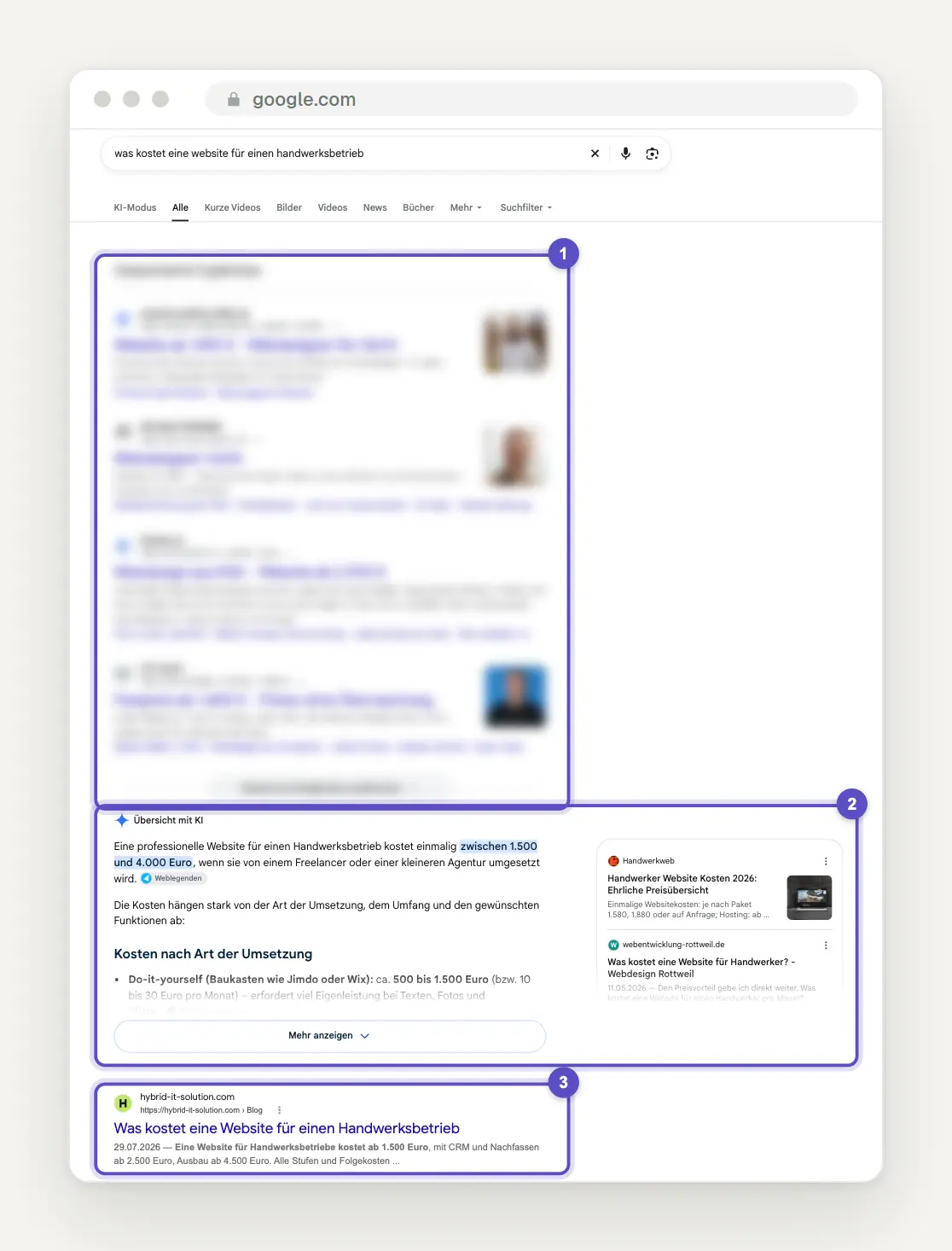
Google search for “how much does a website cost for a trades business,” screenshot from September 29, 2026: (1) four sponsored results, blurred in the image, (2) the AI-generated overview showing a price range of 1,500 to 4,000 euros and source cards, (3) the first regular search result.
Take a look at where your first organic result actually appears on the screen. In our test search for the cost of a contractor’s website, four ads appear first, followed by the AI-powered overview, and only then does the first organic result appear. The price range we were looking for is already listed in the overview. The site ranked No. 1 here is actually the sixth item on the screen, and the answer has already been provided.
Advertising is another factor: According to Google Ads Help, ads may appear above or below the AI-generated overview in all markets. According to the same Help article, ads within the overview are currently available only in English in a number of countries—Germany is not among them. Google itself acknowledged in August 2025 that traffic is shifting: some websites are receiving less, while others are receiving more. At the same time, Liz Reid wrote on the Google Blog that organic clicks overall remain relatively stable year-over-year and that Google continues to send billions of clicks per day to websites.
So try searching for your top ten queries on Google yourself and note whether an AI-generated overview appears, whether your site is linked in it, and how many ads appear before it.
Why is the click-through rate dropping even though we're in the #1 position?
Because ranking in position 1 no longer means you'll be seen first, and because Search Console counts positions differently in AI features. In the Help section for the Performance Report, Google explains two counting rules that, together, produce exactly this result.
First, the position: “An AI-generated overview occupies a single position in the search results, and all links in the AI-generated overview have the same position.” If the overview appears at the very top, every page linked within it is assigned position 1, even if it appears only as a small source card in the margin. Your average position will therefore improve, even though you’ll be clicked on less often.
Second, follow-up questions in AI mode: According to Google, anyone who asks a follow-up question there is “essentially performing a new search,” and impressions, position, and clicks are attributed to the new query. A single conversation can thus generate multiple impressions without resulting in a single click on your site.
Google does not publish separate click-through rates for results with or without AI functionality. Therefore, filter your site in the performance report and compare its position and click-through rate with the period before March 2025: If the position has improved and the click-through rate has worsened, this indicates that the metrics are being calculated this way—and not a ranking issue.
How much clicks are declining, according to independent measurements
When using AI to browse search results, expect significantly fewer clicks on the first result—to an extent that is consistent across multiple studies. Google itself does not provide any figures, so we rely on independent analyses.
Sistrix, Germany, February 2026: For about 20 percent of roughly 100 million German search terms, Google displays an AI-powered overview; for longer, more specific queries, the figure is about 30 percent. When it appears, the click-through rate for the first organic result drops from 27 to 11 percent, according to Sistrix. Based on this analysis, German websites lose an estimated 265 million organic clicks per month—that’s 6.6 percent of all clicks from the search terms analyzed.
Ahrefs, February 2026: Based on a comparison of 300,000 search terms between December 2023 and December 2025, Ahrefs reports that the No. 1 result in searches using an AI-powered overview loses 58 percent of its click-through rate, the No. 2 result loses just under 51 percent, and the No. 10 result loses 19 percent.
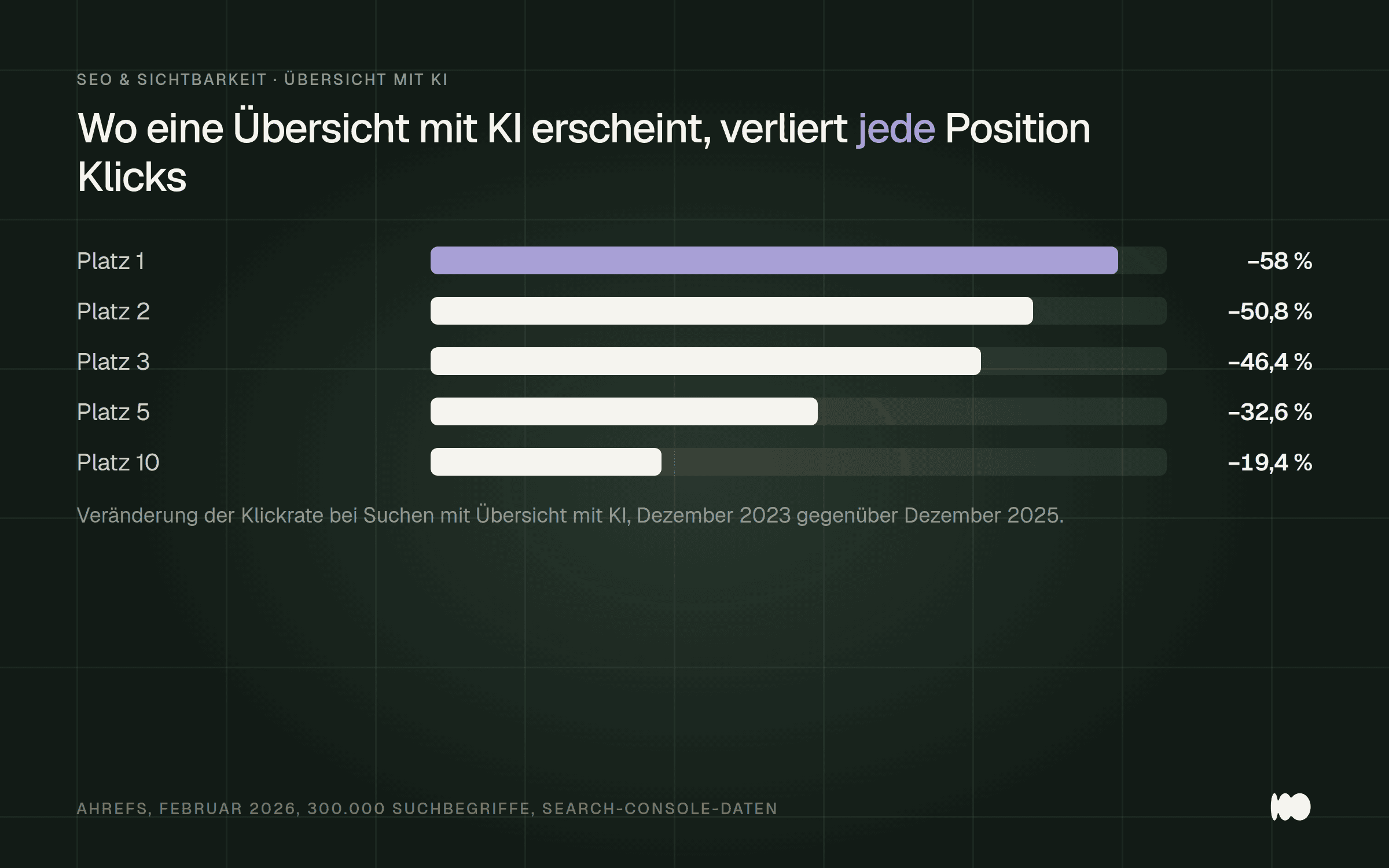
The higher a page ranks, the more traffic it loses when Google provides the answer itself. Source: Ahrefs, February 2026.
Google disagrees: According to Liz Reid, reports of dramatic declines are often based on flawed methods or isolated cases. The German announcement regarding AI Mode states that such a click is “potentially of higher quality, since the user usually spends more time on the websites visited.” Google does not provide a specific figure for this, so it analyzes the metrics and checks whether the remaining visitors make inquiries more frequently.
Sort your pages into two groups: pages that explain something, and pages where people buy, book, or make inquiries. The first group is losing traffic, while the second is barely affected. According to Sistrix, specialized health portals are losing about 30 percent of their clicks, parenting and baby portals over 24 percent, and news sites a good 7 percent. Amazon, on the other hand, is losing 1.7 percent, and Booking 0.5 percent.
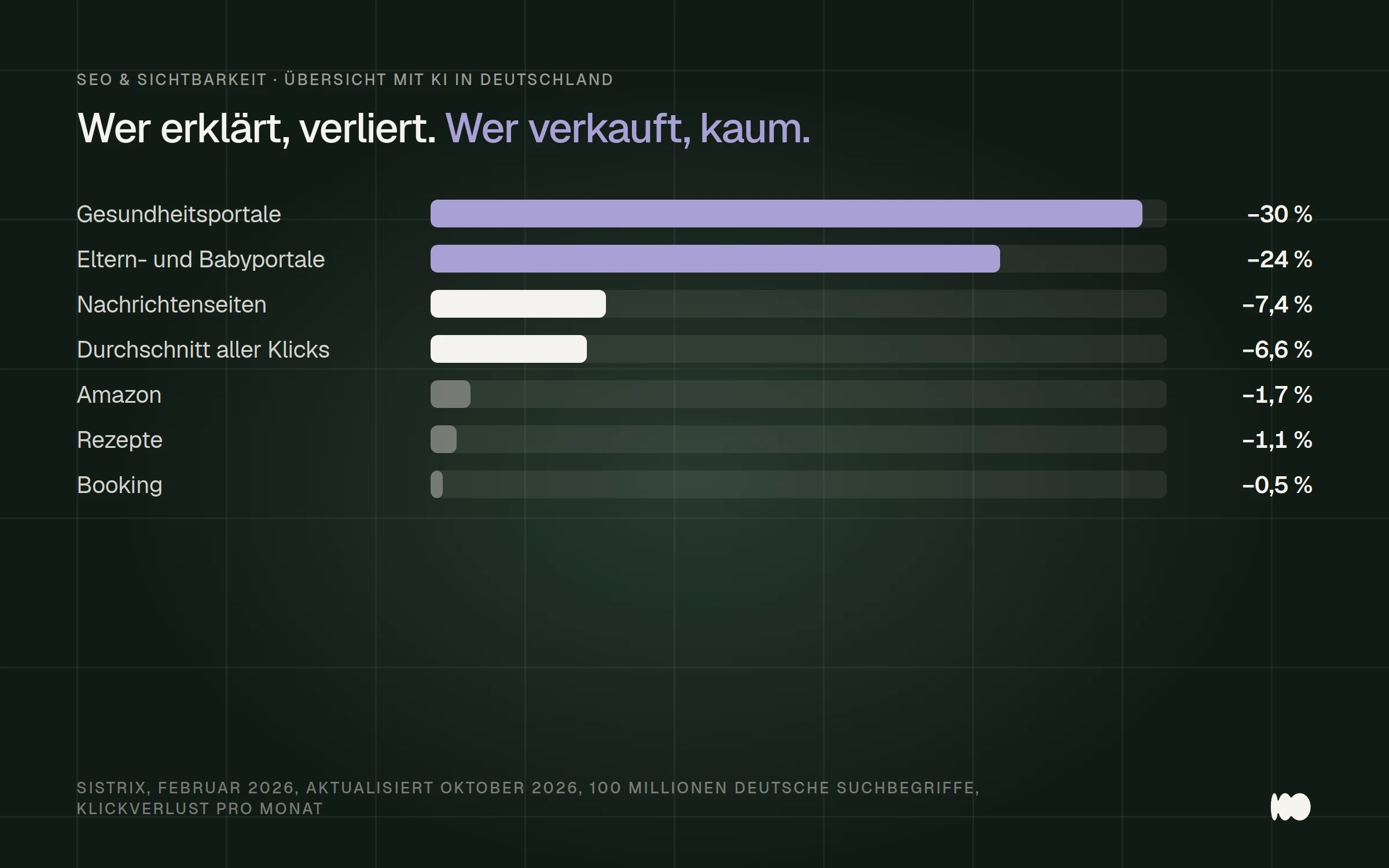
The loss of clicks is unevenly distributed: advice sites and health portals are losing clicks, while online stores and booking sites are barely losing any. Source: Sistrix, February 2026.
For corporate websites, this means that an advice page on photovoltaic costs loses clicks, while the services page featuring an offer in Cologne loses hardly any. According to an Amsive study from April 2025 covering 700,000 search terms, the click-through rate for searches using brand names that triggered an overview page actually rose by nearly 19 percent. Therefore, set up two filters in Search Console—one for pages under /blog and one for your service pages—and compare the click-through rates of both groups separately.
How AI Mode Answers a Trivia Question and Where Your Page Appears
Ask your most important question about price or expiration dates in AI mode and see which websites are listed as sources next to the answer. That’s exactly what we did when asking about the cost of a contractor’s website.
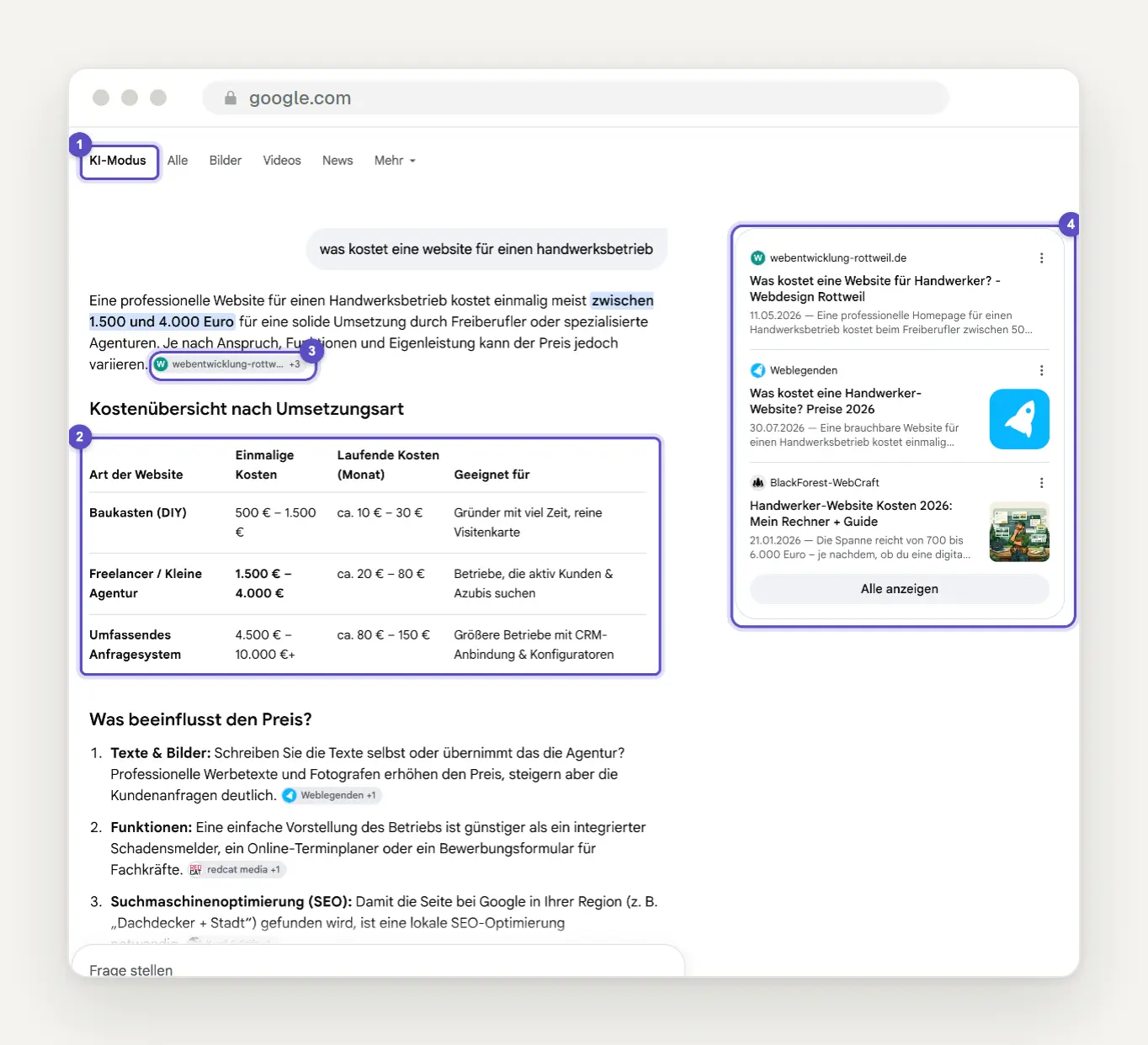
The same search in AI Mode: (1) the "AI Mode" tab, (2) the answer with a table titled "Cost Overview by Implementation Type," (3) a source chip directly in the text labeled "+3," (4) the source bar on the right with three websites and "Show All."
The answer compiles its own cost table from several websites; the sources are listed as icons in the text and as a bar with three cards. Anyone who doesn't appear there practically doesn't exist for this question, even if they rank well in a regular search.
Behind this is a process that Google refers to as the “Query Fan-Out Method” on its German blog. The Help section describes it as follows: “Your question is broken down into subtopics, and all subtopics are researched simultaneously.” For our question, this means: one-time costs, recurring costs, and price drivers—each with its own sources. Therefore, check whether your page contains a clear, verifiable statement for each of these subtopics—such as an actual price range instead of “upon request.”
Find the AI effect in the regular performance report
Set the performance report to 16 months, sort by search queries, and compare impressions and clicks for your top ten queries. Clicks and impressions from AI-powered overviews are included in the standard performance report from the start, while those from AI mode have been included since June 16, 2025—both under the “Web” search type. There is no separate filter available to isolate them.

The typical pattern in Search Console, schematically: Impressions remain steady, while clicks drop off.
The Fingerprint: Impressions are the same or increasing, clicks are decreasing, and ranking is the same or better. Whenever you see it, check the search results in your browser. Usually, this applies to only a handful of pages, and those are exactly the ones that matter.
It's no different for us: The predecessor to this post generated 316 impressions and 4 clicks in 90 days, with an average position of 12. Many of the queries were complete sentences—typical of searches that also trigger AI mode. For a general guide on how to read the report, see our post “How to Use Google Search Console Effectively.”
What the Performance Report Shows—and Doesn't Show—About Generative AI Functions
Under "Performance," open the new performance report on generative AI features and start by looking at the "Pages" tab. It shows which of your pages have appeared as links in AI-powered summaries and in AI mode. According to Google, it has been available to all websites worldwide since August 31, 2026; it was announced on June 3, 2026, for a subset of websites.
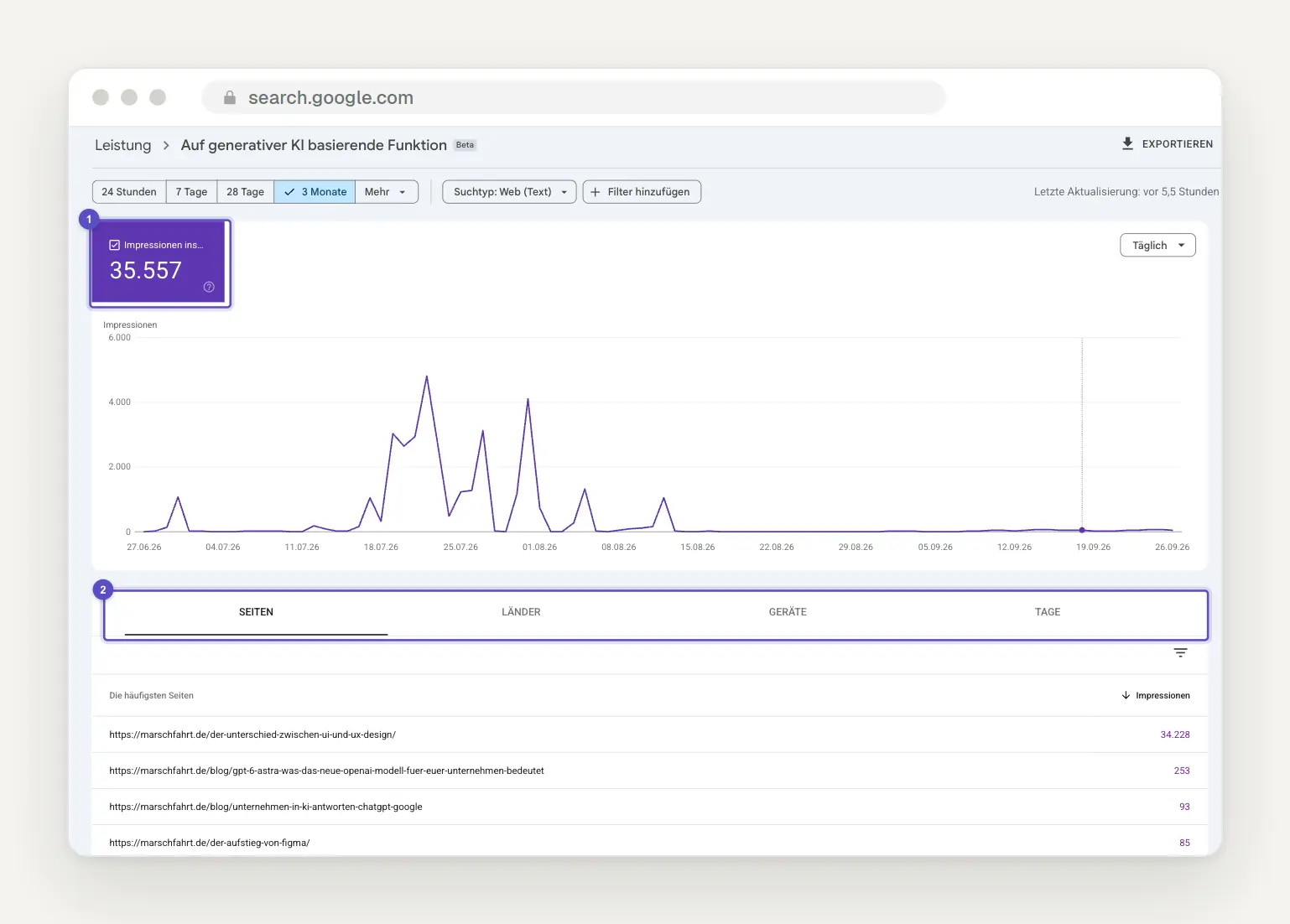
The report in our own Property, displayed as a “Generative AI-based feature” with a beta label: (1) a single tile showing impressions—in this case, 35,557 over three months—and (2) the tabs Pages, Countries, Devices, and Days.
According to the help section, the report includes impressions—that is, how often links to your website were displayed in an AI feature. The help section does not mention clicks, search queries, or click-through rates; we only have this one tile. The help section lists the tabs as “Pages,” “Countries,” “Time Periods,” and “Devices”; in our interface, the “Time” tab is labeled “Days.” Two results from the same website in a single response count as one impression in the chart.
An honest look at our own numbers: Of the 35,557 impressions, over 34,000 came from a single older post on the difference between UI and UX design, and the curve has been nearly flat since mid-August. That’s exactly what it’s for: to see if and on which pages you appear, not to quantify traffic.
According to Google, if you don’t see the report, it’s usually because you have too few impressions in AI features, or: “This may be because you’ve excluded your website from Google Search’s generative AI features.” Since September 24, 2026, there has been a search type here and in the standard performance report for multimodal searches using Lens, Circle to Search, uploaded images, and image search via right-clicking in Chrome. The German help section does not yet mention the name, but our filter already shows the search type “Web (Text).” If you display project photos, adjust the filter to see if they generate impressions in image searches.
The new "Generative AI in Google Search" setting: leave the default as is
Under Settings › Generative AI in Google Search, make sure that “Include” is selected, and only change this for a good reason. As of August 31, 2026, every website can specify there whether its links and content appear in AI-powered summaries, in AI mode, and in Discover’s AI features. This setting applies to the entire property and is inherited by child properties.
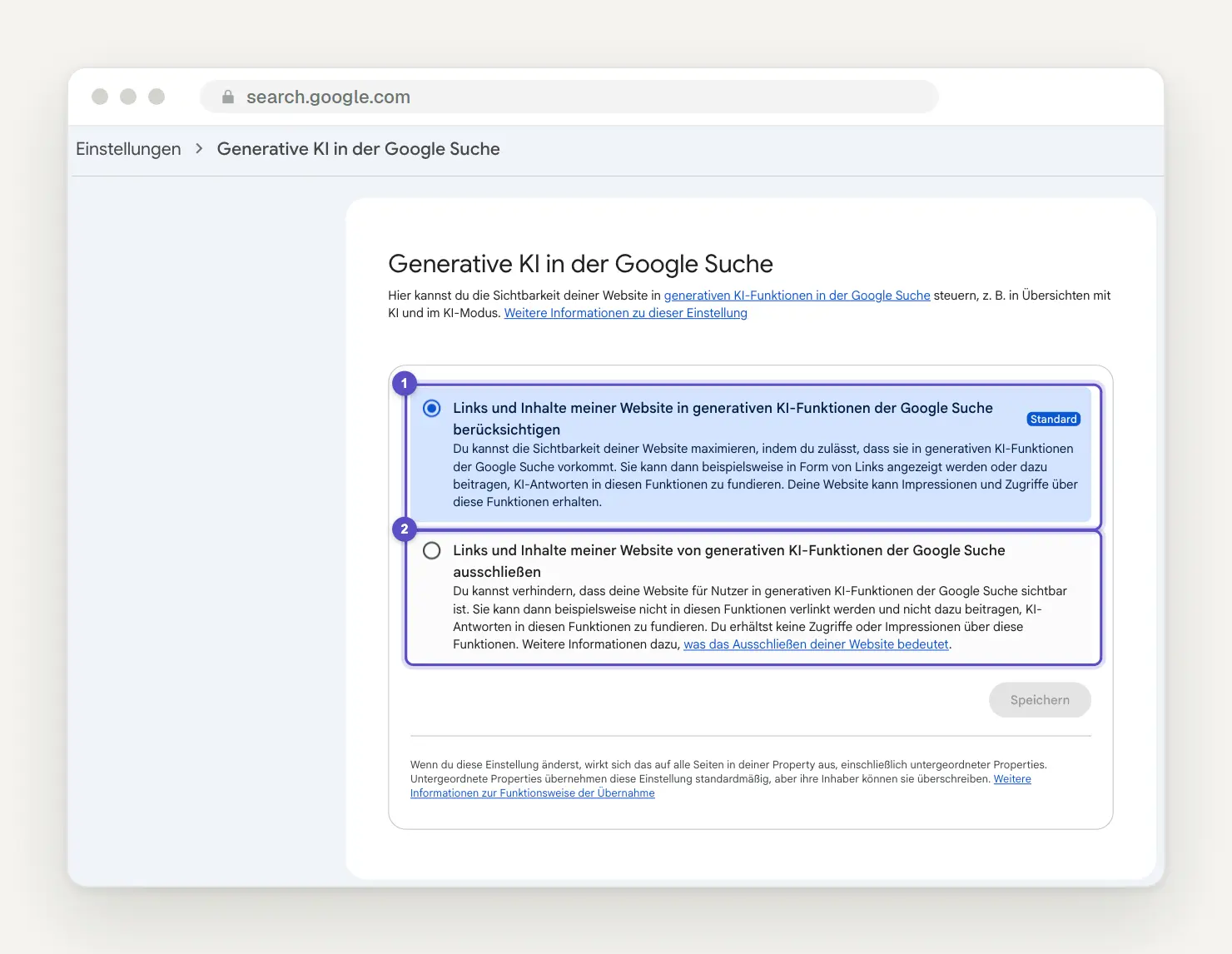
Search Console, Settings › Generative AI in Google Search: (1) the default option “Include my website’s links and content in generative AI features in Google Search,” (2) the option to exclude them.
Google describes the consequences of exclusion in no uncertain terms: “You will not receive any traffic or impressions through these features.” According to the Help Center, the exclusion takes effect within one to two days, though it may take longer for some content due to caching. According to Google, it does not affect normal rankings: “It is not used as a ranking or inclusion signal that affects other areas of Google Search.”
The downside is outlined in Google’s optimization guide: Approval in Search Console is now a prerequisite for appearing in the search’s AI features at all. So anyone who clicks “Exclude” is completely out of the running.
Don’t confuse this setting with Google Extended or with AI training. The help section clearly states: “This setting has no effect on AI training.” Conversely, Google Extended in the robots.txt file does not determine whether your site appears in AI mode; according to Google, it affects model training. If you only want to exclude individual pages or sections, use `nosnippet`, `max-snippet`, or `data-nosnippet`; according to Google’s German documentation, `nosnippet` also prevents content from being used as direct input for the “Overview with AI” feature and AI mode. For most corporate websites, the rule is: don’t exclude anything; instead, make the right pages quotable.
Being cited is not the same as ranking
Be sure to answer the follow-up questions on your most important pages as well, because people who answer a specific question well get cited—not just those who rank at the top. In March 2026, Ahrefs analyzed approximately 863,000 results pages: Only 37.9 percent of the cited links in AI-generated summaries came from the top 10; in July 2025, that figure was still around 76 percent, according to Ahrefs.
This aligns with the fan-out approach: For each sub-question, Google searches for its own sources. The source that provides the clearest answer to the sub-question about monthly maintenance costs may be cited, even if it ranks far down the list for the main question about website costs. Technically, Google requires that the page be indexed and eligible to appear in search results with a snippet; in addition, it must be approved in Search Console.
Being cited pays off in measurable ways. Seer Interactive analyzed this data across 53 brands and 5.47 million search queries (April 2026): If a brand is cited in the overview, it receives about 120 percent more organic clicks per impression than without a citation; however, for how-to questions, this figure is still 38 percent lower than for searches without an overview. So, for your five most important pages, create a list of related questions and check whether each one is answered on the page in one or two sentences.
Is it worth optimizing for AI mode?
Yes, but not as a separate discipline: According to Google, optimization for AI mode is just standard SEO, and that’s exactly how you should budget for it. Google’s May 15, 2026, guidelines essentially state that, from a search perspective, optimization for generative AI is optimization for the search experience—and therefore still SEO. Anyone selling you a separate package for this is usually just selling the same thing under a new name.
It’s most effective when your customers ask a lot of questions before making a purchase—such as about price, the process, and duration. It’s not very helpful if your pages mainly repeat general information that twenty other sites also have; according to the guide, original, unique, and useful content has a stronger long-term impact than any other tip in it.
Our rule of thumb from client projects: If a page is meant to generate inquiries and answers a question you’d also ask an AI, it’s worth revising. If it’s only meant to build reach for a general topic, it’s hardly worth the effort. Start by focusing on the three pages that generate the most inquiries today.
Five Strategies That Are Generating Leads Right Now
Go through these five points in exactly this order, because the first two are the most effective. They are based on Google's guidelines, the metrics above, and our projects over the past twelve months.
1. Service pages before advice pages. Check whether your service pages answer the questions a prospective customer might ask: price range, process, duration, region, and references. A service page that simply says, “We are your partner for,” will neither be cited nor clicked on. In our test search, two of the three sources in the bar already listed a price range in the preview.
2. Firsthand information instead of a summary. An AI will summarize whatever it can from five other pages. What it can’t do: provide your actual prices, project photos, your workflow, or your experience from numerous construction sites. Google refers to this in its guidelines as “non-replicable content” and contrasts it with mass-produced content, such as the umpteenth list of general tips.
3. Answer sub-questions on a single page, not on twenty. Use clear subheadings, with a short, direct answer under each one, followed by more in-depth information. According to Google’s guidelines, creating separate pages for every conceivable variation to influence rankings or AI responses is considered spam due to the mass production of content.
4. Keep your Business Profile and Merchant Center up to date. According to Google, AI-generated responses may include product listings and information about local businesses, and a well-maintained Business Profile helps ensure your visibility there. Services, hours of operation, photos, and responses to reviews must match the information on your website. For instructions on how to do this, see our article “Set Up, Verify, and Maintain Your Google Business Profile.”
5. Get mentioned where your customers read. Ahrefs found, after analyzing 75,000 brands, that mentions of the brand name on other websites are more strongly correlated with AI visibility than backlinks. Google warns, however, that purchased or fake mentions are less effective than you might think. Therefore, focus on genuine mentions in trade publications, industry associations, and review sites; read more about this in our article on how your company can appear in AI responses from ChatGPT and Google.
What You Can Do Without
Remove llms.txt, specialized AI markup, and text fragmentation from any proposal you receive. Google’s guidelines essentially state that you don’t need new machine-readable files, AI text files, markup, or Markdown, because Google Search doesn’t use them. The note regarding llms.txt has been explicitly included in the guidelines since June 15, 2026.
It’s equally clear: According to the guidelines, there is no requirement to break content down into small chunks for AI, and structured data is not required for AI search—there is no specific schema for this. And according to Google, no third-party tool has access to internal ranking data, no matter what it claims.
We tried this ourselves and decided against it: Making an advice page even longer to make it longer than the summary didn't bring us a single click. It's better to invest that time in the service pages from Lever 1.
Conclusion: What you do today, this week, and in the future
Today: Check your settings and Google the top ten search queries yourself. In Search Console, under Settings > Generative AI in Google Search, the option should be set to “Include.” Then enter each of the ten queries in both regular search and AI mode, and note whether you’re cited.
This week: Look for patterns in the performance report and open the AI report. 16 months, sorted by queries, impressions vs. clicks. In the performance report for generative AI features, you can see which pages actually appear in AI responses—and whether there’s only one, as is the case with us.
Later: Expand your performance pages and measure success by inquiries, not by sessions. Track the number of inquiries and calls per month, monitor your brand searches, and keep an eye on the list of pages that link to you. If you don’t want to do this yourself: We build exactly these pages as part of our fixed-price SEO service.
What Has Changed and What That Means for You
September 24, 2026: Search Console separates multimodal searches—including Lens, Circle to Search, and image uploads—into a distinct search type. As a result, for the first time, you can check whether your photos appear in image search results and AI responses.
August 31, 2026: The performance report on generative AI features is available to all websites, and the “Generative AI in Google Search” setting is available worldwide. As a result, anyone who didn’t have a report this summer can now check it, review the setting, and see which pages are appearing each month.
June 15, 2026: Google's guidelines explicitly state that llms.txt is not used for search. As a result, you can eliminate any proposals based on it.
May 19, 2026: Follow-up questions from the overview, when asked using AI, will switch computers and smartphones worldwide directly to AI mode. Result: The overview is often just the starting point for a longer conversation, so be sure to check your inquiries in both views.
May 15, 2026: Google publishes its guide to optimizing for generative AI features, last updated on July 10, 2026. Result: It is now the benchmark for every AI optimization offering.
October 8, 2025: AI Mode launches in Germany, Austria, and Switzerland. As a result, your customers can ask more detailed questions in the chat without visiting your website.
June 16, 2025: Data from AI mode is included in the performance report under the “Web” search type. Result: Follow-up questions increase your impressions without a corresponding increase in clicks.
March 26, 2025: The AI-powered overview launches in Germany. Note: Always compare click-through rates with a time period prior to this date.
Do you want to know how your website is performing in AI mode?
We’ll analyze your Search Console data to assess the impact of AI. We’ll show you which pages are losing clicks and which ones are being cited, and tell you which two or three changes will make the biggest difference. Just send us a quick message using the contact form. We’ll respond within 24 hours—personally and without any sales pitch.
Sources
Studies, Google documentation, and help pages, accessed on November 4, 2026.
Update: AI Overviews Reduce Clicks by 58% – Ahrefs, February 4, 2026
Update: 38% of AI Overview Citations Come From the Top 10 – Ahrefs, March 2, 2026
An Analysis of AI Overview Brand Visibility Factors – Ahrefs, May 2025
AIO's Impact on Google CTR: 2026 Update – Seer Interactive, April 24, 2026
Google AI Overviews: New Research on Click Drop-off – Amsive, April 2025
AI in Search Is Driving More Queries and Higher-Quality Clicks – Google, August 6, 2025
AI Mode Launches in Germany, Austria, and Switzerland – Google, October 8, 2025
New opportunities, control, and insights for website owners – Google, June 2026
Optimizing Your Website for Generative AI Features – Google Search Central
More Articles
© Marschfahrt Studio
Practical knowledge on web design, SEO, AI, and conversion optimization. Based on real projects, without any marketing spin.

