Headless CMS for Businesses: When It's Worth It and When It Isn't
When a headless CMS like Storyblok, Contentful, or Sanity makes sense for businesses, and when a traditional system is a better fit: featuring prices as of October 2026, case studies, a decision tree, and an Excel template for comparing CMS platforms.
Date
Category
Author
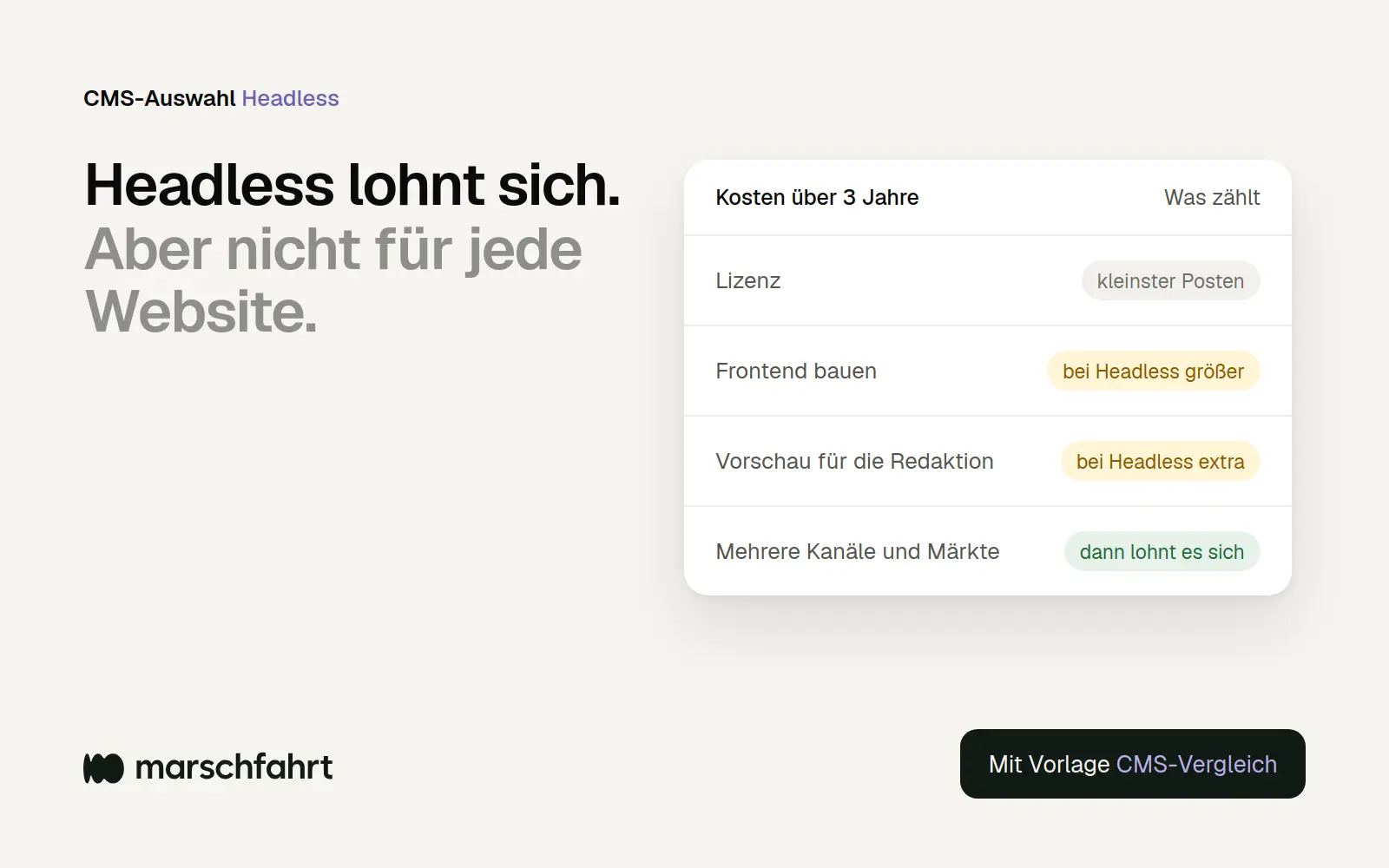
Do we need a headless CMS for the relaunch? This question appears in many project specifications, often because an agency suggested it or because it sounds modern. The honest answer: For some companies, it’s the best choice; for many others, it makes the website more expensive, more difficult to maintain, and more dependent on developers—without visitors automatically benefiting from it.
For this guide, in October 2026, we personally reviewed the pricing and product pages of seven headless providers, read Google’s documentation on JavaScript and search engines, analyzed case studies from Germany, Austria, and Switzerland, and drew on our own metrics from the Chrome UX Report. We build corporate websites ourselves—mostly using Framer—and are therefore interested in providing a clear distinction, but we have no interest in talking you out of a solution that works for you. At the end, you’ll receive an Excel template that lets you compare systems based on your criteria and costs over a three-year period.
In a nutshell (as of October 2026)
A headless CMS is worth it if the same content is distributed across multiple channels, brands, or countries, and you have your own development team or a dedicated agency. If the website is your main channel and your marketing team needs to publish content without developers, a traditional or visual CMS is usually the better choice. The license cost is rarely the issue; for small teams, it ranges from about 100 to 350 euros or dollars per month. In our estimation, the front end—which, with a headless CMS, must be built and maintained entirely in-house, including a preview for the editorial team—is where the costs add up. For enterprise requirements such as single sign-on, approval workflows, and contractual data storage in the EU, you’ll almost always end up on a custom enterprise plan from major providers upon request. Use the Excel template at the end to calculate the costs for your specific situation.
The difference: Content and presentation are separate
With a traditional CMS, a single system manages content and uses it to build the pages; with a headless CMS, the CMS simply delivers content via an API, and the website is built by a separate program. WordPress, TYPO3, Framer, and Webflow are traditional or integrated in this sense: The editorial team maintains text and images, and the same system generates the finished page. With Storyblok, Contentful, Sanity, Strapi, or Hygraph, this “head” is missing. The content is stored in a structured database and delivered via an API to a website, an app, a customer portal, or a screen in a store.
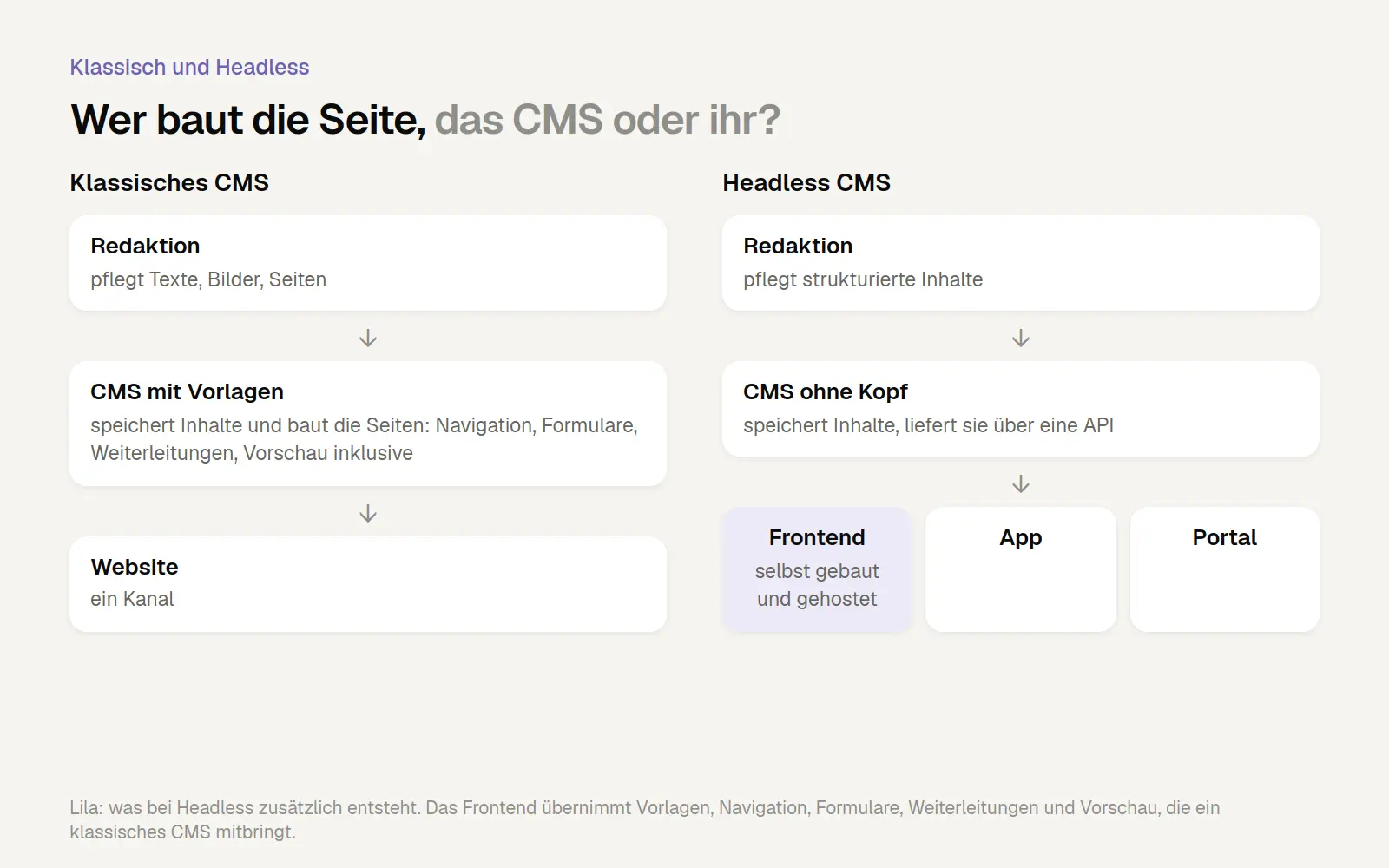
Comparing Traditional CMS and Headless CMS: With the headless approach, a separate front-end application is required, which must be built, hosted, and maintained.
This brings with it both advantages and disadvantages. Because the front end is open, you can implement any technology and design and use the same content everywhere. But because the front end is open, you also have to build it yourself: page templates, navigation, forms, redirects, search, and previews for the editorial team. What a traditional CMS provides out of the box is a development project with a headless CMS.
When Is a Headless Approach Worth It?
Headless really shines when content is reused multiple times and the technical and editorial teams need to work separately. The publicly documented projects from German-speaking countries that we found reveal four patterns:
Many countries and languages: According to Storyblok, Austria Tourism promotes austria.info in 24 markets and 20 languages. According to Contentful, more than 100 employees at the industrial group HARTING work in the system, which is deployed in 19 markets.
One Source for the Website and App: According to its agency, Ergosign, Stadtwerke Düsseldorf plans to manage content for its website and app through a single CMS in the future.
Portals and applications instead of just websites: Using Storyblok, dmTech built a portal for about 800 suppliers in twelve languages—technically in eight weeks.
An in-house development team looking to speed things up: McMakler replaced its legacy WordPress site. According to Storyblok’s case study , the development time for new workflows dropped from eight to ten weeks to just a few days. Matthias Knoche of McMakler: “We like that we can separate content work and development work in Storyblok.”
All of these examples come from case studies provided by the vendors or their agencies. Independently measured results from headless projects are rarely available to the public. It’s also striking what they have in common: many markets, many editors, multiple channels, and a development team working behind the scenes.
When Headless Is the Wrong Choice
If the website is your only key channel and the marketing team wants to publish content quickly and without developers, a headless approach mainly involves extra effort. In an article from April 2026, Oleksiy Kalinichenko of PathToProject lists conditions that, taken together, argue against a headless approach, including “the primary channel is still the website,” “marketing teams publish frequently without engineering support,” and “leadership is choosing headless mainly because it sounds future-proof.” Geoffrey Bock wrote on TechTarget in July 2024 that many traditional systems offer the necessary functionality for a single content stream, “without investing in the back-end complexities of a headless CMS.”
A clear counterexample comes from the Slovenian agency Agiledrop. Its CEO migrated the company’s own website from Drupal to Storyblok in 2023 and, in October 2025, described what was missing afterward: forms, simple redirects, and versionable configuration. His conclusion: “I traded constraints I understood for constraints I didn’t.” Agiledrop is a Drupal agency and has a vested interest, and the author sees the root cause primarily in his own approach: “The problem isn’t Drupal. It’s your process.” Nevertheless, the gaps mentioned are typical building blocks that must be built from scratch in a headless setup.
For a typical medium-sized company with a website in two or three languages, a small marketing team, and no app, a headless CMS is therefore usually overkill. A good traditional or visual CMS meets the same requirements with less ongoing development effort.
What a Headless Project Really Costs
With headless solutions, the license fee is usually the smaller expense, while the front end and ongoing maintenance are the larger ones. We haven’t found a reliable, publicly verifiable breakdown of the total costs—only estimates without sources. That’s why we’re not providing a flat-rate estimate here, but instead listing the items you should compare in quotes:
License: monthly, depending on the number of seats, languages, and features; for enterprise features, pricing is often available upon request
Front-end development: page templates, components, navigation, forms, search, redirects, multilingual support—in other words, everything a traditional CMS provides
Preview for the editorial team: This must be set up separately in a headless environment, for example using Next.js's Draft Mode.
Front-end hosting: in addition to the CMS, for example on Vercel, Netlify, or your own server
Ongoing development: every new page type, every new module, and every framework update requires developers
An analysis by Storyblok itself suggests that developers aren’t getting any cheaper. For its “State of CMS 2025” report, the provider analyzed 7,374 job postings. In the U.S., the average salary for developers with traditional CMS skills was $75,575, while those with headless CMS skills earned $97,738. In a Netlify survey of 6,407 developers and executives, teams cited a lack of resources (29 percent) and a shortage of technical staff (21 percent) as barriers to transitioning to composable architectures—which include headless CMS—in 2023. Conversely, Storyblok touts on its pricing page that headless users spend, on average, nearly $88,500 less than companies with monolithic systems. We have not verified the methodology used in this white paper.
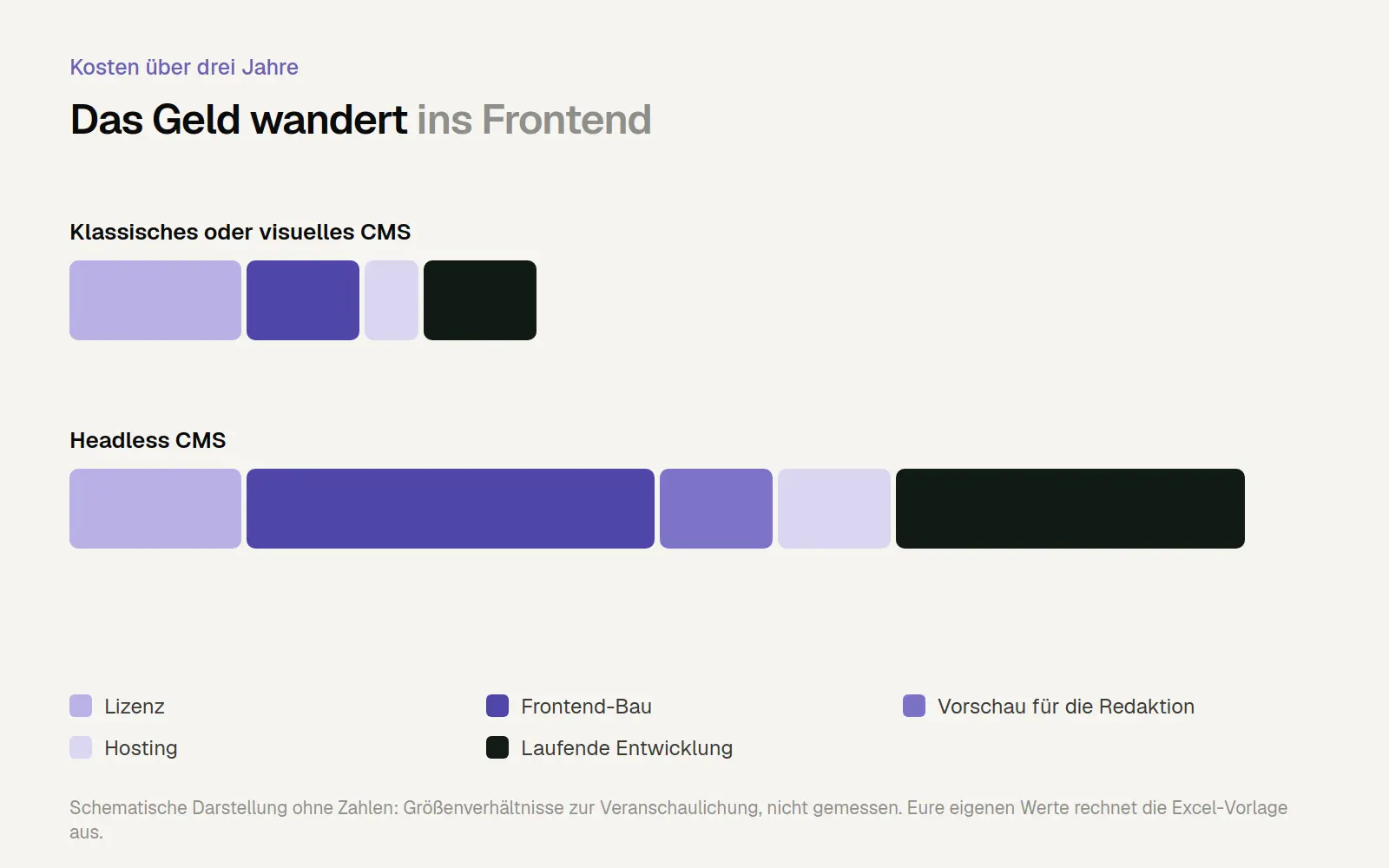
Cost items over three years: With a headless architecture, spending shifts from licensing to the front end and ongoing development. The figures are approximate; please enter your own numbers into the template.
An Overview of Providers, as of October 2026
For small teams, the starting prices are similar; for enterprise features, almost all providers require a custom quote. We obtained the following information from the providers’ pricing pages on October 31, 2026. Prices change frequently, so be sure to check them before making a decision.
Storyblok: Growth —99 euros per month with 5 seats and 2 languages; Growth Plus—349 euros with 15 seats and 10 languages; Premium and Elite available upon request. Known for its visual editor.
Contentful: Free trial and Lite plan; Enterprise plan available upon request. Contentful has been part of Salesforce since September 1, 2026.
Sanity: Growth—$15 per seat per month for up to 50 seats; single sign-on is available only on the Enterprise plan.
Strapi: Free Community Edition under the MIT license for self-hosting; Growth plan: $45 per month for 3 users, $15 for each additional user.
Payload: Open source under the MIT license; self-hosted. Payload has been part of Figma since June 2025; new projects in the Payload Cloud are currently on hold.
Hygraph: Growth plan starting at $199 per month with 10 seats and 3 languages, built on GraphQL.
Prismic: Plans with fixed prices, but according to its own security page, hosted “in the us-east-1 region” in the U.S. According to the provider, an online data processing agreement is still in the works.
Headless WordPress: free; content is accessed via the built-in REST API or the WPGraphQL plugin. Costs are incurred for hosting, the front end, and maintenance.

Storyblok's pricing page: Growth and Growth Plus have fixed prices, while Premium and Elite are available only upon request (1), and features such as single sign-on (2) are only available at those tiers.
For a company with ten editors and three languages, a mid-tier plan is often sufficient in theory. However, as soon as single sign-on, custom approval workflows, a higher availability guarantee, or contractually mandated data storage in the EU are required—and this is typically the case in larger companies—you’ll end up on the Enterprise plan with Storyblok, Contentful, Sanity, and Hygraph. Be sure to inquire about these prices early on—they often matter more than the features.
Acquisitions are a decision-making factor in their own right. With a CMS, you’re locked in for years, and if a provider becomes part of a larger corporation, prices, plans, and direction may change. Salesforce has announced that it will integrate Contentful into its own products, stating that it will preserve the open, combinable architecture. With open-source systems like Strapi, Payload, or WordPress, you can generally continue working with them even if the developer changes.

The Salesforce press release noting that the acquisition of Contentful was completed on September 1, 2026 (highlighted).
Search Engines and Load Times: Not a Sure Thing
Headless websites can be very fast, but only if the front end is rendered on the server side or statically. According to its documentation, Google renders each page in its own queue: “The page may stay on this queue for a few seconds, but it can take longer than that.” This means Google doesn’t see content generated by JavaScript until after this step. And further: “server-side or pre-rendering is still a great idea,” in part because “not all bots can run JavaScript.”
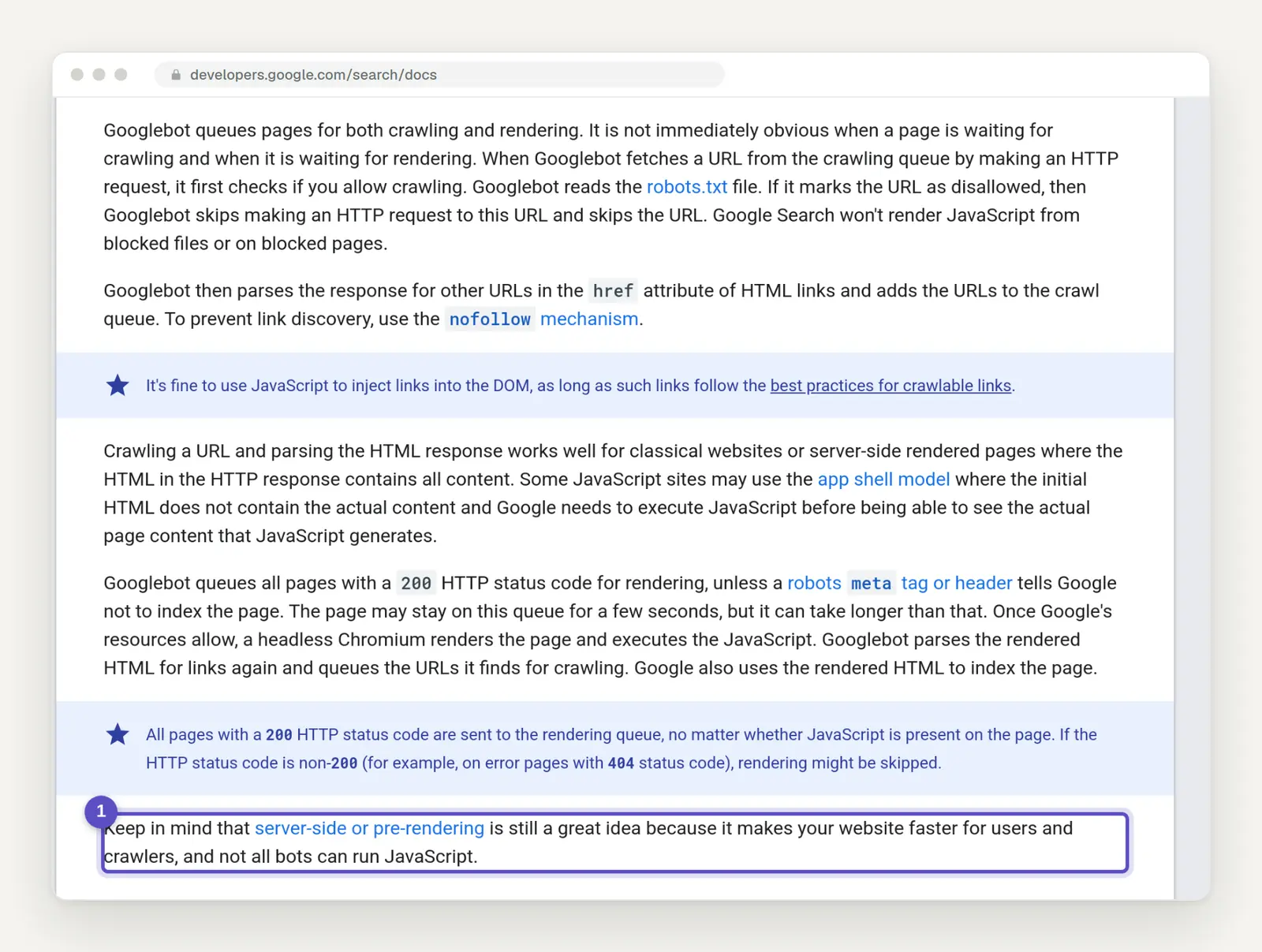
From Google's documentation on JavaScript SEO: Server-side rendering or pre-rendering is still recommended (highlighted).
Data from real visitors shows that a modern framework doesn’t automatically make a site fast. In the August 2026 Chrome UX Report for users in Germany—which we analyzed for our comparison of website systems’ load times —46.3 percent of mobile websites built with Next.js and 41.9 percent built with Nuxt meet the Core Web Vitals standards. For WordPress, the figure is 63.2 percent, and for TYPO3, 87.2 percent. The framework figures also include web applications and online stores and are therefore only comparable to a limited extent. However, they contradict the assumption that a modern framework automatically makes a website faster.
Editorial Staff: Check the preview first
Ask the people who will be working with it every day, and have them show you the preview before you sign up. Netlify, a platform for headless projects, describes the preview in its 2023 guide as the biggest hurdle of the early headless years: “While previewing was the biggest challenge with the headless CMS editing experience, there were others.” Because the preview was limited, editors needed “an intimate understanding of the content schema to make changes to a page.” Today, Sanity, Strapi, Hygraph, and Contentful promote live previews as part of their pricing plans. This shifts the work to the user’s own front end, which must integrate the preview.
In 2021, the Swiss program EnergieSchweiz described what this might look like in everyday life in an article by the agency Unic, which at the time used Contentful and Gatsby: The preview takes about 20 seconds to generate, and that’s enough because in 90 percent of cases, you know what the change will look like. That might work for a technical editorial team, but it’s not really suitable for a marketing team that builds and tests landing pages. Providers like Storyblok therefore rely on visual editors with live previews, though these also depend on the team’s own front end and need to be set up.
The Middle Ground: Visual CMS or Hybrid
Between traditional and headless systems, there are solutions that are a better fit for many companies than either extreme. Visual website builders like Framer or Webflow combine design, a CMS, multilingual support, and hosting into a single package, allowing editors to edit pages directly as they appear. For a scenario with ten editors and three languages, their list prices are comparable to mid-range headless plans, without the need to build a custom front end. However, the enterprise scale applies here as well: With Framer, single sign-on is only available in the Enterprise plan upon request; we did not find approval workflows in any of the plans; and the Pro plan is limited to 10 collections, 2,500 entries, and 150 pages. Such systems are not designed for large volumes of data, complex permissions, or integration with apps.
The second middle ground is a hybrid CMS: a traditional system that also offers an API, such as WordPress with its REST API. The website operates in the traditional way, while individual pieces of content are also fed to an app or a portal. This is often the pragmatic approach when a second distribution channel is foreseeable but not yet the core focus. To learn how Framer, Webflow, and WordPress differ, check out our article on why there isn’t a single “best” system.
Here's how to decide
Answer four questions before discussing vendors. The decision tree summarizes the first three. It is a suggestion from us, based on the criteria from PathToProject and TechTarget and the case studies above.
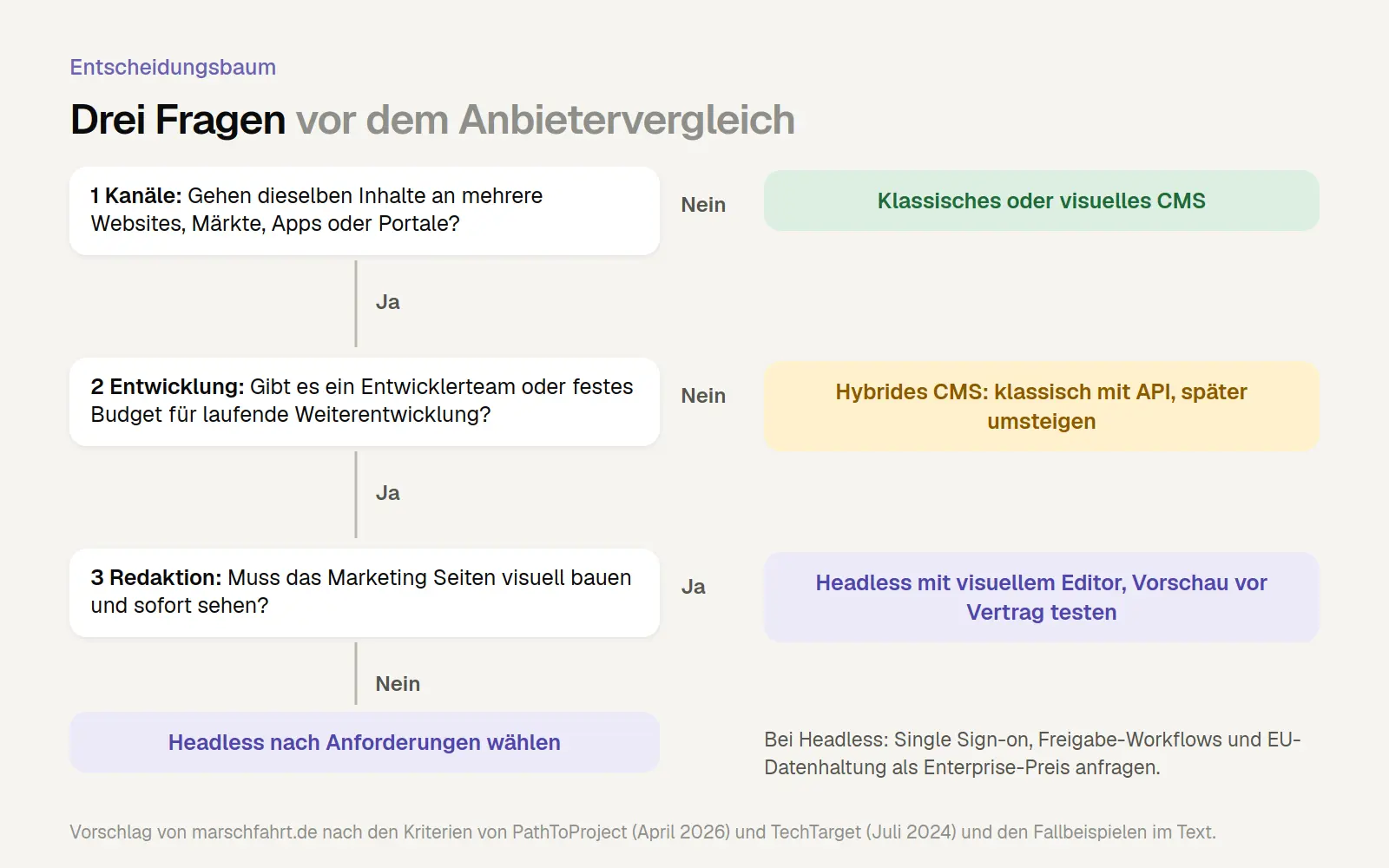
Headless CMS Decision Tree: Channels, developer capacity, and editorial requirements determine whether to choose a classic, hybrid, or headless approach.
Channels: Will the same content be distributed across multiple websites, marketplaces, apps, or portals today or over the next two years?
Development: Is there a development team or an agency with a fixed budget for ongoing development?
Editorial Team: Should the marketing team build the pages themselves and see right away what they look like?
Requirements: Do you need single sign-on, approval workflows, and EU-compliant data storage, and have you requested enterprise pricing for these features?
If you decide to compare options, you should do so using specific criteria. Our Excel template for comparing CMS platforms weighs your requirements, evaluates up to four systems, and calculates the total costs over three years; a completed example with fictional values is included. For guidance on how to clearly document your requirements beforehand, see our guide to creating a website requirements specification.

Excerpt from the completed example using fictitious numbers. In this case, the visual CMS has the edge because the example describes only a single website without any additional channels. With multiple channels and an in-house development team, the assessment would be different.
Frequently Asked Questions
Most questions revolve around costs, dependency, and search engines.
Is a headless CMS better for SEO?
Not on its own. What matters is how the front end renders. With server-side or static rendering, a headless website can perform very well; with browser-only rendering, you risk delays with Google and issues with other crawlers.
Does using a headless approach give us more independence?
From the front end, yes, because you’re free to choose the technology and design. In return, you’re more dependent on the developers who built the front end—and, in the case of Software-as-a-Service, on the CMS provider. Make sure your contract guarantees you access to the source code, login credentials, and documentation.
Can we switch to headless later?
Yes. If you structure your content properly today—for example, by creating clear categories for products, testimonials, and articles—you can later migrate it to a headless CMS. However, the front end will then have to be rebuilt, so you’ll end up paying for the relaunch a second time. If you already have multiple channels firmly planned, the direct approach is therefore usually more cost-effective. To learn how to migrate your site without losing search rankings, check out our website relaunch checklist.
What about data protection?
Check where the data is stored and whether the provider offers a data processing agreement. The answers vary widely: Some providers specify an EU region, others host data only in the U.S., and a contractually guaranteed region is often only available with the Enterprise plan.
What Has Changed and What That Means for You
The market is consolidating, and that is changing the risks involved in choosing a provider.
June 17, 2025: Payload is now part of Figma. The software remains open source, but new projects in the Payload Cloud are currently on hold. Users of Payload must host it themselves.
September 1, 2026: Salesforce completes its acquisition of Contentful. Existing customers should review their contract terms and export options, while new customers should consider future product plans.
As of October 2026: AI features such as automatic translation and content assistants are now included in the pricing plans of many providers, such as Storyblok, Sanity, and Strapi, often with usage limits. Check what’s included in the plan you’ve chosen.
Date of this version: October 31, 2026. Prices and rates change frequently; be sure to check them on the providers' websites before making any decisions.
Conclusion
Headless is not an upgrade, but rather an architectural decision that pays off when you have multiple channels, many markets, and your own development team. For a corporate website designed primarily to generate inquiries and maintained by the marketing department, a good traditional or visual CMS does not require a custom front-end build and is therefore usually faster to implement and easier for the editorial team to use. The decisive factor is not the license fees, but the costs for the front-end, preview, and ongoing development over three years.
First, answer the four questions above, then download the Excel template for comparing CMS platforms and enter your criteria and costs. If you’d like a second opinion, take a look at how we plan and build corporate websites.
More Articles
© Marschfahrt Studio
Practical knowledge on web design, SEO, AI, and conversion optimization. Based on real projects, without any marketing spin.