Redesign, Relaunch, Rebranding, and Refactoring: The Differences Explained
Redesign, relaunch, rebranding, and refactoring sound similar, but they are four different types of projects with very different levels of risk. We’ll explain each term in a single sentence, use four questions to show you what you need, and outline the additional obligations involved in a relaunch, according to Google.
Date
Category
Author
“We need a relaunch. The site just looks outdated.” That’s how many of our initial meetings begin, and often it becomes clear after just a few minutes that something else is meant. Sometimes a new design is enough; sometimes there’s a new brand behind it; sometimes it’s just about technology that no one sees.
Redesign, relaunch, rebranding, and refactoring describe four different types of projects, each with varying levels of effort and risk. If you use the wrong term, you might receive an inappropriate proposal or underestimate what’s at stake with Google. This article provides a one-sentence definition for each term, four questions to help you distinguish between them, and the responsibilities that come with a website relaunch but are not required for a redesign.
In a nutshell (as of November 2026)
Before making any proposal, first check whether your page URLs will change. This will determine whether you should plan a redesign or a relaunch.
A redesign changes the look of an existing website. A relaunch rebuilds the structure, content, and often the technology and URLs. A rebranding changes the brand itself—that is, the name, logo, or brand identity—and the website is only one part of that. Refactoring cleans up the code without visitors noticing.
What is a redesign?
A redesign is a visual overhaul of an existing website in which the structure, content, and URLs remain largely the same. The colors, fonts, layout, and visual style are updated. The navigation, page layout, and—in most cases—the backend system remain unchanged. This is precisely what distinguishes a redesign from a relaunch: Afterward, Google finds the same pages at the same URLs, just with a new look.
Here’s a typical example from the day-to-day operations of a small business: A carpenter has a website where the services are clearly organized and that regularly generates inquiries. However, it looks outdated, the photos are small, and the text is hard to read on a cell phone. All it needs is a new design, larger images, and improved readability—the rest can stay as is.
The effort involved in a redesign is manageable because the information architecture—that is, the organization of the content—remains unchanged. This approach is suitable for websites whose content is still relevant but no longer fits with their current design. Before making an inquiry, write down specifically what bothers you about the design, and check whether the content and menu are still appropriate.
What is a relaunch?
A relaunch is the relaunch of a website, in which the structure, content, and often the technology and page URLs are rebuilt. The navigation is reimagined, text is revised or rewritten, and the backend system is often changed. A relaunch almost always includes a redesign, but goes significantly further. The key difference for search: As soon as URLs change, a relaunch is considered a move from Google’s perspective.
Here’s an example: An electrical contractor started out years ago doing residential electrical work and now also offers solar panels, energy storage systems, and wall boxes. The old website doesn’t have room for this; the new services are tucked away as sub-items somewhere in the menu. New colors wouldn’t change anything—the structure needs to be redesigned.
A relaunch is worth it if the website no longer aligns with the company’s size, offerings, or target audience. It requires more effort than a redesign and involves additional obligations, which are listed below. Our article “Website Relaunch: When It’s Worth It” explains whether this step will pay off for you. Before a relaunch, decide which pages will remain and at what URLs.
What is rebranding?
Rebranding is the overhaul of a company’s brand—including its name, logo, colors, tone of voice, and positioning. It is the only one of the four terms that does not primarily refer to the website, but rather to the entire company. The website is one of many places where the new brand must be visible, alongside vehicle graphics, business cards, promotional materials, social media profiles, and the Google Business Profile. A logo relaunch or corporate design relaunch is a smaller-scale version of this: the visual identity is refreshed, while the name and positioning remain the same.
Here’s an example: A painting company is being taken over by the owner’s son, will have a new name going forward, and wants to place greater emphasis on facades and thermal insulation. The name, logo, and message are changing, so the website must follow suit. Whether a redesign is sufficient or a relaunch is necessary depends on whether the domain and site structure are also changing.
The effort involved in a rebranding is primarily outside the website: brand development, coordination, and replacing all printed materials. A major rebranding often leads to a relaunch, but conversely, a relaunch rarely requires a rebranding. First, determine whether only the visual identity is changing or whether the name and domain are also changing, as this will determine the amount of work required for the website.
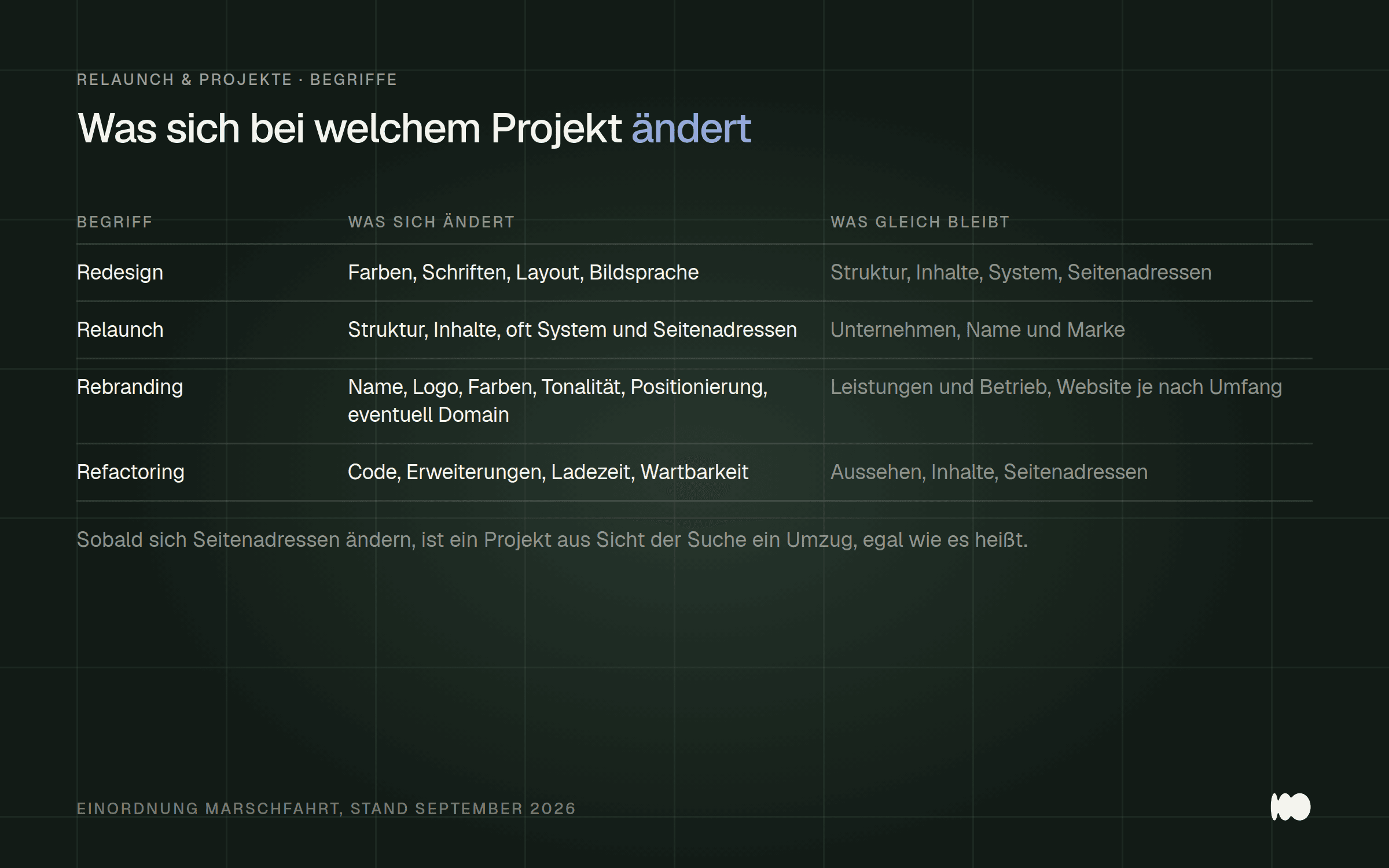
A comparison of the four project types: The column containing addresses and domain names is crucial for the search.
What is refactoring?
Refactoring is the process of cleaning up and restructuring a website’s code without changing its appearance or content for visitors. The term originates from software development, where it has the same meaning: the code becomes cleaner, while the visible behavior remains the same. On websites, this means, for example, removing duplicate scripts, organizing cluttered code, and replacing outdated extensions. This often involves technical maintenance as well, such as delivering images correctly and reducing load times. Strictly speaking, this is optimization, not refactoring.
Here's an example: A plumbing company has a website that has been updated over the years by a succession of different people. It looks neat, but it loads noticeably slowly on a cell phone, and every small change breaks the layout somewhere. A new design won't help here—what's needed is a cleanup behind the scenes.
Refactoring is often cheaper and faster than a relaunch because the design and content remain the same. It’s worth considering for websites that have outgrown their current structure—ones that function well externally but have become a burden internally. Before investing in an expensive rebuild, check whether your problems are actually technical issues; if so, refactoring might be enough.
Why These Four Terms Are Constantly Confused
Only use “relaunch” if you really want to rebuild the structure and content from scratch. In everyday use, the word has become a catch-all term for “changing something on the website,” whether it’s a color adjustment or a complete redesign. There are no standard definitions for “redesign,” “relaunch,” and “rebranding”—every agency uses the terms a little differently. Only “refactoring” is clearly defined, as it comes from software development. That’s why the one-sentence definitions above are helpful: they distinguish based on what’s changing.
In real-world projects, however, these types often overlap. A relaunch almost automatically involves a redesign; a rebranding usually entails at least one redesign; and refactoring often happens on the side when someone is working on the code anyway. This isn’t a contradiction—these terms are tools for thinking, not rigid categories. What’s important is to understand the effort and risk associated with each part.
Our observation from the studio: A good portion of our initial consultations involves clarifying exactly these terms before we discuss services. This takes a few minutes and helps prevent proposals that don’t meet your needs. When talking to an agency, it’s better to describe what’s bothering you rather than just giving them a term.
Redesign or Relaunch: How to Tell Which One You Need
Answer these four questions honestly before you request a quote. First: If it’s mainly the design that bothers you, but the menu and content are still appropriate, a redesign is usually sufficient. Second: If the structure no longer fits your offerings, features are missing, or no one can find the important pages, these are strong indications that a relaunch is needed.
Third: Are the company’s name, logo, domain, or direction changing? If so, a rebranding is in order, and the website is a key part of that. Fourth: Does the website function as intended but is slow, prone to errors, and difficult to maintain? If so, refactoring should be the first option to consider.
One additional question will determine the level of risk: Will the URLs of your pages change because pages are being merged, renamed, or migrated to a new system? If so, you’re planning a relaunch—whatever you choose to call it. Write down your answers and share them with the agency; this will result in a more precise quote than any technical term.

Four questions, one direction: Anyone who answers “yes” to question two or to the addresses is planning a relaunch.
The Role of a System Change in Classification
Determine early on whether you should switch content management systems, as this affects the effort and risk more significantly than the new design. A visual overhaul within the same system—such as a new WordPress theme—is a manageable project. Switching from one website builder to another system, however, should be planned like a relaunch, even if the pages look almost the same afterward. Each system generates its own URLs according to its own rules, which often results in URLs changing without anyone intending it.
Google explicitly advises separating these steps. The "Migrate a Website" guide states: "Make changes to your website one at a time." As examples, Google cites domain changes, CMS changes, and new layouts, and recommends: "First, move the website to the new domain, and then change the layout of your website." If you want to change both the system and the design at the same time, ask your agency if this can be split into two steps.
What Can Go Wrong With a Website Relaunch When You Think It's Just a Redesign
Treat every project involving address changes as a move and plan for redirects from the very beginning. With a redesign, all URLs remain the same, so no one has to worry about redirects. If a relaunch is approached with this mindset, old URLs will lead nowhere: links from other websites, entries in business directories, and Google search results will then lead to error pages. Google describes how to handle this in its “Migrate a Website” guide for website moves involving URL changes.
The first step is to make a list. Google writes: “An important step is mapping the URLs of your old website to the URLs of the new website.” To implement this, Google advises: “We recommend setting up server-side permanent redirects from the old URLs to the new ones according to your mapping.” This refers to redirects with status codes 301 or 308, which, according to Google, indicate “that a page has been permanently moved to a new location.”
The easy way out—simply redirecting everything to the homepage—isn’t a solution. Google warns: “If possible, avoid redirecting a large number of old URLs to a single irrelevant destination URL, such as the new website’s homepage. This can confuse users and be interpreted as a soft 404 error.” Images and PDF files should also be included in the list, because, according to Google, these files “already generate traffic via Google Search or links.”
Google provides clear guidelines regarding duration: “Keep the redirects in place for as long as possible—generally for at least one year.” Properly set up redirects do not cost link equity, because “301 and other permanent redirects have no negative impact on PageRank.” Before you begin, ask to see the list of old and new addresses and confirm in writing who will set up the redirects.
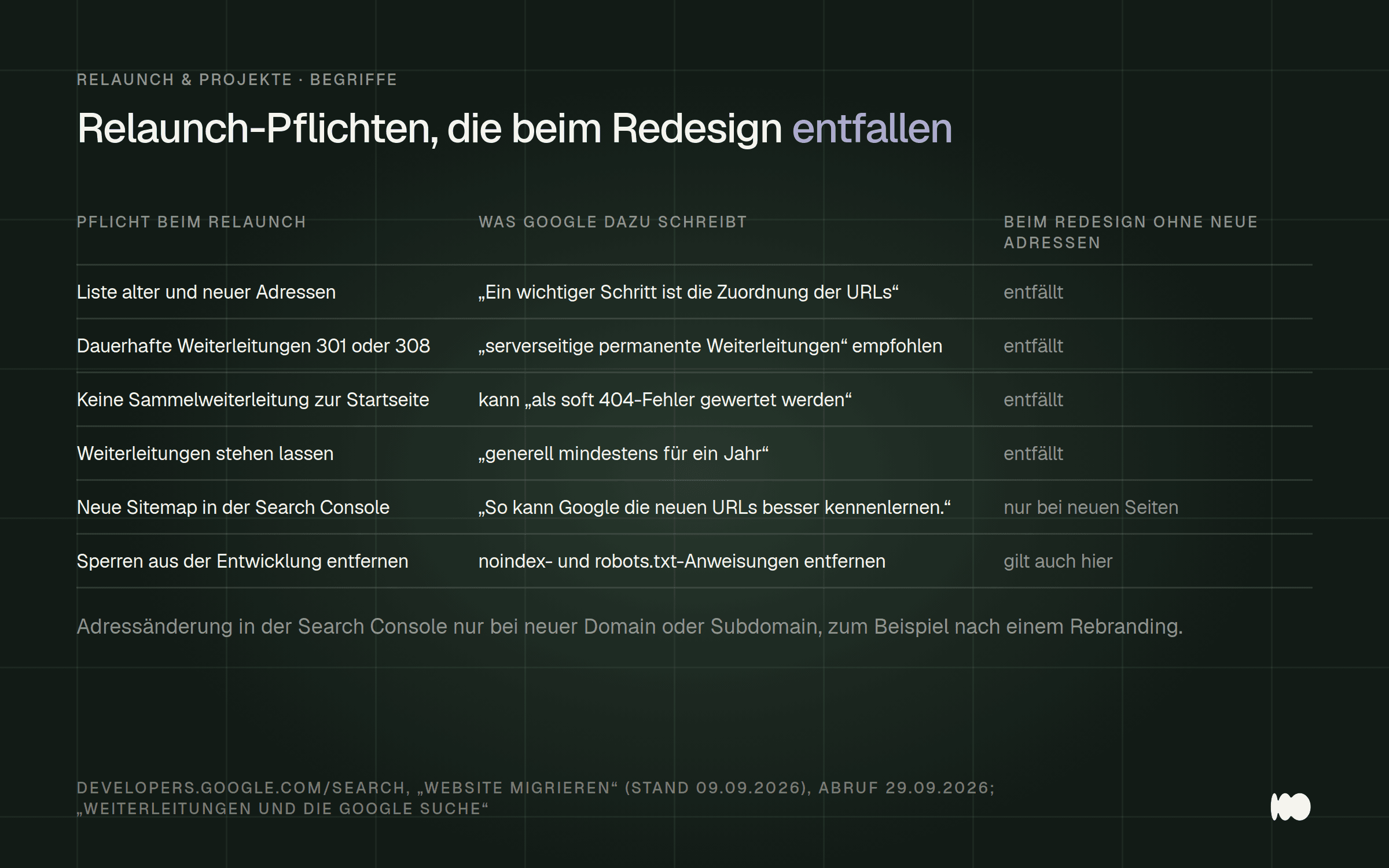
These obligations arise as soon as addresses change. In the case of a simple redesign, they do not apply; in the case of a relaunch, they are part of the project.
Search Console and Rankings After the Relaunch
Set up Search Console before launch and check it regularly in the weeks that follow. Google calls it “very useful, especially during a website migration.” After launch, “Submit the new sitemap to Search Console. This will help Google get to know the new URLs better.”
According to Google, anyone who changes their domain or subdomain should also submit “a change of address for the old website in Search Console.” Our article “How to Use Google Search Console Correctly” explains how to read the reports.
A common mistake occurs during the development phase. Many new websites are blocked from search engines during development, and this block remains accidentally active at launch. Google states: “Remove any noindex or robots.txt directives used to block content that were only necessary for the migration.” Another common issue: “Redirects often point to incorrect or nonexistent URLs on the new website.”
Fluctuations in the first few weeks are normal; Google states: “Expect temporary fluctuations in your website’s ranking.” For small to medium-sized websites, it says it takes “a few weeks for most pages to be migrated,” and the ranking “will stabilize again after a while.” Time the launch for a quiet period in your business and schedule regular check-ins with Search Console during the first few weeks. For more common pitfalls, see “5 Common Mistakes When Relaunching a Website .”
Rebranding Without a New Website? What Needs to Change on the Website
When rebranding, start by updating everything that mentions or displays the brand, and only change the URLs if absolutely necessary. A rebranding doesn’t automatically require a new website. If the domain remains the same and the structure is appropriate, a redesign with a new logo, new colors, and new copy is often sufficient. This is the smoother approach because nothing changes in the URLs as far as Google is concerned.
On the website, you’ll definitely need to update the logo, colors, and fonts; the company name in text, in the page title, and in the page description for search results; the legal notice; and the privacy policy. You’ll also need to update the thumbnail image for shared links, the small icon in the browser tab, email signatures, and forms with automatic replies. Outside of the website, this includes the Google Business Profile and business directories, so that the name and address are consistent across all platforms.
If the new name comes with a new domain, the website rebranding will turn into a migration—with all the tasks listed in the section above, including updating the address in Search Console. Here, Google’s advice applies: handle the domain change and the new layout one after the other. Make a list of all the places where the old name appears, and check them off one by one after the switch.
Why We Sometimes Advise Against a Larger Project
Ask your agency directly if there’s a smaller-scale solution available, and pay attention to how they respond. From a business perspective, there’s little reason for us to disagree with someone who brings up the word “relaunch.” Nevertheless, we regularly suggest a redesign when the structure and content are sound. An unnecessarily large project benefits no one—except us, in the short term.
One experience that left a lasting impression on us: An interior design firm came to us wanting a complete relaunch. During our discussion, it became clear that the site’s features and navigation were working well—it was just the visual design that dated back to an earlier phase. We carried out a redesign—faster and more affordably than expected—and the result was exactly what they had envisioned.
If, in the middle of the project, it becomes clear that the classification was incorrect
If the redesign turns into a relaunch, renegotiate the budget and timeline immediately. Sometimes it’s only upon closer inspection that you realize the structure isn’t viable after all, and then URLs suddenly change as well. This isn’t a sign of poor preliminary work; the full scope often doesn’t become apparent until you start working on the existing website.
Things get tricky when the change happens without explicit communication. In that case, the relaunch requirements that weren’t included in the redesign proposal—especially the redirects—end up being missing. Whenever there’s a change to the scope, ask whether it will result in any address changes, and make sure the answer is documented.
Conclusion: What you do today, this week, and in the future
Today: Categorize your project using the four questions and answer the follow-up question about whether any URLs will change. Check whether you have access to Search Console. This will help you determine whether you’re dealing with a redesign, a relaunch, a rebranding, or a refactoring.
This week: Write down exactly what bothers you, and if you’re planning a relaunch, create a list of your most important pages, including images and PDF files. For a rebranding, add a list of all the places where the old name appears. Our article “How Much Does a Website Really Cost in 2026?” gives a rough estimate of the cost of a project of this size.
Later: After the launch, submit the new sitemap, leave the redirects in place for at least one year, and check Search Console regularly during the first few weeks. If you'd like help with this, you can find our services under "Website Relaunch for Businesses."
Redesign, relaunch, or rebranding: what's on your agenda?
Send us your website address and a couple of sentences explaining what’s bothering you. We’ll take a look at it with you and give you our honest opinion on whether you need a redesign, a relaunch, a rebranding, or perhaps a refactoring—and whether any URLs will change in the process. Just send us a quick message using the contact form. We’ll respond within 24 hours, personally and without any sales pitch.
Sources
The information on website migrations, redirects, and Search Console is taken from the German guides on Google Search Central; the definition of refactoring is based on Martin Fowler's work. As of November 4, 2026.
More Articles
© Marschfahrt Studio
Practical knowledge on web design, SEO, AI, and conversion optimization. Based on real projects, without any marketing spin.