Putting Claude to Work: Projects, Skills, Connectors, Claude Code, and the Rights Behind Them
Claude decides whether to load a skill at all based solely on the "description" field, which can contain a maximum of 200 characters. The post goes through the topics in order, starting with project instructions, then connector permissions, Claude Code, slash commands, CLAUDE.md, the GitHub app, and the six permission modes.
Date
Category
Author
“I open Claude every day and type the same three paragraphs at the beginning every day. That can’t be the final version, can it?” The question came from the managing director of a planning firm with eleven employees, who has been using the chat window for a year. He isn’t doing anything wrong; he’s just using the only storage space that doesn’t save anything.
Anything you type more than three times belongs somewhere else: in the project instructions, in a skill, or in a CLAUDE.md file. This post goes through the various locations one by one—from the project interface in the browser to the terminal—and explains what belongs in each one and where the boundaries lie.
This isn't a beginner's course; we assume you're already using Claude. We explain why we use it in the studio in a separate post about why Claude is the best AI for us in our day-to-day work. All information here is taken from Anthropic's own documentation, accessed on September 19, 2026.
In a nutshell (as of September 2026)
In the description of a skill, include the trigger condition, not the function. Claude decides whether to load a skill at all based solely on the "description" field, and this field can hold a maximum of 200 characters (support.claude.com, accessed September 19, 2026). “Helps with quotes” never runs, while “Use this when a quote, estimate, or addendum needs to be created” runs reliably. Everything else here—from projects and connectors to permissions in Claude Code—follows the same logic: Describe triggers, not capabilities.
Chat, Project, Skill, or Cowork: What Goes Where
Assign each recurring task to one of the four folders before you start typing the next time. The chat is the folder with no memory: it lasts only as long as the conversation is active. Although the storage continuously saves individual topics, it is disabled by default in Team and Enterprise and must be enabled there by the account owner (support.claude.com, accessed September 19, 2026).
A project is loaded permanently, while a skill is loaded only as needed. Project knowledge is included in the context of every chat within the project; according to Anthropic, a skill is loaded dynamically when the task requires it. Therefore, materials belong in the project, while a workflow with steps belongs in the skill.
Cowork is the fourth folder and the only one that keeps working when you're away. Anthropic describes the process in five steps: create a plan, break it down into subtasks, execute code and shell commands in isolation on Anthropic’s servers, coordinate workstreams in parallel, and deliver results to the session. It’s available on all paid plans and explicitly requires your approval before permanently deleting files.
The most costly sorting mistake is overlooking something that would have been just one line in the project instructions. Take a look at your last ten chats today and mark which ones should have been included in a project.
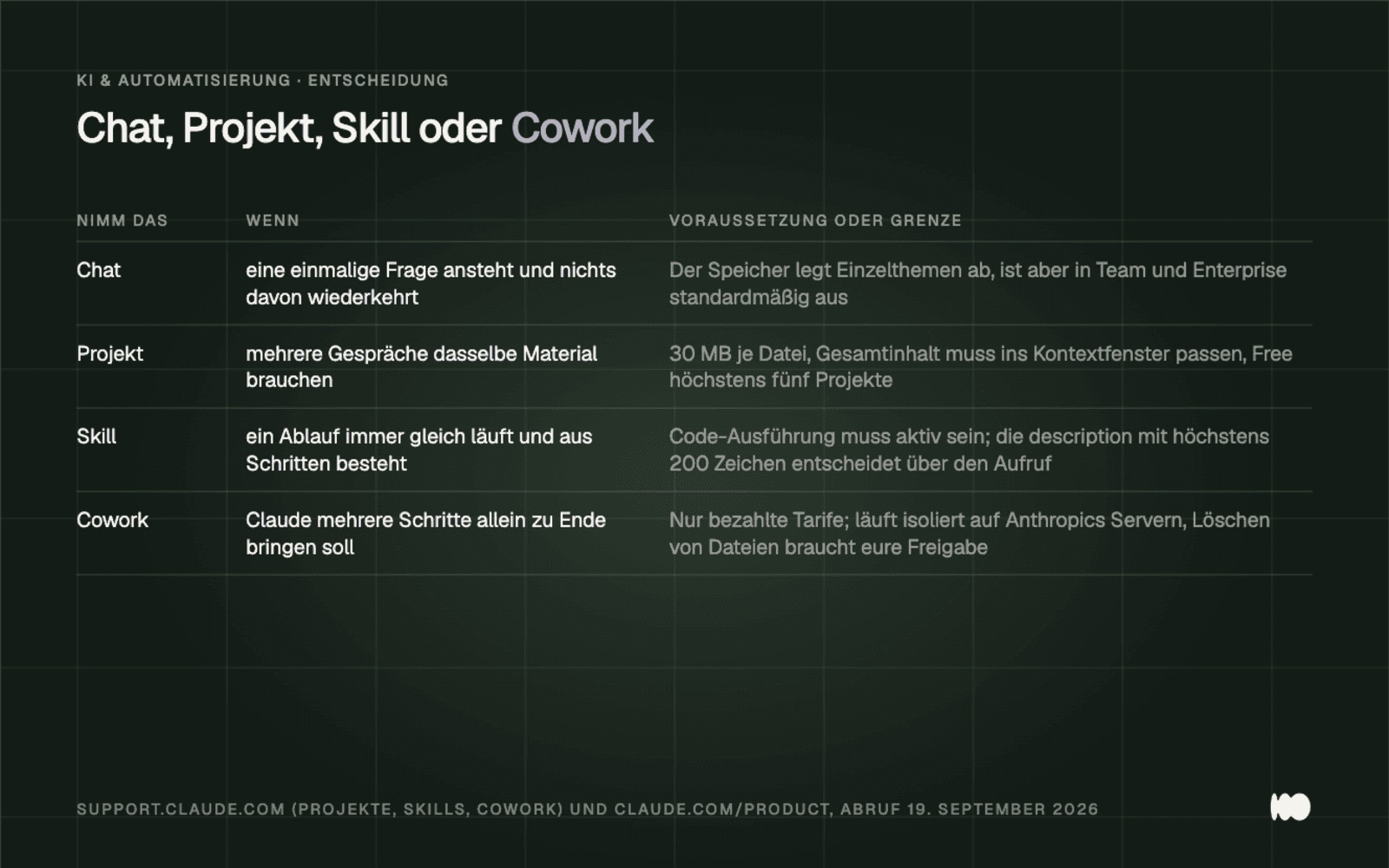
The four sections, along with their links to the help pages for projects, skills, and Cowork (support.claude.com, accessed September 19, 2026).
Setting Up a Project the Right Way
Start with the project instructions, not the upload. They apply to every chat in the project and include exactly what the managing director at the planning office types out anew every day: role, tone, required information, and what must never happen. Only then should you upload the material.
There are two limits on project knowledge, and they are not the same. Each file can be up to 30 MB, and there is no limit on the number of files, but according to Anthropic, the total content must fit within the context window (support.claude.com, accessed September 19, 2026). When approaching this limit, a retrieval mechanism automatically kicks in on paid plans, expanding the capacity up to tenfold, according to Anthropic, “while maintaining response quality.”
Storage is separated by project: Each project has its own storage space and its own summary. Having one project per client is therefore more organized than a single “Quotes” project for everyone. The free plan allows for a maximum of five projects; otherwise, there is no limit. Access is divided only between Team and Enterprise, with the levels “Can view” and “Can edit.”
Here’s where we went wrong: We once uploaded forty PDFs to a project—including scanned old contracts—and wondered why Claude didn’t recognize them. Project knowledge is extracted as text; a scan without a text layer appears as a blank page. Upload three files, ask a question that can only be answered using those three, and only then expand the project.
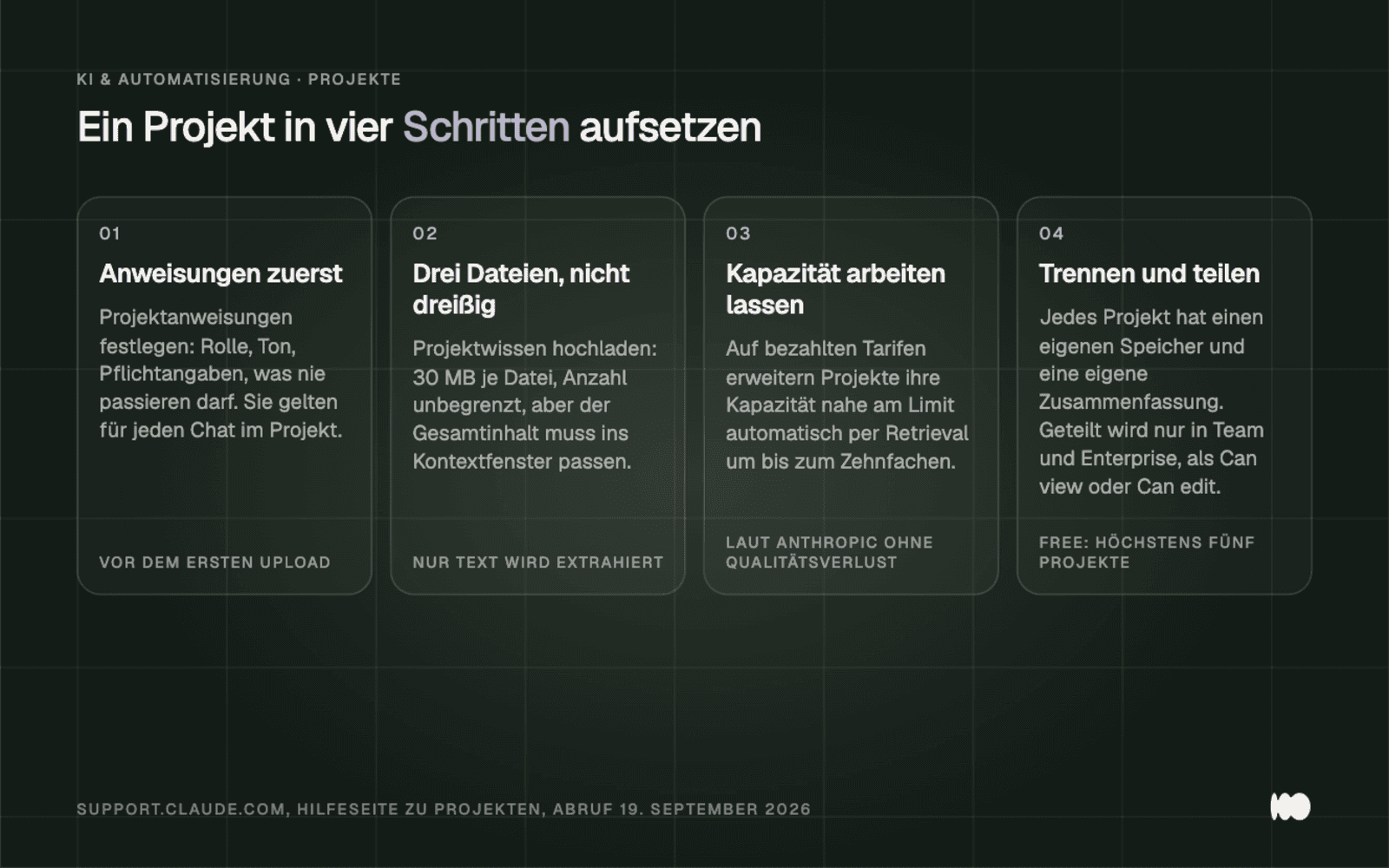
A four-step project, using the boundaries from Anthropic's project help page (support.claude.com, accessed September 19, 2026).
Skills: The folder that teaches Claude your routine
A skill is a folder containing a required file, and it does not exist unless code execution is enabled. Anthropic explicitly states this requirement in the documentation. In Free, Pro, and Max, go to Settings > Capabilities and toggle the “Code execution and file creation” switch; the skills will then appear under Customize > Skills (support.claude.com, accessed September 19, 2026). In Enterprise, the owner must enable both toggles: the one for code execution and the one for skills.
The required file is named skill.md and begins with YAML frontmatter. Two fields determine everything else: the `name` field can be up to 64 characters long, the `description` field up to 200, and the `description` alone determines how the skill is invoked. In addition, supporting files such as REFERENCE.md and executable code in Python or JavaScript may be included, along with packages from PyPI or npm. To upload, pack everything into a ZIP file, ensuring that the skill folder is at the root of the archive and not located in a subfolder.
This loading behavior is called "progressive disclosure" and explains the size of the description. The description is available in context from the start of the session; the full content loads only when called and remains available for subsequent turns (code.claude.com, accessed September 19, 2026). After automatic compression, skills are reattached, with a limit of 5,000 tokens per skill and a total budget of 25,000 tokens.
Anthropic provides four skills for all plans: for Excel, Word, PowerPoint, and PDF. They handle the file format, not your content: Your skill specifies what should be in the spreadsheet, and the Excel skill builds it. Anthropic’s quality criterion helps with selection: solve a specific, repeatable task and build separate skills for different workflows instead of a single, all-purpose skill. For your first attempt, choose a workflow that you’ll need at least twice this week.
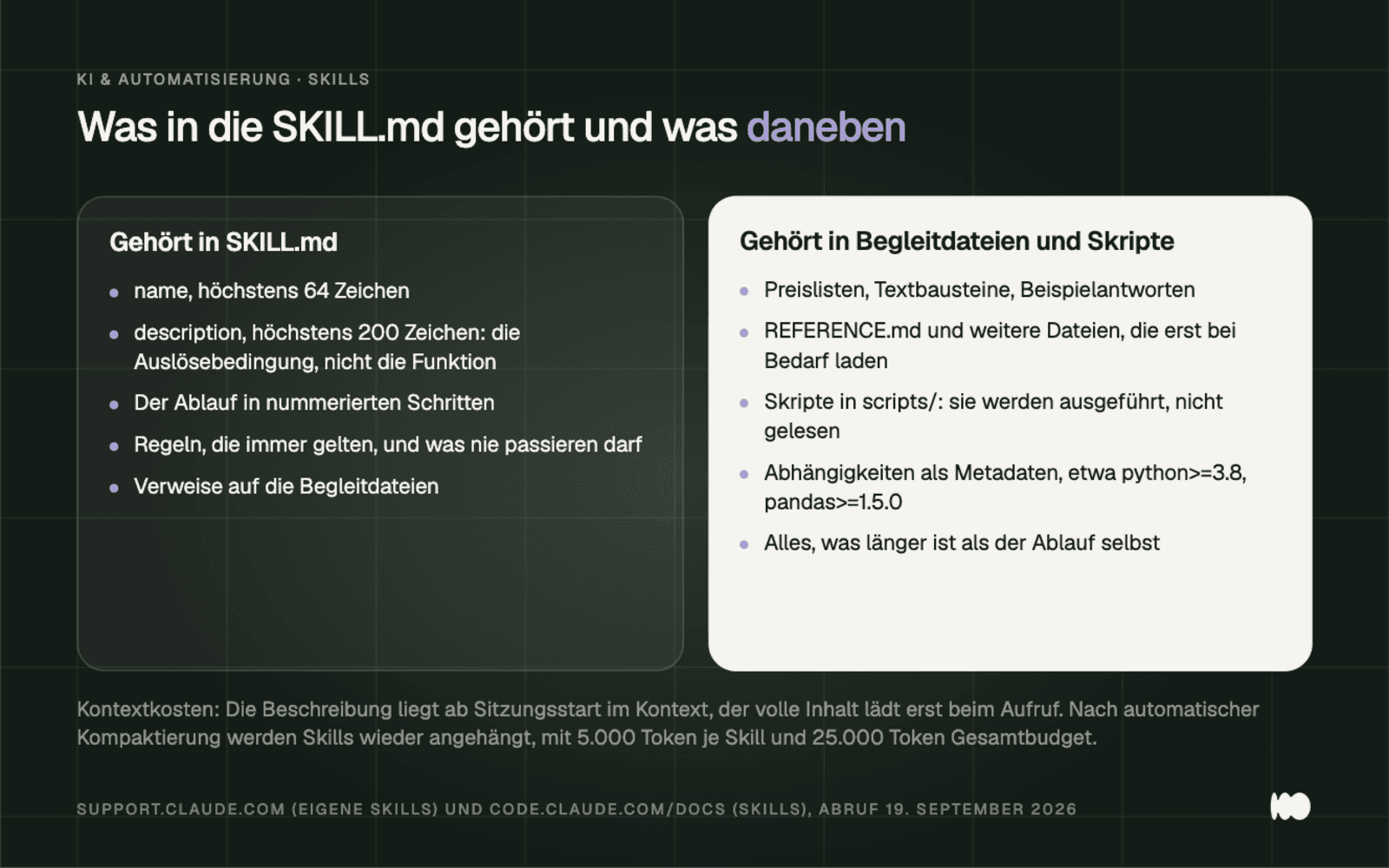
What belongs in the skill file and what belongs elsewhere, including context costs from Anthropic's skills documentation (accessed September 19, 2026).
Three Skills That Are Most Valuable in a Workplace
The following three skills are our suggestions, not requirements from Anthropic. We have deliberately separated them because overlapping descriptions can hinder one another.
The "Quote" skill turns bullet points into a quote in the standard format. The description should include the trigger phrase in the language your colleagues use, such as “Use this when you need to create a quote, a cost estimate, or a supplementary quote.” The main body should include the order of the line items, the required information, and the wording for payment terms and validity. The prices themselves should be included in an accompanying file; otherwise, you’ll have to enter them in two places.
The response skill provides a first draft for incoming inquiries that just needs to be reviewed. The description lists the use cases instead of the skill itself: “Use this when responding to a customer inquiry via email or form, including when rescheduling an appointment, answering a price inquiry, or handling a complaint.” The main body should include a salutation, sentence length, closing, and the escalation policy for all legal matters. Three to five actual responses from your inbox are included as an attached file.
The Analysis Skill generates the same monthly overview as usual from the CSV export of your inventory management system. The description specifies the trigger and file type: “Use this when you want to create a monthly or quarterly analysis from a CSV or Excel export.” The main section should include the column mappings, the metrics, and the rounding rules. The calculation itself belongs in a script in the scripts/ subfolder, since scripts are executed and not loaded into the context.
Our mistake was the obvious one: we started with a general “Marketing” skill that included everything. It almost never triggered because its description applied to everything and nothing. Once we split it into three skills, each with a clear trigger phrase, every one worked on the first try. Check your existing skills to see if any two descriptions overlap, and split them up.
Connectors: What to Connect and What to Block
First, connect the six connectors provided by Anthropic itself, and treat everything else as third-party code. The documentation lists Google Drive, Gmail, Google Calendar, GitHub, Slack, and Microsoft 365 as native integrations (claude.com/connectors, accessed September 19, 2026). Microsoft 365 covers SharePoint, OneDrive, Outlook, and Teams and requires a work or school account. Everything else can be found in the directory at claude.ai/directory, where verified and community entries are listed side by side.
You assign permissions on a per-action basis—not per connector—using three levels: “Always allow,” “Needs approval,” and “Blocked.” Anthropic’s own examples are also appropriate: allow email search but block sending; allow reading files but block creating them; allow viewing issues but block creating them. There’s also some reassurance: the permissions in the source system still apply—if you’re not allowed to write there, you’re not allowed to do so via Claude either.
The convenience ends when you use custom connectors. Anthropic states explicitly: “Custom connectors allow you to connect Claude to services that haven’t been verified by Anthropic. Only connect to servers from trusted organizations and review authentication permissions carefully.” Such servers are accessed from Anthropic’s cloud, so they must be publicly accessible.
The "Verified" label in the directory is explicitly not a security check: Anthropic verifies compliance with listing criteria, but, according to its own statement, does not conduct a security audit and does not manage an MCP server. The reason for this caution is called "prompt injection," because a server that fetches external content can also deliver hidden instructions. Set the write permissions for your existing connectors to “Needs approval” today.
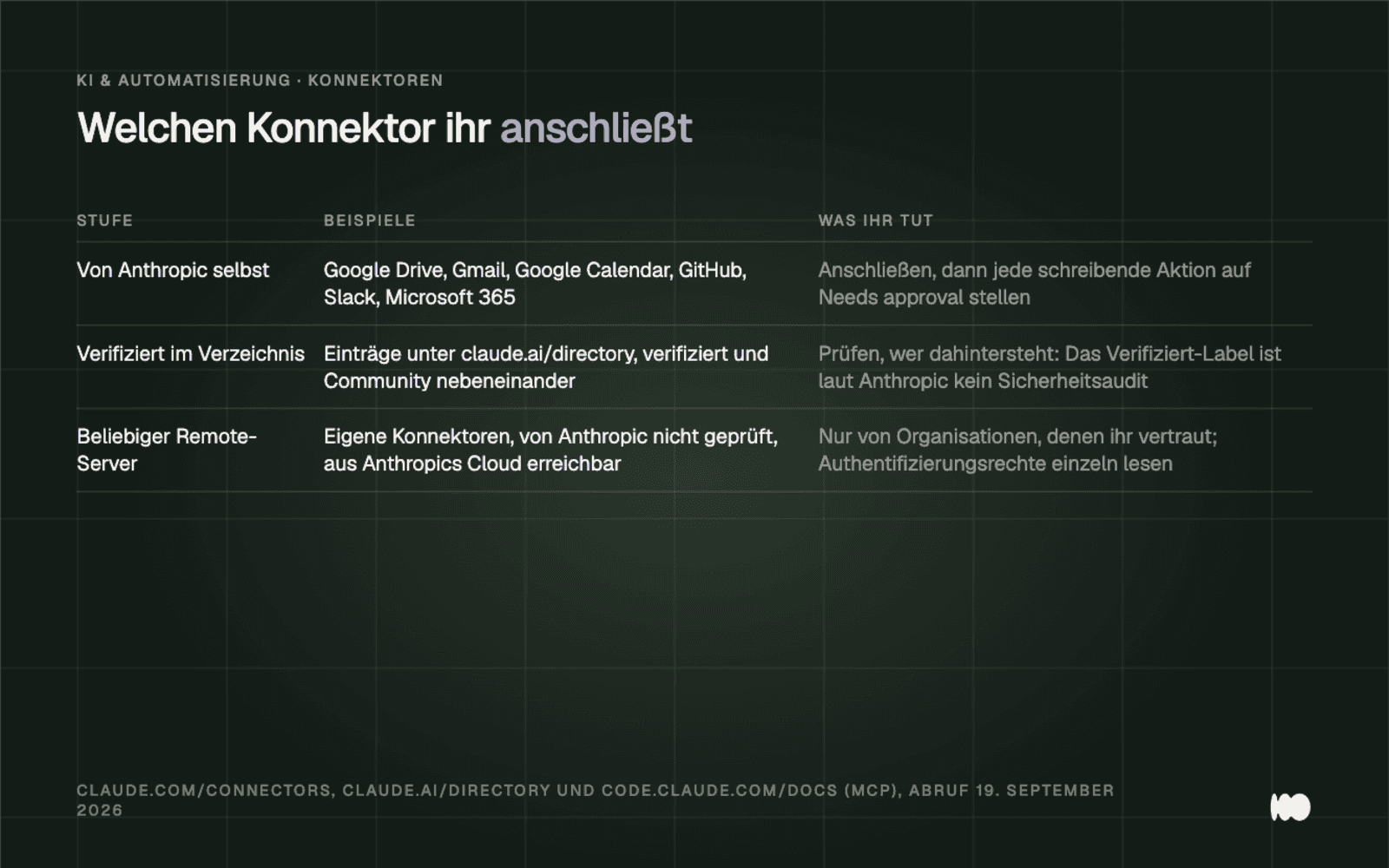
Three levels of connectors with the corresponding countermeasures, according to Anthropic's connectors and MCP documentation (accessed September 19, 2026).
Claude Code: When the chat window Isn't Enough
Claude Code is worth it the moment a task involves more than one file. It’s a terminal and editor agent that reads and modifies your files and executes commands on its own, rather than just providing you with text to copy. For one-off tasks, the chat window is still the better option. But when it comes to batch processing—like renaming twenty files or checking an export—it eliminates the need for manual copying.
A paid account is required: Pro, Max, Team, Enterprise, or Console. According to the documentation, the free claude.ai plan does not include access to Claude Code (code.claude.com, accessed September 19, 2026). In addition, you’ll need macOS 13.0 or later, Windows 10 version 1809 or later, or Ubuntu 20.04 or later, 4 GB of RAM, and one of the following shells: Bash, Zsh, PowerShell, or CMD.
Installation is done with a single command. On macOS, Linux, and WSL, the command is `curl -fsSL https://claude.ai/install.sh | bash`; in Windows PowerShell, it is `https://claude.ai/install.ps1 | iex` ; and in the Command Prompt , it is ` curl -fsSL https://claude`.ai/install.cmd -o install.cmd && install.cmd && del install.cmd. Via Homebrew, use `brew install --cask claude-code`; via npm, use ` npm install -g @anthropic-ai/claude-code ` starting with Node.js 22. The documentation explicitly warns against running npm with `sudo` for this purpose and notes that native installations update in the background, whereas those installed via Homebrew, WinGet, apt, dnf, or apk do not.
According to the documentation, the first fifteen minutes go like this: ` claude --version`, `claude doctor ` as a read-only diagnostic, then change to the project directory, start `claude `, and log in via the browser. After that, let the program walk you through the project, generate the CLAUDE.md file using /init, make a small initial change, and use /context to check whether the CLAUDE.md file appears in the “Memory files” section. If you’re hesitant about using the terminal, be sure to read our guide to the command line for non-developers first.
The Slash Commands That Make Everyday Life Possible
Four commands make up the daily routine: /context, /compact, /clear, and /resume. /context is the most important and the least frequently used: It displays context usage as a colored grid, shows which tools take up a lot of space, flags bloated memory files, and warns of capacity limits. Anyone who has seen how many windows an unused MCP server takes up will call it up regularly afterward.
/compact frees up space by summarizing the previous conversation, optionally with a focus prompt. /clear does something different: it creates a new conversation with an empty context, where the optional name labels the old one in the /resume drop-down menu. We overlooked this naming convention for months and summarized everything instead. A summarized troubleshooting session carries over every red herring as a summary, while /clear angebot-mueller starts fresh, and /resume retrieves the old thread via the labeled checkpoint.
There are two commands that regularly save the day. /doctor is a comprehensive setup checkup: It finds duplicate installations, PATH issues, and unreadable configuration files; reports unused skills, MCP servers, and plugins along with their associated costs; and fixes some of these issues on its own. /usage breaks down what’s driving your usage limit by skill, subagent, plugin, and MCP server. Run /usage before you upgrade to the next higher plan.
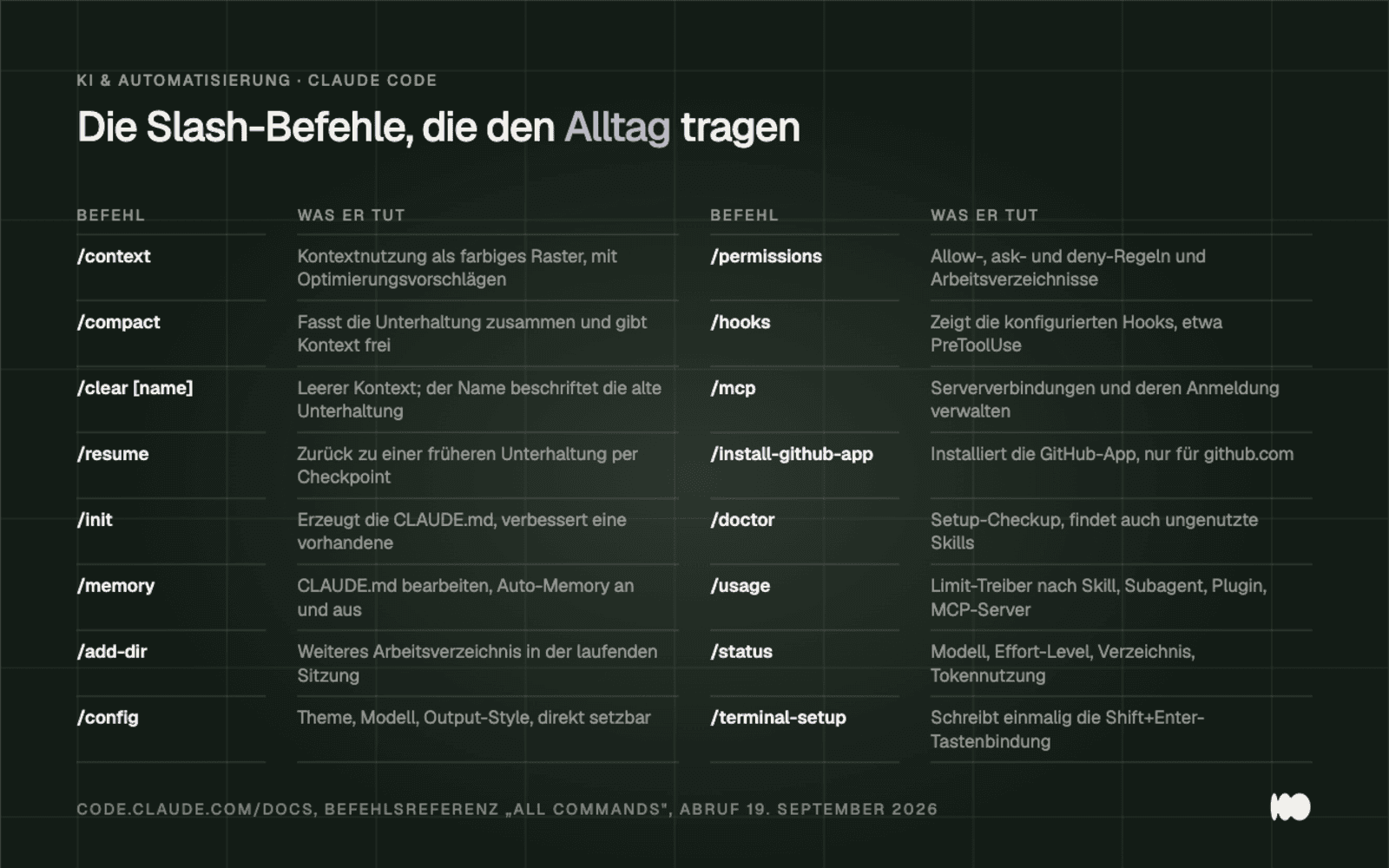
Sixteen slash commands grouped by function, from the command reference in the Claude Code documentation (code.claude.com, accessed September 19, 2026).
CLAUDE.md: What Claude Knows in Every Session
Place a CLAUDE.md file in the project directory, keep it under 200 lines, and don’t expect any guarantees from it. It is read at the beginning of each session and contains whatever applies: build commands, testing instructions, conventions, and etiquette. You can generate it with /init, which analyzes the codebase for this purpose; if one already exists, /init suggests improvements instead of overwriting it.
The locations are staggered, and they are appended to one another rather than overwritten. Personally, the file is located at ~/.claude/CLAUDE.md; in the project, it’s ./CLAUDE.md or ./.claude/CLAUDE.md; and ./CLAUDE.local.md contains information that is nobody else’s business and therefore belongs in .gitignore. Files are loaded from the working directory and every directory above it; files in subdirectories are only included when Claude reads from them. If you want to split things up, include additional files using @path/to/file, recursively up to four levels deep.
Important to note: Imported files load when the app starts and do not save any context. If you want to save space, use a skill instead of an import.
The most important statement regarding this file can be found in Anthropic’s hook documentation: “Put guardrails in hooks. An instruction like ‘never edit .env’ in CLAUDE.md or a skill is a request, not a guarantee. A PreToolUse hook that blocks the edit is enforcement.” CLAUDE.md provides context, not a enforced configuration. If you really want to prevent something, use a PreToolUse hook or a deny rule—not a sentence in all caps.
Create Your Own Slash Commands in Ten Minutes
Ein eigener Slash-Befehl ist heute ein Skill-Ordner, und der Ordnername wird zum Befehl. Für einen persönlichen Befehl legt ihr ~/.claude/skills/angebot/SKILL.md an, danach gibt es /angebot in jedem Projekt. Soll der Befehl zum Projekt gehören und mit ins Repository wandern, nehmt ihr .claude/skills/angebot/SKILL.md. Das alte Format .claude/commands/<name>.md funktioniert weiterhin.
A syntax rule determines whether the command appears at all: The opening --- of the YAML front matter must be on line 1. Our first custom command didn't show up in the list because a blank line had slipped in above it when we copied the code. Ten minutes of searching for a character you can't see.
You can pass arguments using $ARGUMENTS for everything after the command, or using $1 and $2 for individual values. You define named arguments using the "arguments" frontmatter field, and " argument-hint " shows what is expected as you type.
Whether to include something in the project or keep it personal isn’t a matter of taste. Anything your colleagues also need belongs in the project, because it will then be included in the repository and visible during reviews. Anything that’s specific to your way of working should stay in ~/.claude/skills/. Keep the SKILL.md file under 500 lines—as recommended in the documentation—and put details in accompanying files.
GitHub: What Happens After @claude in a Pull Request
The quick way is to run `/install-github-app`, which requires admin access to the repository. Before doing so, you must install the GitHub CLI and log in using ` gh auth login`. The command installs the app, stores the auth secret—either ` ANTHROPIC_API_KEY ` for an API key or `CLAUDE_CODE_OAUTH_TOKEN ` for a subscription token—pushes a branch containing the workflow files, and opens a completed pull request. After the merge, @claude responds—but only on github.com; on gitlab.com or bitbucket.org, the command aborts.
In the repository, the action `anthropics/claude-code-action@v1` operates in two modes. Without the `prompt` input, it runs interactively: It responds to @claude in issue and PR comments, in a review, and in the title or body of a new issue, and replies as a comment. With `prompt`, it runs as an automation without requiring a mention; the result is then recorded in the workflow run log. The trigger phrase itself can be changed via ` trigger_phrase `.
Two checks run before anything happens at all. The user who triggers the action must have write access to the repository; exceptions are only allowed via `allowed_non_write_users` with their own `github_token`. Bots are rejected unless they are listed in `allowed_bots`. And the comment must contain "@claude" as a complete word; "/claude" does not trigger anything.
The GitHub app requires its full set of permissions; a subset cannot be selected: Actions, Checks, Contents, Discussions, Issues, Pull Requests, Repository Hooks, and Workflows—with both read and write access for each. According to the documentation, the action itself relies only on Contents, Issues, and Pull Requests. If you want to grant access only to these, you’ll need to create your own GitHub app, but you’ll then lose Code Review and Web Auto-Fix.
In addition, there are two cost items: GitHub Actions minutes and tokens. When signing in with an OAuth token, the runs are billed through the Claude subscription rather than via the API billing system. The documentation also lists ways to keep costs down: specific requests instead of vague ones, issue templates, a concise CLAUDE.md file, timeouts, concurrency limits, and the --max-turns option in claude_args. Set --max-turns right in the first workflow, not after you receive your first bill.
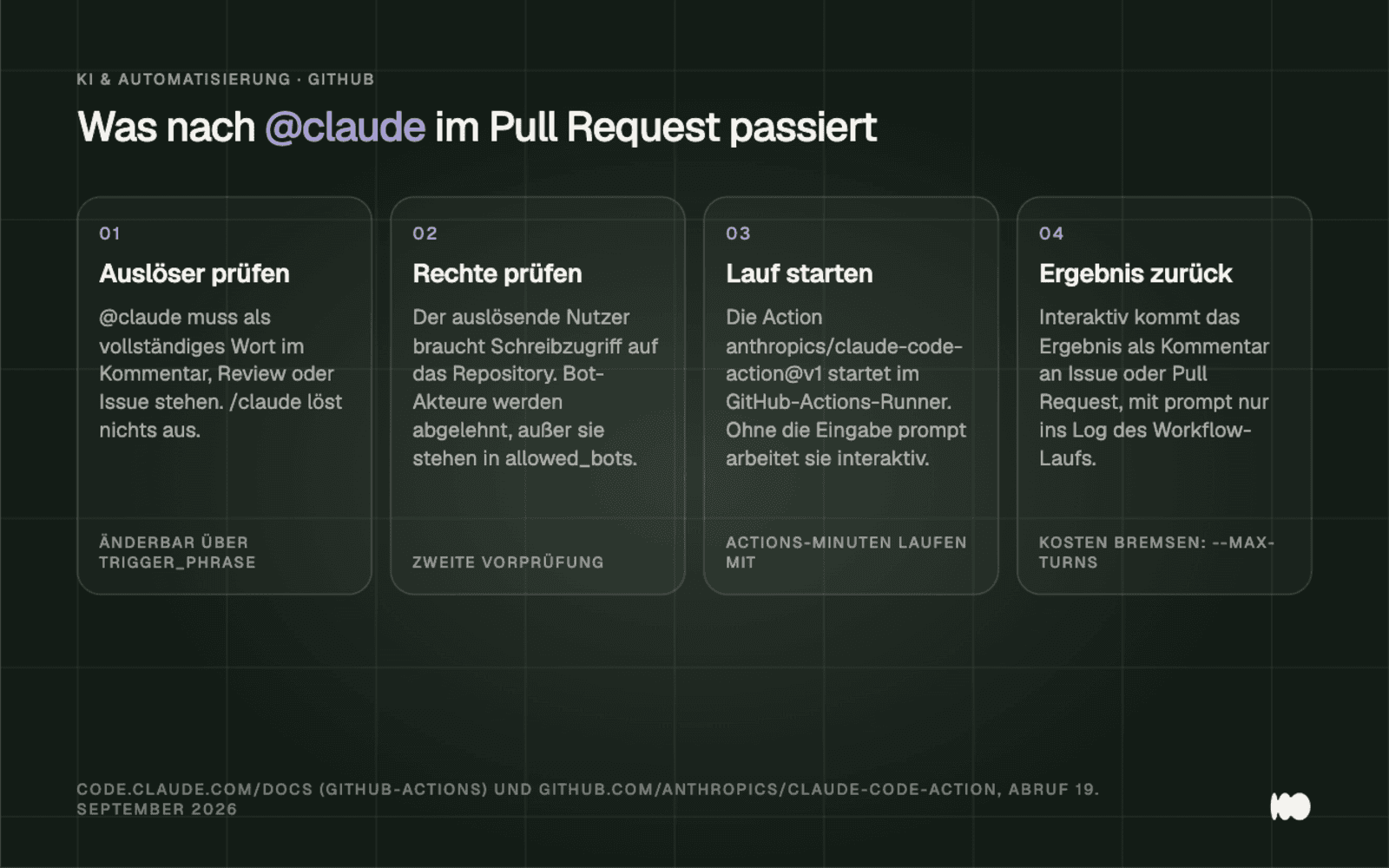
The process following a @claude comment, including the two preliminary checks, according to Anthropic's GitHub Actions documentation (accessed September 19, 2026).
Rights: What's Allowed Without Asking and What's Never Allowed
There are six permission modes, and as of August 14, 2026, the Pro, Max, and Team plans default to "auto." The modes are: " default " (labeled "Manual" in the interface; read-only without prompts), "acceptEdits " (file modifications and common file system commands in the working directory), " plan," "auto " (all actions, with background verification by a second model classifier), dontAsk (anything not shared is rejected instead of prompting), and bypassPermissions (full access, only for isolated containers and virtual machines). You can cycle through them using Shift+Tab; however, bypassPermissions only appears in the cycle after starting with the corresponding switch, and dontAsk never appears there.
More important than the modes is what does not run automatically in any of them. Anthropic explicitly states this “in any mode, including bypassPermissions”: tools with an explicit “ask” rule, connector tools that the organization has set to “ask,” tools that require input from you, as well as `rm` and `rmdir` on a critical path. Write access to protected paths such as .git and .claude is never automatically granted except in bypassPermissions. Deny rules apply in every mode; allow rules have no effect in bypassPermissions.
This determines the order of priority for your team: don't tweak the mode; instead, write deny rules. The system evaluates deny rules first, then ask rules, then allow rules; the first match takes precedence, and specificity does not affect this. A broad rule like Bash(aws *) therefore takes precedence over a narrower allow rule.
You need to be aware of a limit; otherwise, you’ll lull yourselves into a false sense of security. A Bash rule checks the command text that Claude writes, not the program behind it: According to the documentation, `bash (curl *)` does not stop a call made as `/usr/bin/curl ` or one made via `sh -c`. If you want to block it reliably, use a PreToolUse hook or the sandbox, which isolates the file system and network at the operating system level.
How much it costs and what the limits are
Claude Code starts with the Pro plan, which costs $17 per month when paid annually, as of September 2026. Anthropic bills in dollars; there is no official euro pricing tier (claude.com/pricing, accessed September 19, 2026). The monthly rate is $20; the Max plan starts at $100; a standard Team seat costs $20 with an annual subscription and $25 otherwise; and the Enterprise plan starts at $20 per seat plus usage fees based on API rates. The free plan allows for five projects, but Claude Code is not included in that plan.
Two items are noted in the fine print. The Fable models are not included in Pro and Team Standard plans; they run exclusively on those plans using additionally purchased usage credits (support.claude.com, accessed September 19, 2026). Anthropic no longer publishes fixed message limits: What is documented is a rolling five-hour window and weekly limits that depend on conversation length, model, effort level, and attachments. It’s not possible to calculate in advance how many messages are included; the current status is shown under Settings > Usage.
When it comes to file size limits, there’s a difference between Chat and Projects. In Chat, files can be up to 500 MB each, with a maximum of 20 files per conversation, and PDFs can be up to 1,000 pages long—though starting on page 101, only the text is processed. In Projects, the limit is 30 MB per file, and the same 30 MB limit applies to files generated by Claude. Large datasets therefore do not belong in project knowledge but should be placed behind a connector or in a directory that Claude can read.
Eight techniques that hardly anyone knows
The following eight tips are all included in Anthropic’s documentation, but they don’t appear in any introductory guides. They assume that you’re already working with Skills, projects, and Claude code. Each one saves you either context, typing, or a wasted afternoon. They’re listed in the order in which they’ve proven most useful to us.
The frontmatter field `context: fork ` in a SKILL.md file sends the skill to its own context window, like a subagent that ultimately returns only a summary (code.claude.com, accessed September 19, 2026). This is useful for any skill that sifts through a lot of material but produces few results, such as when checking log files. What you get back is the result you specified in the skill—not the process used to arrive at it. The main thread remains clean.
Setting `disable-model-invocation: true` in the same file prevents the skill from triggering automatically. It will then only run when you invoke it yourself, and its description will no longer be included in the context from the start of the session. For any special skill that no one but you ever starts anyway, this frees up valuable space in the window. The skill doesn't disappear; it remains in the list that opens when you press the forward slash.
Rules that apply only to specific files do not belong in CLAUDE.md; instead, they should be placed in a separate file under .claude/rules/. Using the frontmatter field `paths:` and a glob, such a rule is loaded only when a matching file is involved; personal rules are located in ~/.claude/rules/. A rule for migration files therefore only takes up context if someone edits a migration. This way, the CLAUDE.md file is reduced to what actually applies in every session.
An exclamation point before a shell command enclosed in backticks executes that command when a skill is called and places its output into the task. Instead of “check what has changed,” the task starts with the actual status. We have exactly this kind of call in a skill for the weekly report, and it retrieves the current status of the task list before Claude gets started. If you want to disable this in your team, set ` disableSkillShellExecution ` to `true` in the settings.
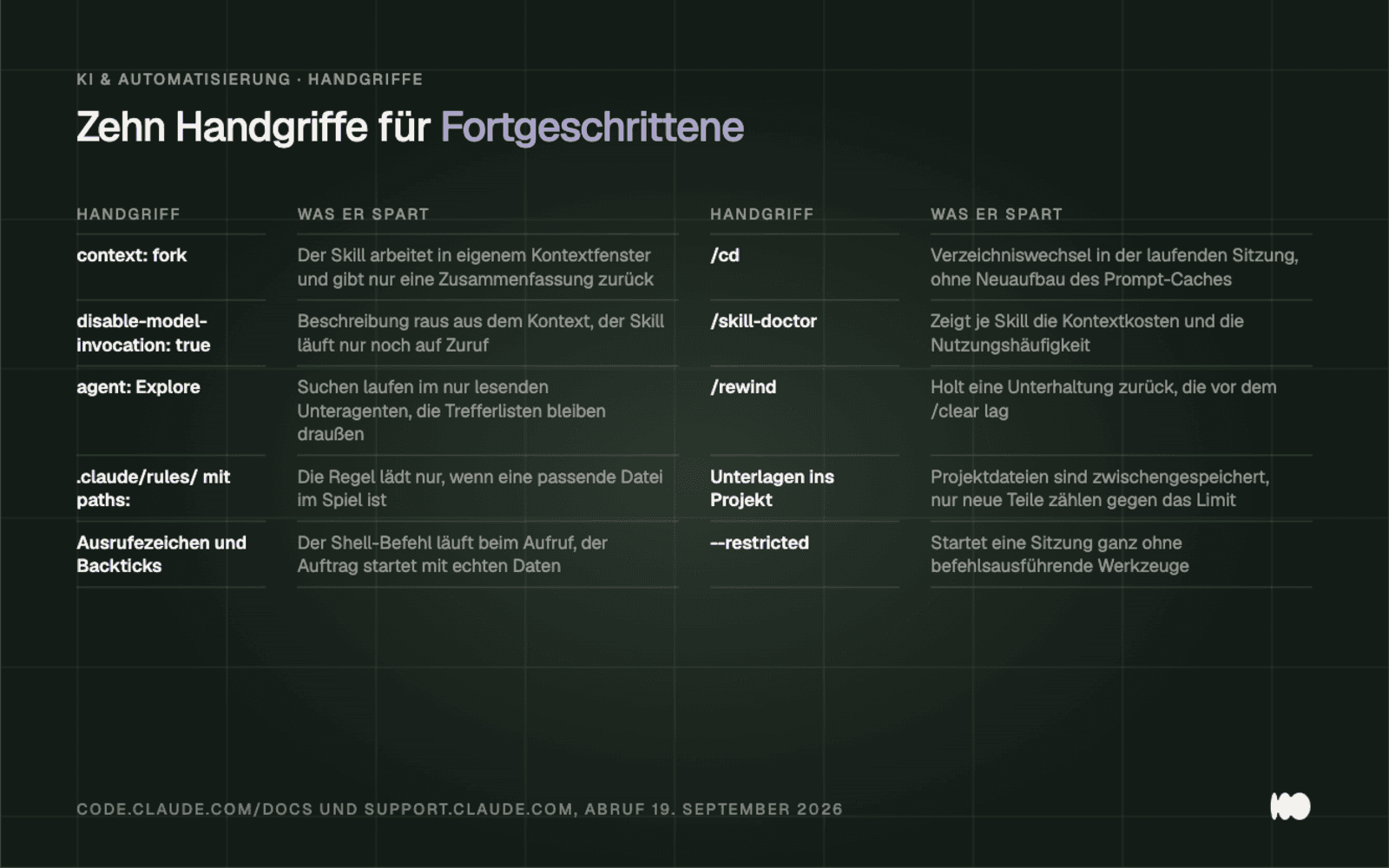
Ten quick tips from the documentation and release notes, each with the time they save (code.claude.com and support.claude.com, accessed September 19, 2026).
/cd moves a running session to a different directory without rebuilding the prompt cache (code.claude.com, Release Notes, accessed September 19, 2026). If you exit and restart instead, you have to rebuild the context from scratch every time. This is especially useful when a task in a neighboring project is wrapping up but builds on what you’ve just been discussing.
/skill-doctor has, since version 2.1.252, shown for each skill how much context it consumes and how often it has been used. This makes it easier to make the difficult decision about which skill to remove. We found two skills that had been loaded in every session since they were created and had not been triggered even once since then.
/rewind restores a conversation that took place before a /clear. This is a safety net for those moments when you’ve cleared the context and realize two minutes later that you actually need the reasoning from earlier. Until now, the only option in such cases was to explain everything all over again. If you don’t want to restore the entire thread, select “Summarize up to here” from the Rewind menu.
The real reason to save recurring documents in a project rather than in the chat isn’t related to the projects themselves, but to Anthropic’s notes on usage limits: Project files are cached, and each time you access them, only new parts that haven’t yet been cached count toward your limit (support.claude.com, accessed September 19, 2026). Anyone who drags the same price list into the chat every morning ends up paying the full price each time.
Two minor details follow the same logic. The `agent: Explore ` directive in a skill’s front matter delegates searches to the built-in, read-only subagent, whose search results do not appear in the main context, and `--restricted ` starts a session without any command-executing tools—for example, if you just want to read third-party code. Call /skill-doctor today and set ` disable-model-invocation: true` for every skill that only you launch anyway.
Conclusion: today, this week, later
Today, twenty minutes is enough to do two things. Enter the project instructions—which you usually have to retype every time—into the project you're working on the most. And if you're using Claude Code, run /context and /doctor once to see what's taking up space in your window and what's running in the background without being used.
This week, you’ll build a single skill—the one with the clearest trigger—and write its description as an “if” statement. Then, go through the connectors and set every writing action to “Needs approval.” Both tasks combined will take half an afternoon and have the longest-lasting impact.
Later, the rest comes in this order: /init for CLAUDE.md, a custom slash command for the workflow you repeat most often, then the GitHub app with --max-turns enabled from the start, and finally the deny rules based on what we’ve learned in the first few weeks. If you don’t want to set this up yourself, we’ll select a process, build the project and skill, and configure the permissions. You can find more information under AI for Small Businesses.
What Has Changed and What That Means for You
Six changes made in recent months affect how you work, not just the feature list. The data is taken from Anthropic's release notes and the Claude code documentation (accessed September 19, 2026).
September 15, 2026: Salesforce in Claude launched as a beta with 37 prebuilt sales skills. If you use Salesforce, it’s a good idea to check there first to see if the workflow you need is already included before building your own skills.
August 25, 2026: Since then, the memory feature has been active across Chat and Cowork Cloud; topics can be edited individually, and there is a setting called “Include sensitive topics in memory.” By default, this setting is enabled in Free, Pro, and Max, and disabled in Team and Enterprise. Be sure to check Settings > Memory before dictating customer names into a chat.
August 19, 2026: Live artifacts created before this date can no longer be edited in place. If you have an old dashboard in your account, you must recreate it instead of continuing to maintain it.
August 14, 2026: "auto" became the default authorization mode for new sessions on Pro, Max, and Team plans. Since then, safe actions have been executed in Claude Code without prompt, as determined by a second classifier. If you want to safely exclude specific paths or commands, you'll need "deny" rules, because only those take effect in every mode.
August 6, 2026: Anthropic is screening Skills and Plugins for harmful content in a beta program for enterprise organizations. For all other plans, this screening remains your responsibility, so be sure to review third-party Skills before activating them.
July 7, 2026: The Microsoft 365 connector gained writing tools—such as composing and sending email, managing the calendar, and updating files—and setup has since required approval from a Microsoft Entra administrator. For you, this means: no connector without IT approval, and writing actions are set to “Needs approval” from the start.
We keep this post up to date. Date of this version: September 20, 2026. We will update this post with any changes that occur since then.
Do you want to know which skill will be most useful to you first?
Tell us in three sentences what routine you follow every week and which programs you use. We’ll let you know whether this belongs in the project instructions, in a skill, or behind a connector, and what permissions you need to grant for it. Please use the contact form. We’ll respond within 24 hours—personally and without any sales pitch.
More Articles
© Marschfahrt Studio
Practical knowledge on web design, SEO, AI, and conversion optimization. Based on real projects, without any marketing spin.