Keyword Research Using a Real-World Example: 80 Search Terms for a Bathhouse Business—and Which Ones Are Misleading
The top result in our real-world keyword research for a bathroom business was a “mirror cabinet” with 9,900 monthly searches—and that exact term is useless. Using 80 suggestions from the Keyword Planner, we’ll show you which numbers are misleading, which ones are worth pursuing, and how to turn them into web pages.
Date
Category
Author

“We have no idea what our customers are actually looking for.” Many of our initial conversations with small businesses start off with something like this. The usual response is a table of search terms, sorted by the highest number. It is precisely this table that often leads us in the wrong direction, because the highest number is rarely the right one.
This post walks you through the keyword research process from start to finish using a real-world example: a plumbing and bathroom renovation company in the Cologne area. On September 28, 2026, we entered three starting keywords into the Google Ads Keyword Planner and received 80 suggestions. Using these 80 keywords, we’ll show you which numbers are misleading, which ones are worth pursuing, and what happens to the rest.
This is not a beginner's course: We assume that you know what a search term is and that you have your own website. All information about the tool comes from Google's own help center and the Google Ads API documentation, accessed on September 29, 2026. Where the German help text has been incorrectly translated, we'll point it out.
In a nutshell (as of September 2026)
Before you adopt a term from the Keyword Planner, search for it yourself on Google and see who appears on the first page. If the results show stores and products, the term is worthless for a small business, no matter how high the number next to it is. In our list, “bathroom mirror cabinet” had the highest value of all 80 suggestions at 9,900 searches per month, and it’s the first one that stands out at a glance. The “Competition” column won’t help you here, because it measures ads rather than competition for organic search results.
Our example: 80 suggestions for a swimming facility in the Cologne area
Start with two or three terms that your customers use on the phone, not your technical jargon. For the bathroom renovation business, these were “bathroom renovation,” “renovate bathroom,” and “plumbing Cologne.” We selected German as the language and all of Germany as the location. This yielded 80 suggestions, each with search volume, competition, and bid value.
One caveat applies to everything that follows: The location was the entire country, not Cologne. The figures for terms like “plumber Cologne” therefore represent nationwide searches for terms that include the city’s name. The exact figures come from a query run through the Google Ads interface using an account that already had active campaigns. We ran the same query the next day in the interface using an account with no active campaigns, and there we only saw ranges. What this means is explained in the next section.
There’s one thing we’ve stopped doing at the studio. We used to send clients the list as a table, sorted by search volume, and they’d usually just read the first row or so. Now we send a short list of decisions: keep, group, or delete. Before you open the tool for the first time, write down your three starting keywords.
Access to the Keyword Planner: Payment information required, but no active campaigns
Create a Google Ads account, enter your payment information, and skip setting up a campaign. That’s all Google requires for access. The help section explicitly states: “You can also create an account without a campaign.” However, none of the help articles mention that you need an active campaign to use the Keyword Planner itself.
Payment information, on the other hand, is required. According to the Help section, without it and without completing the account setup, you won’t have access to the basic features—including keyword suggestions. In addition, Google may ask for money as early as the sign-up stage: “You may also be asked to make a small advance payment during registration to verify your identity.” According to the same page, this amount is fully refundable.
You can find the Keyword Planner in the menu on the left under Tools › Planning › Keyword Planner; the help section describes the first step as the tool icon. Instructions that mention a menu item called "Tools and Settings" show an older interface. On the home page, there are two options: "Discover New Keywords " for suggestions, and "Get Search Volume and Forecasts " for a list you already have.
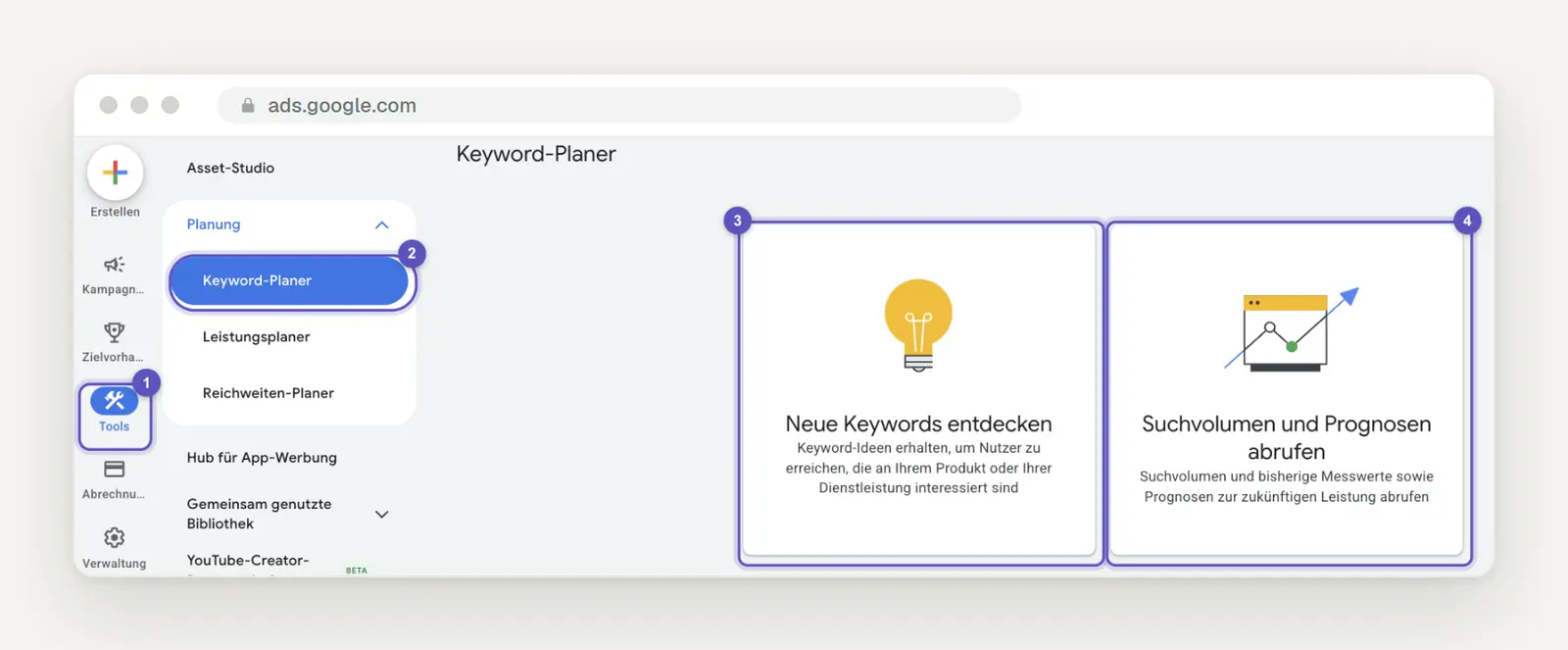
To access the Planner, go to "Tools " (1) and then "Keyword Planner" (2) in the menu on the left. On the home page, "Discover New Keywords " (3) provides suggestions based on your starting terms, while "Get Search Volume and Forecasts " (4) analyzes a list you already have.
If you don't have an active campaign, expect to see ranges instead of exact numbers. There's nothing about this in the Help section, and Google doesn't specify a spending threshold anywhere. But the interface itself makes this clear: In our account without a campaign, the column only showed values like 1,000–10,000, and below that it said, "You'll get more detailed statistics when you launch a campaign." For “bathroom renovation,” this meant 1,000–10,000 instead of 6,600; for “plumbing Cologne , ” it meant 100–1,000 instead of 590.
The mirror cabinet shows just how rough the estimates can be. It was listed in the 10,000–100,000 range, even though its exact average is 9,900—which is below the lower limit of that range. Based on the ranges, it seemed to be in a different order of magnitude than “bathroom renovation”; based on the exact figures, it’s 9,900 versus 6,600. The bid values, on the other hand, appear consistent even without a campaign, with deviations of just a few cents—for example, 4.08 instead of 4.07 euros for “bathroom renovation.”
Ranges are still sufficient for making the most important decision—which intent each page addresses. Search Console shows you how many impressions your own website actually receives; more on that below. So set up your account today and compare terms using ranges only within the same range.
Three search terms, entered correctly
Click on “Discover New Keywords,” select “Start with Keywords,” and confirm each term by pressing the Enter key. Google offers three useful tips: “Keywords that are too specific can be too limiting.” And: “Avoid starting your keyword research with an adjective.” For the bathroom renovation business, this means: “bathroom renovation ” instead of “affordable bathroom renovation in Cologne with a fixed price.”
Below that is the field “Enter a website to filter out irrelevant keywords.” Enter your domain; according to the help section, Google will then try to exclude keywords that have nothing to do with your business. If you’d rather use a page as a starting point, select the “Start with a website” tab. Google will then analyze the page’s content, but: “The content of hyperlinks is not used to generate keyword ideas.”
This combination yields the best results for a performance page. The help section states: “Tip: If you enter a keyword and a URL, you may get more keyword ideas than you would with just the URL.”
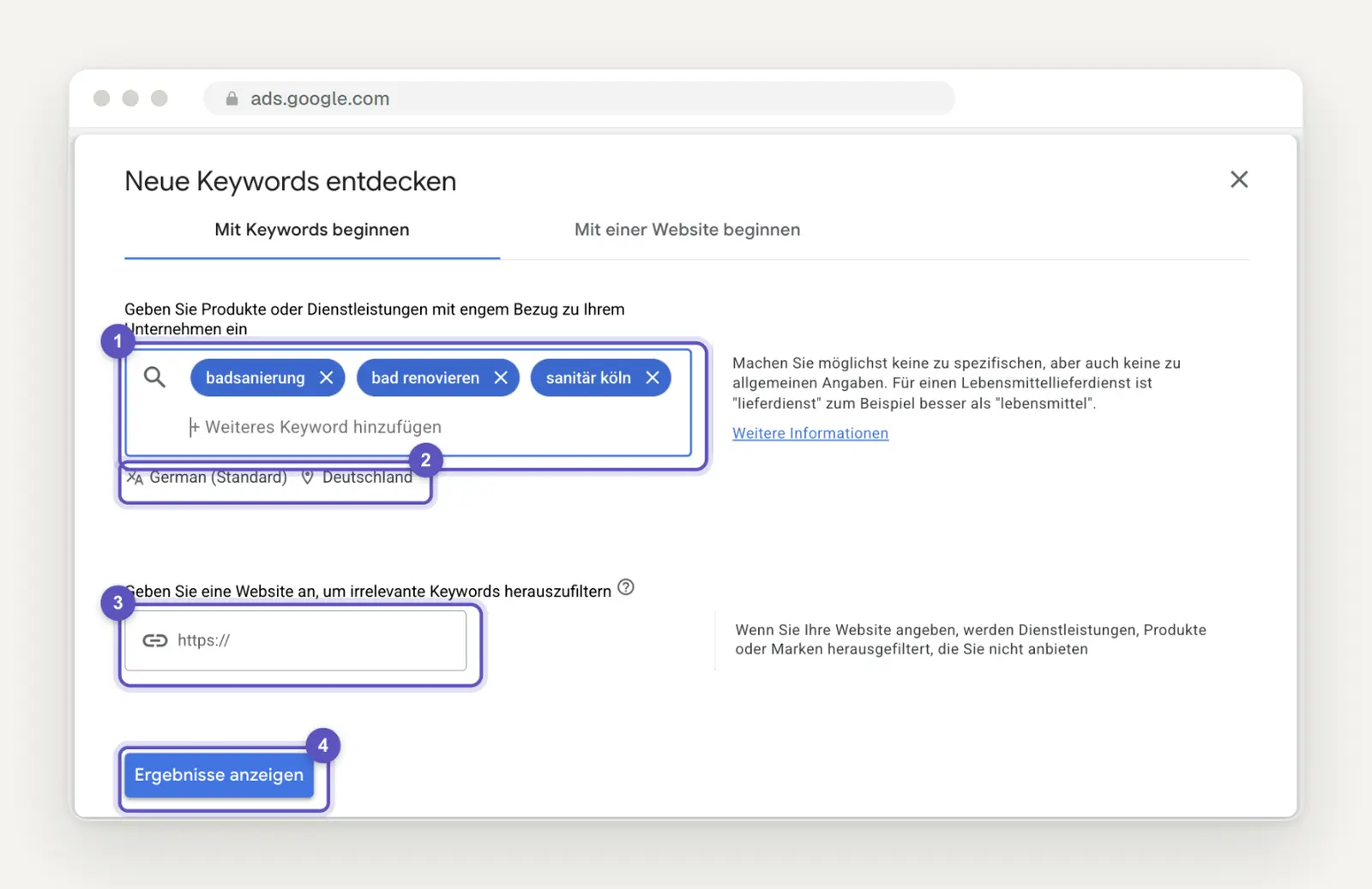
The entry under " Start with keywords": our three starting terms in the keyword field (1), language and location set to German (default) and Germany (2), the website field (3), and "Show results " (4).
Be sure to set the language, location, and ad network before you look at the numbers. For the location, select a country, area, region, or city. For the ad network, choose between Google and Google and Search Network partners. For the question about how searches are conducted on Google, select Google, then click " Show results."
What the Columns in the Keyword Planner Really Mean
Interpret the “Average Monthly Searches” column as an annual average, not as current demand. Google states: “By default, the average value for a keyword (regardless of language) is calculated over a 12-month period.” For “badsanierung, ” the figure is 6,600, but in individual months, the value ranged from 5,400 to 8,100. Anyone who takes the 6,600 figure at face value in January is underestimating demand; in June, they’re overestimating it. Incidentally, the interface showed us 1,301 keyword ideas for the same starting terms, while our run through the API returned 80—and those are the ones we’re working with here.
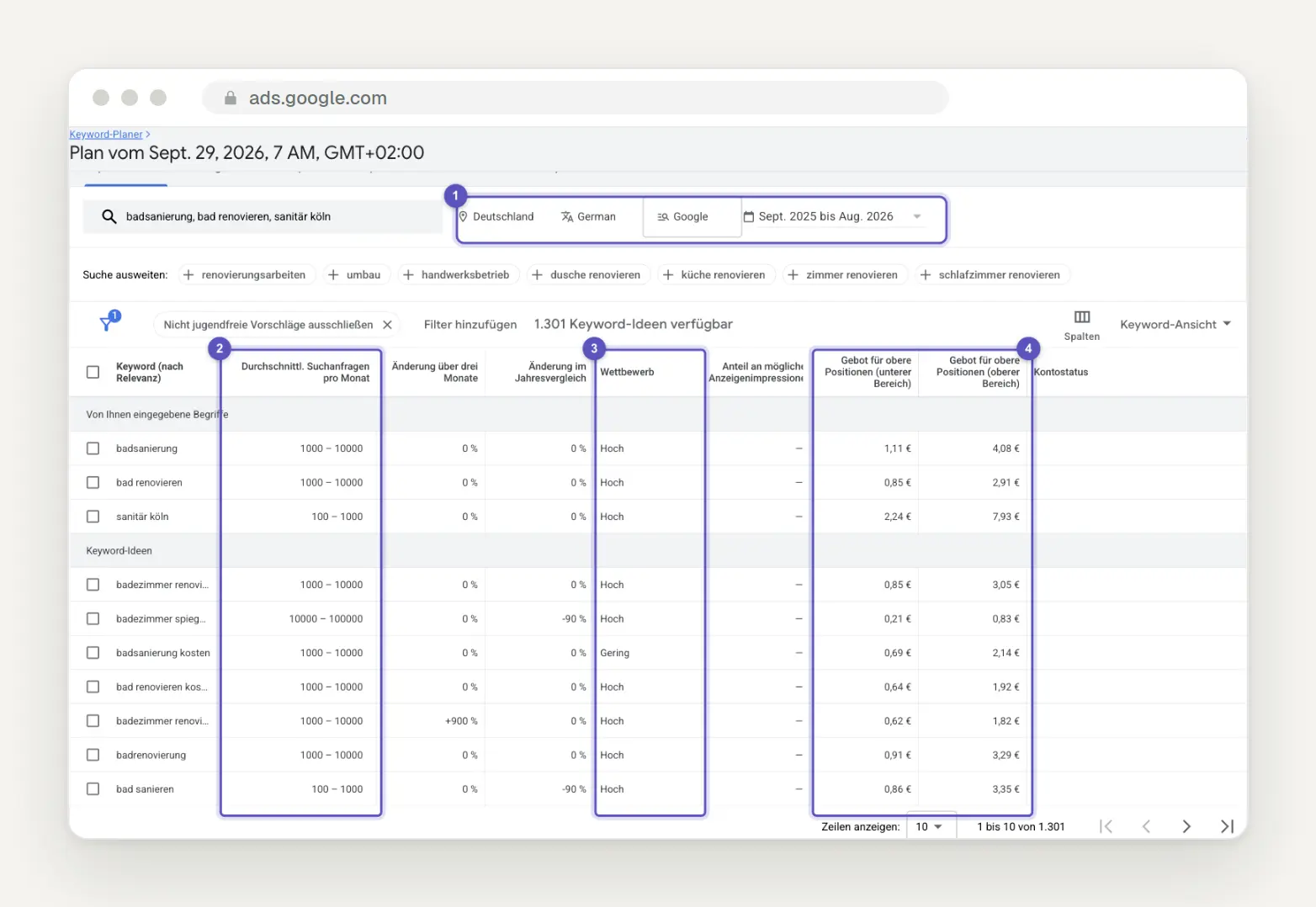
The results list in our account without a campaign. At the top is the bar showing location, language, network, and the time period from Sept. 2025 to Aug. 2026 (1); below that are the average monthly search queries shown as ranges rather than specific numbers (2), competition (3), and the two columns showing bids for top positions (4).
The keyword option you select from the list does not change the search volume. “Historical statistics, such as average monthly search queries, are based exclusively on exact-match search queries.” Whether it says “Broad Match” or something else, the number remains the same. However, it does not count only that exact spelling, but—by definition—the keyword “and similar variations.”
Google defines “similar variants” as “words with very similar syntax”—that is, typos, singular and plural forms, word stems, abbreviations, and accents. In addition, there is rounding: “The search volume data consists of rounded values.” Google does not disclose the method used for rounding. Therefore, make only rough comparisons, because whether a term has 880 or 720 is not a difference you should base a decision on.
Just because there’s no number doesn’t mean nobody is searching for it. The help section states: “Keywords with very low search volume or those classified as sensitive are not displayed.” At the very bottom of our list is “badrenovation” with 10 searches and no bid value. Even rarer spellings don’t appear at all, and those are exactly what you’ll find later in Search Console.
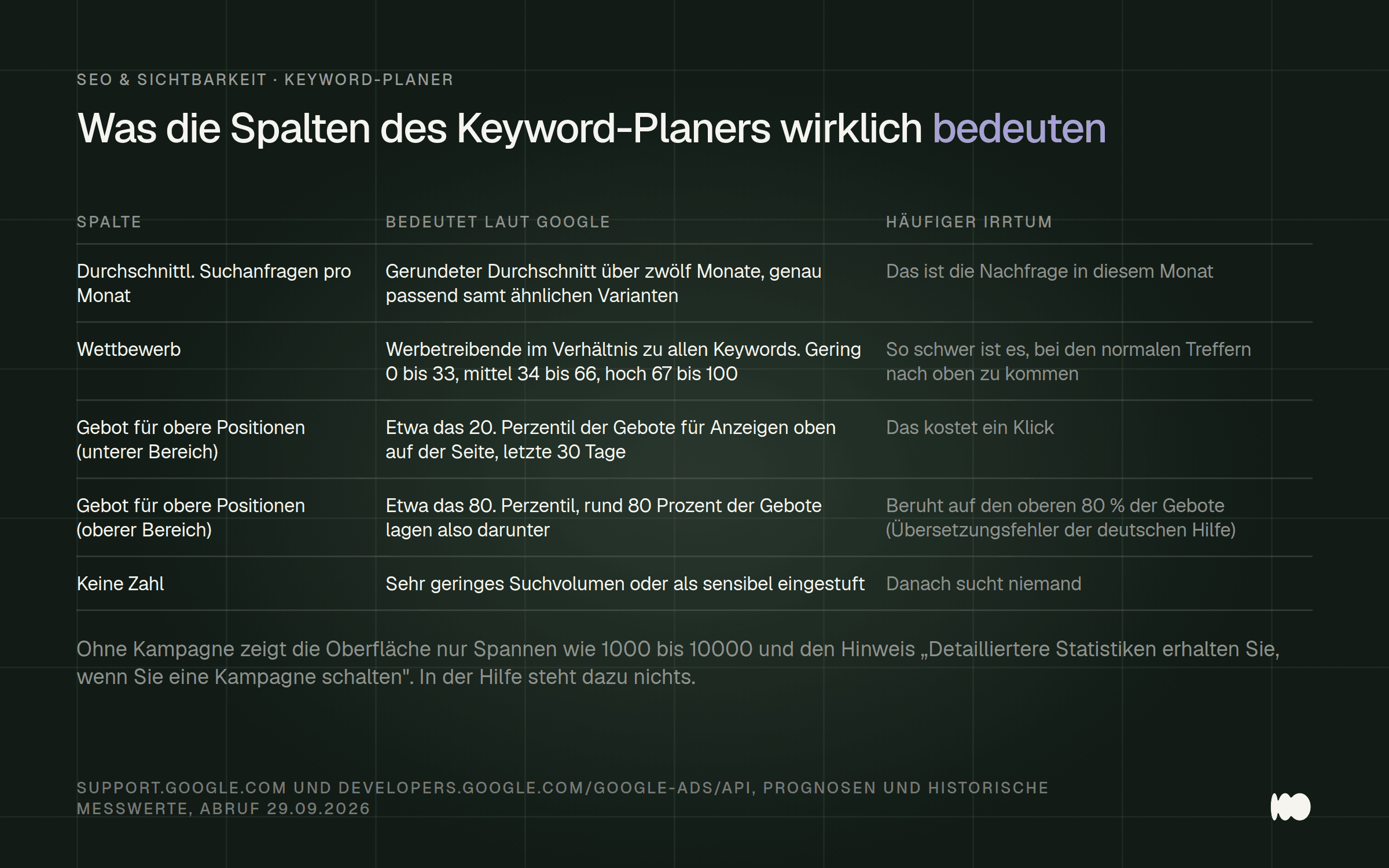
The four columns you see in the Keyword Planner, their meanings according to Google, and the misconception found in many guides.
To change the time period for individual months, "simply click on the date field above the graph." Do this for each term on your shortlist.
Why High Competition Says Nothing About Your Chances on Google
Ignore the "Competition" column when looking at your regular search results. The German help section defines it as follows: "The number of advertisers placing bids on a given keyword, relative to all keywords on Google." The English version even refers to advertisers whose ads were actually served. In both cases, we're talking about ads.
The interface documentation makes this even clearer. There, the competition index—ranging from 0 to 100—represents the ratio of occupied ad slots to all available ad slots. The three levels correspond to fixed ranges of this index: low (0–33), medium (34–66), and high (67–100). In our results list, values such as “High” and “Low” appeared there.
There is no explicit statement from Google that the column reveals anything about organic rankings. However, this conclusion follows from all the definitions, which refer exclusively to advertisers and ad placements. In our list, “bathroom renovation costs” has low competition, while “bathroom renovation” has high competition. This simply means that bids for the ads are lower when it comes to cost, not that the organic search results are easier to rank for.
Interpret the two bid columns as a price range, using the correct definitions. According to the English help section and API documentation, the "bid for top positions (lower range)" corresponds roughly to the 20th percentile, and the "bid for top positions (upper range)" corresponds roughly to the 80th percentile of what advertisers have paid for ads at the top of the page. This means that for the upper range, about 80 percent of bids were below that level. “Statistics for bid ranges are based on data from the last 30 days.”
The German help section translates this incorrectly. It states, regarding the upper range: “An estimated value based on bids in the top 80% of the bid range.” This contradicts the original text and the interface. Google itself warns on the German pages: “This page may contain content that has been translated using AI technology.” Therefore, when checking definitions, be sure to cross-reference the English version before relying on a value.
The longest list is the most inaccurate: Check for intent, remove third-party trademarks
Delete any term where someone wants to buy something you don’t sell. “Bathroom mirror cabinet ” tops our list with 9,900 searches; competition is high, and the top bid is 0.83 euros. Anyone who types that in wants a cabinet, not a renovation. The same goes for “IKEA bathroom base cabinet” with 880 searches and a bid of 0.24 euros, as well as for “vinyl bathroom” with 1,300 searches.
Look at the intent on the results page, not the exact words. The Keyword Planner doesn't have a column for search intent. So search for each candidate yourself—preferably in an incognito window—and see what appears at the top. Businesses on a map mean someone wants to hire someone; guides with prices mean someone is planning; and shops and product images mean someone wants to buy.
What’s listed there will show you what kind of page fits the search. If that type of page doesn’t fit your business, cross out the term—even if the numbers are tempting. If it does fit, you’ll also know what your page needs to look like: a services page with contact information, a guide with price examples, or an entry in your company profile.
Remove third-party brands, even if competition is low. “viterma bathroom renovation ” has 2,900 searches and low competition; “bazuba” has 210 searches and also low competition. Anyone searching for these terms is looking for a specific provider. In the Planner, the “Optimize Keywords” section is helpful: “You can view keywords grouped by topics, brands, or categories.” In our run on September 29, 2026, the appropriate group there was titled “With or Without Brand Reference.”
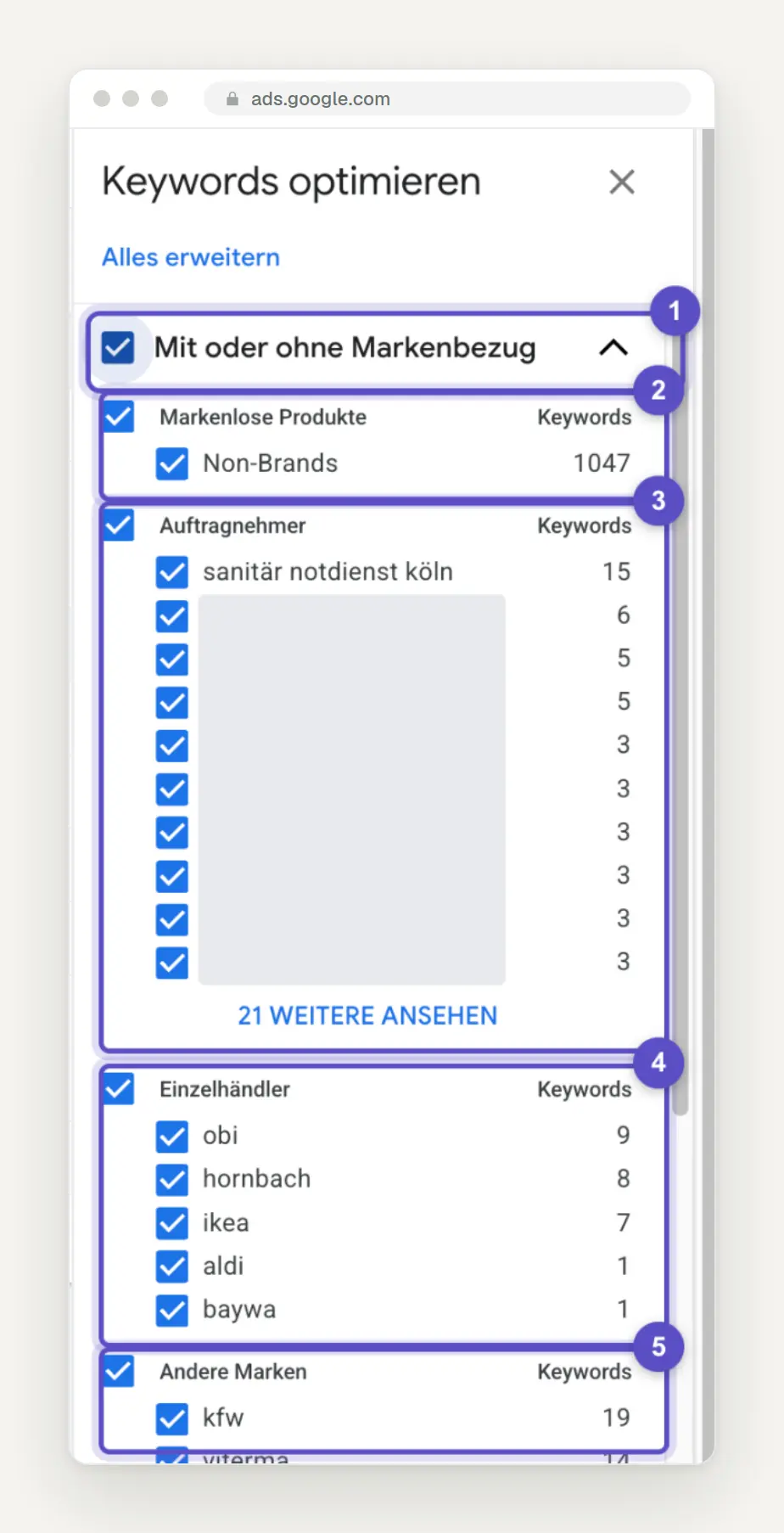
Optimize the sidebar keywords with the group expanded, with or without brand references (1). This includes unbranded products (2), contractors (3) with local businesses, retailers (4) such as OBI, Hornbach, and IKEA, as well as other brands (5), including Viterma. The names of local businesses are covered.
The process of unchecking categories is simple: “Uncheck a category to remove the associated keywords from your list.” For a trade business, uncheck “Retailers ” and “Other Brands,” and take a close look at “Contractors ”: That’s where the names of competitors end up, but also useful terms like “emergency plumbing service Cologne.” From our experience, we know of several websites that had optimized a page for the name of a major competitor simply because that competitor ranked high on a list. We are not aware of any case where this actually generated inquiries. Therefore, remove brands from the list before proceeding with any further analysis.
Merge duplicates; do not add them together
If two terms have exactly the same three values, treat them as one. “bathroom renovation” and “renovation bathroom” both have 2,400 searches, high competition, and a top bid of 3.04 euros. “new bathroom cost,” “new bathroom costs,” and “cost of new bathroom” all have 720 searches, medium competition, and a top bid of 1.41 euros. There are six such groups in our list.
According to the interface documentation, similar variants are consolidated, and the text displayed may be the base form of multiple keywords. It is not possible to tell from the outside whether this is exactly what happened in our cases, but the identical values in all three columns suggest that it did.
The conclusion is simple: If you add both lines together, you effectively double the demand on paper. And no one needs two pages for two different word orders. Google itself writes: “Google’s language-matching systems are sophisticated and understand how your page relates to many search queries, even if you don’t explicitly use the exact terms in it.”
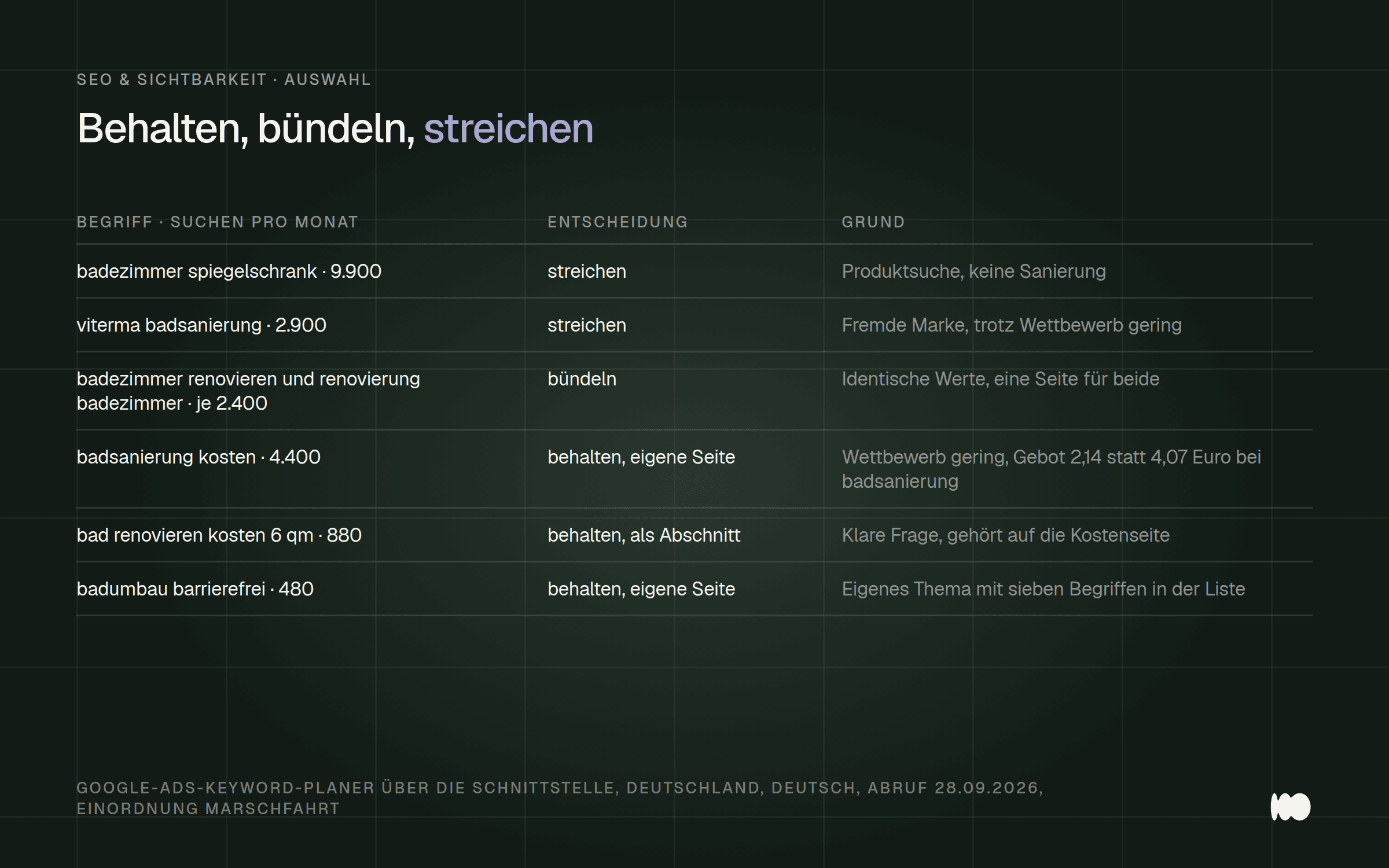
Six terms from our actual campaign and what we did with them. The numbers represent monthly search volumes nationwide, as of September 28, 2026.
In your exported table, highlight all rows with identical values in color and combine them into a single row before you count anything. Click " Download Keyword Ideas " in the upper-right corner to start the download.
Where the Work Pays Off: Cost Considerations and Long-Tail Keywords
Create the first new page addressing the question that comes up before every job: how much it costs. “bathroom renovation costs” has 4,400 searches, low competition, and a top bid of 2.14 euros. “bathroom renovation” has 6,600 searches, high competition, and a top bid of 4.07 euros. In addition, our list includes 28 terms containing the word “costs,” which together account for 18,480 monthly searches, calculated using rounded figures and accounting for possible overlaps.
Anyone asking about costs is already making concrete plans. A page that explains price ranges, typical sizes, and the factors that drive up the price answers exactly that question. Many businesses we work with are reluctant to do this because they don’t want to reveal anything to the competition. A page with price ranges and influencing factors doesn’t reveal any specific calculations, yet it still addresses the most common question before the first call.
Include the long-tail search terms as sections on the same cost page, not as separate pages. “Bathroom renovation costs for 6 square meters ” has 880 searches, “bathroom renovation costs for 8 square meters ” has 480, “bathroom renovation costs for 4 square meters” has 260, and “bathroom renovation costs per square meter ” has 480. These are people who have a very specific bathroom in mind, and they’re the ones who will end up calling later.
Pay attention to word order. The same words in a different order— “6 qm bad renovieren kosten”—appear in our list of 20 search terms. Therefore, write the subheadings and examples the way people actually type them—with the size listed last. A small table with examples for four, six, and eight square meters is the obvious focal point on a page like this.
Seasonality: When Your Site Needs to Be Ready
Create content before demand increases, not after it has already peaked. The monthly trend for “bathroom renovation” shows two peaks and two troughs. September and October 2025 were at 8,100; December dropped to 5,400; January through March 2026 were back at 8,100; and June was at 5,400. If the pattern repeats, we’ll be in another peak period by the end of September.
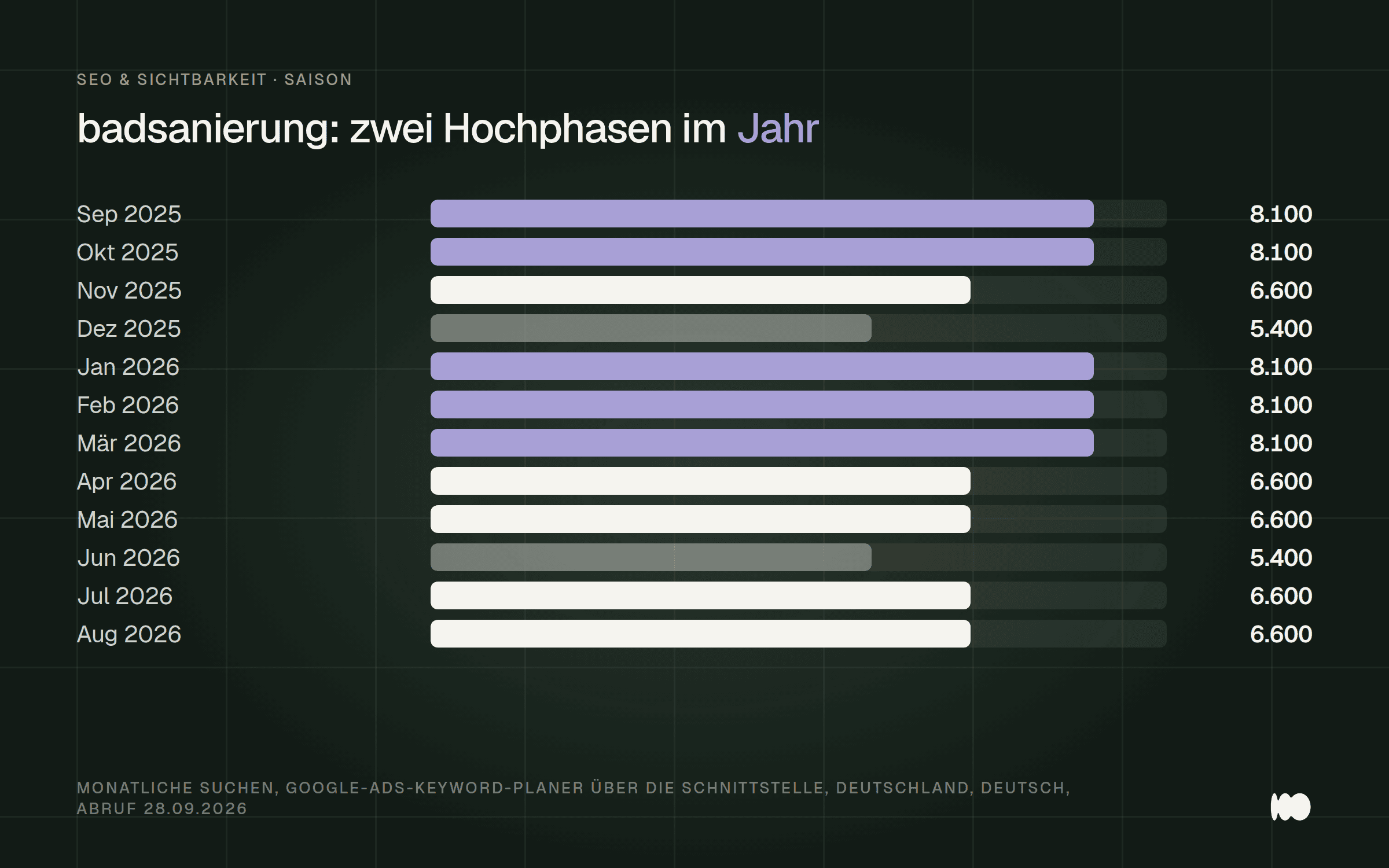
Monthly searches for "bathroom renovation" in Germany from September 2025 to August 2026. The annual average of 6,600 masks two peaks, each at 8,100.
A new page doesn't rank highly the day after it's published. So if you want to be found in January, publish in the fall rather than on New Year's Eve. Google describes the cause of these fluctuations in general terms: "Web traffic varies depending on the season, current events, and various other factors."
Take a look at the trend for each key term individually; the average hides the outliers. "Bathroom renovation costs" has an average of 4,400, but was 8,100 in August 2026 and 3,600 in the spring. "Bathroom renovation" peaked in January at 4,400 and hit its lowest point in June and July at 2,400. So the cost metric does not follow the same pattern as the main term. The “Change over three months” and “Year-over-year change” columns in the results list provide a quick overview.
Don’t confuse these two things, both of which the planner offers. “Forecasts take factors such as bids, budget, and seasonality into account, whereas historical data does not.” For your planning, the historical monthly figures are what matter. Enter the peak periods for your three most important terms into your editorial calendar and schedule publication a few weeks in advance for each one.
Cologne Terms: Little Searching, High Price
When looking at bid values for local terms, interpret them as a measure of search volume, not as an indication of high demand. “Emergency Plumber Cologne” has only 50 searches per month, but a bid of 19.42 euros in the upper bid range. “Emergency Plumbing Service Cologne” has 170 searches and a bid of 15.55 euros, while “Plumber Cologne” has 480 searches and a bid of 13.39 euros. By comparison: “Mirror cabinet,” with 9,900 searches, has a bid value of 0.83 euros.
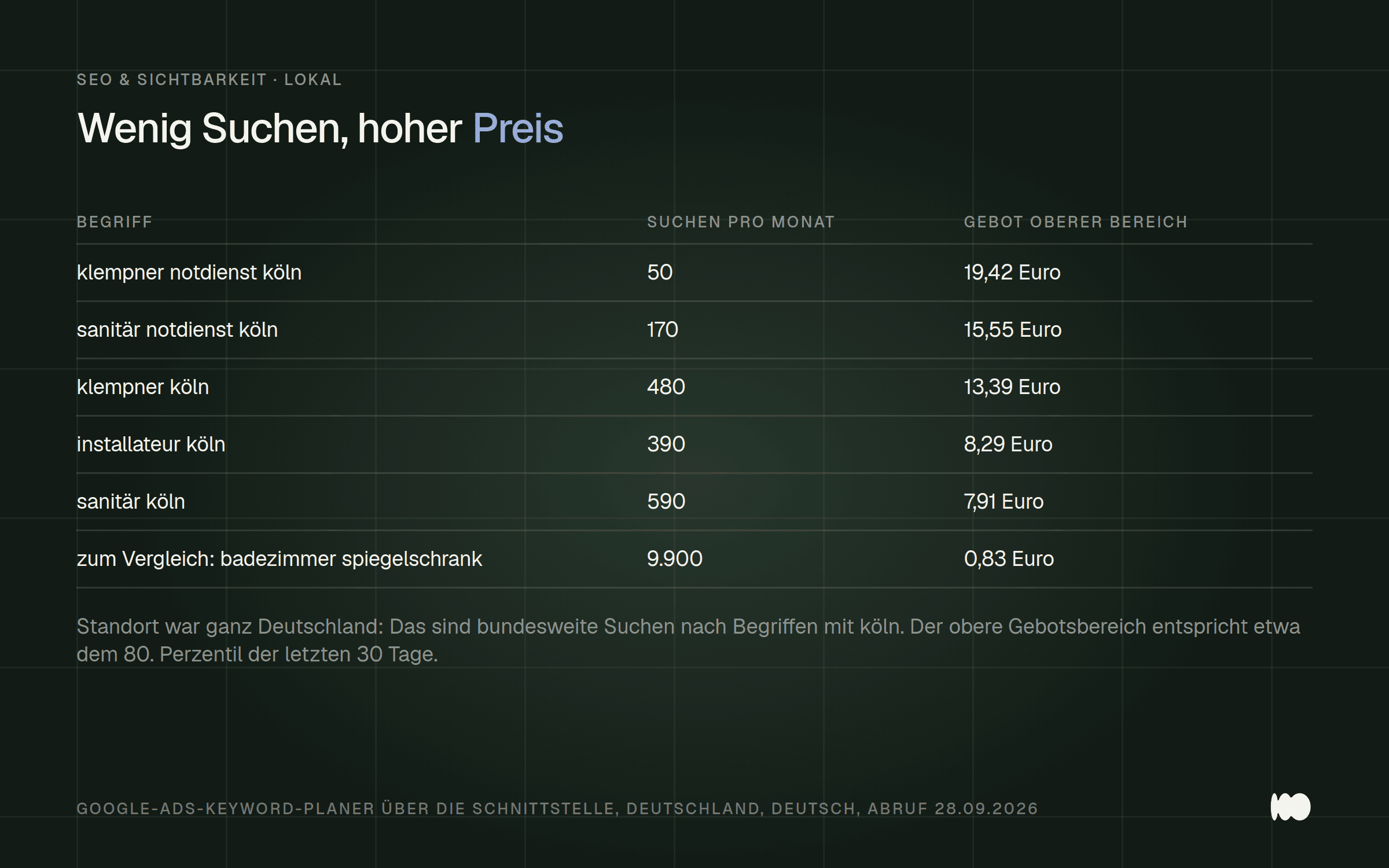
The five terms containing "Köln" from our list. The more urgent the search sounds, the higher the bid value—even though the number of searches is decreasing.
The high bids show that advertisers consider such a search to be very valuable. For your planning purposes, this means that a page that appears in 50 urgent searches can generate more orders than one that appears in 9,900 searches for a piece of furniture.
Narrow down the location if you want to know what people are searching for in your area. Our figures apply to all of Germany. In the location field, you can enter a city instead—or even specific neighborhoods.
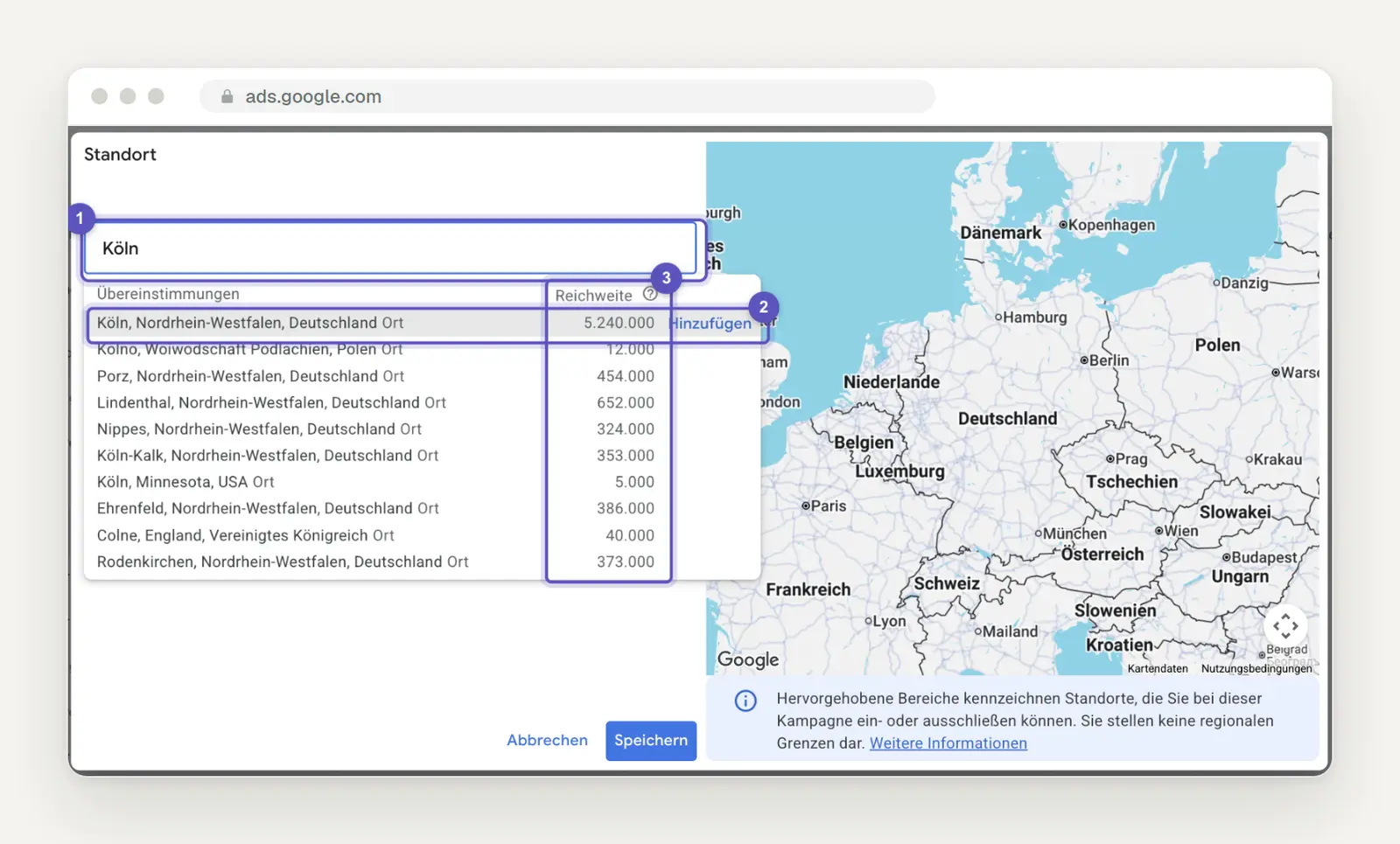
The "Location" dialog box with a search for Cologne (1). The result for the city in North Rhine-Westphalia is selected using "Add" (2); the "Coverage" column (3) shows the size of the area. Below that, Google lists neighborhoods such as Porz, Nippes, and Ehrenfeld as separate locations. Screenshot from September 29, 2026.
Two things stand out in the dialog box. You can narrow your search down to specific city neighborhoods, which is useful for businesses with a small catchment area, even if the numbers get even smaller as a result. And the same list of results also includes a “Cologne” in Minnesota, USA. So before you click “Add,” make sure it’s actually the one in North Rhine-Westphalia.
Don't expect precision for small areas. Regarding the forecasts, Google states: "Estimates for smaller geographic regions are less accurate because there is generally less data available to calculate the estimates." The Help section doesn't mention anything about historical search volumes, but the logic is likely the same. Therefore, treat small numbers for a city as a rough guide, not as an exact figure.
Be sure to check out the results page for these search terms. If businesses appear on a map there, you’re more likely to rank higher in these searches through your Google profile than through a subpage. To learn how to set up your profile properly, check out our article on Google Business Profiles.
Accessible, age-appropriate, and handicap-accessible: one topic, one dedicated page
Give accessible bathroom remodeling its own page instead of hiding it as a section on the renovation page. Our list includes seven related terms: “accessible bathroom renovation” with 480 searches, “barrier-free bathroom renovation ” and “barrier-free bathroom remodeling” with 320 each, “senior-friendly bathroom renovation” with 260, “age-appropriate bathroom renovation” and “barrier-free bathroom remodeling companies” with 210 each, and “age-appropriate bathroom renovation” with 140. All of these terms have high competition, with bid values ranging from 2.59 to 4.54 euros.
These searches are driven by different motivations than those for traditional renovations—and thus raise different questions. The search terms differ because searchers have varying levels of familiarity with the subject. Google puts it this way: “Users who know a lot about a topic are likely to use different keywords in their search queries than someone who is not yet familiar with the topic.”
The search volume for "badumbau barrierefrei " ranges from 390 to 720 searches per month, with the highest figure recorded in September 2025. Include the term with the most searches in the title and main heading, and use the other words wherever they fit naturally in the text. You don't need a list of all variations at the bottom of the page.
Search Console as a Second Source of Keywords
Get the keywords for which your website already appears from Search Console, and start with positions 8 through 20. According to Google, the Performance Report shows “search queries that drive traffic to your website”—in other words, your own real data. Open the Search Queries tab, filter by position greater than 8, and sort by impressions. The results at the top are already recognized by Google as relevant; all that’s missing is the final push.
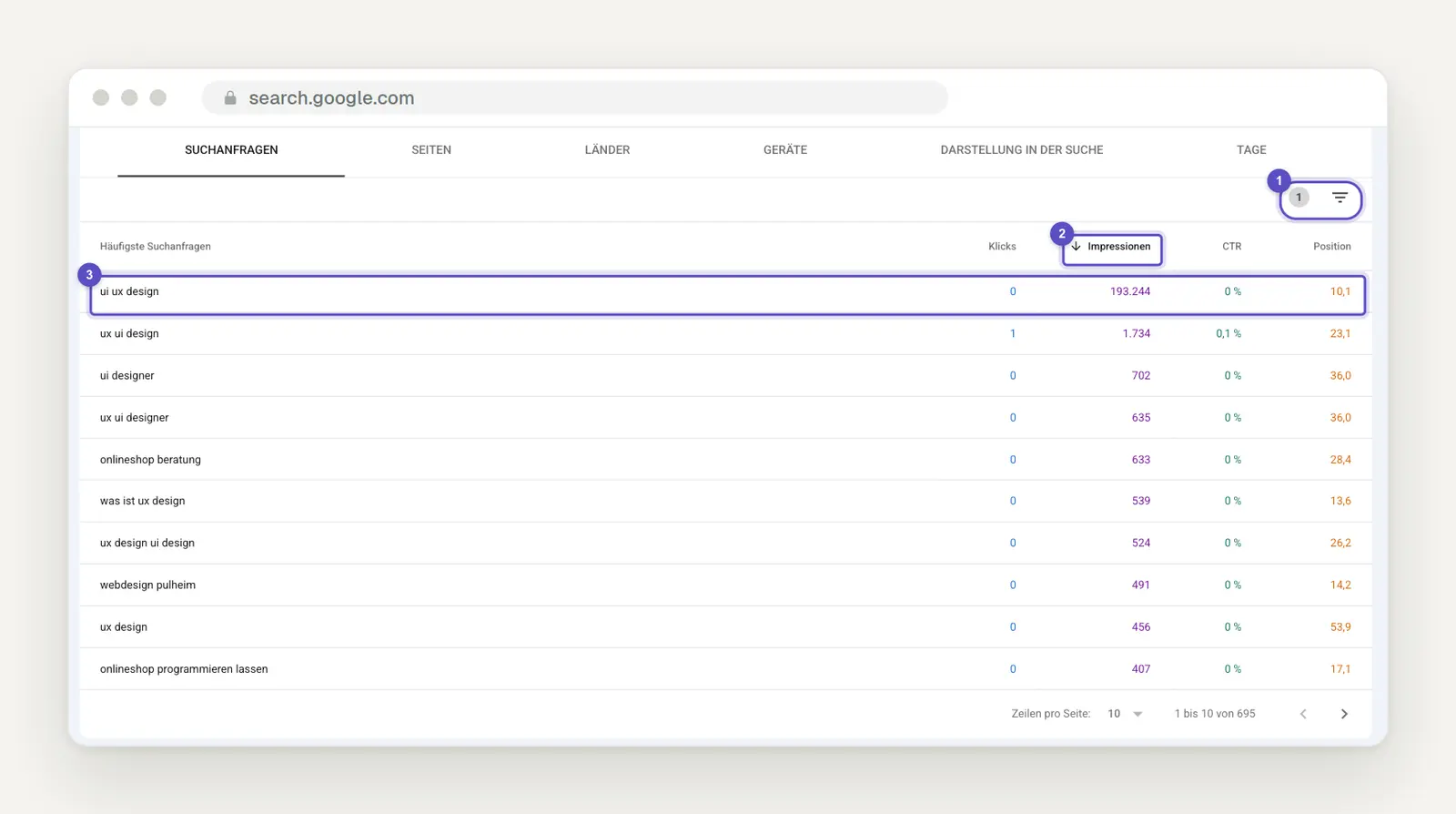
The "Search Queries" table for our own website: Using the filter icon (1), the position is limited to greater than 8, and the "Impressions" column (2) is sorted in descending order. At the very top is the search query "ui ux design" (3), with over 193,000 impressions at position 10.1 and not a single click.
This example is our own failure. We often appear just below the first page for “ui ux design,” but nobody clicks. Google offers clear advice for cases like this: “If a page’s CTR is low, you should update the page’s title and description so they better reflect the content.” For us, this means either refining the title or accepting that this search query isn’t a good fit for what we offer.
Don’t confuse impressions in Search Console with search volume. You’re only seeing how often your own website was displayed. Google hides rare search queries from the table for privacy reasons, and “The table can contain a maximum of 1,000 rows.” However, Search Console shows something that the Planner doesn’t: “The search queries displayed in the table are exact matches (case-insensitive).”
The Keyword Planner groups variants together, while Search Console separates them—and that’s exactly why the two complement each other. Our guide to Google Search Console shows you how to work through the list from positions 8 to 20 step by step. Place this list in a second column next to the selection from the Keyword Planner.
One page per objective, and where the keyword belongs
Assign exactly one page to each intent, and include the main keyword in the title, main heading, and first paragraph. For the bathroom renovation business, this results in a services page for bathroom renovations, a pricing page with examples per square meter, a page on accessible renovations, and—for emergency service-related search terms—the Google profile along with the contact page. Two pages targeting the same search intent split the attention, and afterward you won’t know which one Google wants to show.
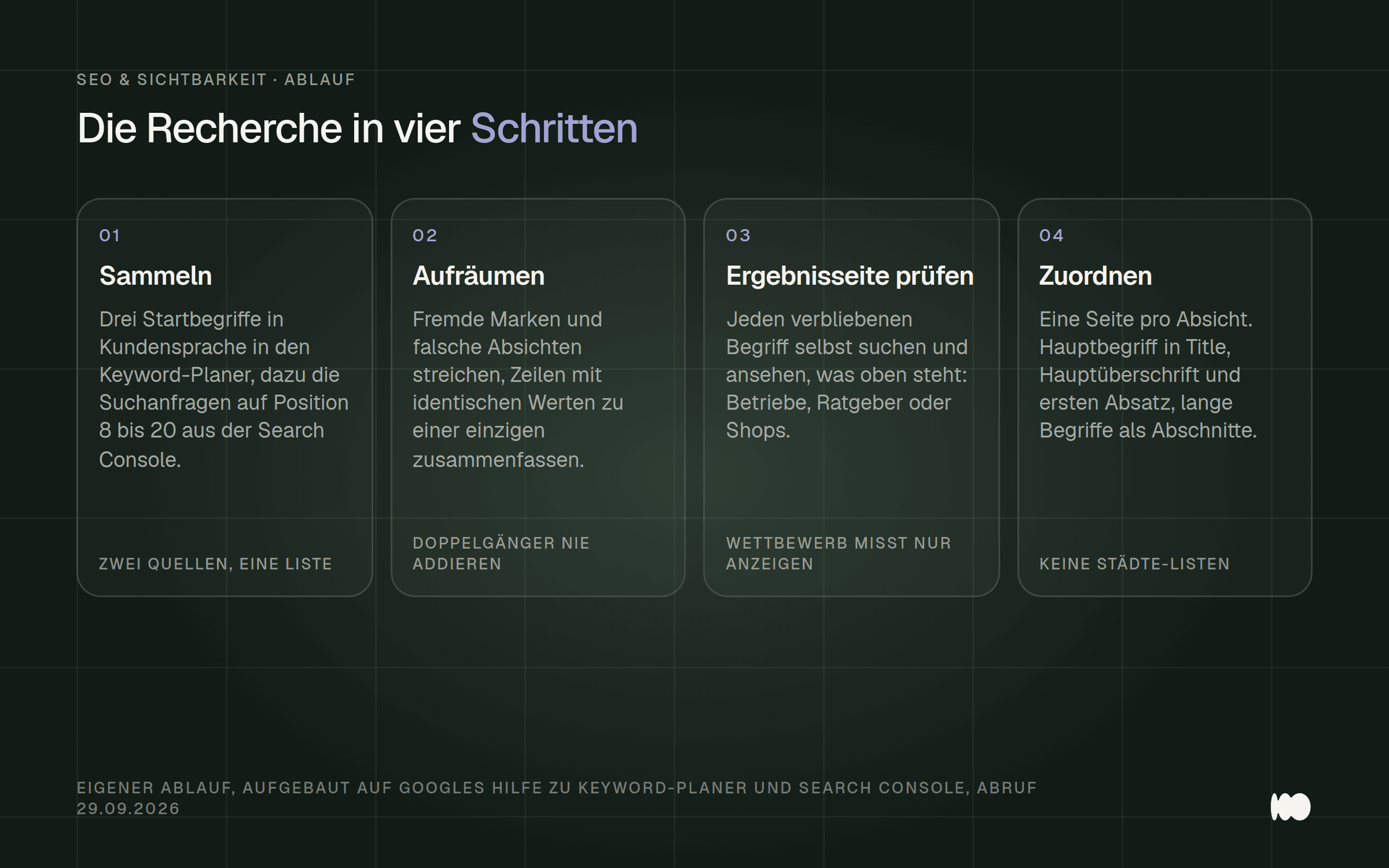
The entire process described in this post, in four steps, from collecting terms to assigning them to a page.
When it comes to the title, the rule from Google’s own guidelines applies: “However, there’s no point in using the same descriptive words or phrases multiple times.” You can skip the “keywords” meta tag; according to Google’s SEO guidelines, Google Search doesn’t use it. And the page’s address isn’t a ranking factor either: “When it comes to ranking, keywords in the domain name (or URL path) alone have little effect, other than appearing in navigation paths.”
Don't include lists of cities in the footer or below the text. Google's spam guidelines explicitly cite "blocks of text containing cities and regions for which a website wants to rank" as an example of unnecessary keywords. Instead, mention your service area in a normal sentence, such as on the contact page. We’ve compiled a list of other SEO basics that are often overlooked when building a website in our post on forgotten SEO fundamentals.
You don't need a target word count either; Google simply says this about the preferred word count: "(We don't have one.)" Make the page as long as the questions on your list require, and check off each question one by one as you write.
Conclusion: today, this week, later
Today, open Search Console and take a look at the search queries ranked between positions 8 and 20. You can do this without creating a new account or providing payment information, and it will show you terms for which Google already considers your site a good match. To do this, set up a Google Ads account for the Keyword Planner and skip creating a campaign.

The order in which it’s worth doing research in everyday life: today, the existing data; this week, the organized list; later, the pages before the next busy period.
This week, run three starting terms through the planner and clean up the list: remove unrelated brands and incorrect intentions, group duplicates together, and search for each remaining candidate yourself once. The result will be a short list with one page per intention.
Later, you’ll build the page that’s most missing—for a swimming pool facility, that’s likely the costs page—and do so in time for the next peak season in January. According to the API documentation, Google updates the current metrics in the Planner monthly, so checking them once a quarter is sufficient. If you’d rather not do the research yourself: This exact process—from compiling the list to analyzing the results pages and assigning them to pages—is part of every website project we undertake.
What Has Changed and What That Means for You
September 2, 2026: Google’s spam guidelines now include a new update date, and lists of cities are still included as examples of unnecessary keywords. For you, this means: If you still have a block of place names in your footer, you should replace it now with a sentence describing your service area.
April 22, 2026: Version 24 of the Google Ads API changes how forecasts are retrieved. This only affects you if a tool you use retrieves forecasts via the API and has been reporting errors since then. The Keyword Planner interface is not affected by this, and the query for historical search volumes—on which this post is based—does not appear in the list of changes.
December 18, 2025: Google’s SEO guide was last updated and still states that Google Search does not use the “keywords” meta tag. For you, this means: If you’re still filling out this field in your content management system, you’d be better off spending that time crafting a better title.
We have not found any official announcements with specific dates from 2024 through 2026 regarding the Keyword Planner interface itself. The current help documentation describes how to access it via the tool icon but does not specify a date for this change. As of this version: September 29, 2026.
Do you want to know what your customers are really looking for?
Write to us, and we’ll take a look at your industry and your website and tell you which three pages are missing the most. Most of the time, it’s an unanswered question about costs, a topic that’s been glossed over, and a few keywords that fall just short of the first page of search results.
Just send us a quick message through our contact form —your domain name is all we need to get started. We’ll respond within 24 hours, personally and without any sales pitch.
More Articles
© Marschfahrt Studio
Practical knowledge on web design, SEO, AI, and conversion optimization. Based on real projects, without any marketing spin.