Creating a Website with AI: When Lovable, Framer Agents, and Others Are Enough—and When It Gets Expensive
By 2026, building a professional-looking website in a single evening will no longer be an exaggeration. We take a sober look at who can get by with an AI website builder, where credits, security, and legal disclaimers can become pitfalls, and what an agency actually does differently anymore.
Date
Category
Author

“I built a website over the weekend using Lovable—it looked really good after just two hours. So why should I still pay you?” The question came from a physical therapist—not accusingly, but more out of curiosity. And it’s a valid point. By 2026, every major tool will be building websites from a text command: Lovable, Framer with its new Agents, Wix with Harmony, Squarespace, Durable, Hostinger. At first glance, the results look better than much of what agencies delivered five years ago.
We work with AI and Framer ourselves every day. This post is therefore not a “stay away from AI builders” warning, but rather a sober assessment: when an AI builder is perfectly sufficient for a small business, where the costs and risks lie—which aren’t shown in the demo video—and what an agency will actually be doing differently by 2026.
What the tools will actually be capable of in September 2026
Framer 3.0 was released on June 16, 2026, and introduced Agents: an AI right on the workspace that designs entire pages, sets up layouts for tablets and mobile devices, creates components, writes code, and integrates with the CMS. Everything it builds consists of real Framer layers that you can then edit manually. Framer estimates that the 3,000 credits included in the Pro plan are enough for about ten landing pages per month.
In August 2026, Lovable closed a $400 million funding round at a valuation of $13.3 billion and reported that over 60 million projects had been created. It generates complete web apps—including a database and login—from a single prompt, hosts them, and provides the code. Since May 2026, new projects have been rendered on the server side, which resolves a long-standing SEO issue for the platform.
Wix Harmony launched in January 2026, featuring an agent named Aria that builds pages, writes text, and adds e-commerce features—available on all plans, including the free one. Since 2025, Squarespace has been onboarding more than half of its new customers via Blueprint AI. Durable bundles CRM and invoicing right along with its AI-powered website. In August 2026, Hostinger merged its website builder and the Horizons agent into a single product, starting at $2.99 per month with a 48-month upfront payment, then $10.99 thereafter.
In short: Creating a professional-looking website in one evening is no longer an exaggeration. The question is, what happens next?
When an AI builder is all you need
We also regularly tell prospective customers who contact us: In certain cases, a modular system is the right choice.
You need a digital business card that lists your services, hours of operation, directions, and contact information, and you have someone on your team who enjoys updating the text and images themselves. You’re testing out a business idea and don’t yet know if it will still be around in six months. You need a landing page for a promotion that will go live for four weeks and then disappear. Or you simply don’t have a budget, and the alternative would be no website at all.
In all four cases, a Framer Basic plan for $10 or a Wix Light plan for $17 a month is money well spent. But please do it right: use your own photos, include a proper legal notice, and get a domain that you own.

The brief decision-making guide we provide to prospective customers.
Cost Trap 1: Credits Are the Real Price
With all providers, the monthly fee is just the entry ticket. Payments are made in credits, and they run out faster than you’d think. Lovable even provides examples on its pricing page: “Make the button gray” costs 0.5 credits, “Remove the footer” costs 0.9, and “Build me a landing page with images” costs 1.7. The Pro plan for $25 comes with 100 credits per month. If you make thirty adjustments after the first draft—which is normal for any website—you’ll quickly use up half your monthly supply in a single afternoon.
With Lovable, there’s one detail that many people overlook: deployment and hosting are both charged to the same credit balance. A published app uses up cloud credits while it’s running. With Framer, unused credits expire at the end of the month—including any credits you’ve purchased. This isn’t a scam; it’s all clearly stated on the pricing pages. It just means that “$10 a month” is rarely the amount you’ll see on your statement at the end of the year.

Sample figures from the Lovable pricing page: Each correction costs money, and the Pro plan includes 100 credits per month.
Cost Trap 2: Your Time
After two hours, the physical therapist mentioned above had a nice homepage. By the third evening, he had a legal notice, a privacy policy, a contact form that actually sends inquiries, an appointment request form, correct business hours on every page, and a mobile view where nothing overlaps. In our experience, twenty to forty hours for a small website is the norm for DIYers, and those are hours during which no one is treating patients, making sales, or doing installations.
To put this in context: The Freelancer Compass 2025 by freelancermap lists an hourly rate of 90 euros for web and software development, and 104 euros across all fields. Thirty to fifty hours of professional work therefore roughly equates to 2,700 to 5,200 euros. If your own hourly rate is less than that, doing it yourself makes financial sense. For most business owners, it doesn’t.
Risk 1: Safety at the Factory
In May 2025, a security vulnerability in Lovable-generated applications was documented, tracked as CVE-2025-48757. Two security researchers examined 1,645 published Lovable apps; 170 of them—just over 10 percent—allowed their databases to be read and, in some cases, written to without authentication. The cause was not some exotic attack, but rather a missing default setting in the generated database. Lovable subsequently changed the template, but operators of existing apps had to patch them themselves. Many likely did not even know they were running a database at all.
This is not an isolated incident involving a single platform. In the summer of 2025, Veracode tested over 100 AI models on 80 programming tasks: In 45 percent of the cases, the generated code contained a security vulnerability, and newer, larger models did not perform any better. For a simple presentation page without a login or database, the risk is low. But as soon as customer data is stored, that’s no longer the case.
Risk 2: Accessibility Issues That No Prompt Can Fix
Every year, WebAIM evaluates the homepages of the one million most-visited websites. In February 2026, 95.9 percent had measurable barriers, averaging 56 errors per page—10 percent more than the previous year. The report explicitly cites “automated or AI-assisted programming practices”—known in the industry as “vibe coding,” or software generated by issuing commands to an AI—as the cause. A manual audit of two Lovable stores against WCAG 2.2 conducted by the provider accessiBe in June 2026 found the same four critical errors in both: dialogs without roles, focus that falls outside of windows, input fields without labels, and insufficient contrast on prices. A more detailed prompt reduced the number of minor errors from 15 to 9, while the four critical errors remained.
We explained why this matters for small businesses in our article on the Accessibility Enhancement Act: Any business that sells appointments or products to consumers via its website and either employs more than nine people or has annual revenue exceeding two million euros has been legally required to comply since June 2025.
Risk 3: Legal Notice, Cookies, Hosting
These tools are designed for an international audience and are not familiar with German law, regardless of whether they come from Amsterdam, Stockholm, or California. There are three things that are almost always missing from self-built websites. First, the legal notice required under Section 5 of the Digital Services Act: name, address, email, registration number, VAT ID, and—for healthcare professionals and tradespeople—the professional association and professional title; all of this must be “easily recognizable, directly accessible, and constantly available,” meaning it must be accessible with a single click from any page.
Second, the cookie notice. Framer does not set any cookies on its own and uses cookie-free analytics, which is good. However, as soon as Google Analytics, a YouTube video, or a booking tool is embedded, consent is required under Section 25 of the TDDDG, and the Data Protection Conference requires that opting out be just as easy as opting in. Framer does not have a built-in consent manager; you’ll need to add one.
Third, the location of the data. According to its own security documentation, Framer operates its services in Amazon data centers in the U.S. with a global delivery network, while Lovable hosts its services globally via Supabase. Neither mentions a guaranteed EU option. This can be resolved with a data processing agreement and standard contractual clauses and is not a critical issue for a presentation page. Anyone who processes patient data or orders should at least be aware of this.
To be fair: The modular system is rarely the technical problem
Just so there’s no misunderstanding: Hosted website builders generally offer solid technology. In the WebAIM Report 2026, Wix and Squarespace sites—with about 33 errors per page—have significantly fewer barriers than WordPress sites, which have just under 53. When it comes to loading performance, as measured by Google’s Core Web Vitals, 74 percent of Wix sites pass the mobile test according to the HTTP Archive, compared to 45 percent for WordPress. So the platform is usually better than its reputation. What’s missing isn’t technology, but structure, content, legal texts, and someone to take responsibility.
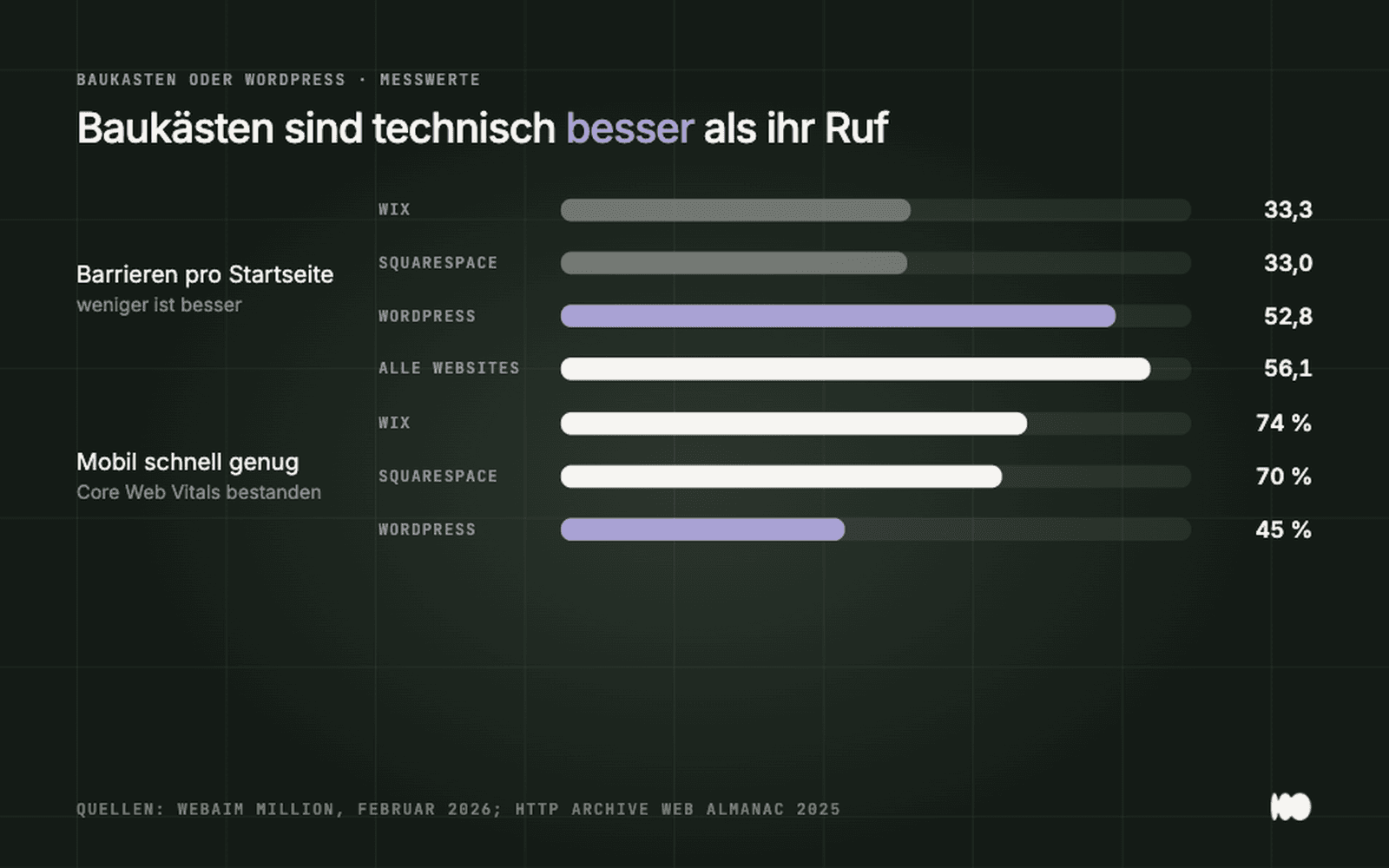
Hosted website builders perform better than average—and better than WordPress—in terms of accessibility and load times.
What Framer Itself Says About Its Agents
The most insightful text on this topic doesn’t come from an agency, but from Framer’s developer blog regarding the launch of Agents. It explains why Agents generally work only on a copy of the project and never on the live website: the results are not deterministic, the same query yields different answers, and AI inference is “unreliable compared to almost any other type of computing.” That’s why there’s branching—separate working copies—per-message undo, and a person who merges the changes at the end. The developer built in this safety net because they know the results must be reviewed. That review is precisely what the work entails.
What an agency will do differently in 2026—and what it won't
Admittedly, arranging colorful boxes doesn’t make an agency any better than AI these days—and it’s often slower. We use the same tools; these days, our initial layouts are also generated by AI. The difference lies in four other areas.
The questions that come before the prompt. Who is the page meant to convince? What objections does that person have? What do they need to see before they call? A prompt can’t know that, and a website builder doesn’t ask. That’s why many self-built websites look great but don’t generate any inquiries.
Texts that come from the workplace. AI-generated texts sound like AI because they write about generalities. What sets one craftsman apart from the other three in town is in his head, not in the model. Someone has to draw it out of him and write it down.
The Invisible. Legal Notice, Privacy Policy, Consent, Accessibility, Form Submission, Redirects for Old Addresses, Google Business Profile, Search Engine Basics. None of this is visible in the screenshot, yet all of it determines whether the site works and whether it causes problems.
Someone who takes responsibility and answers your questions. If the form hasn’t been sending emails for three weeks, if the site looks different after an update, or if you receive a cease-and-desist letter: With a website builder, you’re on your own with the support chat.
Our recommendation in three sentences
Test ideas and campaigns with an AI builder—that’s the best use for it. Have your actual company website built by someone who asks the right questions upfront and takes responsibility for the behind-the-scenes work—whether it’s an agency or a freelancer. And if your budget doesn’t stretch that far, go for a fixed-price package with a clear scope of work instead of a weekend deal with credits: We built a website for 999 euros specifically for this scenario, complete with copy, a form, and all the behind-the-scenes work.
Related: Why Claude Is Currently the Best AI for Us in Our Day-to-Day Work and Why Ready-Made WordPress Templates End Up Being More Expensive · Services: Web Design for Small and Medium-Sized Businesses and Trades
Have you already built something using AI and want to know if it works?
Send us the link. We’ll take an objective look at the legal notice, consent form, accessibility, forms, and structure, and let you know what’s missing and whether you can fix it yourself. Send us a quick message using the contact form. We’ll respond within 24 hours—personally and without any sales pitch.
More Articles
© Marschfahrt Studio
Practical knowledge on web design, SEO, AI, and conversion optimization. Based on real projects, without any marketing spin.