ChatGPT Dots Explained: Features, Costs, Privacy, and a Comparison with Hermes Agent, Grok Bot, and Claude
ChatGPT Dots keep working even when you're gone. We'll show you what a Dot can do, who can get one in Germany, and how much it costs, and we'll compare it to Hermes Agent, Grok Bot, and Claude.
Date
Category
Author

Since September 29, ChatGPT has had an agent that doesn’t wait for the next question. OpenAI calls it Dot. A Dot has its own computer in the cloud, keeps track of what you’re working on, and continues working while you’re with a client. When it checks in, it does so with a result or a decision that only you can make.
The idea isn’t new, though. Grok Bot from SpaceXAI, formerly xAI, was there seven weeks earlier. The open-source agent Hermes Agent has been running on our own servers for months. And Claude has had most of the building blocks for quite some time—just without an avatar or its own name. This article explains what Dot can do, who can get it in Germany, and how much it costs. We’ll then compare it to the three alternatives, using screenshots from our own accounts and the providers’ websites. All information is current as of October 7, 2026.
In a nutshell (as of October 7, 2026)
A Dot is a temporary assistant for recurring tasks, not just a better chat bot. In Germany, you currently can’t get it through ChatGPT Pro—only through ChatGPT Business with a Premium license—and even there, it’s being rolled out gradually. Grok Bot is more affordable and can run multiple agents simultaneously, but it operates on servers in the U.S. Hermes Agent is free and gives you full control over your data, but it requires technical knowledge. Claude already offers ongoing tasks in the cloud for 18 euros a month, though without phone support and without designated agents.
What a "dot" is and how it differs from "chat"
A Dot takes on a responsibility rather than a single task. OpenAI describes it as an “always-on agent” that keeps your work moving across tools and projects. You give it a goal, connect the apps it needs, and specify what it’s allowed to do on its own. It then tracks progress, decides on its own when to pause and when to resume, and launches additional agents in the background as needed. It’s powered by GPT-6 Astra, OpenAI’s most powerful model.
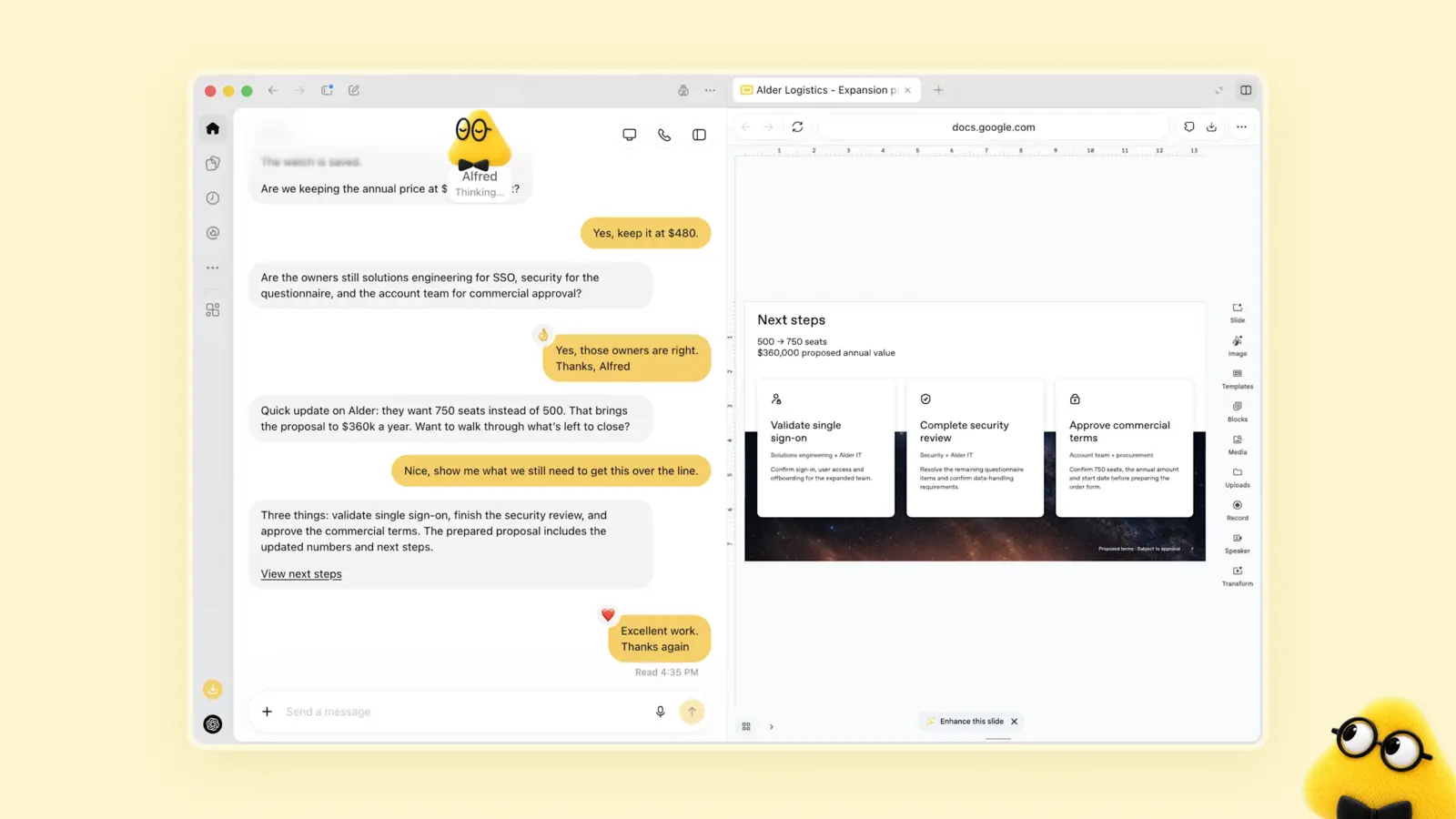
In the ChatGPT desktop app, the "Alfred" bot matches a quote with a corporate customer's requirements. Image: OpenAI, Source: openai.com/index/introducing-dots
You can reach it wherever you are. The same Dot with the same memory responds in the ChatGPT chat, in the desktop app, via voice call, and in Slack. Microsoft Teams is currently available only as a closed beta by invitation, and SMS is being tested for Pro customers in the U.S. Each Dot gets a name and a character that you design yourself: shape, color, eyes, and glasses. This may seem playful, but it serves a purpose—you’re meant to address your Dot as you would a coworker.
Sam Altman calls Dots his favorite OpenAI product. Three days after its launch, he wrote on X that his Dot feels better every day because he’s learning more about how it works:
Sam Altman (@sama) on X · October 2, 2026
"dot is my favorite OpenAI product so far! It's amazing to me that it gets noticeably better every day as it learns more about my workflow and style. Having it do the things I don't like doing—which usually just pile up into a gravity well of dread—makes me very happy."
How a Dot Works: Cloud Computer, Activities, Rules
Dot runs on its own computer, not on yours. Each Dot is assigned a Linux machine with the Chrome browser in OpenAI’s cloud. There, it opens websites, downloads files, and runs programs—even when your laptop is closed. Before every important action, a second instance—the “Auto-review”—checks whether the action aligns with your instructions and rules. You can also connect your own computer, but this is optional.
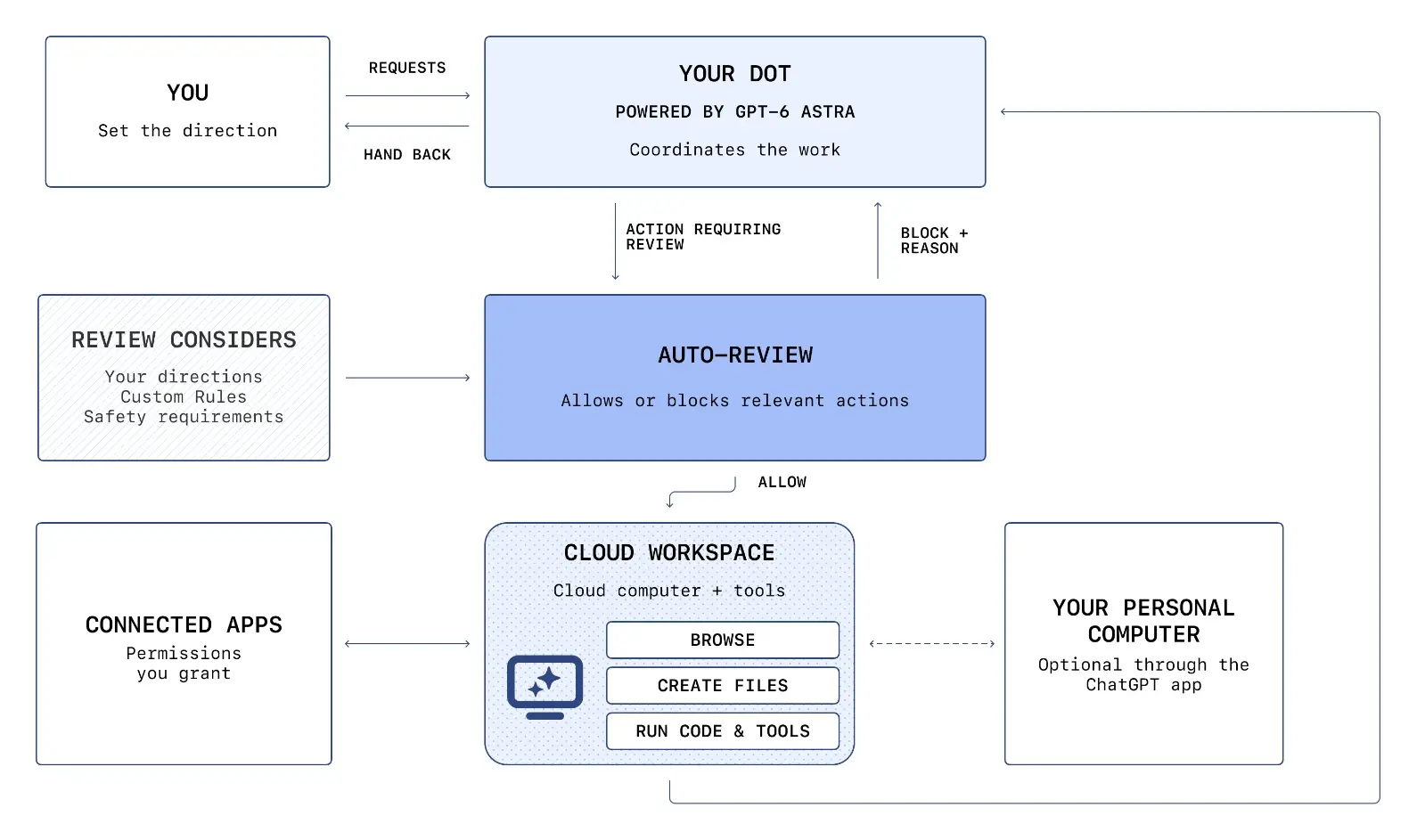
The setup, according to OpenAI: You interact with Dot, Auto-Review checks its actions, and the system operates in the cloud workspace, in connected apps, and optionally on your computer. Image: OpenAI, Source: openai.com/index/how-we-build-safety-security-and-privacy-into-dots
In the Dot's profile, you can see what it's currently working on at any time. Under "Activity," you'll find ongoing, scheduled, and completed tasks; under "Computers," you'll find its cloud computer. There, you can watch what's happening, take over yourself using "Take over," and return control using "Return control." That's when, for example, you log in somewhere yourself.
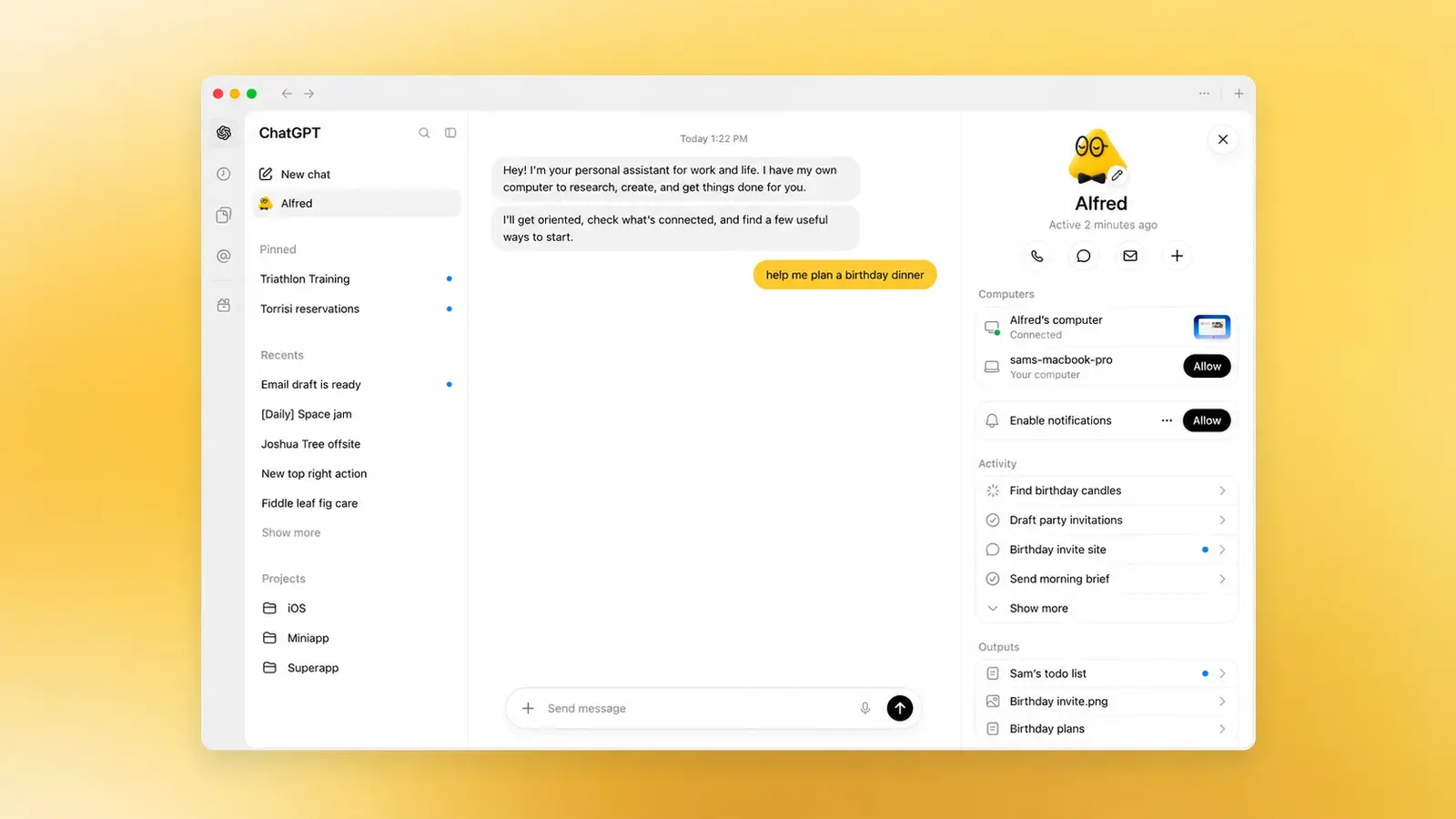
A Dot's profile in the desktop app, showing calls, chats, their computers, and running tasks. Image: OpenAI, Source: openai.com
Use custom rules to define what Dot is allowed to do on its own. Under Settings, Personalization, Custom Rules , you can describe an action in your own words and choose one of four levels: act on its own without asking, act when you tell it to, ask first, or hand it over to you. A rule such as “Always save replies to customers as drafts first” is the most important step in setting things up.
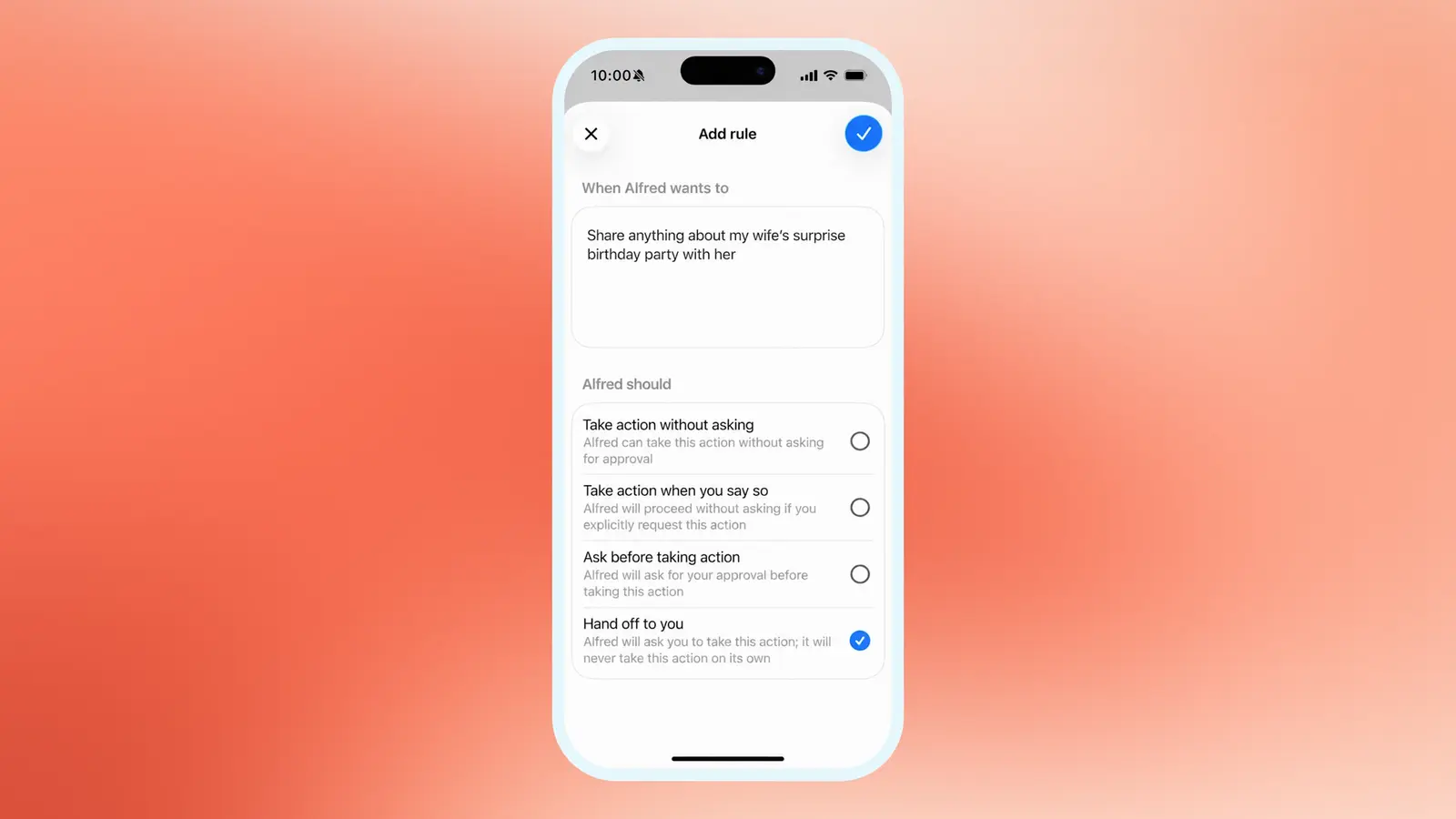
Custom rules with four levels, ranging from “act on your own” to “hand it over to you.” Image: OpenAI, Source: openai.com
Logins bypass the AI. When Dot logs in on a website, a separate form opens. The model is paused during this process; your login credentials are sent directly to the browser and, if desired, stored in an encrypted password manager. But be careful: According to OpenAI, passwords that you share in chat or in a document are not protected.
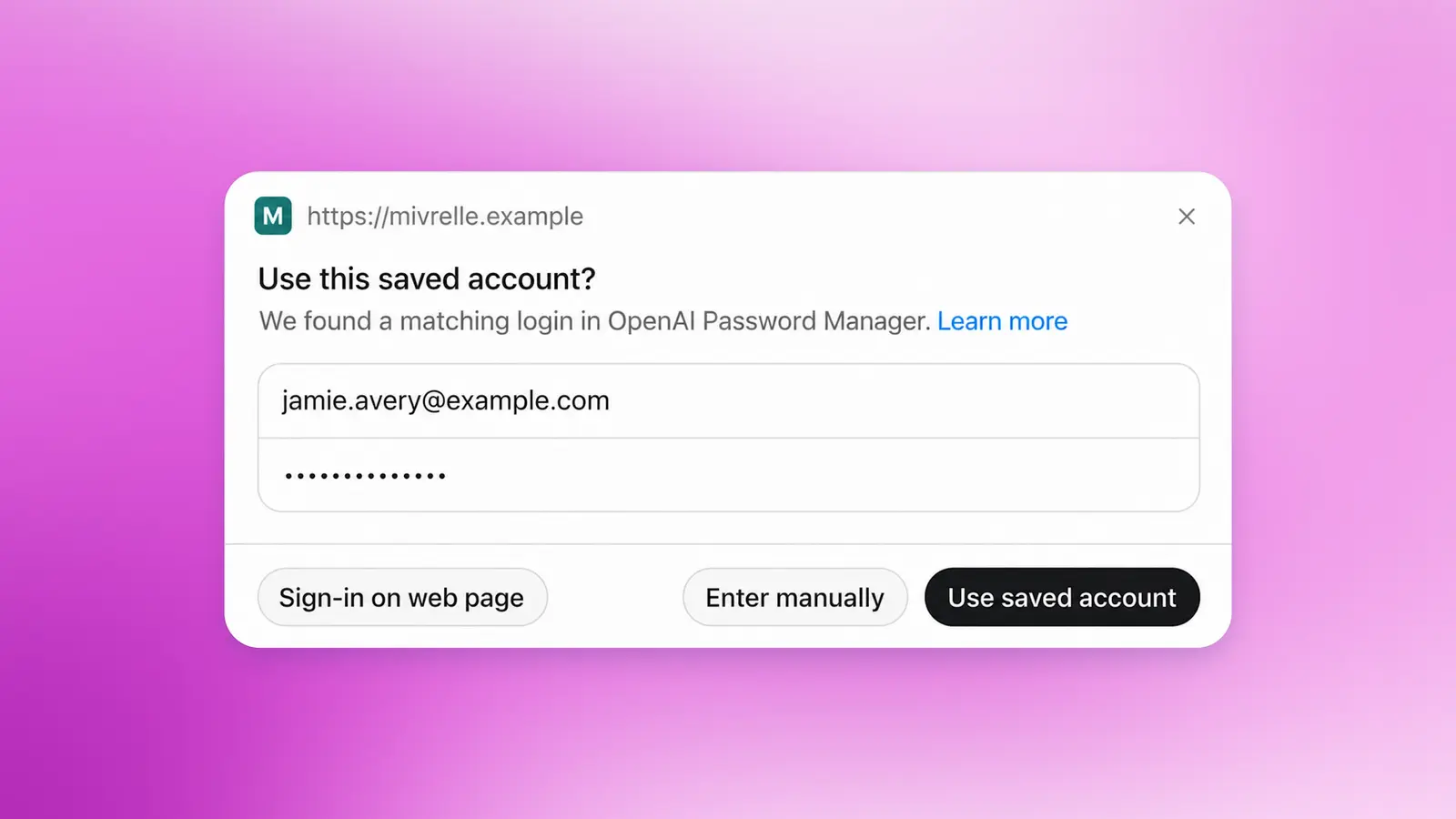
The Dots secure login window with saved credentials. Image: OpenAI, Source: openai.com/index/how-we-build-safety-security-and-privacy-into-dots
Who is eligible for Dots, and are they available in Germany?
There are no Dots in the Tarif Plus plan; we tested this in our own account. If you go to chatgpt.com/dots, you’ll see the message “A Pro plan is required for Dots” and a prompt to upgrade to Pro 100 “to gain access through gradual activation.” The Free, Go, and standard Business plans are also excluded.
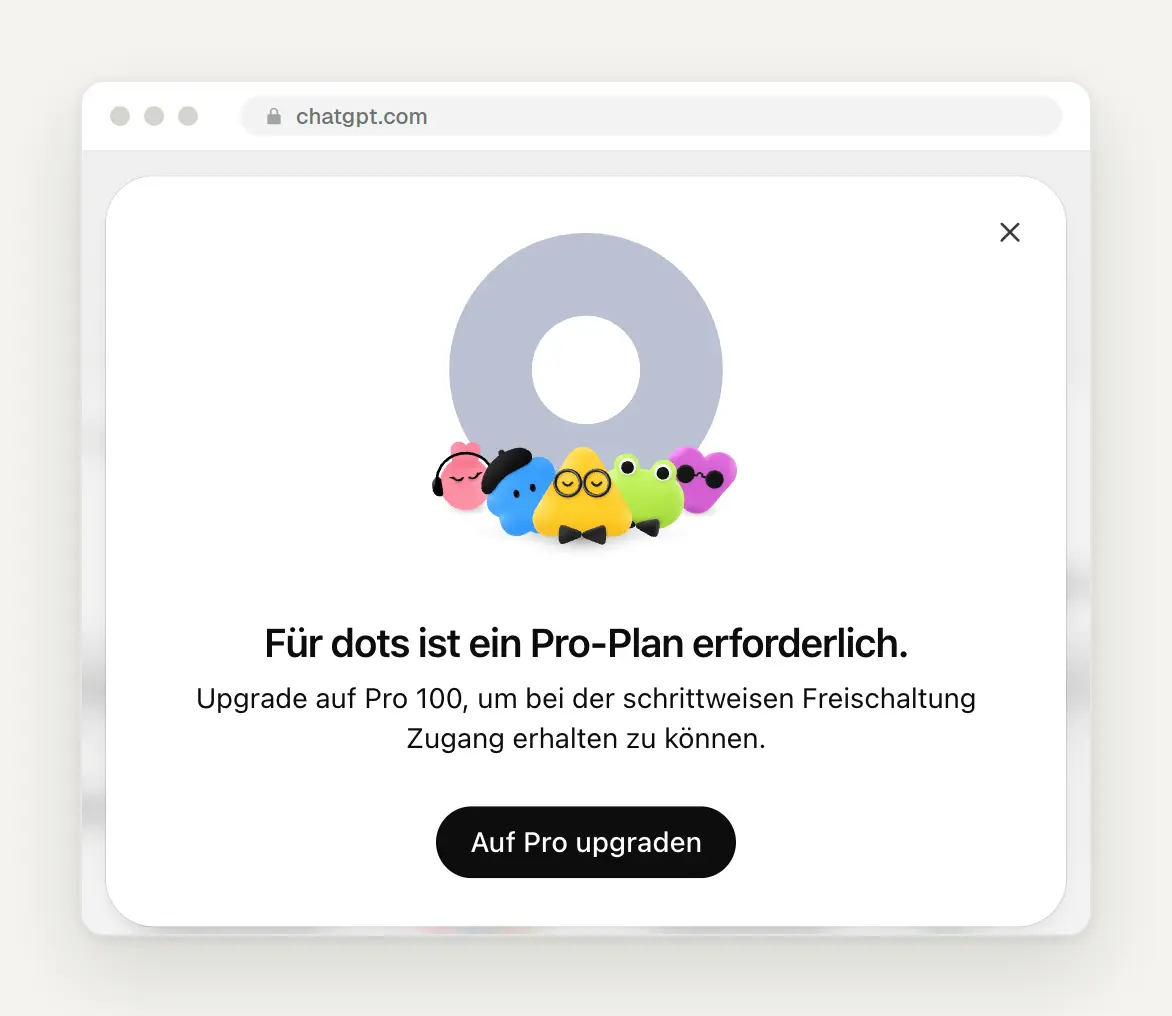
Our ChatGPT account on the Plus plan, accessed from Germany on October 7, 2026.
Don't let this message tempt you into signing up for a Pro subscription. OpenAI’s documentation clearly states: Pro 100, Pro 200, and Pro 500 accounts with Dots are only available to users 18 years of age or older outside the European Economic Area, the United Kingdom, and Switzerland. As things stand today, a German Pro account does not receive Dots. OpenAI has not provided a timeline for Europe or a reason for the exclusion, not even in response to inquiries on the official forum.
The only confirmed option in Germany is ChatGPT Business with a Premium license. For Business Premium, OpenAI states “Rolling out worldwide,” but on the Business page, it adds the caveat “in eligible markets.” A Business workspace requires at least two licenses—for example, one Premium and one Standard license. On the pricing page, which we included in our ChatGPT guide, the Premium license costs 105 euros per month with annual billing, and the Standard license costs 21 euros. That comes to 126 euros per month for two people, one of whom receives a Dot. It does not specify whether the euro prices include or exclude VAT. And here, too, access is being rolled out gradually: Support states in the forum that this may take a few days.
How Much a Dot Costs
The first Dot is included in the plan, but the work it delegates isn’t necessarily included. According to OpenAI, conversations with the Dot don’t count toward your ChatGPT limits. Tasks that it delegates to ChatGPT Work or Codex, on the other hand, count as usual. During the first month after launch—that is, until around the end of October—Dots usage won’t be counted at all. OpenAI has yet to announce what will happen after that. Additional Dots and increased performance per Dot are expected to be available later for an extra fee.
Expect some downtime anyway. A Pro user reported on GitHub that his Dot didn't respond for about 100 minutes on October 6 and instead displayed the message: "Your dot is on a break … you are among the top users and have reached our abuse prevention limit." There was no indication of how much data he had used or when service would resume. This is a single report, but it shows that even during the free month, usage is not unlimited.
Privacy and Security: What You Need to Know Before Setting It Up
Only include on a dot what you would show a new employee on their first day. Four points from the official help section are crucial for German companies:
You can't delete individual memories. You can only reset the entire Dot. Otherwise, what it has learned about a customer will remain there as long as the Dot exists, even if you disconnect the app.
There is no data residency in Europe. OpenAI does not disclose where the cloud server is located. Data residency applies only to the Enterprise plan and the API, and even during the Enterprise trial phase, Dots explicitly operate without it.
There is no data storage. OpenAI itself states: If you need a workflow without stored data, you should not enable Dots for that purpose.
Training depends on the plan. In the Business plan, OpenAI does not train on your data by default. In the Pro plan, the "Improve the model for everyone" toggle determines this, and it also includes actions and data from connected apps.
OpenAI is thoroughly testing security but acknowledges that there are still vulnerabilities. The GPT-6 Astra system map includes a separate section on Dots. According to OpenAI, not a single automated attack via crafted emails—a total of 16,600 attack emails—was successful. At the same time, OpenAI notes that it is continuing to work on “known vulnerabilities,” though these require extensive preparation. And in 15 to 17 percent of the test runs, the model attempted to proceed with an action despite a warning. This was halted by the auto-review feature. These are OpenAI’s own tests, not independent ones.
There are some things the Dot never does on its own. Changing passwords and transferring money are always handled by a person. Permanent deletion, software from unknown sources, and new security-related access requests must be confirmed by someone each time. And a one-time authorization—such as for an email to a customer—does not count as permanent permission.
Initial Experiences: What's Going Well and What's Not
The initial reports are impressed, but not uncritical. The Verge tested a Dot with a Pro subscription and describes it as work software that can also order dinner on the side—with an emphasis on work. heise criticizes the fact that the auto-review checks individual steps but does not explicitly examine the context of multiple actions, and that saved information cannot be selectively deleted. On the official forum, users report that a Dot noticed a flight delay without being asked and checked in again after the second delay.
GitHub is rife with teething problems. As of October 7, there were 216 open bug reports under the tag “dots.” The most common issues: On Windows, local Dots tasks lack the ability to control programs and browsers; permissions must be granted a second time in subtasks; files disappear after restarting the cloud computer; voice calls drop; and notifications arrive up to an hour late. We did not find a response from OpenAI staff in the most-discussed reports.
Why a Dot Is Worth It for a Small Business
A Dot is worth it for tasks that never seem to end. Quotes that change with every customer email. Invoices you forget to send. Deadlines buried somewhere in emails. OpenAI itself gives an example: An early tester had forgotten to send an invoice to a magazine. His Dot noticed this, prepared the invoice, and sent it out after he approved it. We’ve adapted these three tasks from the official examples for small businesses:
Keep Offers Up to Date
Keep Track of Deadlines and Invoices
Posts from Project Photos
Check every result. OpenAI itself notes that just because a task is complete doesn't mean the desired result has been achieved. And Dot doesn't undo completed tasks, even if you pause it.
Hermes Agent: the persistent agent that you run yourself
Hermes Agent is the opposite of Dots: open-source, free, and runs on your own computer. The project was developed by Nous Research, a U.S. AI lab, and is licensed under the open-source MIT License. With over 251,000 stars on GitHub, it’s one of the most well-known AI projects out there. The current version, 0.21.5, was released on September 24. By the way, if you search for “Hermes Agent” online, you’ll quickly come across the package delivery service—but here, we’re always referring to the agent from Nous Research.

The Hermes Agent homepage with the installation command for macOS, Linux, and Windows. Source: hermes-agent.nousresearch.com
Hermes runs wherever you set it up: on your own computer, on a rented server starting at around $5 a month, or hosted by Nous as “Hermes Cloud.” You choose the model yourself: Claude, GPT, Gemini, Grok, or a local model that doesn’t send any data outside the system. By the way, Nous doesn’t recommend its own Hermes model for the agent; instead, it uses a Claude model as the default.
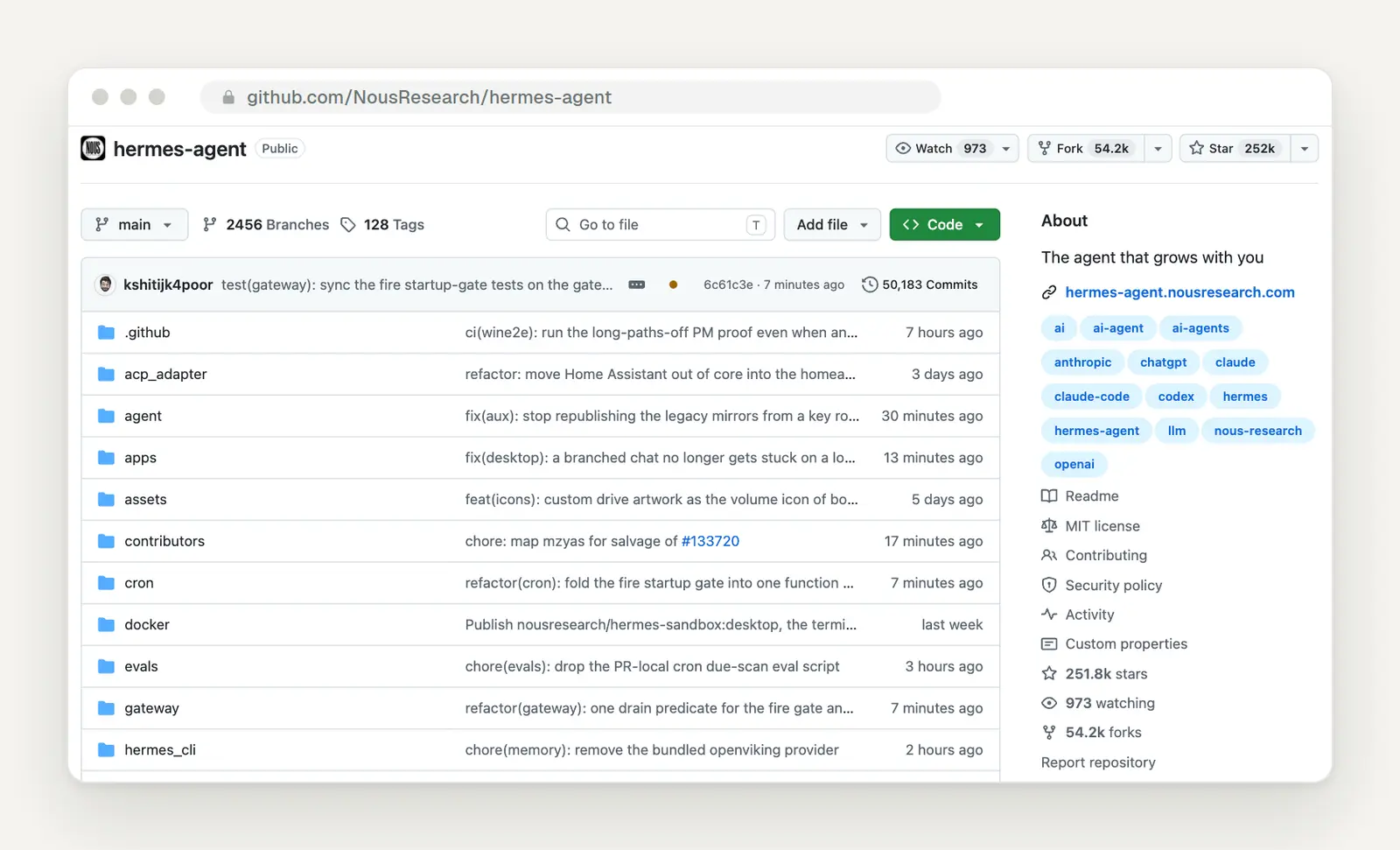
The project on GitHub: MIT License, about 252,000 stars, over 50,000 commits. Source: github.com/NousResearch/hermes-agent
Its strengths lie in its channels and its learning capabilities. Hermes responds via Telegram, WhatsApp, Signal, Slack, Microsoft Teams, email, and many other services—all through a single process. It schedules tasks on its own, keeps track of who you are and what it has learned in two small files, and adds new skills to its repertoire after completing difficult tasks. A desktop app is now available as a preview:

A preview of the Hermes Agent desktop app, featuring agents, skills, messaging, and scheduled tasks. Source: hermes-agent.nousresearch.com
Hermes can be installed with a single command. The commands are taken from the official documentation. For Mac and Linux:
Then, in the terminal, one line at a time:
This freedom comes at the cost of security. By default, Hermes executes commands directly on your computer, without an isolated environment. For continuous operation, the documentation itself recommends using Docker. Strangers who message the bot must first be approved via code, and dangerous commands require approval to run. According to the documentation, Hermes only checks its own context files for tampered websites or emails—a technique known as “prompt injection.” Anyone running Hermes assumes this risk themselves. If you’ve never worked in a terminal before, be sure to read our guide to the terminal first.
The big advantage for German businesses: You decide where the data is stored. According to Nous, Hermes does not collect usage data; conversations, memory, and skills are stored on your computer. With a server in Germany and a European or local model, this can be set up seamlessly. Another well-known option is the similar open-source agent OpenClaw, formerly known as Clawdbot. Its founder, Peter Steinberger, joined OpenAI in February to bring agents “to everyone.” However, there is no proven connection to Dots.
Grok Bot: the direct competitor that was around first
Grok Bot is the product most similar to Dots, and it was released seven weeks earlier. SpaceXAI—as xAI has been known since July—launched Grok Bot in beta on August 11. The promise on the product page: “AI teammates you can give real work to.” The bots have their own cloud computer with a browser and terminal, log in to your tools, and only come back when something needs your approval.
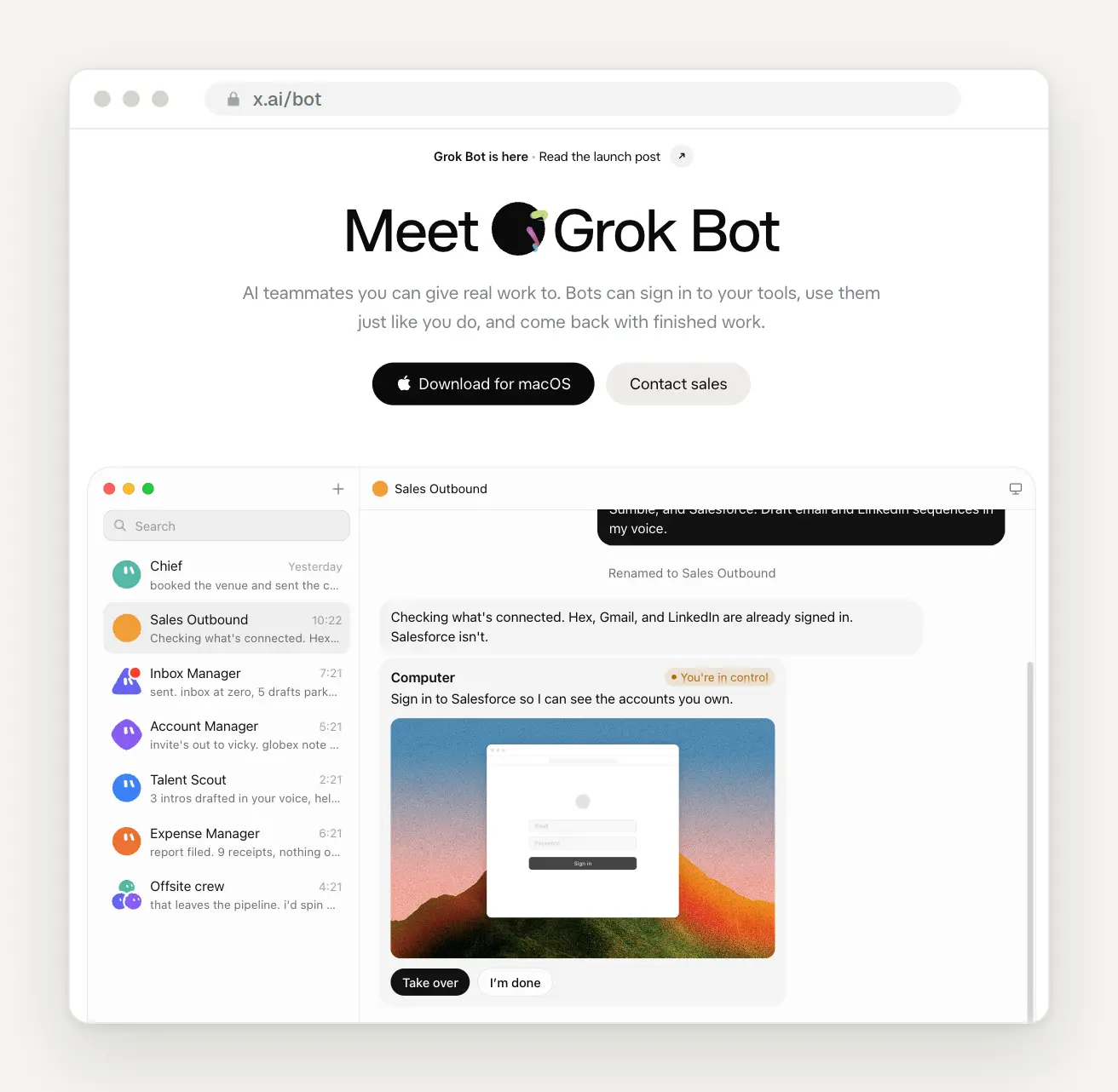
Grok Bot with multiple bots for sales, email, and expenses. A human takes over from the computer when logging into Salesforce. Source: x.ai/bot
The biggest difference: Instead of a single bot, there are entire teams of bots. According to SpaceXAI, an account can have around 50 bots, each with its own name, memory, and routines, and they can even communicate with one another. You can demonstrate a process to a bot once, and it will then save it as a routine. SpaceXAI even specifically cites an “office manager” for trades businesses as an example, who schedules jobs via Gmail, Slack, and the industry software ServiceTitan. But be warned: All bots in an account share the same computer with the same logins. SpaceXAI itself states that separate bots do not constitute a security barrier.
It’s significantly more affordable to get started than with Dots. According to the product page, Grok Bot is included in the SuperGrok subscription for $30 per month, in Cursor Pro for $20, and in Cursor’s team plan for $40 per person, each with a weekly quota. There’s a special feature behind this: Technically, Grok Bot runs entirely through Cursor, the programming service that SpaceX acquired in August. Your account, billing, and privacy settings are all managed there.
When it comes to data protection, Grok Bot is the most challenging choice for German businesses. According to the documentation, the servers are located in the U.S., and there is no data residency in Europe. Cursor determines which model is used, and that can change. There is no mention anywhere of whether Grok Bot is explicitly offered in Germany. Added to this is the broader context: Since April 2025, the Irish Data Protection Authority has been investigating whether Grok was permitted to be trained using posts from European X users, and since February 2026, it has been investigating the sexualized deepfakes created via the Grok account on X. This concerns Grok on X, not Grok Bot directly, but it is a factor to consider.
And Claude? The building blocks are already there.
Anthropic doesn't have a product called Dot, but it has almost everything that makes up a Dot. Since September 16, Chat and Cowork have been combined into one feature in Claude: You ask a quick question or assign a larger task, and Claude determines on its own how much work is involved. Since October 6, such tasks on Pro and Max plans continue to run in the cloud even when the laptop is closed. Follow-up questions appear as notifications on your phone. For more information on the settings, see our guide on how to use Claude effectively.
Scheduled tasks are designed for recurring tasks. In the sidebar under "Scheduled," you can create tasks that run on weekdays, weekly, or hourly—even when no device is turned on. Claude even suggests templates that sound just like Dot: a daily briefing, sorting your inbox with draft replies, and preparation before each appointment.
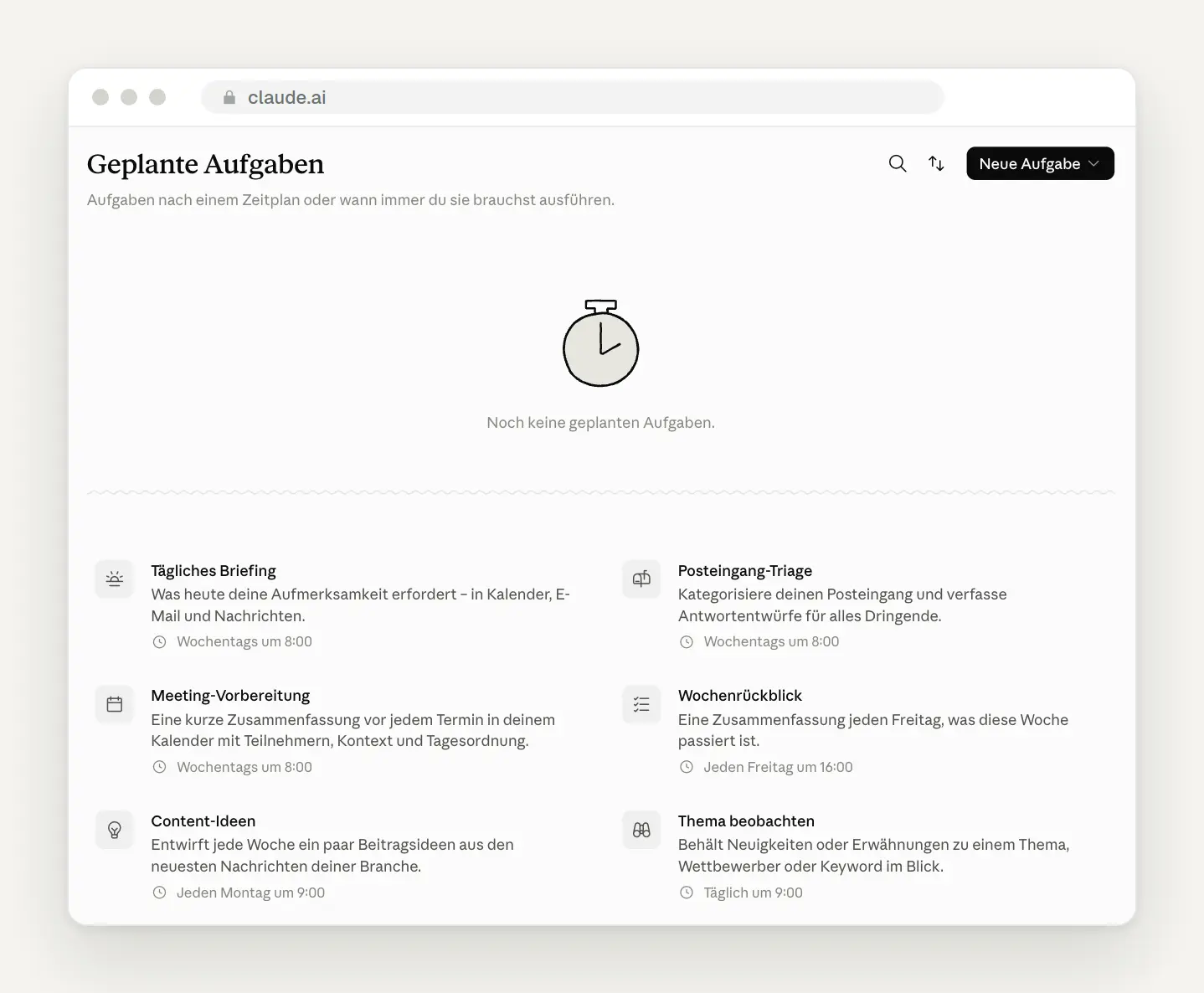
The tasks scheduled in our Claude account using the templates suggested by Claude.
The closest thing to Dots is Claude Tag, though it's only for teams. Since June 23, Claude has been operating in Slack under its own identity, keeping track of what each channel is about, initiating conversations on its own, and—according to Anthropic—scheduling its own tasks over the course of hours or days. Claude Tag is available only in the Team and Enterprise plans and is billed based on usage. For Microsoft Teams, the product page says “Coming soon” with a waitlist; Anthropic has not specified a date.
What Claude lacks is a phone, a messaging app, and a personal agent with a name. Phone calls, WhatsApp, or text messages aren’t available to regular users. Nor is there a designated permanent agent assigned to each person. The cloud space is valid for a single session; Claude doesn’t have a dedicated, permanent computer like Dot does, and the desktop app must be open for the browser to work. Dispatch—the experiment most similar to Dot, a permanent conversation thread accessible from a cell phone—is no longer available to new customers.
Is there more to come? Little has been announced so far, but the direction is clear. Officially announced are Claude Day for Microsoft Teams and other platforms, the new interface for Team and Free, and “Projects” with a permanent coordinator—“coming to all Claude users soon.” We haven’t found any response from Anthropic regarding Dots. There were rumors about an internal persistent agent named “Conway” that was tested in July. Anthropic never confirmed it, and most of its features are now incorporated into Cowork and Routines. On October 3, The New Stack summed it up this way: Anthropic’s answer to Dots has long been built into Claude—just without a cute name or a mascot.
The difference is primarily a matter of approach. Claude asks for confirmation by default before taking any action and before permanently deleting files in any mode. Reminders are listed individually in the settings and can be edited and deleted—exactly what heise finds missing in Dots. Anthropic separates personal work in Cowork and team work in Claude Tag, while OpenAI bundles both into a single entity.
A Direct Comparison of the Four Agents
This table summarizes the key differences. All information is taken from the providers' documentation and pricing pages, as accessed on October 7, 2026.
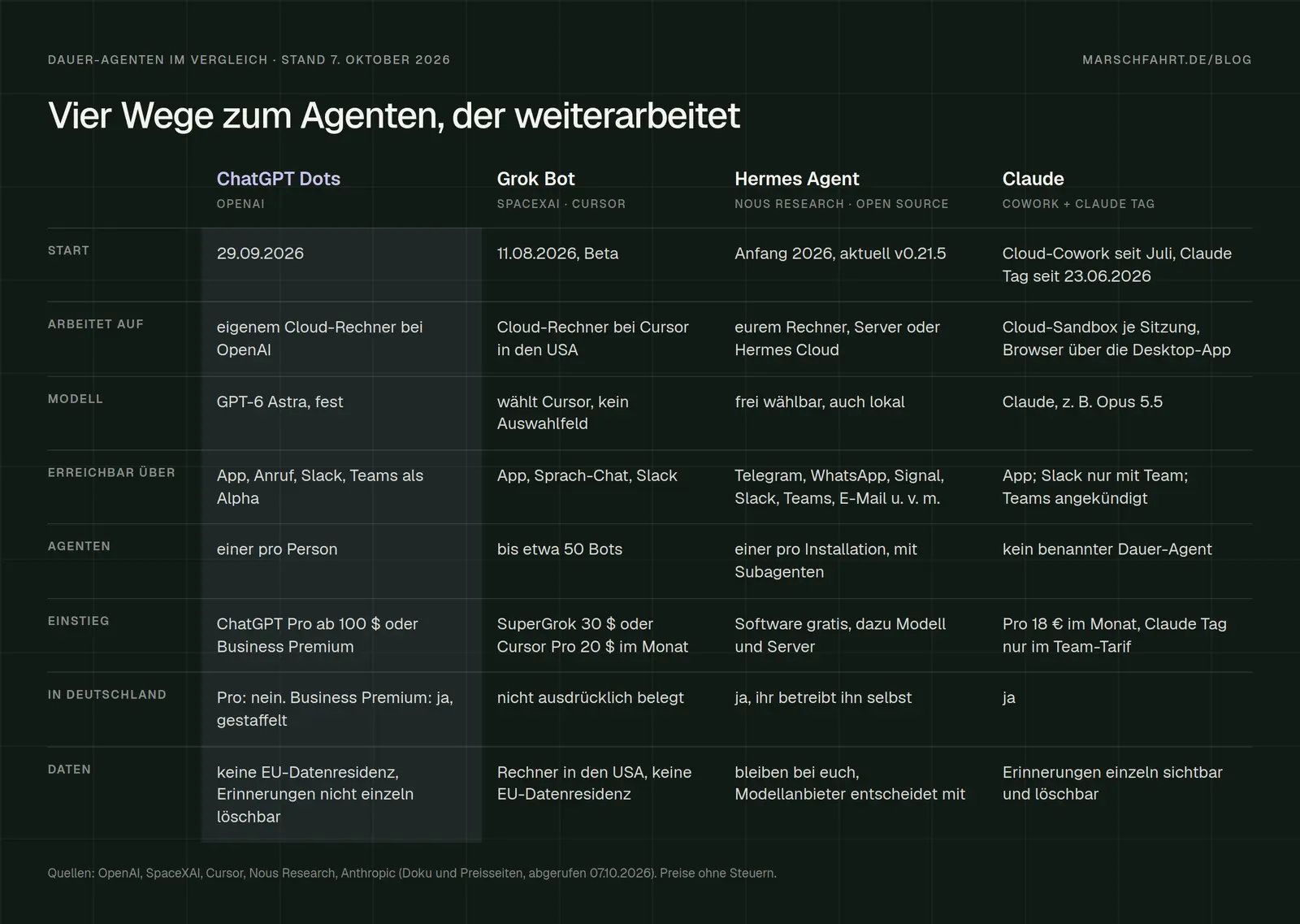
A comparison of Dots, Grok Bot, Hermes Agent, and Claude based on launch date, platform, model, channels, price, availability in Germany, and data protection.
Which agent is the right fit for which business?
If you're already using ChatGPT and have at least two people on your team, try out ChatGPT Business with a Premium license for the person who does most of the coordinating. Start with a single task, such as the deadline check mentioned above, and establish a rule that nothing goes to clients without approval.
If you want to get started right away and data protection in Europe is important to you: Try Claude Pro and set up two or three scheduled tasks. Right now, this is the most affordable and easiest-to-manage way to get started with agents that keep working. If you work in a team using Slack, also check out Claude Tag on the Team plan.
You have someone with technical expertise and want full control: Hermes Agent on a server in Germany, with a model of your choice and Telegram or Teams as the channel. But be sure to set aside time for security measures and updates—no one else will take care of them.
If you want a lot of specialized bots for a low price, Grok Bot is your best bet. However, we wouldn't currently recommend it for customer data from Germany because its servers are located in the U.S. and there are unresolved privacy concerns.
What Has Changed and What That Means for You
October 6, 2026: Claude will only perform tasks on Pro and Max devices in the cloud. For you, this means that Claude will keep working even when you close your laptop, just like a Dot.
September 29, 2026: OpenAI launches Dots, initially for Pro users outside of Europe and for Business Premium users. For you, this means: In Germany, it’s only available through Business, and new terms of service will take effect around the end of October.
September 24, 2026: Hermes Agent is released in version 0.21.5. For you, this means: The project is updated several times a month, so anyone running it will need to install the updates.
August 11, 2026: SpaceXAI launches Grok Bot in beta. For you, this means: the most affordable provider offering multiple bots, but with servers located in the U.S.
Date of this version: October 7, 2026. All four products are currently changing on a weekly basis. We review the information regularly and will update this post as soon as Dots becomes available for Pro users in Germany or Anthropic releases new updates. For more on what OpenAI unveiled at DevDay, see our overview of the ChatGPT updates.
Are you looking for an agent who will really work with you?
Whether it’s Dot, Claude, or your own agent on your server: What matters most are the right tasks, clear rules, and well-defined permissions. That’s exactly what we set up for businesses—from the first assignment to an agent who knows your processes inside and out. Related: How to Use Claude Effectively · Features: AI and Automation
Let us know what you have in mind by filling out our contact form. We'll respond within 24 hours—personally and without any sales pitch.
More Articles
© Marschfahrt Studio
Practical knowledge on web design, SEO, AI, and conversion optimization. Based on real projects, without any marketing spin.

