Claude Duet: What Anthropics' Proactive AI Agent Can Do, How Much It Costs, and When It's Coming to Germany
Claude Duet reaches out on its own, checks its inbox and calendar every few hours, and asks for confirmation before taking any significant action. We’ll show you what Anthropic’s new agent can do, what permissions apply, how much it costs, why it’s not yet available in Germany, and how you can recreate the core functionality today using Claude.
Date
Category
Author
Can Claude finally keep an eye on your inbox without you having to open a chat every time? That’s exactly what Anthropic promises with Claude Duet, which launched as a Research Preview on October 21, 2026. Duet doesn’t wait for you to ask a question. It checks in with you in the morning with a brief overview, monitors your connected apps throughout the day, and notifies you when something needs your attention or a task is complete.
We’ve analyzed all of Anthropic’s official documentation: the announcement, the security article, the product page, and the Help Center. We’ve also reviewed the first hands-on tests from the trade press. This article explains what Duet can actually do today, which tasks are worth doing, where Anthropic itself acknowledges limitations, how much it costs, and why you can’t access it in Germany for the time being. At the end, we’ll show you how you can recreate the most important part of it today using the standard Claude.
In a nutshell (as of October 26, 2026)
Duet is Anthropic’s proprietary AI agent that operates independently and asks for confirmation before taking any significant action. It runs on Claude Opus 5.5, operates on its own cloud server, and uses up the limits of your Pro or Max subscription. Access is available only to U.S. accounts via a waitlist; Team and Enterprise plans are excluded, and Anthropic has not announced a release date for Europe. The most useful tip for you today: Set up a scheduled task in Claude that summarizes your inbox and calendar every morning. This way, you can replicate the most useful feature of Duet, even here in Germany.
The difference: Duet responds first
The standard Claude Chat is waiting for you, while Duet reaches out to you. Here’s how Anthropic describes the difference on its product page: The Claude app waits until you open a chat, whereas Duet tells you every morning what needs your attention, accepts tasks via message, and notifies you when something is done or needs approval.
Duet is a standalone app, separate from the Claude app. It’s available for iPhone and Android; on a computer, you can open Duet in your browser at claude.ai. Anthropic hasn’t mentioned a dedicated Mac or Windows app. According to the announcement, Anthropic plans to learn from early users about how the two apps will work together in the future.
You hardly have to set anything up because Duet takes over your Claude account. Your history, skills, and connected apps come from your existing account. So if you’ve already connected Claude to Gmail and Calendar, you’ll start with an agent that already knows you. You can’t choose the model: Duet always runs on Opus 5.5 and decides on its own how much effort a task requires.
What’s new is primarily the way these features work together, not the individual functions themselves. According to VentureBeat, Claude has been able to continue running background tasks in the cloud on the Pro and Max models since October 6—even when the laptop is closed. The tech magazine VentureBeat sums it up: What’s new is the combination of its own app, an ongoing conversation, regular checks of connected accounts, and its own judgment about when to interrupt Duet.
This is what a day with Duet looks like
In the morning, you’ll receive a brief briefing with the most important items from your inbox and calendar. According to the Help Center, Duet selects what needs your attention most urgently and can already take care of the first steps—such as drafting replies that you just need to review. Anthropic doesn’t say whether you can set the time for the briefing. Throughout the day, Duet also sends progress updates and follows up on conversations that have stalled.
During the day, Duet checks your accounts “every few hours,” not constantly. Anthropic explains this openly: Constant checking would use up your subscription’s limits much faster. The reason is also explained in the Help Center: Something urgent might come in between two checks and not be noticed until later. For real emergencies, you can always call.
Simply tell Duet in your own words what you want to be notified about and how often. Anthropic doesn’t describe a specific toggle for this; according to the announcement, the control is handled through the message itself. A sentence like “Include incoming payments only in the morning briefing; prioritize customer complaints” is the intended approach.
Everything takes place in a single conversation thread; for larger topics, you create separate channels. You can type or speak using Duet; quick follow-ups and projects lasting more than a week all start in the same place. According to Every’s test, spoken words are currently converted only to text—there isn’t a true voice mode yet. Channels for individual topics share the same history, so Duet knows in the “Accounting” channel what you’ve discussed in the main thread.
In the Tasks tab, you can see what Duet is working on and what’s waiting for you. Tasks are sorted there into “Ready for review,” “Needs input,” and “Working.” Duet may suggest that a task looks complete, but only you can mark it as done. Larger deliverables, such as a presentation, a financial model, or a dashboard, are saved as files in the “Make” tab, where you can review and edit them.
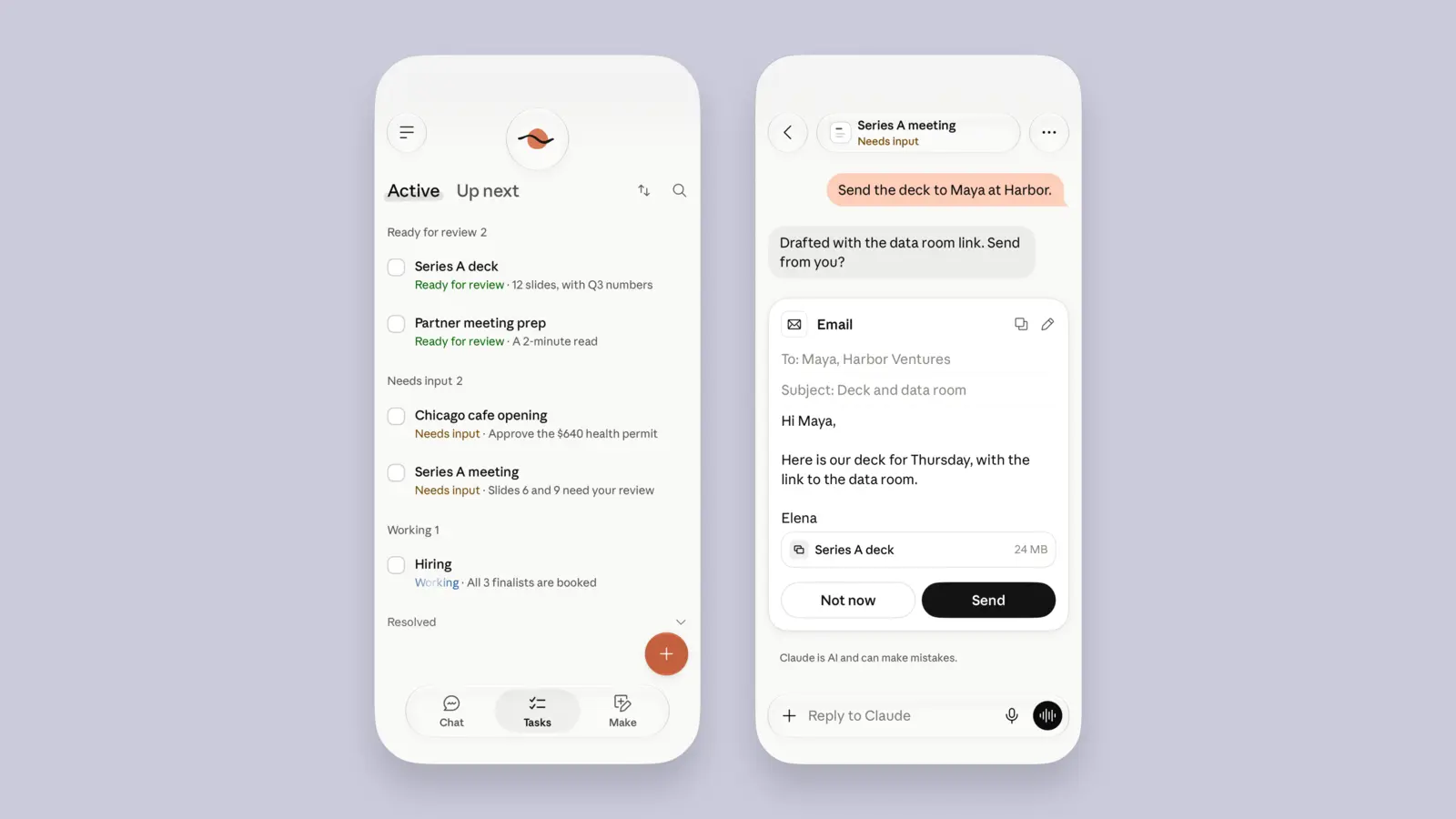
On the left is Duet’s task list with the groups “Ready for review,” “Needs input,” and “Working”; on the right is an approval card for an email with “Not now” and “Send.” Image: Anthropic, security article on Claude Duet dated October 23, 2026.
When Duet provides a number or summary, it cites the source. According to the Help Center, it specifies which email, file, or spreadsheet the information comes from. Get into the habit of checking those sources for amounts and deadlines before you approve anything.
Which apps Duet uses and which ones are still missing
Duet works with the connectors you've linked in Claude. The Help Center lists Gmail, Google Calendar, Google Drive, Slack, QuickBooks, HubSpot, Docusign, and Calendly as examples. You initiate each connection yourself, and you can disconnect any of them at any time. They're managed in the Claude settings; according to the security article, if you disable an app in one place, it's disabled in both places.
Microsoft 365 isn't working yet, even though the logo appears on the product page. The Help Center explicitly states that Microsoft 365 is not yet available and that Slack has limited functionality. Nevertheless, the product page displays an Office logo among the supported apps. For many companies in Germany that rely on Outlook and Teams, this is currently the biggest catch.
If there's no connector available, Duet uses its own browser in the cloud. You describe a task, and Duet decides on its own which apps and steps it needs. You can't yet watch or take control of the browser; Anthropic acknowledges this itself in the list of limitations.
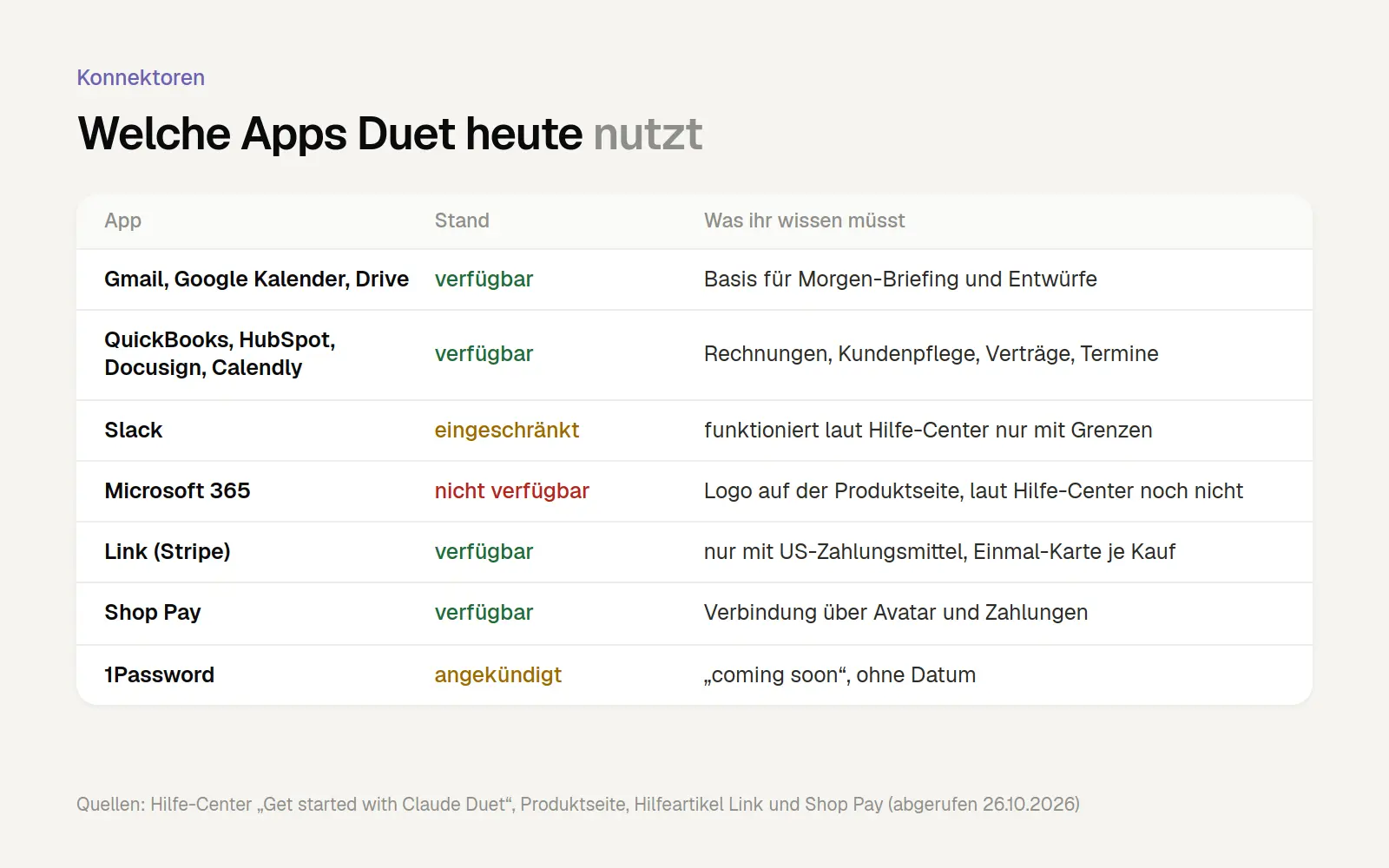
Which Duet apps are available today, along with their current status and limitations. Sources: Help Center “Get started with Claude Duet,” product page claude.com/product/claude-duet, help articles on Link and Shop Pay (all accessed on October 26, 2026).
Duet only accepts payments via Stripe and Shop Pay; Stripe requires a U.S. payment method. You can set this up via your avatar in Duet and the "Payments" menu item. For each purchase, a one-time card is generated, limited to the merchant and the transaction amount. Duet sees the card type, the last four digits, the nickname, the expiration date, and the shipping addresses—never the full card number. According to the Help Center, recurring payments via Link aren’t supported, and some stores block Duet entirely during checkout.
Duet won't be able to log in with 1Password until later. Anthropic has announced that logging in using saved 1Password credentials is "coming soon," without specifying a date. Until then, you'll need to type your passwords into a separate form within the app; more on this in the section on security.
Jobs that Duet is designed for
Assign Duet tasks related to your daily office routine—not personal errands. Anthropic itself notes that the core features are designed around work, and personal tasks like booking tickets don’t work quite as well yet. According to the product page, these include: the morning briefing; flagging important emails and appointments; preparing replies for approval; finding unpaid invoices and drafting payment reminders; preparing payroll for review; and getting contracts ready to send.
Anthropic lists these three sample commands in its Help Center. We've translated them for you. There is no official confirmation that Duet understands German instructions just as well; Anthropic does not specify the operating language. However, there is already a German version of the help article.
Formulate tasks so that they end with a request for approval, not a completed action. Duet asks for confirmation before sending anyway, but if you write “draft” instead of “send,” you can review it at your leisure before an approval card even appears. We’ve created these templates based on the official examples:
Larger tasks require a higher limit, so plan them carefully. Anthropic cites dashboards made up of dozens of tools, financial and revenue forecasts, prototypes, and web apps as examples of demanding tasks. According to the announcement, such tasks require more model runs and more background processing. If you’ve already used up your weekly limit with chats, you should schedule these tasks for quieter days.
Plugins, such as the one for small businesses, add pre-built workflows to Duet. According to the Help Center, Duet supports plugins and even suggests suitable ones. Right after you start Duet, it asks, “Which plugins are right for my work?”
Permissions: What Duet Always Asks For and What It Never Does
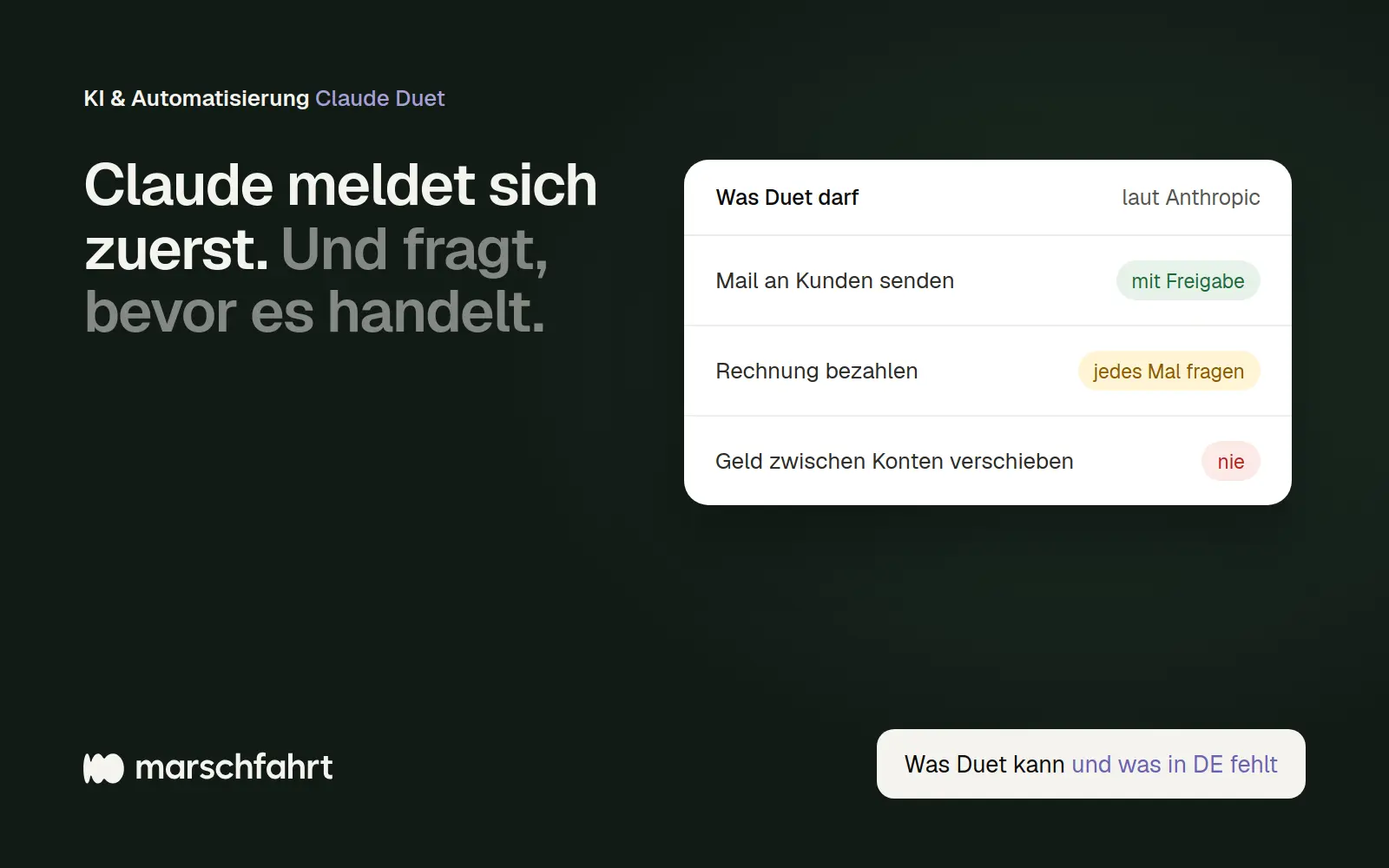
Before sending, paying, signing, or deleting, Duet clearly shows you exactly what’s going to happen and waits for your approval. According to the security article, the approval card specifies the action, the destination, and the content, including all recipients. If you can’t approve it right away, Duet handles the rest of the task and presents the approval to you again later.
There are some things Duet won’t do, even with your permission. According to Anthropic, these include trading securities, banking transactions such as transfers between accounts, and accessing another person’s account. According to the security article, there’s a rule for certain actions that prevents further inquiries—Anthropic doesn’t specify which ones these are. The following are explicitly excluded, no matter how many times you’ve already given consent: making payments or sending money, canceling an order, and creating an account. These rules also apply to processes that run while you’re away.
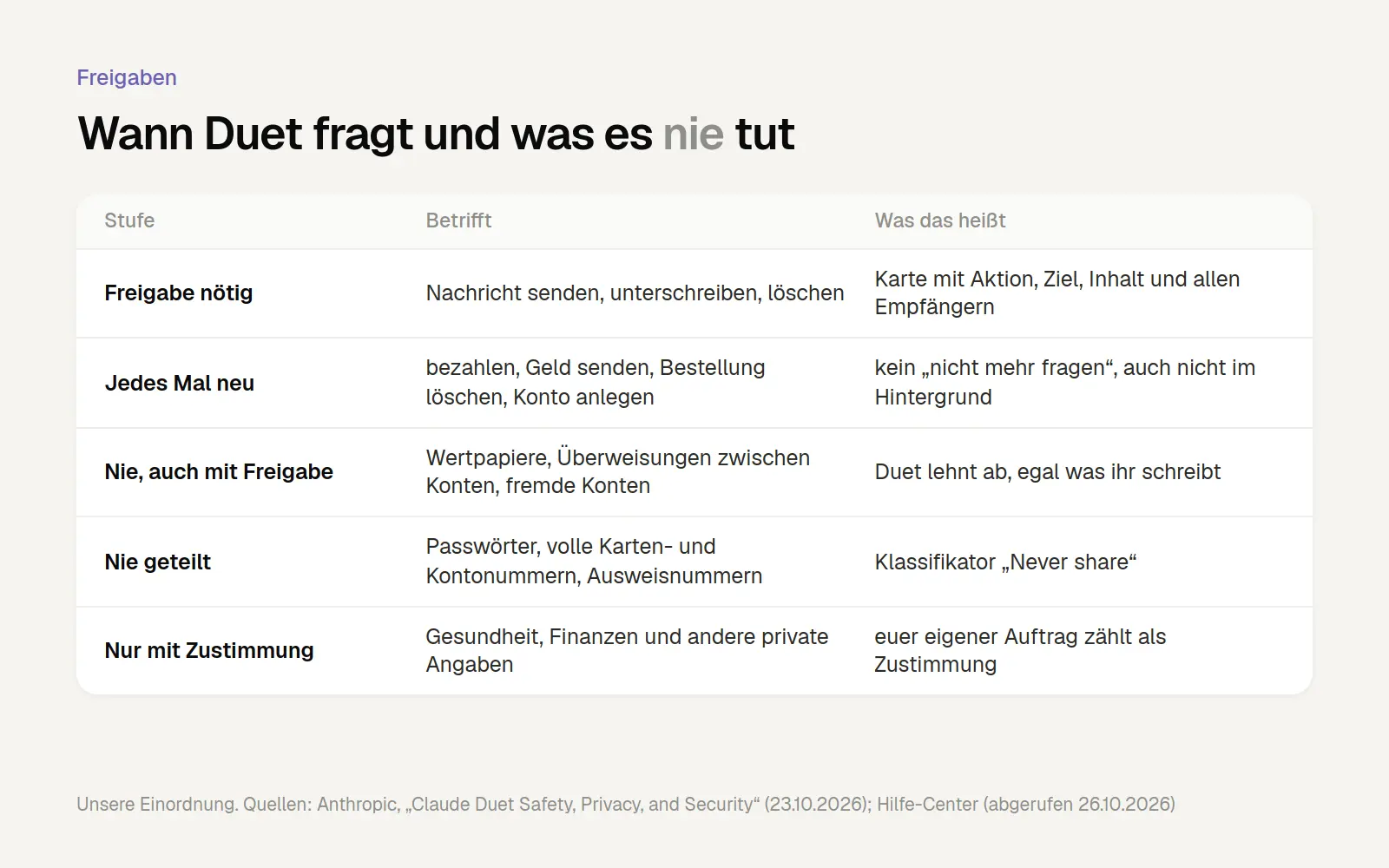
When Duet asks questions and what it never does, based on information provided by Anthropic. Sources: Anthropic, “Claude Duet Safety, Privacy, and Security” (October 23, 2026) and Help Center, “Get started with Claude Duet” (accessed October 26, 2026).
In addition to the model, a second, separate system checks every action. According to the security article, an automatic check runs in parallel; it is based on the classifier from Claude Code’s auto mode and evaluates whether the action aligns with your task. It runs outside the active model so that hidden instructions on a website or in an email do not influence the result. Anthropic does not disclose exactly how this check works, as heise also points out.
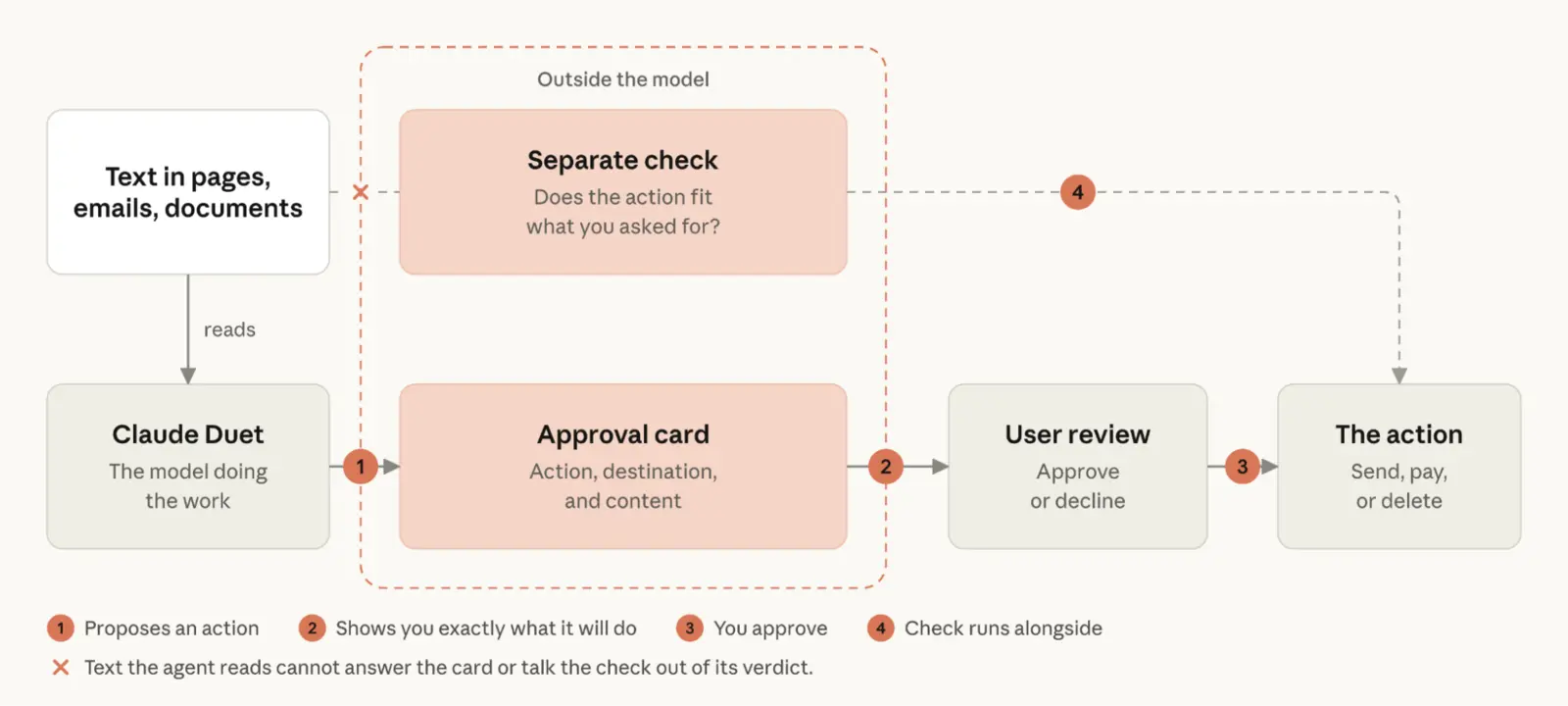
The approval process: Duet suggests an action (1), displays it on a card showing the action, target, and content (2), you approve it (3), and a separate review runs in parallel (4). The card cannot respond to text from emails or websites. Graphic: Anthropic, security article from October 23, 2026.
Make sure to actually read every approval form instead of just tapping through it. Anthropic itself calls out the problem: “Approval fatigue is a serious issue, because too many requests teach people to tap through them, sometimes without adequate consideration.” Too many requests lead people to confirm things blindly. One user on Hacker News quipped that Duet even asks whether signing in to DocuSign is okay. Anthropic plans to continue fine-tuning this balance.
You can review the progress of each task and make corrections along the way. In the task list, each task has its own page, and you can change course in Duet even while you’re working on it. Anthropic does not describe an exportable log for reviewers or a button that allows you to pause Duet completely.
Sensitive Data and Passwords: How Duet Protects Them
Duet should never share login credentials, full credit card or account numbers, or ID numbers—even if you ask it to. To ensure this, Anthropic has built its own classifier for sensitive information. It has two levels: “Never share” for the data mentioned above and “Needs consent to share” for other private information, such as health or financial details. Duet will only share information at the second level with your consent—though your own instruction already counts as consent.
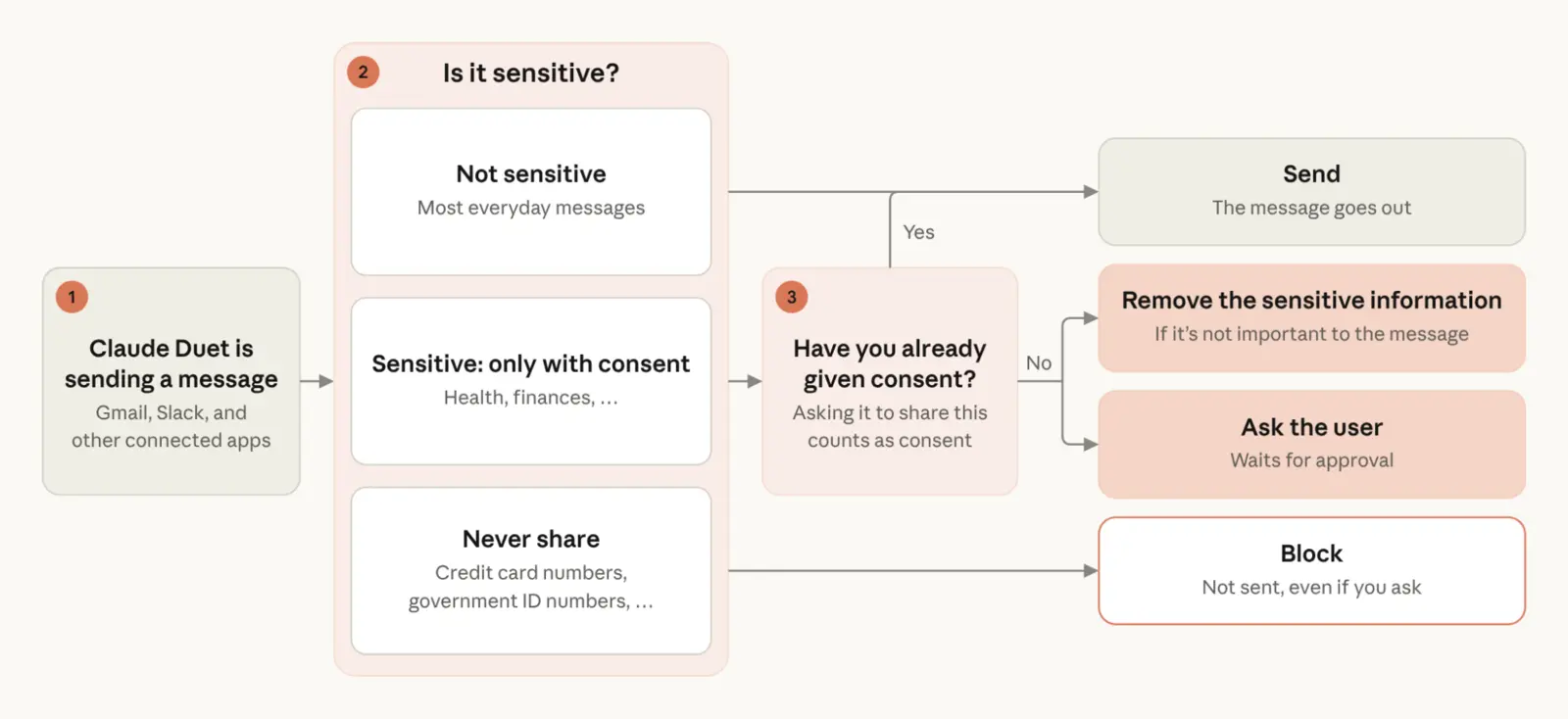
What Duet does with sensitive information in a message: send it, send it only with consent, remove the information, ask for confirmation, or block it. Graphic: Anthropic, security article from October 23, 2026.
If the classifier blocks a message, Duet will rewrite it—if necessary—without the sensitive information. It will then submit the new draft to you for approval. According to the security article, this also applies to files that Duet uploads via its browser. Anthropic acknowledges that this check occasionally misses something or flags a harmless message.
You enter your passwords into a separate form on your device; Duet itself never sees them. According to the security article, they are sent directly to the cloud browser in encrypted form. Passwords, browser cookies, and login tokens are never stored by Duet or retained in its memory.
Only enter your password in the app or on claude.ai—nowhere else. This is the most important security tip in this entire security article: Duet’s login form only appears in the app and only when you’ve initiated the login yourself. It never appears as a link, text message, email, or on any other website. If something else that looks like Duet asks you for a password, it’s a scam.
One limitation remains: No protection against hidden commands is perfect. Anthropic itself states that Duet is designed to treat what it reads as information and to carry out only your instructions, but that no defense is foolproof. That is precisely why actions with significant consequences require your approval. According to heise, there are no independent security analyses of Duet yet.
How much Duet costs and how it helps you save
During the Research Preview, Duet doesn't cost anything extra, but it does count toward your normal limit. Duet is included in the Pro and Max plans, and according to the Help Center, it counts toward the five-hour limit and the weekly limit at the same rate as chats. Background activity also counts toward these limits, including the Morning Briefing and midterm exams. This means you might reach your limits sooner than you would with chats alone.
Anthropic does not specify how much of the daily limit is used on a typical day. There is no breakdown by task or briefing. The newsletter *The Neuron* summarized it this way: “The assistant that never sleeps is also using up your quota while you’re at it.” We have not yet found any reports of limits being exhausted.
Don't trigger the one-time limit reset until you need it. Anyone included in the preview will receive a one-time full reset that resets the five-hour and weekly limits. It’s valid through November 30, 2026. According to the help article “What is a limit reset?” on the website or in the desktop app, you can redeem this reset by going to Settings > Usage in the Resets section and clicking “Reset for free.” This isn’t available in the mobile app, and the reset expires if you downgrade or cancel your subscription.
Schedule large tasks for quiet days and tell Duet what to ignore. The only thing we know for sure is that briefings and exams count. We assume that fewer topics mean less work, so we’d rule out newsletters and internal notifications early on. Schedule computationally intensive tasks, such as presentations or financial models, for days when you’re not working much with Claude yourself.
To put the pricing plans in context: Pro costs $20 per month in the U.S., while Max starts at $100. That’s how VentureBeat describes it; there is no separate Duet price, nor is there one in euros. The current euro prices for the Claude plans are listed in our Claude guide.
Why You Still Have to Wait in Germany
Duet is only available for Pro and Max accounts in the U.S., by invitation from the waitlist. The Help Center lists three requirements: a Pro or Max subscription, a Claude account in the U.S., and an invitation. Team and Enterprise accounts are excluded, but according to Anthropic, they will be added “later.” Anthropic has not provided a release date for Europe, Germany, Austria, or Switzerland.
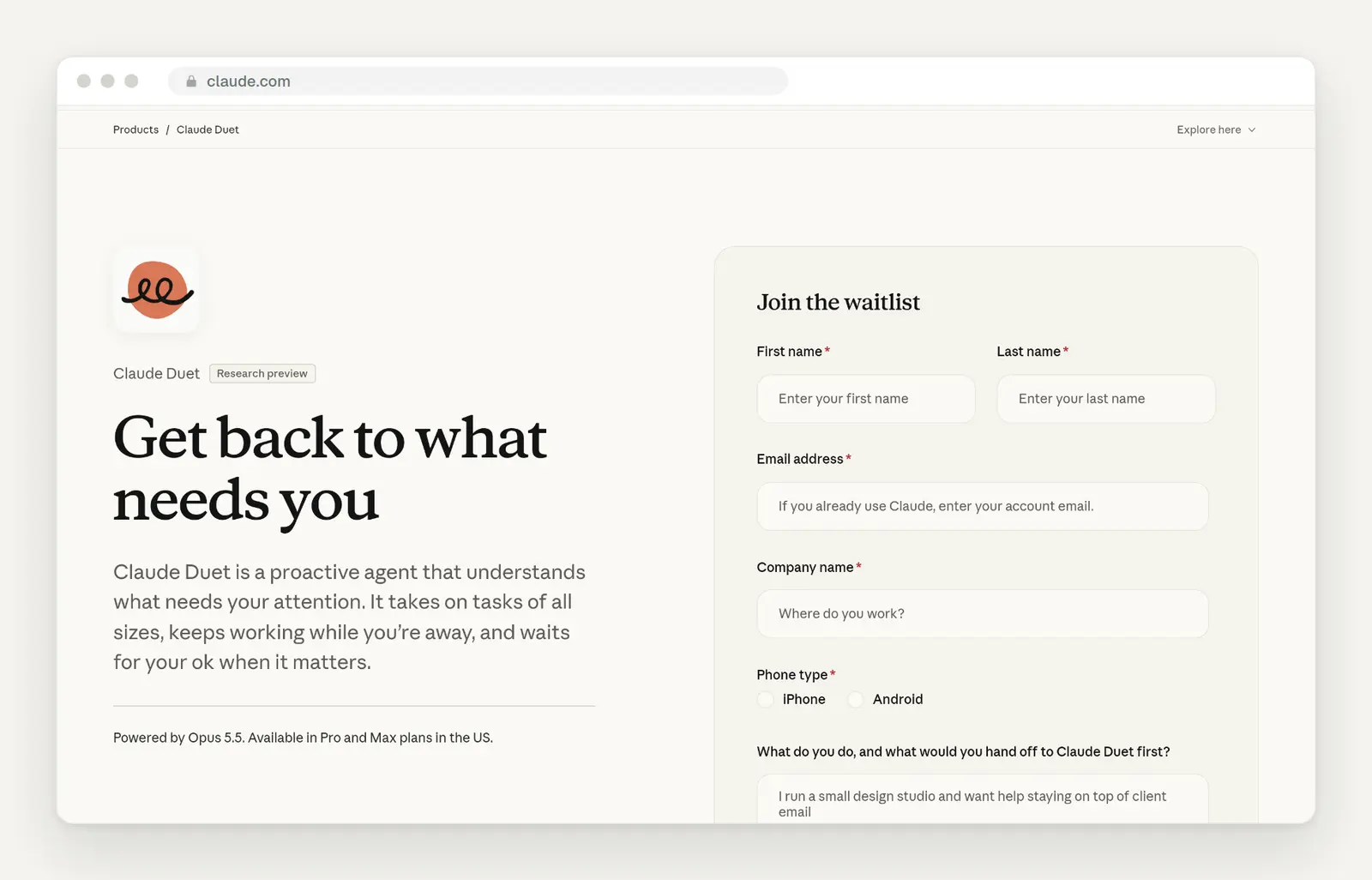
Claude Duet's product page with the waiting list form. On the right are the required fields: name, email, company, and phone type. Source: claude.com/product/claude-duet, accessed October 26, 2026.
Sign up anyway if you want to use Duet later—using the email address associated with your Claude account. According to the Help Center, access is tied to that exact email address, and the Apple or Google account on your phone must match it as well. Invitations are sent out in waves via email. Once you receive an invitation, log in to the Duet app with your Claude account—it may take a few minutes for the app to be activated.
We advise against using workarounds such as VPNs or U.S. accounts. You would be granting a service intended for U.S. customers access to customer emails and invoices without having clarified the terms for its use within a German company. More on this in the next section. Meta Muse is also available only in the U.S. and Canada, and according to The Next Web, Google’s Gemini Spark was not available in the EEA. Only ChatGPT Dots is intended for companies in Germany via the Business plan; more on that below.
Data Protection: What Companies Should Know Before Implementing It
Duet reads not only your data, but also that of your customers and business partners. Anyone who links their email, calendar, and invoicing software grants a service access to third parties’ personal data. According to its security article, Anthropic promises to handle this data discreetly. According to the security article, history and cache remain stored until you delete them. Anthropic does not specify retention periods in days, the location of the cloud servers, or provide any information regarding training using Duet data.
Disconnecting an app doesn't mean Duet has forgotten anything. According to the security article, disconnecting an app only stops access from that point on. What Duet has already learned from the app remains in its memory until you reset it in the app's settings. If you delete an account, you delete everything Duet has saved.
Duet also searches your previous Claude chats, but you can turn this off. According to the Help Center, you can do this under Settings > Your Claude using the "Search and reference chats" toggle; in the older settings view, it's under Settings > Memory. Chats in projects are excluded anyway.
Currently, there is no corporate plan available for business data. Duet operates only on individual subscriptions. According to VentureBeat, audit logs and custom retention policies are available only with the Enterprise plan, and Duet has not yet been approved for that plan. Our assessment—not legal advice: Customer data from a German business should only be stored in Duet once corporate plans are available that include a data processing agreement and administrative controls.
Follow the BSI’s recommendation and don’t give any single agent access to everything at once. The German Federal Office for Information Security (BSI) states in its guidelines on AI agents: “No single agent should have access to your emails, your bank account, and your personal files all at the same time.” Since Duet takes over all the connectors from your Claude account, this means: Before you start, disconnect any connections that Duet doesn’t need, and don’t grant access to your email inbox and payment services to the same agent.
What the first testers are reporting
The few actual hands-on reviews have been mixed, with praise for the design and organization. Most articles published at launch simply report on the announcement. Among those who have actually tried it out are *Every* magazine, which had two weeks of early access, and product expert Claire Vo in Lenny’s newsletter.
Every calls Duet the first personal assistant that could be called a professional tool. It praises the channels for recurring topics, the ongoing list of open items, and the fact that Duet keeps documents, slides, and dashboards up to date right within the app. There is also some criticism: the email drafts are said to be weaker than those from ChatGPT Dots, and scheduled runs do not reach the app’s own, custom-built connectors.
Claire Vo praises it as the cleanest agent launch she's ever seen—and yet she still forgot about it. Her post is titled “Claude Duet is beautiful. I still forgot to use it.” According to the chapter overview, her criticisms are: not proactive enough, responses too slow for real-time collaboration, and no desktop app.
On Hacker News, three users with access describe their own experiences—these are individual accounts. One reports two mistakes: Duet wrote employee evaluations based on incomplete notes instead of asking for clarification, and suggested a meeting with a spam sender. Another user was unable to view the files on the cloud server. Anthropic itself notes that Duet may misinterpret a conversation or misjudge its urgency.
So be sure to review drafts, especially in areas where Duet might fill in gaps with assumptions. In evaluations, proposals, and contract terms, the very information that only you have is often missing. In such assignments, be sure to include the following: “If you’re missing any details, ask me instead of making assumptions.”
A Comparison of Duet, ChatGPT Dots, and Meta Muse
OpenAI, Meta, and Anthropic now each have one proactive agent; for companies in Germany, a maximum of one is provided. OpenAI introduced Dots in late September, and Meta introduced Muse in September. According to OpenAI’s documentation, Dots is available to companies in Germany through the Business plan with a Premium seat, requiring a minimum of two seats starting at about $120 per month; the Enterprise plan is currently in beta. OpenAI continues to exclude the private Pro plan with Dots in the EEA.
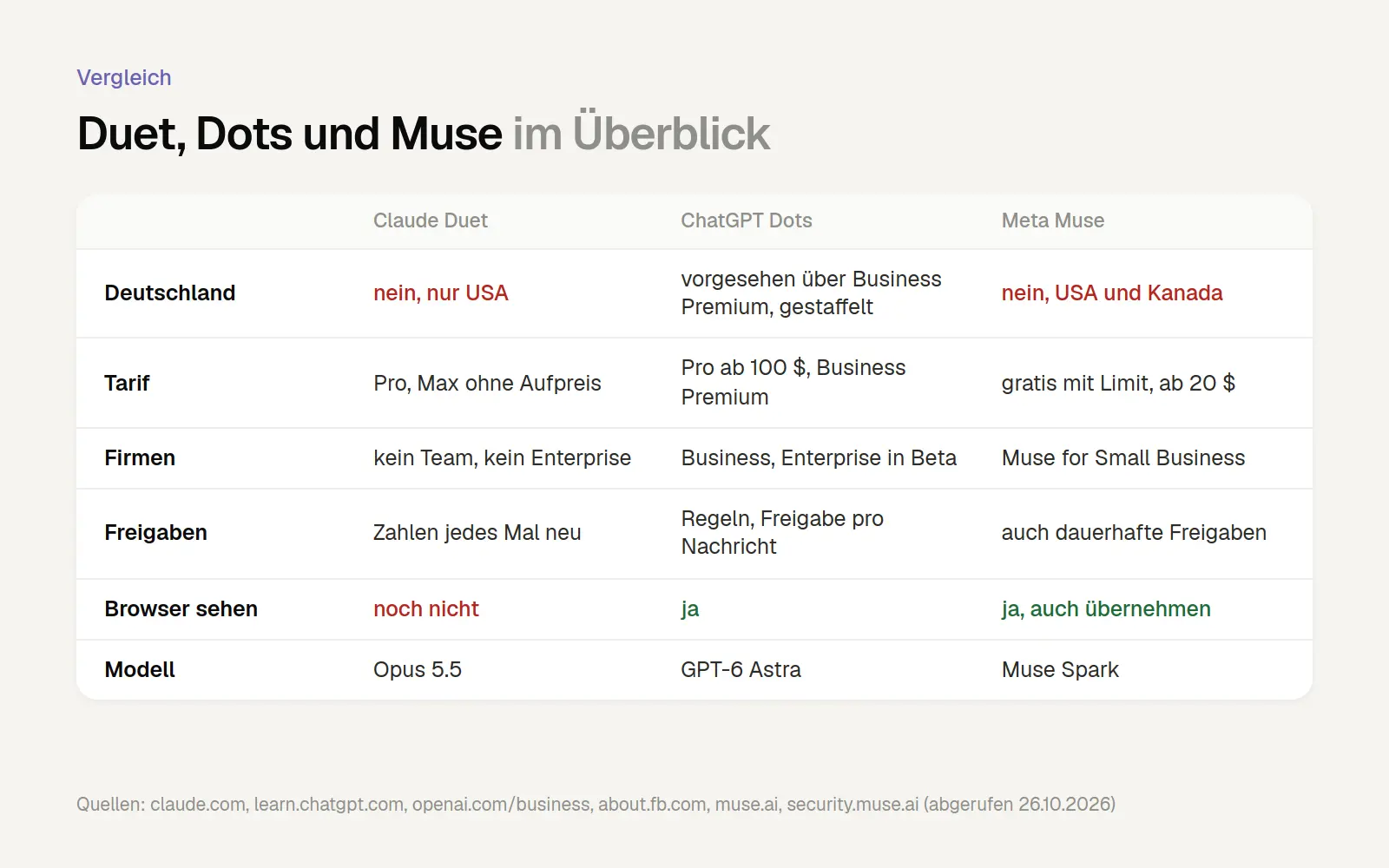
A Comparison of Claude Duet, ChatGPT Dots, and Meta Muse, as of October 26, 2026. Sources: claude.com, support.claude.com, learn.chatgpt.com, help.openai.com, openai.com/business/chatgpt-pricing, about.fb.com, muse.ai/business, security.muse.ai (all accessed October 26, 2026).
When it comes to payments, Duet is stricter than Muse. Muse also allows permanent authorizations that remain in effect once granted. Duet requires payments and the creation of accounts to be set up anew each time. On the other hand, Dots and Muse let the agent watch the process in the browser; Muse also allows the agent to take over, but Duet does not yet.
Anyone in Germany looking to try out an AI agent today should check out ChatGPT Dots on the Business plan. It’s unclear whether German work spaces have been activated yet; OpenAI is rolling out access in phases. Full details on features, costs, and privacy can be found in our comparison of ChatGPT Dots.
Here's how you can start building the core of Duet today with Claude
You can also get the morning briefing without Duet, by setting up a scheduled task in Claude. Scheduled tasks are available in all paid Claude plans, including Team and Enterprise, and are also available in Germany. According to the Help Center, they run in the cloud on a fixed schedule, even when your computer is asleep. The easiest way is to describe in the chat what you want Claude to do and when. Claude will then suggest a name, schedule, and instructions, and you confirm by clicking “Schedule.” Alternatively, you can create the task manually via “Scheduled” in the sidebar using “New task” and set the approval mode there as well.
The difference: You set the schedule and the task, and Duet decides on its own when to check in. According to the Help Center, a scheduled task runs hourly, daily, weekly, on weekdays, or on demand. Anthropic doesn’t mention triggers such as an incoming email. That’s more than enough for a daily briefing.
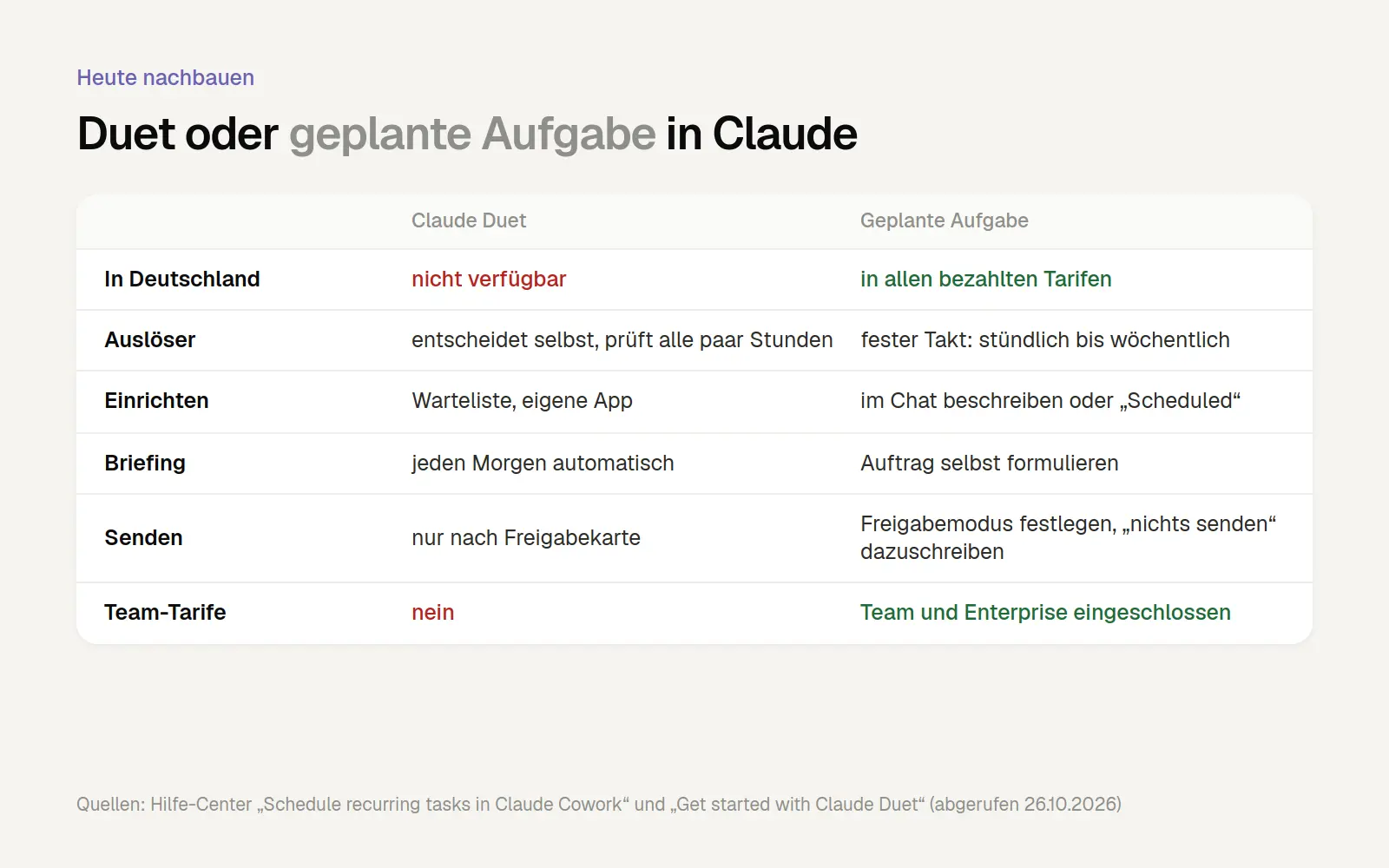
A direct comparison between Duet and a scheduled task in Claude. Sources: Help Center “Schedule recurring tasks in Claude Cowork” and “Get started with Claude Duet” (accessed October 26, 2026); analysis by us.
First, connect Gmail and Google Calendar in Claude, then copy this task into a new chat. It replicates what Anthropic describes for the Duet briefing: select the most important items, prepare drafts, and don’t send anything yourself. Before confirming, check to make sure Claude has correctly incorporated the schedule and instructions.
Check the draft responses yourself every day during the first two weeks. That way, you’ll quickly see if the selection is correct and can refine the prompt—for example, by adding “Ignore newsletters and system messages.” We’ll show you how to manage scheduled tasks and what other commands are available in the Claude Guide.
The same pattern applies to the list of open invoices. Anyone who has connected an accounting or payment service as a connector should create a weekly task:
Who Should Consider Using Duet Once It's Available Here
Duet is perfect for anyone whose day consists of many small decisions in email, calendar, and invoices. Anthropic built Duet specifically for professionals and small business owners who have more on their plates than they can keep track of. The official examples come from exactly this world: a real estate agent, a restaurant owner with about 110 employees, and a brand consultant. Anthropic selected these examples itself; they are not based on independent evaluations.
This version of Duet is not intended for teams or larger companies. There is no Team or Enterprise plan, no admin controls, and no announced API. A Forrester analyst told TechTarget that what sets Duet apart is, above all, its cautious rollout. For teams on Slack, Anthropic offers a separate product called Claude Tag, which runs only on the Team and Enterprise plans.
Our assessment: The greatest benefit lies in the morning briefing, not in automated task completion. Knowing in just five minutes each morning what the most pressing issues are for the day is more valuable than having an agent send out emails. This specific aspect can already be handled today using scheduled tasks. We’d introduce Duet in the same way later on: first have it read and draft, then grant approvals step by step. Our article on AI agents for small and medium-sized businesses explains which processes are generally suitable for agents and what they cost.
Frequently Asked Questions
Does Claude Duet cost extra?
No, not during the Research Preview. Duet is included in Pro and Max, but it uses the same usage limits as your chats, including background activity.
Can I use Claude Duet in Germany?
No, as of October 26, 2026, access is limited to users with a U.S. account, a Pro or Max subscription, and an invitation from the waitlist. Anthropic has not announced a launch date for Europe.
Does Duet send emails without my consent?
According to Anthropic, this isn't possible without an authorization card: Before sending a message, making a payment, signing a document, or deleting data, Duet displays the action, recipient, and content to all recipients and waits for confirmation. You can disable this confirmation step for some actions, but not for payments or creating new accounts. Duet does not make calls or send text messages to others at all.
Which model is used in Claude Duet?
Claude Opus 5.5. You cannot select a different model; Duet decides on its own how much effort a task requires.
Does Duet work with Outlook and Microsoft 365?
Not yet. The Help Center explicitly states that Microsoft 365 is not yet available. Gmail, Google Calendar, and Google Drive, on the other hand, are working.
What is the difference between Claude Duet and ChatGPT Dots?
Both operate independently in the cloud and prompt users before performing important actions. Duet does not yet display its browser and is available only through individual subscriptions in the U.S.; Dots is intended for businesses in Germany through the Business plan.
What Has Changed and What That Means for You
October 26, 2026: First version of this post. Duet is only available in the U. S. For you, that means: Recreate today’s briefing with a planned task in Claude and add it to the waitlist for later.
October 23, 2026: Anthropic publishes a security article on Duet, covering access levels, a classifier for sensitive data, and a password form. For you, this means: Enter passwords only in the app or on claude.ai—never via a link.
October 21, 2026: Launch of the Research Preview for Pro and Max in the U. S. For you, this means: Team and Enterprise customers won't have access to Duet for the time being—not even in the U.S.
October 6, 2026: Tasks in Claude continue to run in the cloud on Pro and Max models, even when the laptop is closed. For you, this means that longer jobs and scheduled tasks no longer require the computer to be running.
Date of this version: October 26, 2026. We will update this post as soon as Duet becomes available in Europe or if there are any significant changes to permissions, connectors, or costs.
Conclusion
Set up the briefing in Claude today, add yourselves to the waitlist, and wait for a corporate plan while you work with customer data. Claude Duet takes a more cautious approach to payments and approvals than its competitors. It notifies you automatically, continues to work in the cloud, and, most importantly, asks what the consequences will be. That’s exactly what you want from a tool that looks into your inbox, calendar, and accounting.
In Germany, we’ll have to wait for now. However, you can already set up the most useful part—the daily briefing with draft responses—today by creating a scheduled task in Claude: Connect the mail and calendar connectors, copy the task above, and review each draft yourself for two weeks. If you’d like help with this, we’ll review your workflows in an AI potential analysis and set up these tasks together with you.
More Articles
© Marschfahrt Studio
Practical knowledge on web design, SEO, AI, and conversion optimization. Based on real projects, without any marketing spin.