PHP2Shell: How to Check If Your Website Is Secure (with Instructions for IONOS, STRATO, ALL-INKL, and Others)
The BSI is warning of two critical vulnerabilities in PHP that are not addressed by any WordPress update. We’ll show you how to find your exact PHP version, how to change it with IONOS, STRATO, ALL-INKL, and six other hosting providers, and what to tell your hosting provider.
Date
Category
Author

"Our website runs on WordPress with a major hosting provider. Now the BSI is warning about a PHP vulnerability, and everyone is talking about PHP2Shell. Do we need to do anything ourselves, or will the hosting provider take care of it?"
This is the kind of question many small business owners are asking themselves right now. On October 21, 2026, the PHP project released updates that address two critical security vulnerabilities, identified by the CVE numbers CVE-2026-109618 and CVE-2026-109619, referred to as “PHP2Shell” in reports. PHP is the programming language that the server uses to build pages for WordPress, Joomla, TYPO3, or Shopware. According to W3Techs, 69.3% of all websites whose server language can be identified use PHP (as of October 22, 2026).
On the same day, the Federal Office for Information Security (BSI) issued a warning with a severity rating of “3 / Orange,” which, according to the BSI, means: “Measures must be taken immediately.” According to the BSI, an attack does not require the user to log in or click on anything. The most important thing for you to know: The vulnerability lies in PHP itself—not in WordPress, not in the theme, and not in a plugin.
This guide shows you how to check whether your website is secure, where to find and change the PHP version for nine popular hosting providers, what to write to your hosting provider, how to recognize signs of a breach, and what the legal requirements are. There is a separate section for professionals who have their own server. All information is sourced from publications by the PHP Project, the BSI, and web hosting providers, as well as from specialized sources, which we cite in each sentence. Date of this version: October 22, 2026, 11:10 a.m.
PHP2Shell in a nutshell: Which version of PHP is secure?
According to the PHP Project, PHP versions 8.2.35, 8.3.36, 8.4.27, and 8.5.12—as well as any higher version in the same branch—are secure. WordPress displays the full version number under Tools → Site Health → Report → Server. If your hosting provider shows an older version number but may have still applied the fix or patch, contact them in writing to confirm. According to the BSI, a WordPress or plugin update is not sufficient because the vulnerability lies within PHP itself.
If you're still using PHP 8.1 or earlier, upgrade to 8.3 or 8.4 right away, because 8.2 will only receive security updates through December 31, 2026.
Is my website affected by PHP2Shell? The Quick Check
First, determine what type of hosting your website uses, as this will determine who needs to take action. According to the PHP Project, all PHP installations that respond to web requests are affected; the BSI cites WordPress, Drupal, TYPO3, Joomla, Magento, and Nextcloud as examples. Who updates PHP on the server depends on your contract.
Website builders: You can’t apply patches; if in doubt, ask the provider. With hosted website builders like Framer, Wix, Jimdo, Squarespace, or Webflow, the provider manages the servers—you can neither view nor configure the PHP version there. Only the provider itself can confirm whether it was affected. For Shopify, it’s confirmed that the core is written in Ruby, not PHP, as Shopify Engineering describes; our own website runs on Framer, where there’s no PHP version for us to configure.
Shared Hosting: The hosting provider applies the patch; you check and select the version. Shared hosting means that you rent space on a server operated by the hosting provider and shared with many other customers—for example, with IONOS, STRATO, or ALL-INKL. The hosting provider applies the patch, and you select the PHP version for your domain yourself in the customer menu.
Managed WordPress: The provider manages PHP; check with them to see which version is being used. In this case, the provider maintains the server and the WordPress environment; the PHP version is often not selectable—and, according to the IONOS Help Center, not selectable at all with IONOS Managed WordPress. “Hosted” does not mean PHP-free; it just means someone else takes care of it.
Dedicated server or VPS: You are the administrator and must apply patches yourself. A VPS is a rented virtual server that you manage yourself. In its status update, IONOS states that anyone running a self-managed application on a VPS or bare-metal server—that is, their own physical server—should install the PHP update as soon as possible. The steps to do so are outlined in the Pro section.
If in doubt, check your contract. “Web hosting” or “hosting package” almost always refers to shared hosting; with “VPS,” “cloud server,” or “root server,” you manage the server yourself—even if you’ve never done so before.
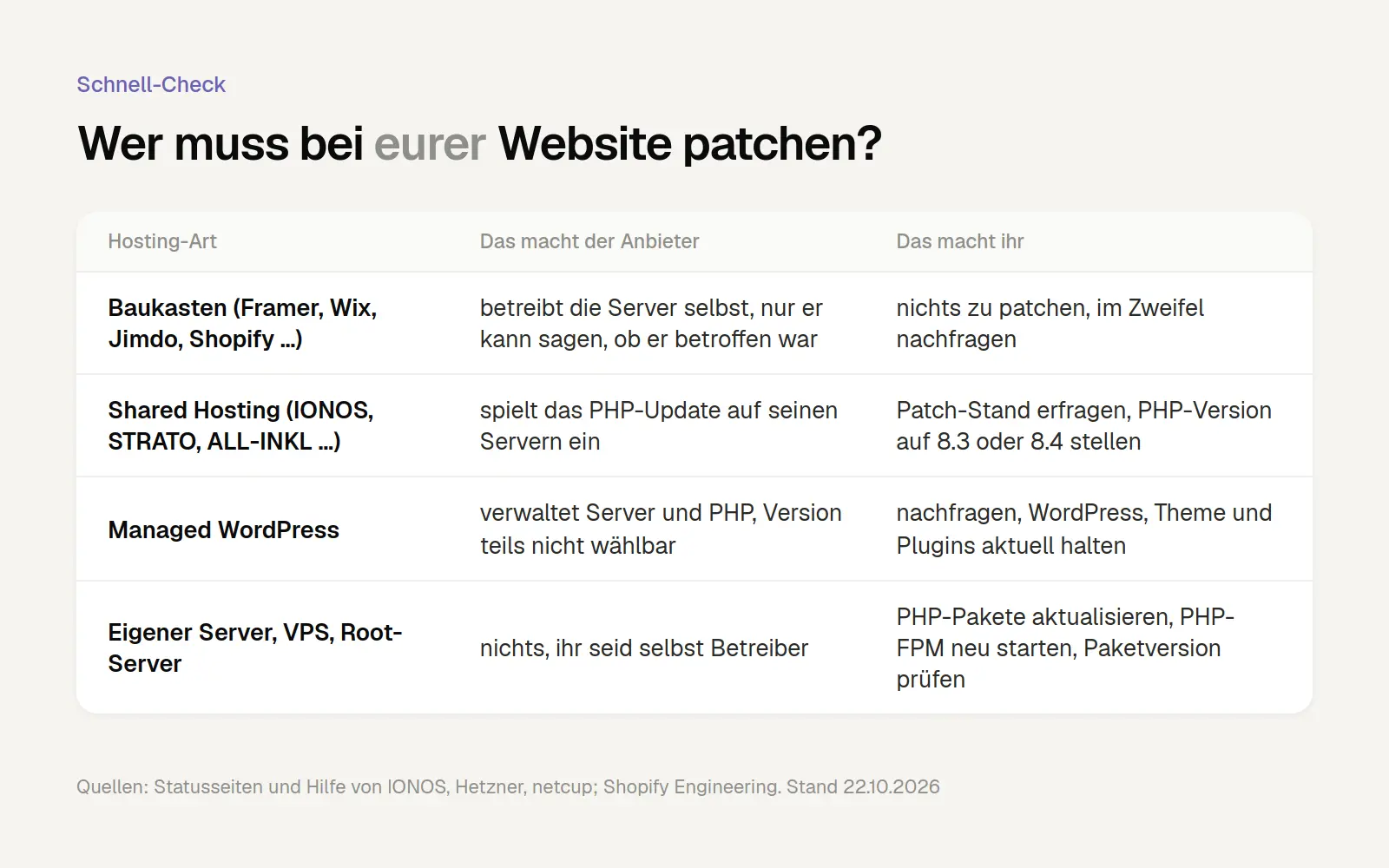
The less you manage yourself, the more is handled by the provider. Feel free to ask questions at any time. Sources: Providers' status pages and help sections, as of October 22, 2026.
If you're not sure what type of hosting you have, we'll take a look at your website for free and let you know which version of PHP is running, what type of hosting you have, and what questions you should ask your hosting provider.
These PHP versions address the security vulnerability
Compare your version number with these four values: 8.2.35, 8.3.36, 8.4.27, and 8.5.12. According to the PHP Project’s security advisory dated October 21, 2026, these are the first versions that patch both vulnerabilities. The number has three parts: the first two indicate the branch, such as 8.3, and the last number indicates the patch status within that branch.
Also pay attention to how long your branch will continue to receive updates. According to php.net , 8.2 will receive security updates through December 31, 2026; 8.3 through December 31, 2027; 8.4 through December 31, 2028; and 8.5 through December 31, 2029. PHP 8.1 reached end-of-life on December 31, 2025; 8.0 on November 26, 2023; and 7.4 on November 28, 2022. End-of-life means that the PHP project will no longer provide regular updates.
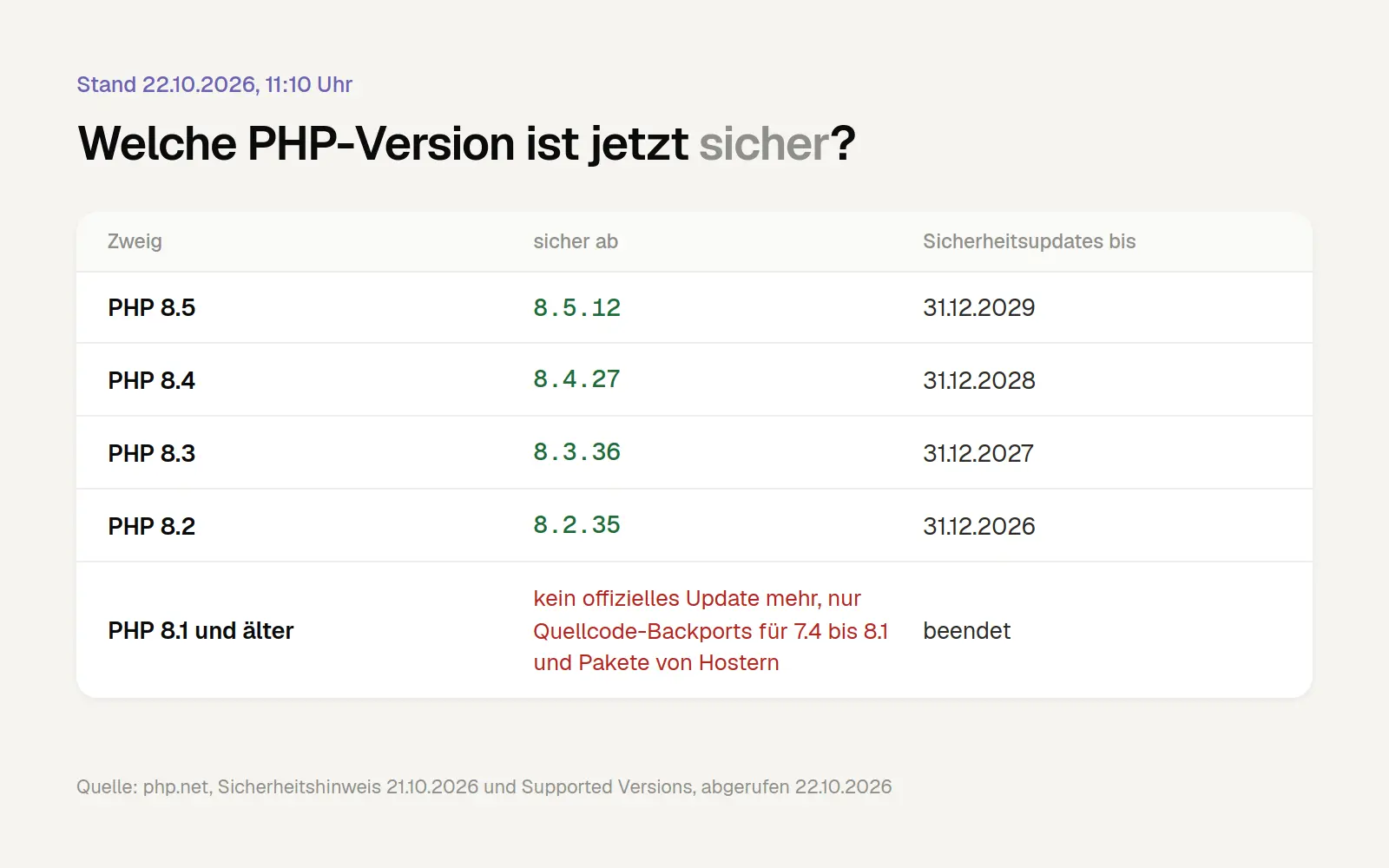
Any version starting with the number mentioned is definitely safe. If you're planning to upgrade anyway, choose 8.3 or 8.4, because 8.2 will reach end-of-life on December 31, 2026. Source: php.net, as of October 22, 2026.
There is no official update for PHP 8.1 and earlier versions; only workarounds are available. The PHP project has provided source code backports for versions 7.4, 8.0, and 8.1—that is, retroactively applied fixes—from which some hosting providers and Linux distributions build their own packages. There is no ready-made update such as “7.4.34.”
Just because you have an old version doesn’t automatically mean you’re unprotected. Hosting providers and distribution teams often apply patches without changing the version number. netcup states explicitly: “Even if the PHP version displayed to you remains unchanged, it is in any case a version that we have patched.” Only a statement from your hosting provider can give you certainty, so be sure to note down the full version number for your email to them.
Check Your PHP Version: Here's How to Find the Version Number in WordPress and Using phpinfo
Get the three-part number, not just the sub-number from the customer menu. Many hosting providers only show “8.3” in the menu, which isn’t enough for a comparison. There are two ways to do this that don’t require any prior knowledge.
In WordPress: Tools → Site Health → Report → Server. Log in as an administrator and click on Tools and Site Health in the sidebar. At the top, switch from the Health tab to the Report tab. There, expand Server; the PHP Version line shows the full version number.
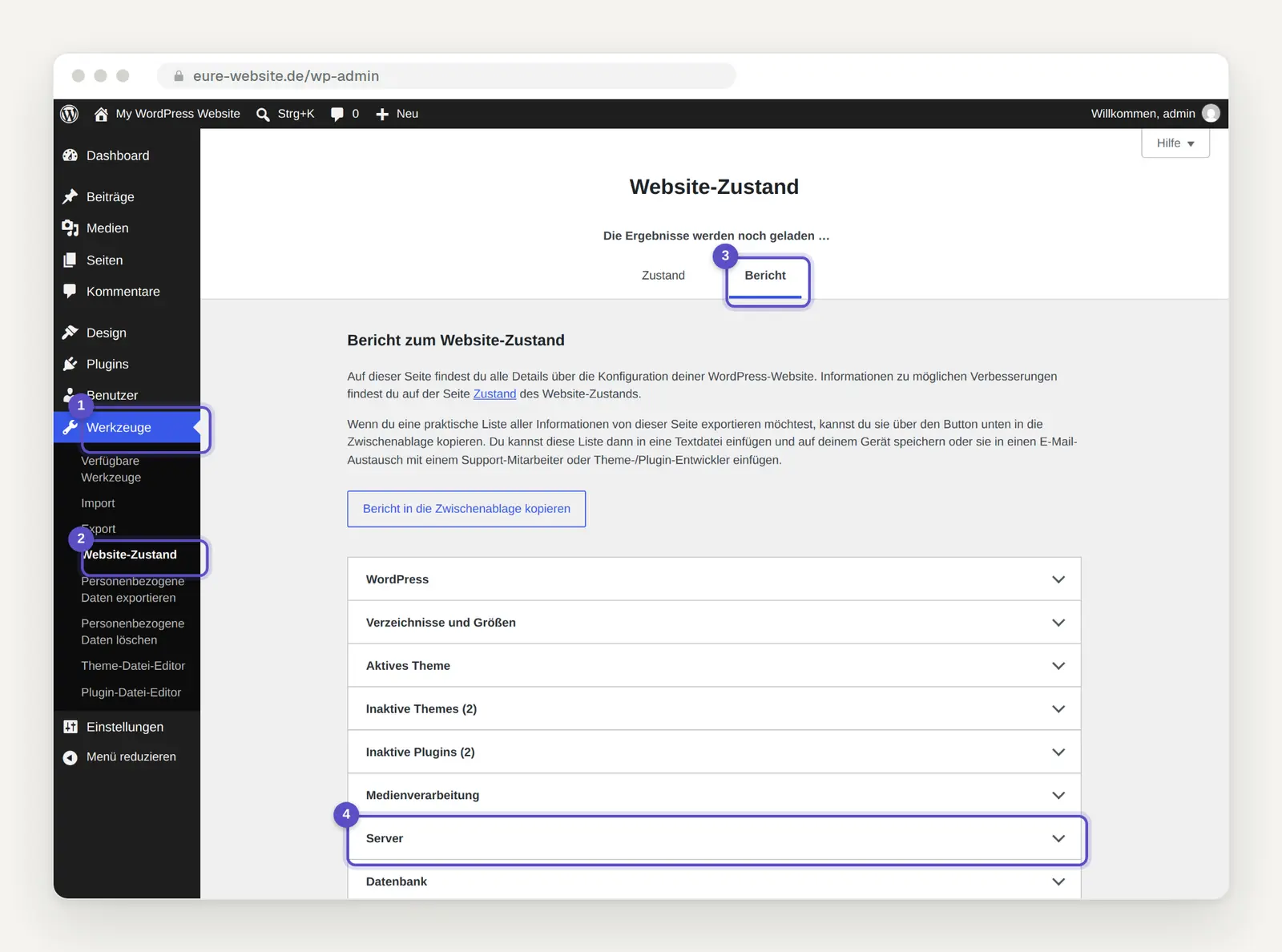
Under Tools → Website Status, the "Report" tab provides all the technical details about your installation. Image: own photo
If the version number in the respective branch is at least 8.2.35, 8.3.36, 8.4.27, or 8.5.12, you are up to date with the latest patches. So a version like 8.4.20 isn’t guaranteed to be up to date, even though the number is higher than 8.3.36. WordPress.org also recommends this method; in the “Sie” version of WordPress, the menu names may differ slightly.
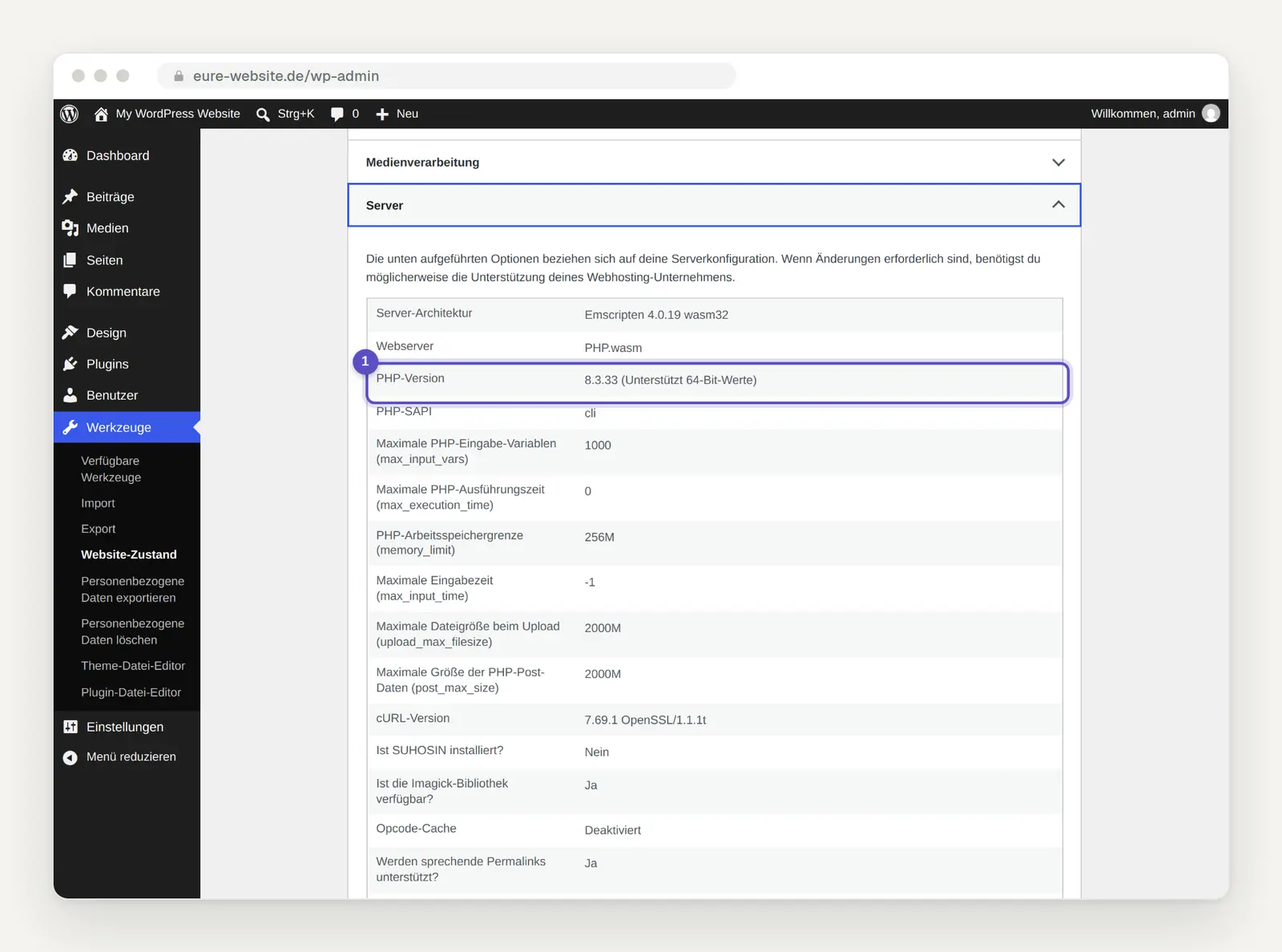
The "Server" section, when expanded, displays the full PHP version with all three numbers. Image: own photo
Without WordPress: Create a phpinfo file and delete it immediately afterward. phpinfo is a built-in PHP command that displays a page with all server settings; the version is listed at the very top. STRATO and Host Europe describe this method in their help sections; it also works with Joomla, TYPO3, Contao, and Shopware. To do this, you’ll need FTP access, which you can use with a program like FileZilla to upload files to your web space—preferably using the encrypted SFTP protocol.
Contents of the test file (copy and save as a plain text file):
Give the file a name that’s hard to guess. Save the line in a simple text editor—for example, as versionstest-8174.php—upload it to your website’s root directory, and go to https://eure-domain.de/versionstest-8174.php. "PHP Version" will appear at the very top, along with the full version number. Delete the file immediately afterward, because it reveals a lot of details about your server to anyone who finds it.
On the phpinfo page, also check the build date. It’s listed near the top under “Build Date” and shows when PHP was built on the server. Hostinger states that a date on or after October 21, 2026, indicates that the fix is included, even if the version number has remained the same. Our own server also shows October 21 after the update.
If you see a version number listed under the "secure" versions, contact your hosting provider before you start worrying. A self-secured 7.4 on Hetzner or Mittwald will inevitably show the old version number because there is no new 7.4 release.
BSI Warning: Why a WordPress Update Isn't Enough This Time
Update PHP, not just WordPress, because the vulnerability lies one level deeper. The BSI states: “Fundamentally, the vulnerabilities affect the PHP runtime environment itself and not specific applications. Updating the applications is therefore not sufficient; the underlying PHP runtime environment must also be patched.” WordPress.org also advises site operators to update PHP immediately; there is no WordPress update to address this vulnerability.
The other major platforms are saying the same thing. WooCommerce states that the vulnerabilities affect any server running a PHP application, and that an update to WooCommerce or WordPress is neither necessary nor planned. TYPO3 announced on October 21 that the TYPO3 code itself is not affected, but PHP is; Drupal cites the PHP update as the only complete solution. The e-commerce security firm Sansec states that Magento, Shopware, and WooCommerce remain vulnerable even with clean, unmodified code.
A security plugin is no substitute for a patch. Wordfence, the widely used security plugin for WordPress, explains that some attacks can begin before WordPress even starts up. The PHP project even describes an attack for mod_php—a common operating mode on Apache servers—that occurs before any of the website’s code is executed.
A web firewall is only a temporary solution. A WAF is a filter that checks requests before they reach the server. According to Cloudflare, its protection rules against PHP2Shell are automatically enabled on all plans that include WAF, including the free plan. However, according to the BSI, the only way to ensure complete protection is to apply patches or disconnect from the Internet, so make sure to address the PHP issue today.
IONOS: Check and Change Your PHP Version, and Cancel Extended Support
According to IONOS, the update has been deployed; however, please check your version anyway. In the status update from October 21 at 5:44 p.m., IONOS states: “To protect you and your data, we are currently installing the security update on all our systems. We expect to be finished within the next 24 hours.” On October 22 at 10:02 a.m., the status page reported: “The systems are running stably again, and all services are functioning normally.” Technically, the entry is still marked as “Under Observation,” not “Resolved.”
According to IONOS, customers do not need to take any action themselves on the provider’s platforms. The IONOS Newsroom states: “IONOS has already deployed the official update on all platforms that the company operates itself. Customers do not need to take any action themselves.” The announcement specifically mentions Web Hosting, Managed WordPress, and the MyWebsite 8 website builder. According to IONOS, anyone running PHP on a VPS or dedicated server should install the update immediately. The announcement does not explicitly state whether the older, paid versions under Extended Support have been patched.
Here's how to check the PHP version. According to the IONOS Help Center, log in to your IONOS account and click Menu > Hosting in the title bar; if you have multiple plans, select the correct one. In the PHP tile, click Manage to view all domains and their PHP versions.
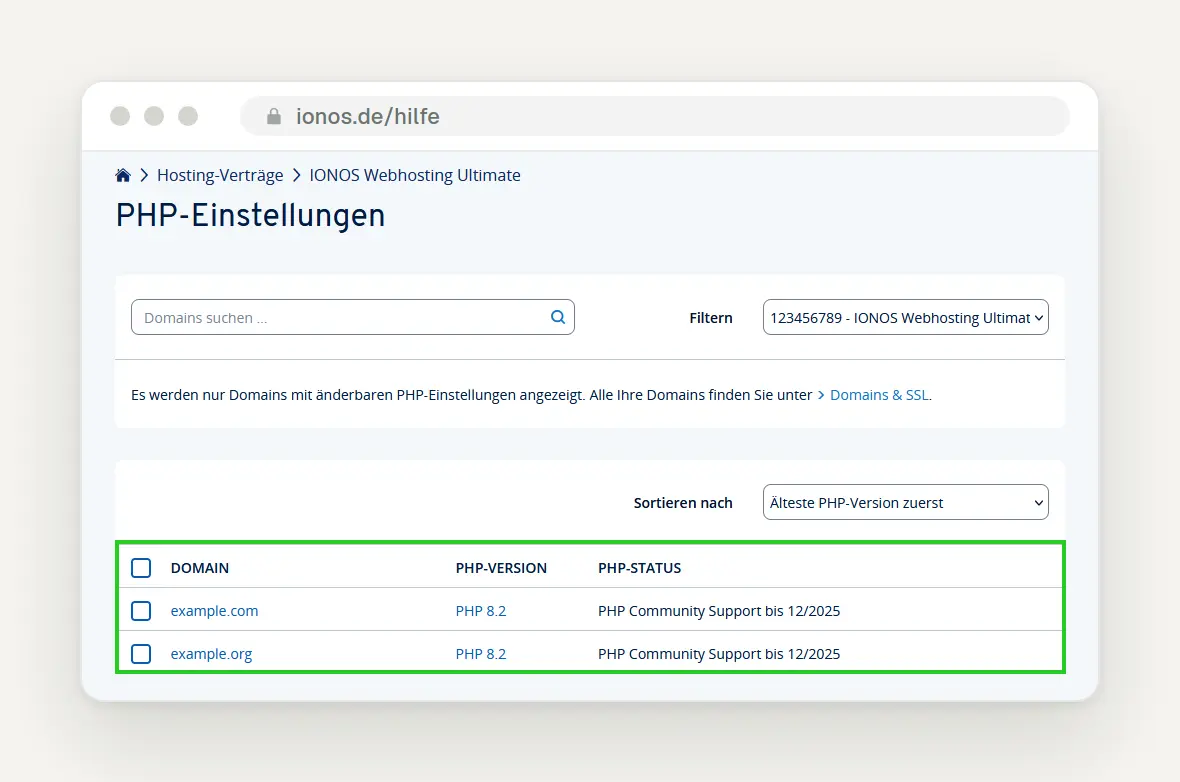
The "PHP Settings" page lists each domain along with its PHP version. The help image shows an older version with PHP 8.2 and "Community Support until 12/2025"; the table on your end looks newer. Image: IONOS Help
Here's how to change the version. Click on the domain, select the desired PHP version—8.4, as recommended by IONOS—and click Save. For multiple domains, check the boxes and use "Select PHP Version." According to IONOS, the version cannot be changed for Managed WordPress and MyWebsite; however, IONOS has already patched both, according to its Newsroom.
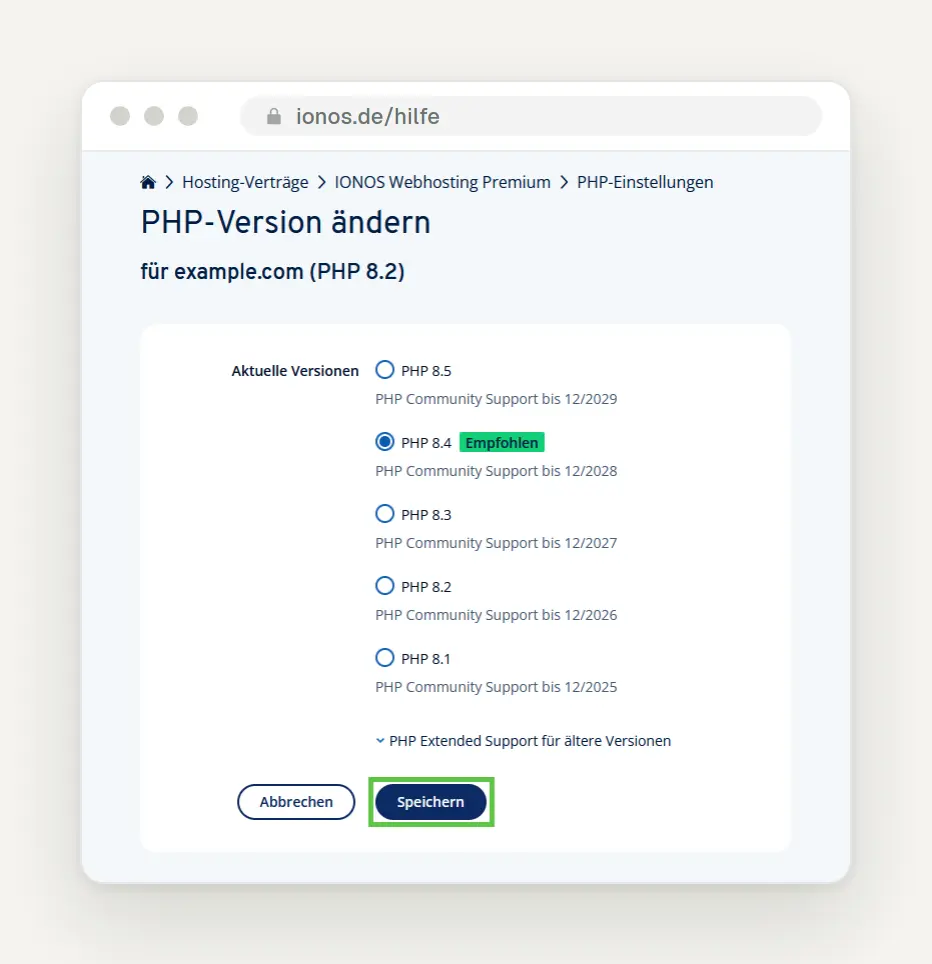
The selection window lists versions 8.5 through 8.1; 8.4 is marked as “Recommended,” and below that is the paid Extended Support option. Image: IONOS Help
Stop using Extended Support if you're still using it. With Extended Support, IONOS continues to run discontinued PHP versions for a monthly fee—versions 5.6 through 8.1, according to the help section. The product page lists approximately €7.81 per month for PHP 8.1, €15.62 for 7.4 and 8.0, and €18.28 for 7.0 through 7.3. It is not clear from the page whether these amounts include VAT, and IONOS has not publicly stated whether these versions are protected against PHP2Shell.
Be sure to cancel Extended Support after the upgrade. According to IONOS, the fee is billed three months in advance, and it's easy to overlook the cancellation after the upgrade. According to IONOS, upgrading to the latest version is free.
Be sure to create your own backup first—IONOS backups only go back 14 days. To restore your data, go to Menu > Hosting, click the three dots in the Webspace section, select "Restore Files," then "Backup and Files," and finally " Restore Selection"; the files will be saved in the "_ProviderRestore" folder. According to IONOS, you can create your own backup via SFTP download and by exporting the database using phpMyAdmin, the database management tool.
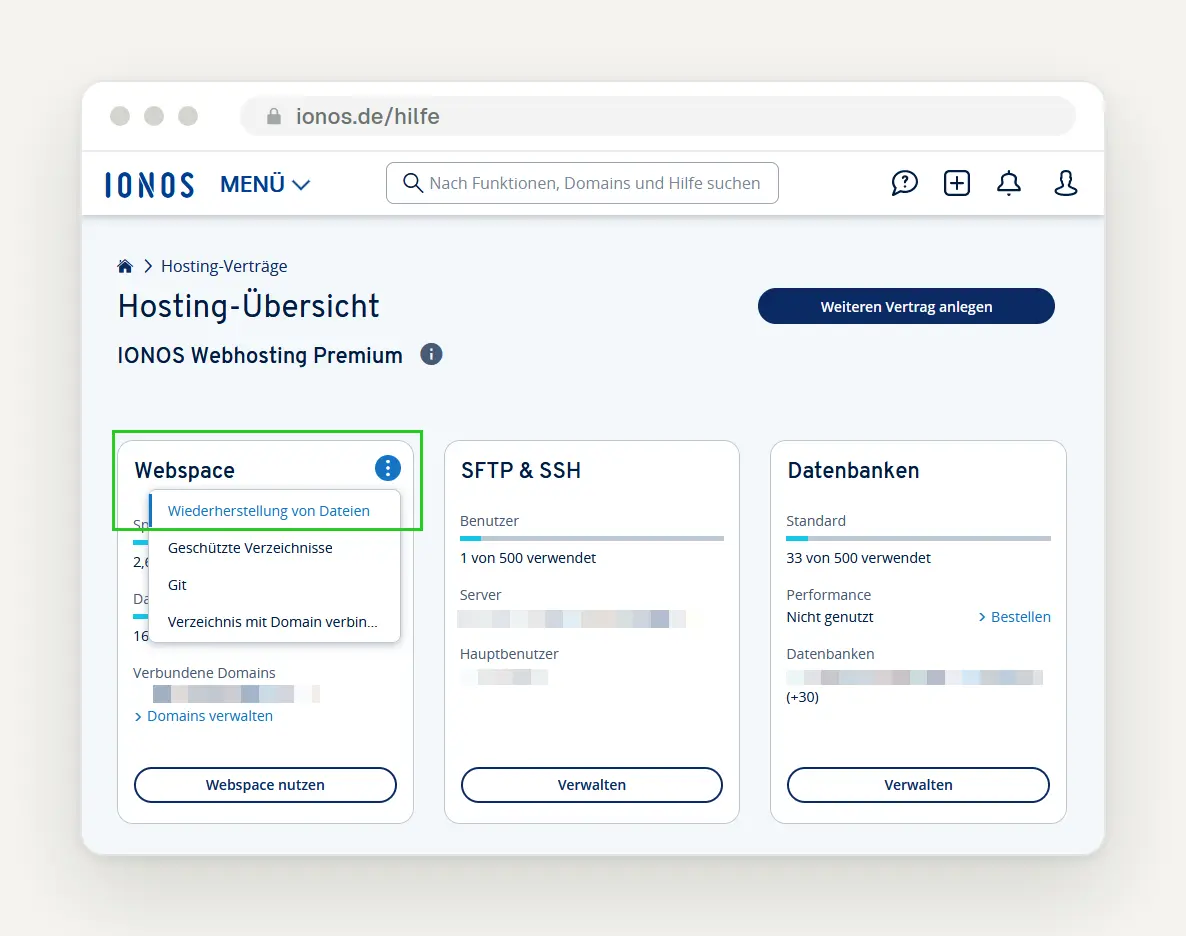
You can access the restore option from the daily backups by clicking the three dots in the "Webspace" tile. Image: IONOS Help
Ask support specifically about the patch status. IONOS lists the phone number 0721 / 170 5522; you can also reach customer service through your account at mein.ionos.de/support.
STRATO: Check and Change the PHP Version
Don't rely on a public announcement from STRATO; instead, send them a written inquiry. As of 11:10 a.m. on October 22, we haven't found any public announcement from STRATO regarding PHP2Shell on their website, press page, or in the help section, and there is no public status page. This doesn't mean that STRATO isn't taking any action; it just means that the information isn't publicly available. Therefore, please use the email template below.
Here's how to find the PHP version in the customer login. According to STRATO Help, log in with your customer number and password, then select your package from the three-dot menu. In the package overview, go to Databases and Web Space → Set PHP Version; the currently used version is listed there.
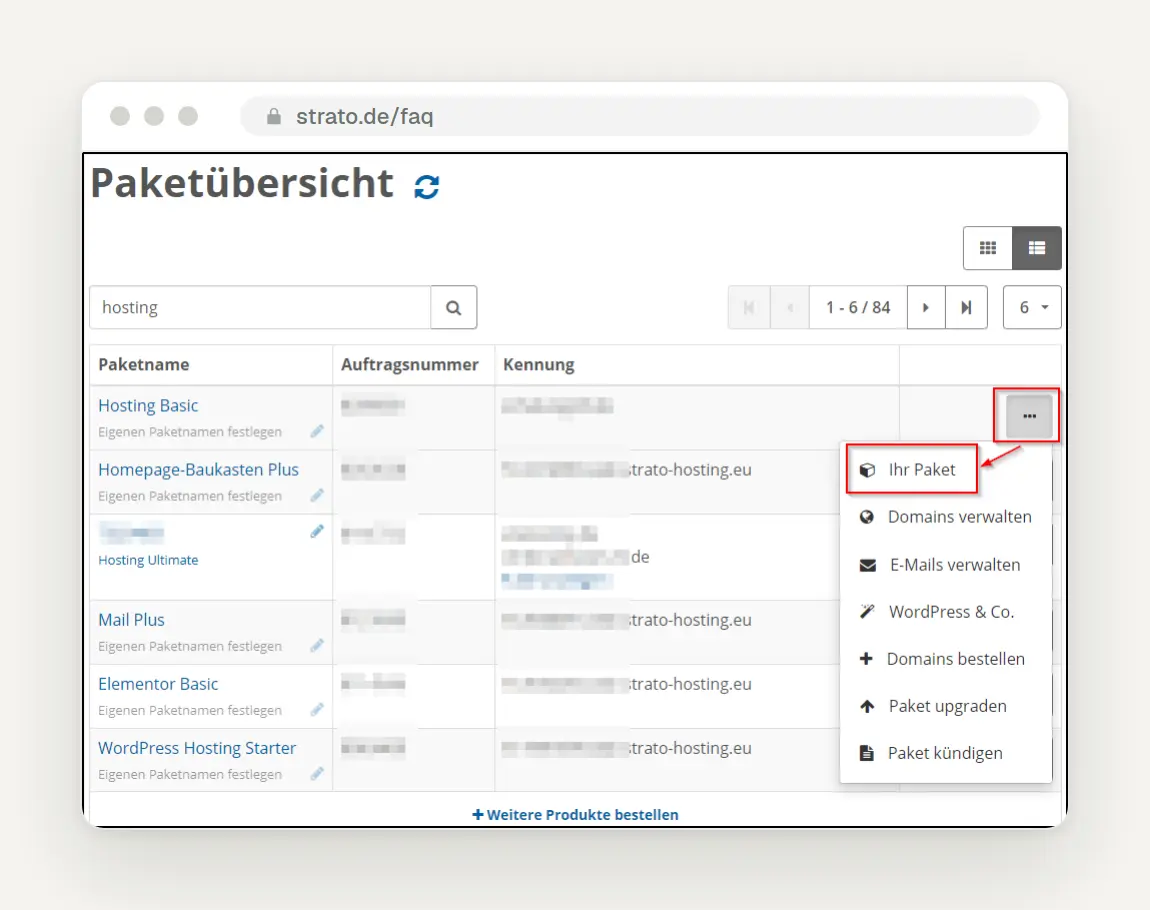
In the package overview, the three-dot menu opens the "Your Package" entry. Image: STRATO Help
Change the version to 8.4 or 8.3 and save. Select the new version and click Save; STRATO will confirm the change. According to the help section, you can choose between 8.2, 8.3, 8.4, and 8.5; STRATO recommends at least 8.4. Please note: According to STRATO, once you’ve made the change and logged out, you can no longer revert to an older version, so be sure to test everything while you’re still logged in.
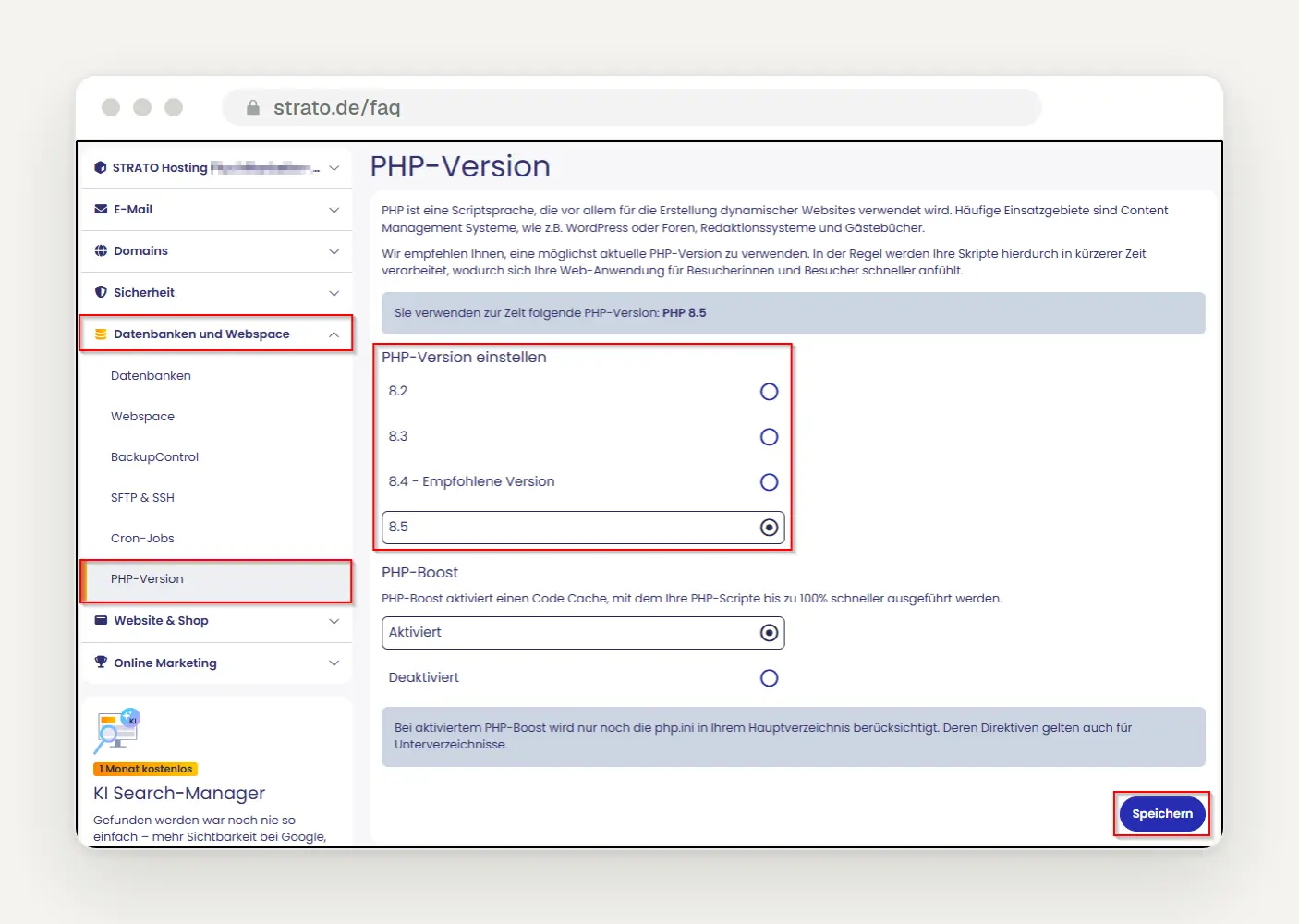
Under “Databases and Web Space,” STRATO displays the configured version and offers versions 8.2 through 8.5; version 8.4 is recommended. This image is current. Image: STRATO Help
Disable Extended Support as soon as you’re running a current version. For discontinued versions, STRATO offers Extended Support as a paid special service; for PHP 8.1, this has been available since March 2, 2026. The official help section does not specify an amount, only a “small monthly fee.” To disable it, go to Databases and Web Space → PHP Version, select the version, click Save, then Overview, and finally Disable Extended Support.
Make a note of where the backups are located beforehand. According to STRATO, daily backups from the last 14 days are available in the customer login area. In the package overview, select "Security" / "STRATO BackupControl," choose the version under "Backup Version," and then select either "Restore Complete Backup " or "Restore Selection." STRATO backs up databases separately, so be sure to check both parts.
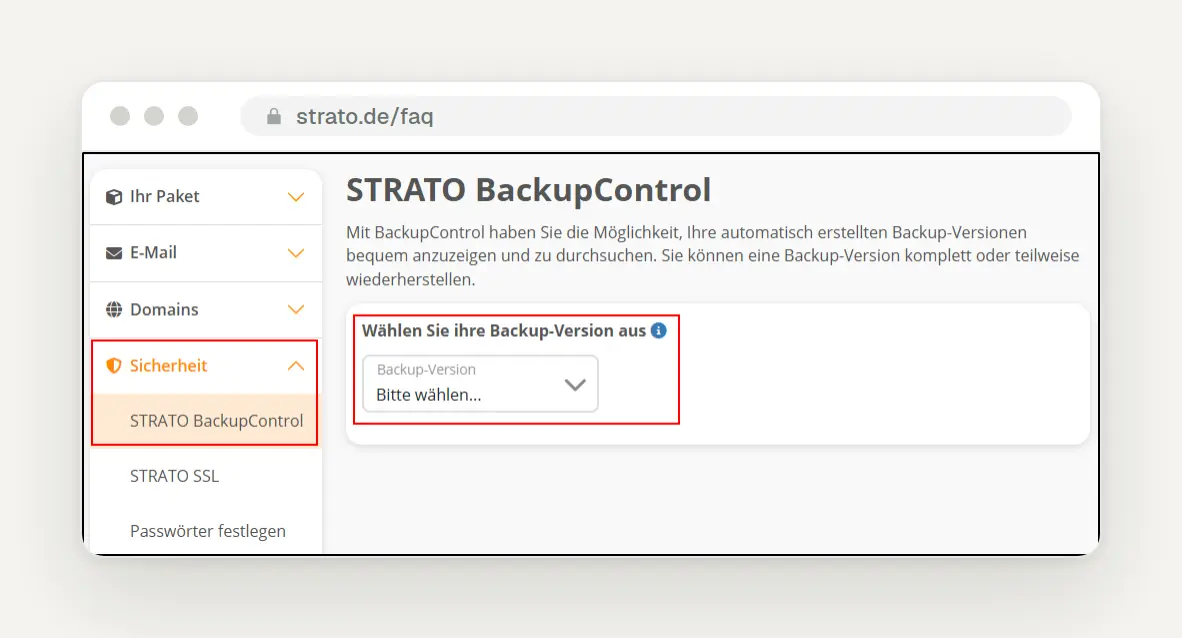
Under "Security," "STRATO BackupControl" opens the list of backup versions. Image: STRATO Help
Ask in writing so you have the answer in black and white. There’s a contact form for this purpose; according to STRATO, you can reach the hotline at 030 / 300 146 0, Monday through Friday from 8 a.m. to 8 p.m. and on weekends from 10 a.m. to 6:30 p.m. Have your customer number and service PIN ready.
ALL-INKL: Check and Change the PHP Version in KAS
Expect an ongoing patch at ALL-INKL and check your version in KAS. ALL-INKL posted a “Current Security Notice” on Instagram on October 21 at approximately 5:49 p.m., which states: “The patches will be rolled out gradually over the next few hours.” As of October 22 at 8:55 a.m., we found no mention of this on all-inkl.com; there is no status page. Even after checking again at 11:10 a.m., ALL-INKL had not publicly announced that the issue had been resolved.
Pay attention to warnings in the Maintenance Center. KAS, ALL-INKL’s technical customer management system, displays notifications in the Maintenance Center when a domain is using an outdated PHP version. Information on which versions ALL-INKL currently offers and whether paid Extended Support is available was not publicly available.
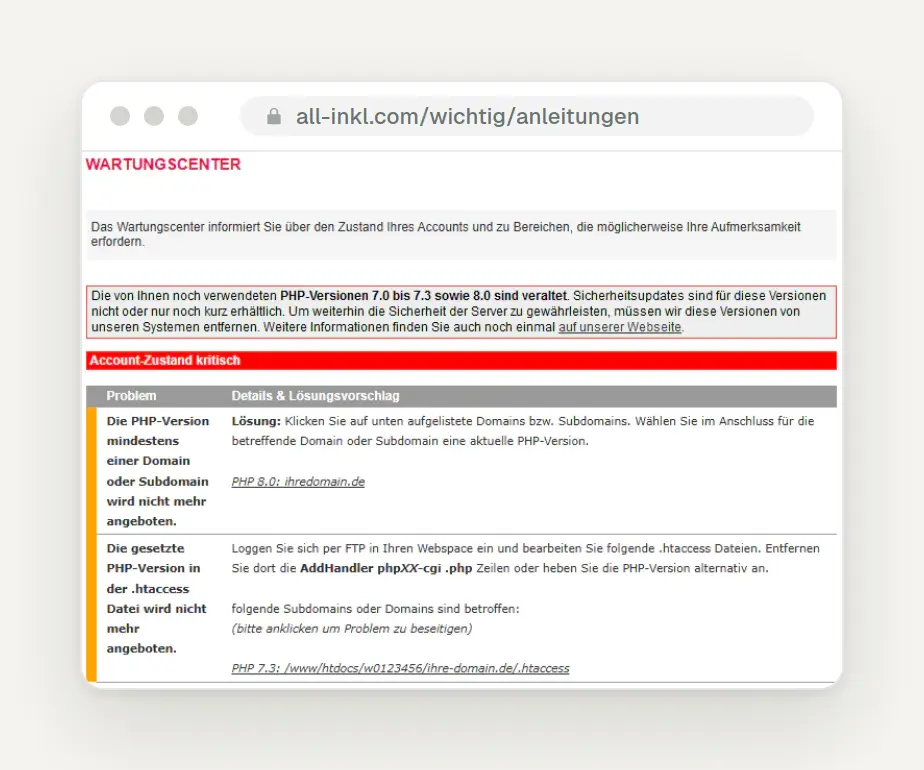
The KAS Maintenance Center warns about outdated PHP versions and provides a link to the affected domain. The image shows an older warning regarding versions 7.0 through 7.3 and 8.0. Image: ALL-INKL Help
Here's how to change the version. According to the ALL-INKL instructions, click the link for the relevant domain or subdomain in KAS. Under "PHP Version," select the new version and click " Save." If that doesn't work, click on the domain or subdomain, edit the entry, and select a different version there.
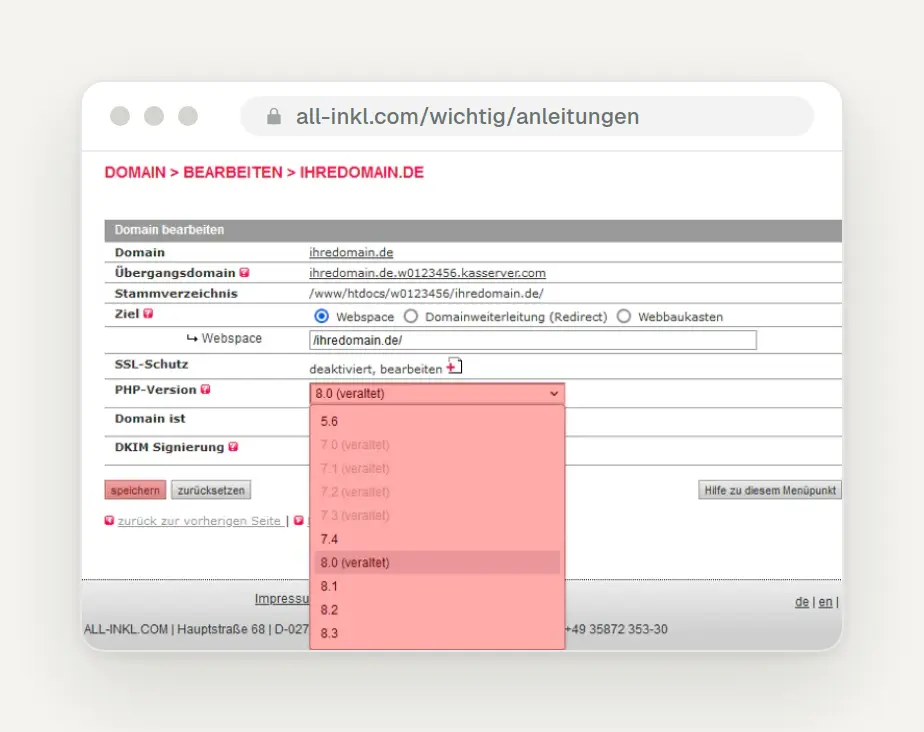
The list of PHP versions opens in the domain's Edit window. The help image ends at 8.3; the menu you see is newer. Image: ALL-INKL Help
In the domain overview, you can see all versions at a glance. The following two images are from the English help section; in German, the options are called “Domain,” “Edit,” and “Save.”
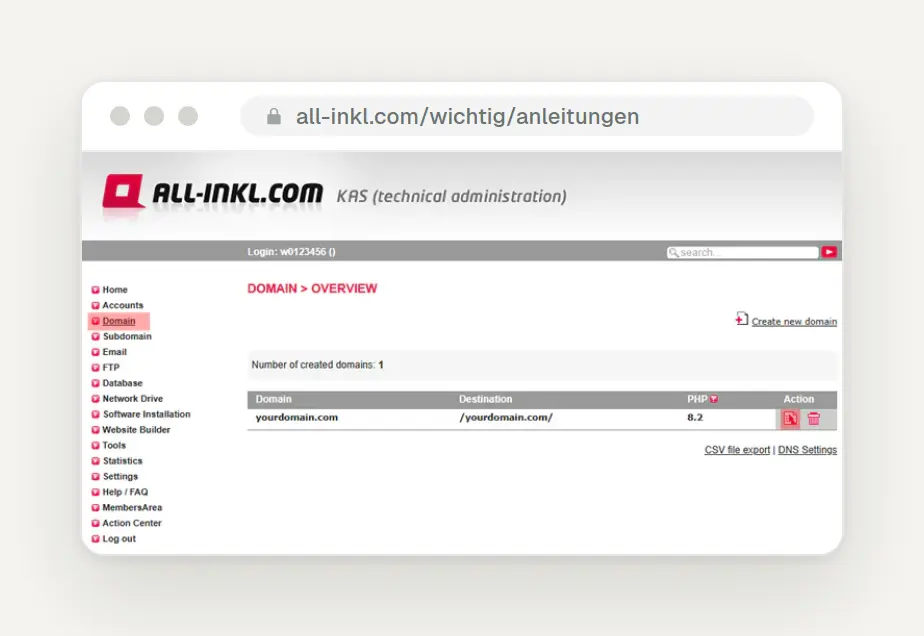
The domain overview in KAS shows the configured version in the "PHP" column—in this case, 8.2—with the edit icon to the right. English interface. Image: ALL-INKL Help
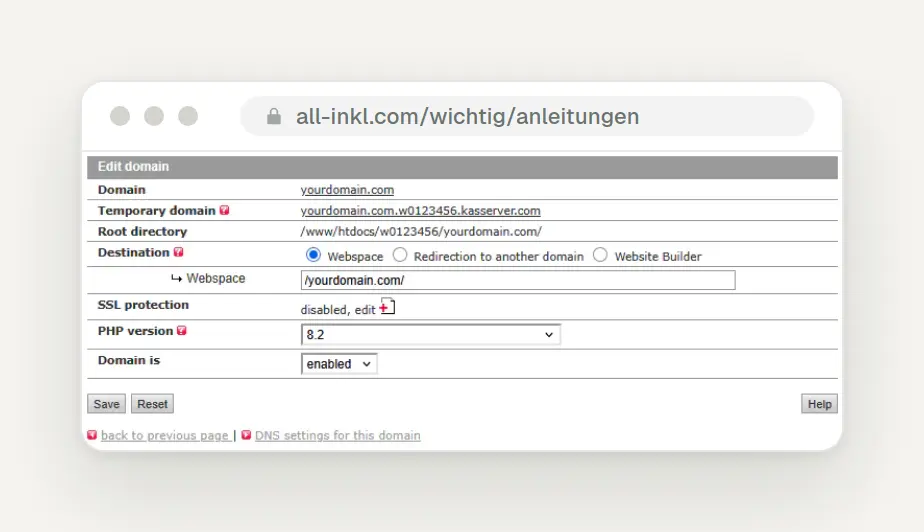
In the "Edit domain" window, select the new version under "PHP version" and save. English interface; the image still shows 8.2. Image: ALL-INKL Help
Also check the .htaccess file; it can override the KAS setting. The .htaccess file is a small configuration file located in the website's root directory. According to ALL-INKL, the PHP version can also be set there, and this setting takes precedence over the KAS. If nothing changes after the switch, this may be the reason.
Be sure to create your own backup beforehand, because ALL-INKL only provides backups upon request. According to ALL-INKL, the backups are not accessible from outside the system. Files are backed up approximately every 14 days; for databases, there is a backup from the previous day, one that is about 5 to 8 days old, and one that is about 9 to 12 days old. Export the database via phpMyAdmin and download the files via FTP.
Please send an email asking about your patch status, including your customer number and domain. The email address is support@all-inkl.com. You can reach ALL-INKL by phone at +49 35872 353-10, Monday through Friday from 8:30 a.m. to midnight and on weekends from 10 a.m. to 10 p.m.
If you're having trouble with IONOS, STRATO, or ALL-INKL, just send us a quick message, and we'll check your PHP version for free, review your host's response, and let you know if your theme and plugins can handle a switch.
Hetzner: Web hosting has been patched; you'll need to update the servers yourselves
If you use Hetzner for web hosting, just check your version. On the Hetzner status page, Hetzner announced on October 21 at 1:04 p.m. that it would apply patches as soon as they became available; at 4:34 p.m., Hetzner reported that it had begun the rollout immediately after the patches were released. At 7:50 p.m., the announcement read: “PHP versions 7.4 and 8.0–8.5 have been updated to patched versions on all web hosting and managed servers.” Versions 5.6 and 7.3 followed on October 22 at 6:32 a.m. Hetzner is notifying customers with dedicated and cloud servers separately via email; you’ll need to patch these servers yourself.
Here’s how to find the PHP settings in konsoleH. According to Hetzner’s German documentation, select your hosting name and click “Settings” on the left ; then select “PHP Configuration.” In the English version, the path is “Services” and “PHP Configuration.” The available versions are 8.5 through 8.0, as well as 7.4, 7.3, and 5.6. Even though Hetzner has patched the older versions, they no longer receive updates from the PHP project, so switch them to 8.3 or 8.4.
Be sure to back up your data beforehand; according to Hetzner, backups are retained for 14 days. In konsoleH, click on "Settings" on the left , then "Backup"; there you can restore files, emails, and databases—to a new directory if desired. The Hetzner documentation does not mention any additional charges for older PHP versions.
Technical support is available around the clock. Hetzner lists the number +49 (0) 911 234226-100 for this purpose, daily from 0 to 24.
Host Europe: Upgrade to 8.4 now, before the mandatory upgrade takes effect
Host Europe has been applying patches since the previous evening; the process is not yet complete. On its status page, Host Europe posted the following regarding Classic Hosting on October 22 at 10:00 a.m.: “Since 6:00 p.m. (CEST), the patches have been rolled out and activated on all affected systems.” According to Host Europe, the rollout for the cPanel plans Web Hosting and Web Hosting Plus began around 3:30 a.m.; the Managed WordPress plans are “already fully patched against these security vulnerabilities.” VPS customers must update their systems themselves and, according to Host Europe, were notified via email on the evening of October 21.
The reference pages already show the new numbers. The public reference pages that Host Europe links to in its help section showed 8.2.35, 8.3.36, and 8.4.27 when we checked them on October 22 at 9:11 a.m. This does not prove that every customer server is running this way, so check with Classic Hosting until Host Europe confirms that the process is complete.
Here's how to access the PHP settings in KIS. KIS is Host Europe's customer information system; according to the help section, the setting is located under Product Management > Your Product Area > Configure > Scripts & Databases> PHP Versions—that's exactly how Host Europe describes it. There, you can set the PHP version separately for each domain directory.
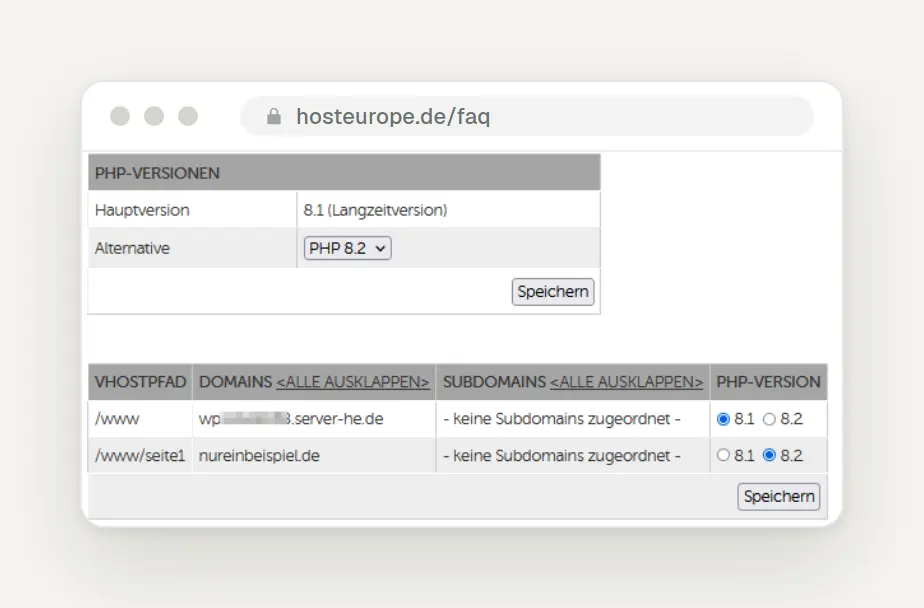
In the KIS, select the PHP version for each directory and save your changes. The help image shows an older version with 8.1 and 8.2; Host Europe now offers 8.2, 8.3, and 8.4. Image: Host Europe Help
Plan your switch now, because PHP 8.2 will be discontinued anyway. According to a notice from Host Europe, Host Europe will upgrade PHP 8.2 to 8.4 on November 9, 2026; you can roll back until December 7, 2026. According to Host Europe, the final deactivation on December 7, 2026, is irreversible. We were unable to find any paid extended support options for the classic hosting plan.
You can restore web space backups yourself; databases cost extra. According to Host Europe, data is backed up daily and retained for 14 days. You can restore your webspace via Product Management > Your Product Area > Configure > Restore & Backup > Webspace Restore, specifying the date, directories, and restore type. A database restore costs a one-time fee of €15, so be sure to back up the database yourself beforehand using phpMyAdmin.
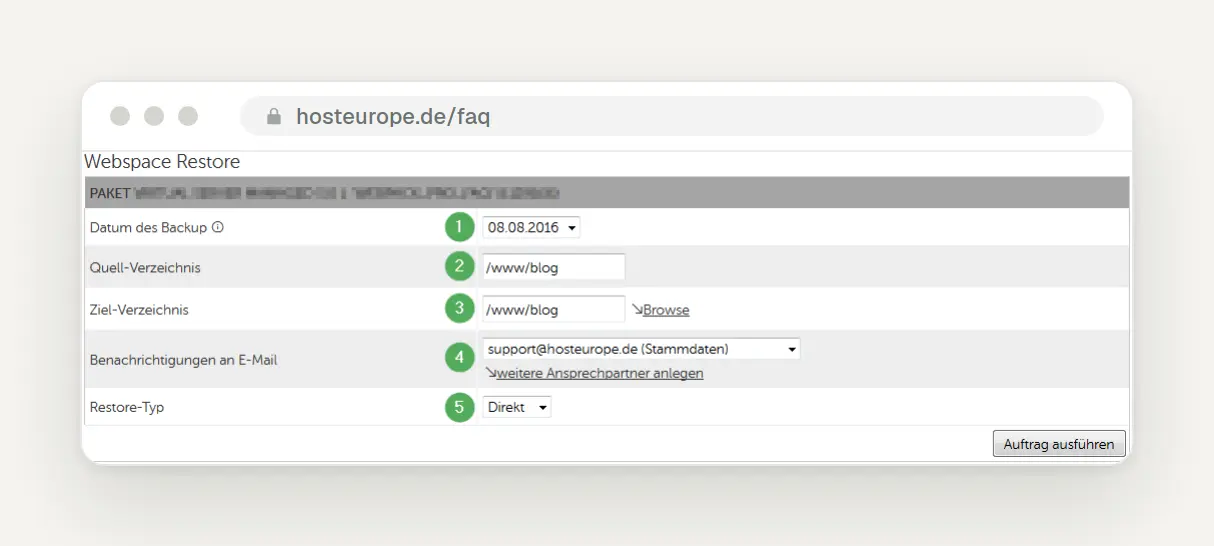
"Webspace Restore" asks for the date, directories, email, and restore type. The help image is from 2016, but the fields match the current instructions. Image: Host Europe Help
Submit your question as a ticket in KIS. Alternatively, you can email support@hosteurope.de. The contact page was unavailable during our research, so we are not listing any phone numbers.
netcup: patched, but the web hosting control panel was offline at times
With netcup web hosting, you don’t need to apply any patches—just check your version. According to netcup’s status page, netcup disconnected all potentially vulnerable systems from the Internet as a precautionary measure on October 21; patching began at 4:25 p.m. At 10:51 p.m., netcup reported: “All web hosting packages (including reseller plans) as well as all managed servers have been patched, secured, and are back online.” Only the web hosting control panel remained offline as a precaution; the status page indicates whether it is up and running again.
Here's how to find the PHP settings. According to the netcup Help Center, log in to the Customer Control Panel (CCP), go to "Products," and click the magnifying glass icon next to " Web Hosting." In the Web Hosting Control Panel (WCP), select the domain and click " PHP" under "Developer Tools " on the dashboard.
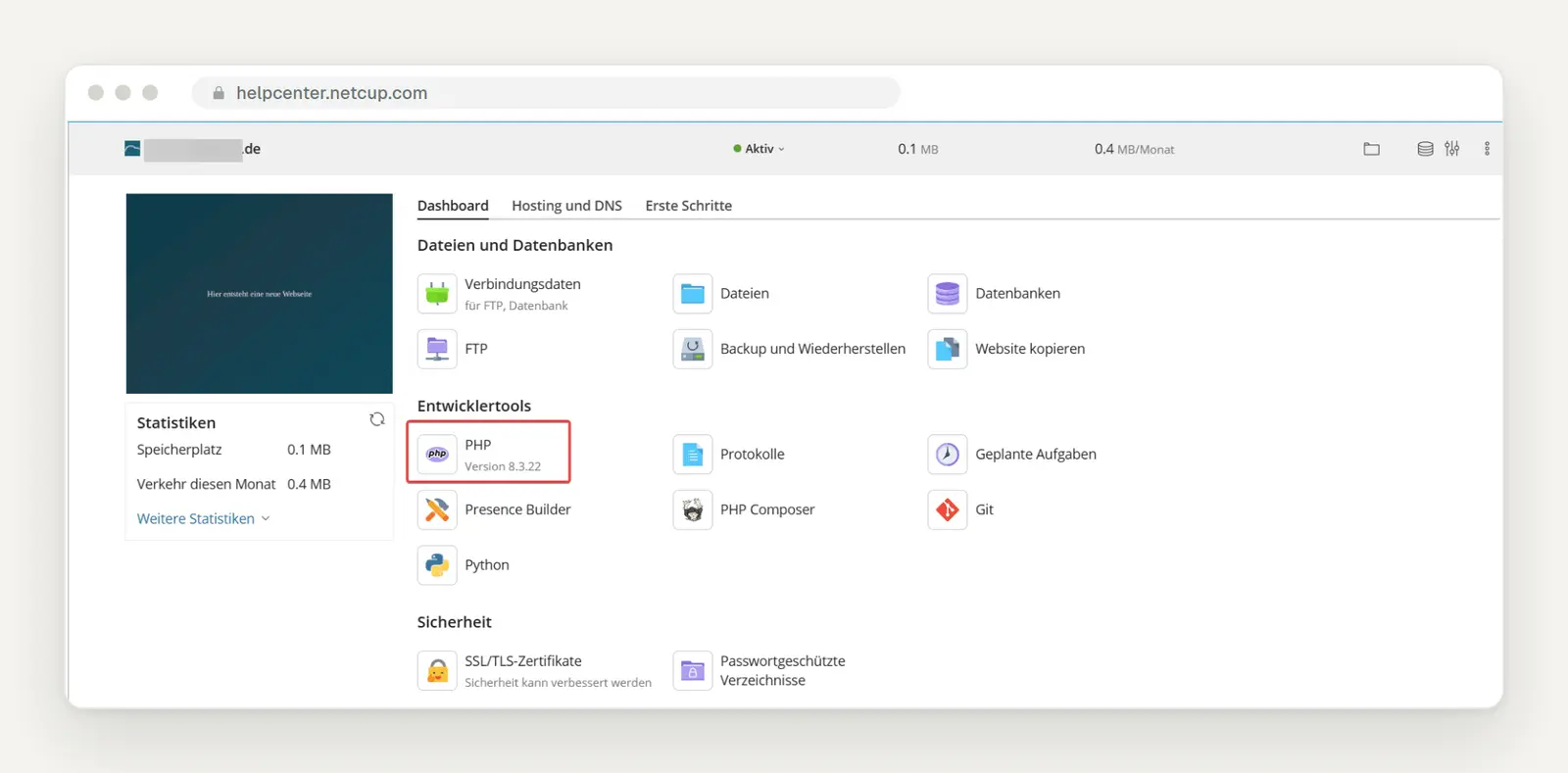
In the domain dashboard, the "PHP" tile under Developer Tools displays the version. The 8.3.22 shown in the help image is an older version; you'll see a different number. Image: netcup Help
Use the built-in phpinfo button. You can change the version in the drop-down list next to "PHP Support"; click "View the phpinfo() page" to see the details, so you don't need to create your own test file. According to netcup, versions 7.3 and later only run with proxy mode enabled, a web server setting found under Hosting and DNS > Apache and nginx > nginx Settings.
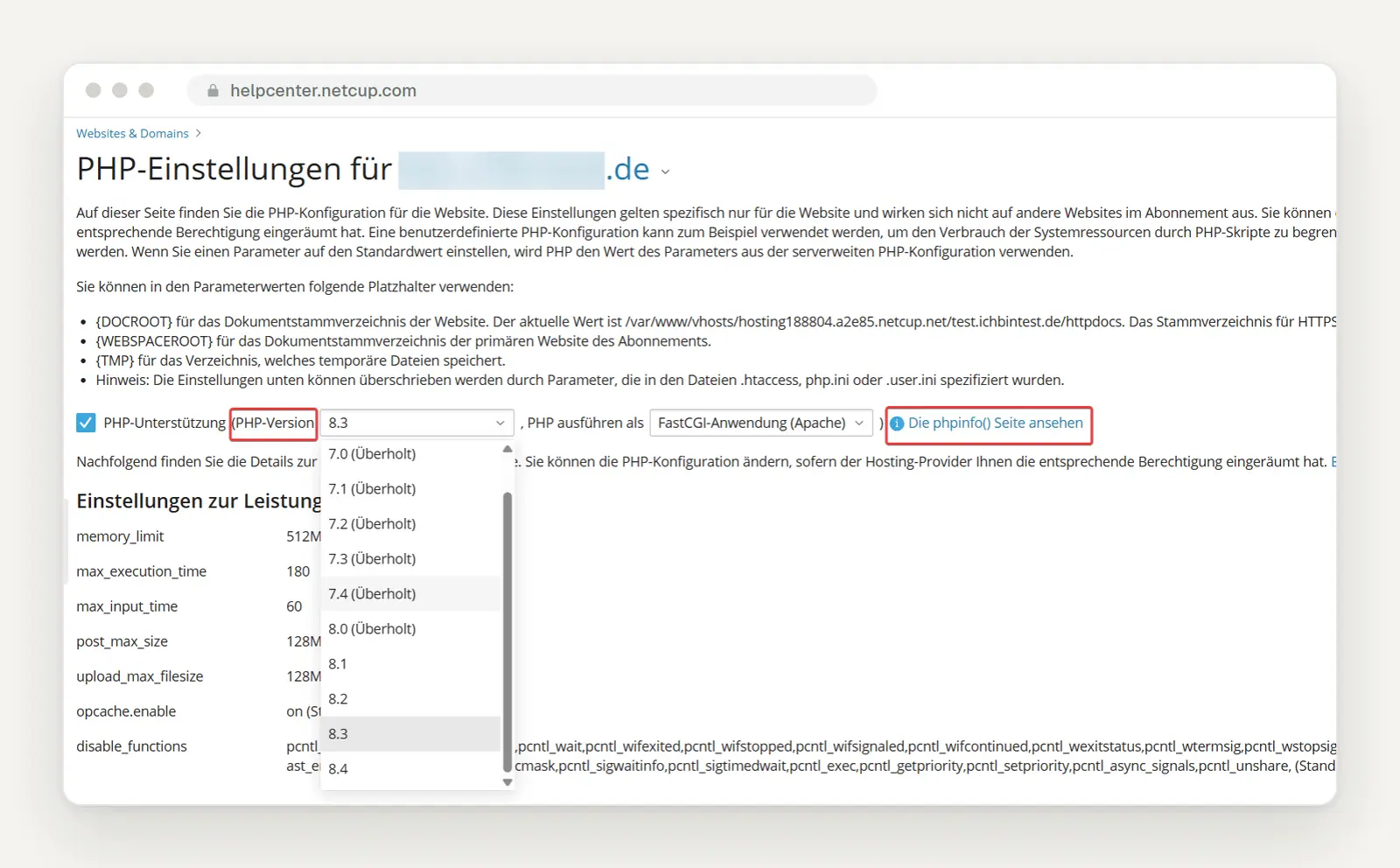
Next to "PHP Support," select the version; below that is a link to the phpinfo page. The list in the help image ends at 8.4. Image: netcup Help
Before making the switch, create your own backup if your plan allows it. According to netcup, the Backup Manager is available starting with the Webhosting 2000 plan: Under " Websites & Domains " in the dashboard, click " Backup and Restore " and then "Create Backup," select the content and type, and confirm by clicking "OK." According to the English help section, a restore performed by netcup is subject to a fee.
Call during business hours; there is a second number for emergencies. Netcup lists +49 721 754 0 755 0, Monday through Friday from 9 a.m. to 5 p.m.; for emergencies outside these hours, call +49 721 754 0 755 5.
World4You (Austria): Change PHP Version
Contact World4You in writing to inquire about the patch status. As of October 22 at 11:10 a.m., we have not found any public announcement regarding PHP2Shell on the homepage, blog, IT security page, or FAQ portal; there is no status page.
Here's how to change the version. According to the World4You FAQ, go to the customer portal at my.world4you.com, then navigate to Your Package > Webspace > Settings, where you'll see "Currently set PHP version:". In the "Updates available" section, select the version labeled "(recommended)" and click " Change PHP version."
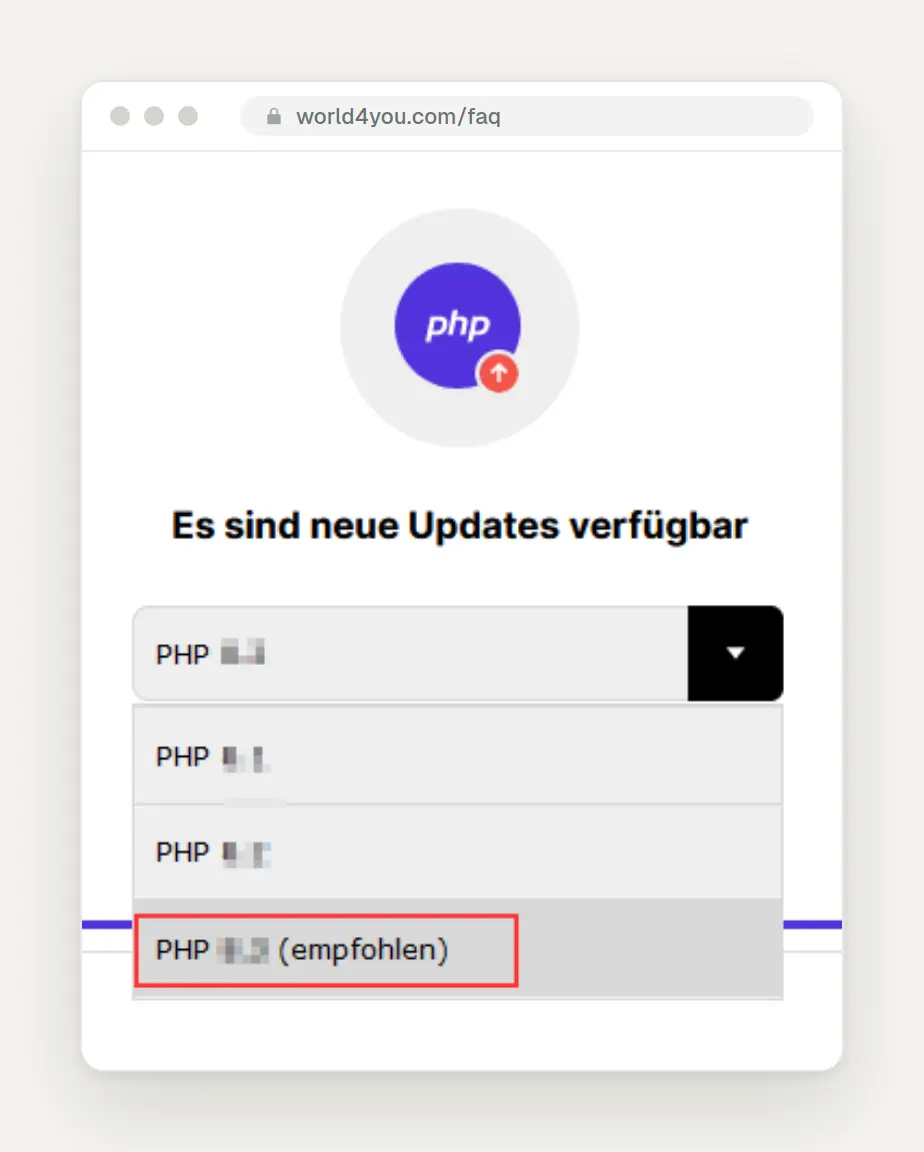
In the section listing available updates, the recommended version is highlighted. The small help image is from 2024 and shows pixelated version numbers. Image: World4You Help
Don't wait for World4You to make the switch for you. According to World4You, you decide for yourself when to start using a new version of PHP; there is no automatic upgrade. According to the FAQ, PHP 8.5 is available. Extended support for older versions of PHP comes at a cost, though the pages we consulted do not specify a price; upgrading to a current version is free.
Be sure to back up your data yourself beforehand, as automatic backups are performed at irregular intervals. According to World4You, web backups are created at irregular intervals. You can restore them under Your Package > Web Space > Backup in the “Web Backups” section by clicking “Restore Backup.” World4You warns that when restoring a database backup, the existing database will be deleted first.
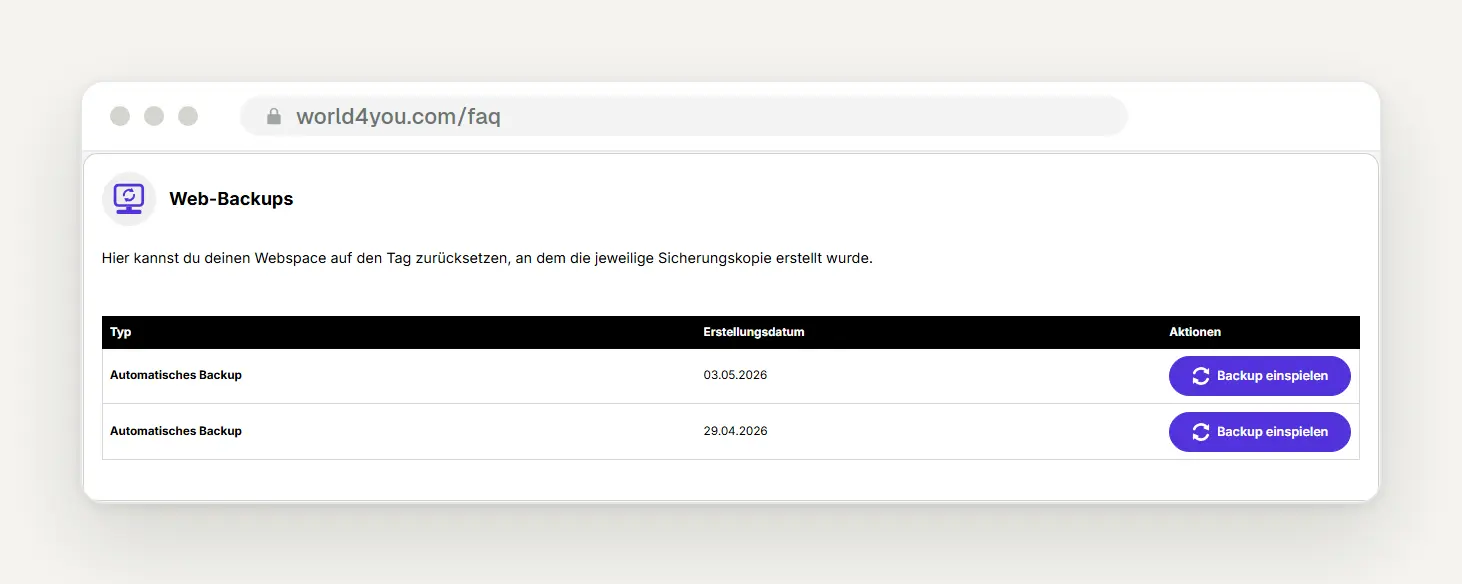
In the "Web Backups" section, you'll find the automatic backups along with the "Restore Backup" button. Image: World4You Help
You can reach support by phone or through the customer portal. World4You's phone number is +43 (0) 50 5859. You can also submit inquiries under "Your Package > Help / Support."
Hostpoint (Switzerland): PHP Version in the Web Settings
Check with Hostpoint to see the patch status and update to the latest version. As of October 22 at 11:10 a.m., we had not found any public announcement regarding PHP2Shell; the status page was unavailable when we checked.
Here's how to switch versions. According to Hostpoint Support , go to "Services" > "Open" Hosting > "Websites" > "Web Settings" for the relevant website, or alternatively via "Explorer" > "Web Settings for Current Directory." The options are “Default Version,” “Latest Version,” “Oldest Version,” and “(Apply)”; Hostpoint recommends “Default Version” or “Latest Version.”
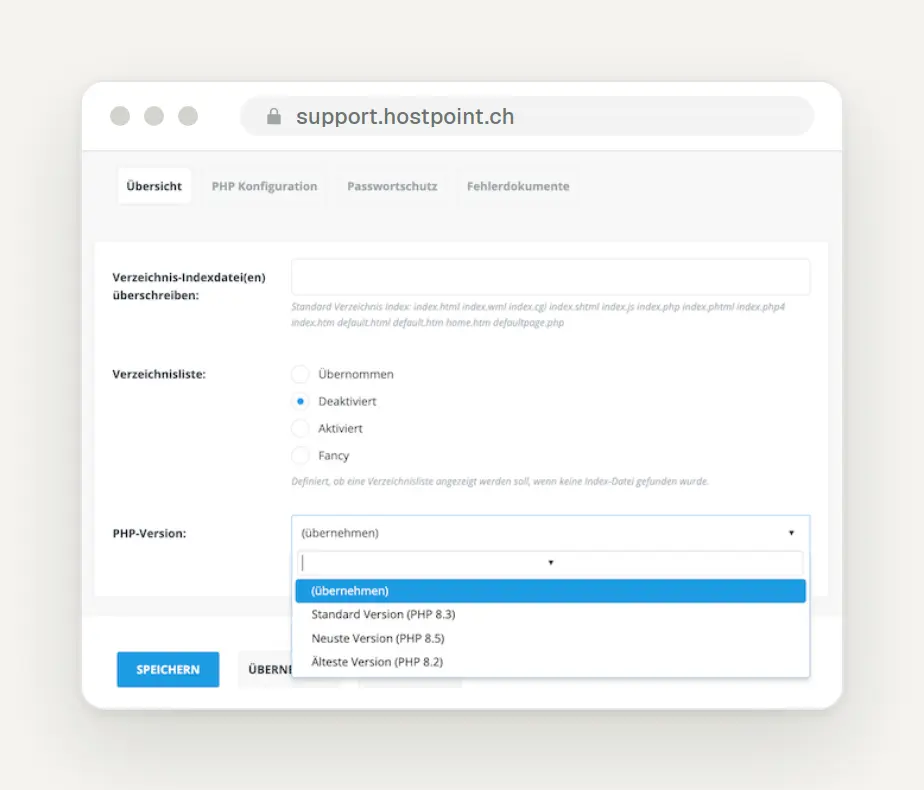
In the Web Settings, the drop-down menu in Help Figure 8.3 shows 8.3 as the default, 8.5 as the latest, and 8.2 as the oldest version. Image: Hostpoint Help
Switch away from PHP 8.1 while you still have the option to do so. According to Hostpoint’s support team, the company currently supports versions 8.1 through 8.5. Generally, versions remain available there for up to one year after their end of life and are then disabled; we were unable to find any paid extended support options.
Create your own backup point beforehand. According to Hostpoint, in the Control Panel, click “Advanced” > “Backup Manager” > “Server Backup,” select the archive type, and click “Start Backup”; the download will be available for 24 hours. You can back up databases separately under “Database Backup”; a disaster recovery service provided by Hostpoint costs CHF 100.
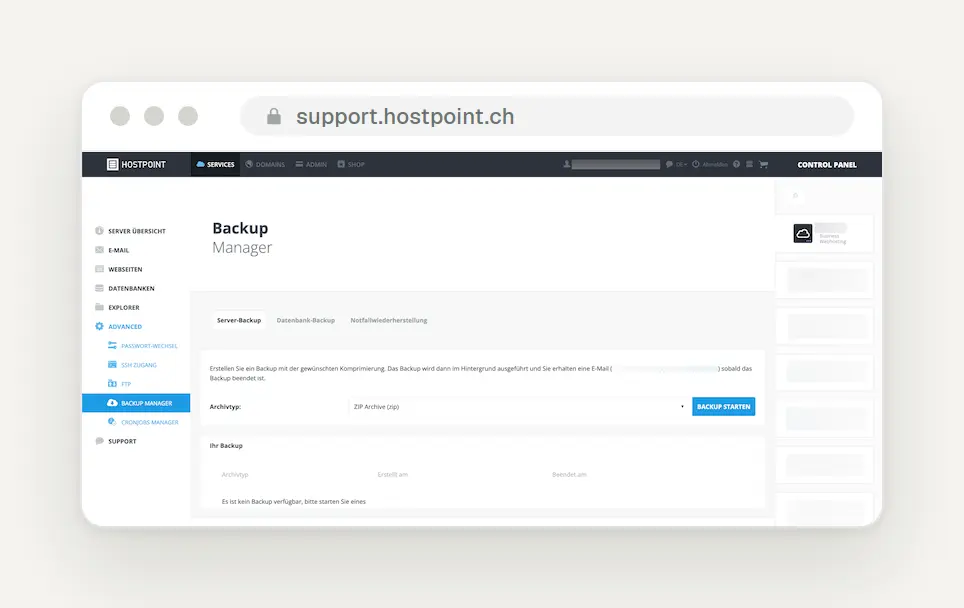
In Backup Manager, you can start your own backup under “Server Backup”; databases are managed via the adjacent tab. Image: Hostpoint Help
Call the hotline or send an email. Hostpoint lists the hotline number as 0844 040404, available daily from 8 a.m. to 6 p.m., and the email address as support@hostpoint.ch.
Hostinger: Secure, According to the Provider; Check the Version in hPanel
According to Hostinger, you don’t need to do anything on Hostinger’s managed plans, but you do on a VPS. On the Hostinger status page, Hostinger stated on October 21 at 5:44 p.m. UTC (7:44 p.m. German time) that tests had shown the platform was not vulnerable, but that they were rolling out patched PHP versions nonetheless. On October 22 at 3:34 a.m. UTC (5:34 a.m. German time), Hostinger reported that all cPanel servers had been updated. The Hostinger blog took a more cautious tone, stating that the attack code circulating online had not worked on their servers, that no action was required for any plan except VPS, and that sites running version 8.1 and older were also covered.
Don’t be surprised if the version number hasn’t changed—check the build date. On October 22 at 8:44 a.m., Hostinger announced that the update had been completed on all managed servers and noted that some websites would still show PHP 8.5.11 instead of 8.5.12; this was intentional because the fix had been incorporated into the existing version. According to Hostinger, you can check this under Websites → Dashboard → PHP Info: If the build date listed there is on or after October 21, 2026, the fix is included.
Here's how to change the version. The help is available only in English, so the German menu names may differ. Go to " Websites," click "Dashboard" next to your website, open "PHP Configuration," select the version, and click " Update." According to Hostinger, the version applies to all websites on your plan; the exact number is shown in the "PHP Info" entry in the sidebar.
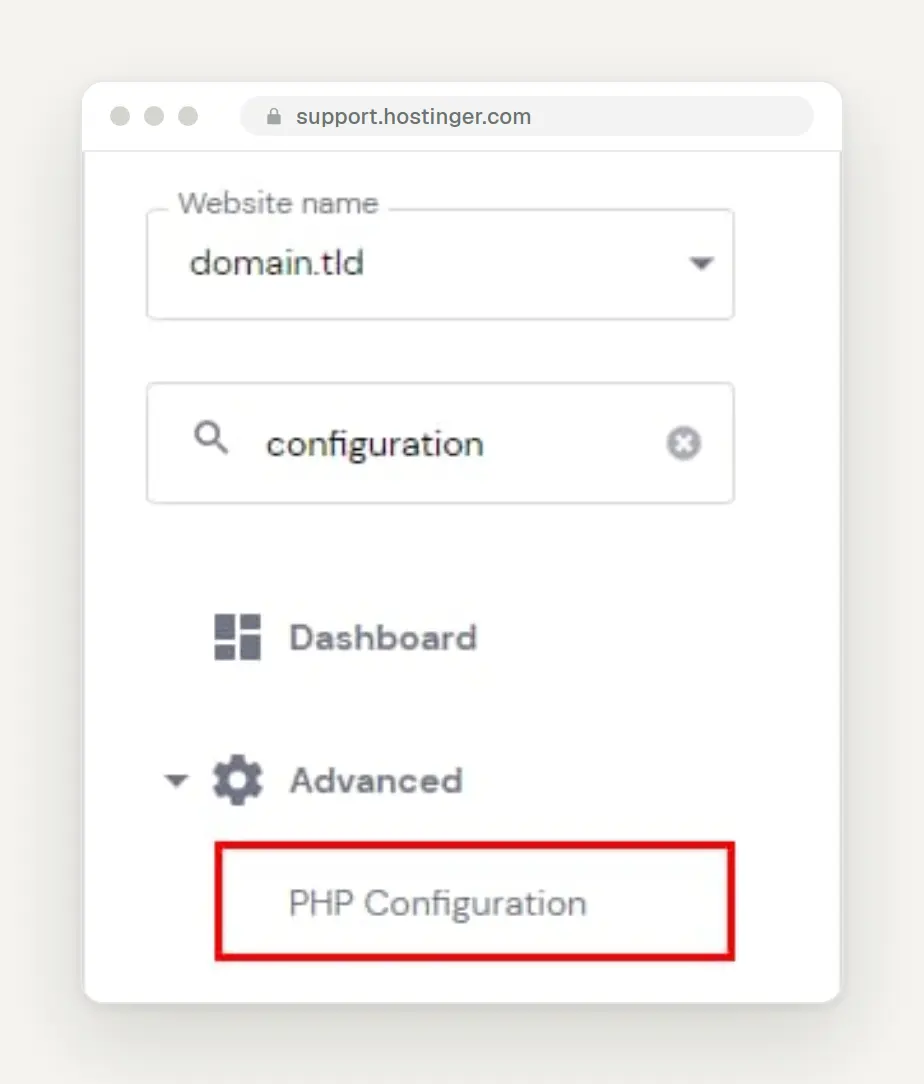
Use the search function in the hPanel sidebar to find the "PHP Configuration" entry. English interface. Image: Hostinger Help
Plan the change during a single session, because you can only go back for a short time. According to Hostinger, the only options are 8.2 through 8.5. According to the help section, you can only revert the change within the same login session, so be sure to test it before you log out.
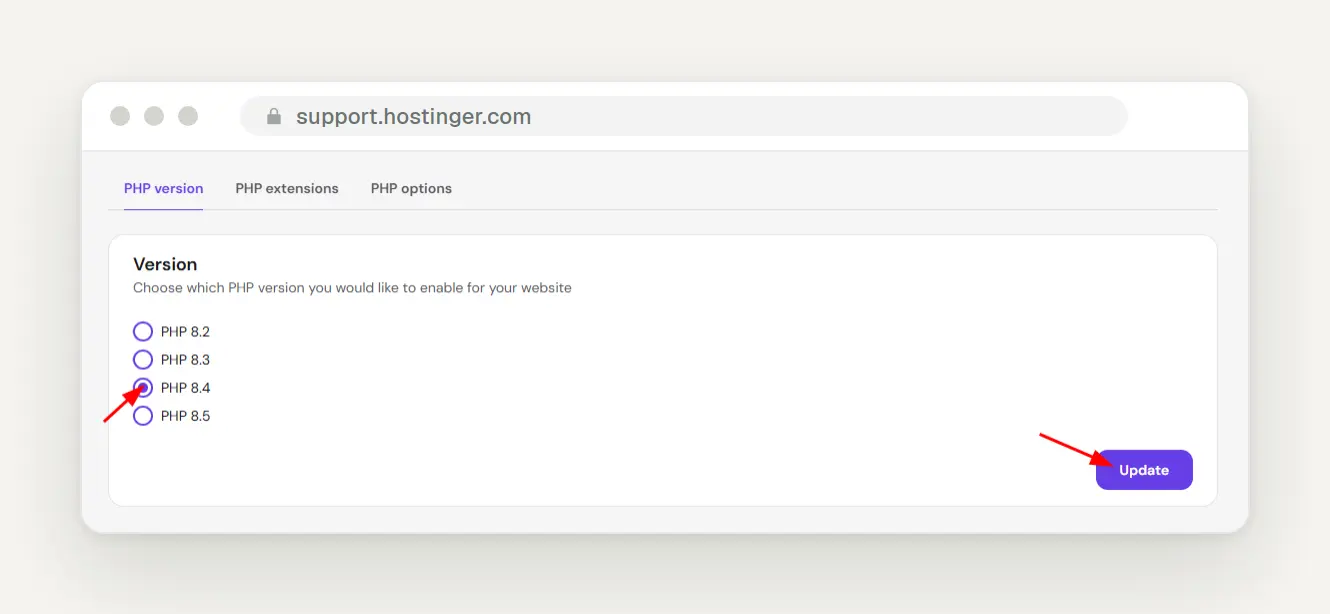
In the "PHP version" tab, you can choose between 8.2 and 8.5; click "Update" to save. The screenshot is from October 15, 2026, and is therefore up to date. Image: Hostinger Help
You'll find "Backups" in the sidebar, and support is available 24/7. Under "Backups" in the website dashboard, you can restore a website; according to Hostinger, the live chat in the dashboard is staffed 24/7.
Mittwald, domainFACTORY, webgo, dogado, checkdomain, and cyon at a glance
If you use one of these hosting providers, check their status page and then verify your version. Here is the public status as of October 22, 11:10 a.m.
Mittwald: patched. Mittwald shut down all systems on October 21 starting at 4:17 p.m.; according to the status page, the patches for versions 7.2 through 8.5 were rolled out by 10:52 p.m. At 12:28 a.m. on October 22, Mittwald reported the issue as resolved, with the exception of PHP versions below 5.6.
domainFACTORY: Patch is underway, including for older versions. On October 22 at 10:04 a.m., domainFACTORY stated that the patches were being rolled out on all affected systems, adding that “PHP versions prior to 8.2 will also receive the necessary security fixes through backporting.” According to domainFACTORY, Managed WordPress has already been fully patched; VPS customers must update their systems themselves, and as of 11:10 a.m., the process had not yet been completed.
webgo: mostly done. On October 22 at 2:06 a.m., webgo wrote: “We have successfully installed the security updates across our entire web hosting platform and on our dedicated servers.” webgo supports older versions through CloudLinux’s PHP Extended Support, which was still being rolled out at the time.
dogado and checkdomain: Patch announced or currently being implemented. dogado wrote on October 21 at 4:08 p.m. that they were preparing the installation with the highest priority; checkdomain reported on October 22 at 8:27 a.m. that a server restart would be necessary to complete the process, and that websites and email might be temporarily unavailable during that time. Both stated that customers did not need to take any further action regarding their web spaces; as of 11:10 a.m., neither had reported that the process had been completed.
WordPress.com and Kinsta: Secured. Automattic stated on October 21 that websites on WordPress.com, WordPress VIP, and Pressable were already protected, and that PHP is maintained at the infrastructure level there, not by customers. Kinsta reported on October 22 at 10:26 a.m. that the update had been completed for all versions from 7.4 through 8.5 and stated that there were no indications of any breaches.
cyon (Switzerland): Updates requiring a reboot are expected to continue through October 30. The cyon status page lists security updates requiring a reboot on all servers starting October 21, 2026. If you don't see any notification from your hosting provider, use the email template in the next section.
Send this email to your web host
Do not click on any links in emails that refer to the PHP vulnerability. IONOS explicitly warns that scammers are sending fake emails to steal login credentials and advises against clicking on any links in such emails or entering any login credentials. Instead, log in directly through your host’s website using the address in the customer menu—the one you typed in yourself or saved as a bookmark.
Write to the hosting provider instead of calling, so you have a written response. You can keep a copy of it and show it later, for example to customers, your insurance company, or if you have a data protection question. Replace the information in square brackets; the template uses the formal “Sie” form of address because most hosting providers use it.
Template: Email to the hosting provider (for copying)
Take note of the response and act accordingly. If the host confirms a patched version, the most important part is taken care of; if the response is vague, ask for a deadline for completion. If your old version is not secure, upgrade to 8.3 or 8.4 immediately.
If you'd rather not send an email or aren't sure how to respond, we'll handle the assessment for you free of charge, including a review of your PHP version, patch status, and any signs of a breach.
Still using PHP 8.1 or older? Upgrade directly to 8.3 or 8.4
Skip PHP 8.2 and go straight to 8.3 or 8.4. According to php.net, PHP 8.2 will only receive security updates until December 31, 2026; anyone who switches to 8.2 now will face the same task again in just over two months. The BSI states that all versions prior to 8.2 have reached end-of-life and that 8.2 will also only be supported until the end of the year; operators should therefore migrate to a version that is still supported.
Don't rely on Extended Support indefinitely. Some hosting providers have secured older versions—for example, Hetzner supports 5.6, 7.3, 7.4, 8.0, and 8.1, and Mittwald supports all versions starting with 5.6; for IONOS, STRATO, and World4You, there is no public information regarding paid older versions. The U.S. agency CISA advises taking systems running PHP 8.1 or older—which cannot be updated immediately—offline.
Before making the switch, check which version your system supports. According to its requirements page, WordPress recommends PHP 8.3 or higher; WooCommerce also recommends this and has been tested up to version 8.4. Joomla 6 requires at least 8.3; TYPO3 13 and 14 run on versions 8.2 through 8.5; and Contao and Shopware 6 recommend 8.4. Drupal 10 supports versions 8.1 through 8.4, but not 8.5; Drupal 11 runs on 8.3 and 8.4, and starting with version 11.3, it also runs on 8.5.
It’s worth taking a closer look at some shopping cart systems. Gambio specifies a maximum of PHP 8.3 for version 26.07.0, so 8.4 isn’t supported yet. The system requirements page for JTL-Shop 5 only lists 8.1 and 8.2 and appears outdated; check with the manufacturer or your service provider. Make a note of the target version before clicking in the customer menu.
If you want to know whether your theme and plugins are compatible with 8.3 or 8.4, we'll check for you free of charge and let you know which version is right for your website.
Here's how to switch PHP versions without taking the website offline
First, back up your files and database, and only then make the switch. In its guide to updating PHP, WordPress states that a backup allows you to restore the website if something goes wrong. Host-provided backups are no substitute for your own copy, because they are sometimes restored only upon request or for a fee.
A patch within your branch is usually non-critical. For a jump such as from 8.3.35 to 8.3.36, Laravel Forge—a server management tool—states that such patch updates typically shouldn't break anything. The jump from 7.4, 8.0, or 8.1 to a new branch is particularly critical.
Do not use the “PHP Compatibility Checker” plugin. Although the WordPress page on PHP updates still recommends it, according to the plugin directory, it is no longer maintained, has only been tested up to WordPress 6.4.13, and only checks up to PHP 8.0. It is therefore not suitable for 8.3 or 8.4. A better option is to create a test copy of the website—known in technical jargon as “staging,” which many hosting providers offer—or to ask your service provider for assistance.
Update the theme and plugins first, then test the key paths. Make the changes when traffic is low, and then visit the homepage, a subpage, the contact form, and—for online stores—the checkout process up to the point just before payment. Send yourself a test request using the form.
If a critical error occurs, use WordPress’s recovery mode. The message reads, “A critical error has occurred on this site.” WordPress will then send an email to the admin address with the subject line “[Site Name] Your site has a technical problem” and a secret link to the recovery mode. There, WordPress will temporarily disable the faulty plugin or theme for you; you can log in and deactivate it. The site will remain down for visitors until then, so act quickly.
If you can no longer access the dashboard, disable the plugins via FTP. According to the WordPress documentation, to do this, rename the wp-content/plugins folder to plugins_old; this will deactivate all plugins. Then rename it back and activate the plugins one by one until you find the culprit.
If necessary, revert only to another patched version. If 8.4 doesn’t work, 8.3.36 is the way back—not an unpatched 8.1. Keep in mind the hosting providers’ limitations: With STRATO, you can’t revert to an older version after logging out; with Hostinger, it’s only possible within the same session; and with Host Europe, you can only revert to 8.2 until December 7, 2026.
Checklist: Has anyone hacked your website yet?
After the update, check the areas where hackers typically leave traces. According to the BSI, there are no specific indicators of an attack involving PHP2Shell yet, and according to the PHP project, the absence of error messages is not proof of security. Therefore, perform a general check for compromise starting on October 17, the date Amazon reported the first attempted attack.
First: Check for unknown administrators. In WordPress, go to Users → All Users and filter by “Administrator.” The WordPress help section on hacked websites specifically mentions newly created users as a warning sign. Don’t delete an unknown account right away; instead, make a note of the name and date.
Second: Look for PHP files where they don't belong. The wp-content/uploads folder normally contains only images and documents; files with the .php extension do not belong there. Also check temporary folders such as cache and tmp for .php files that have been modified since October 17 and, according to WordPress Help, for changes to .htaccess, index.php, header.php, and footer.php.
Third: Check Google Search Console. In the “Security Issues” report, Google flags hacked content or malware on your website. For instructions on how to set up Search Console, see “How to Use Google Search Console Correctly.” Also, watch out for strange redirects or pages in foreign languages in the search results.
Fourth: Run a scanner, but don’t rely on it alone. The WordPress Help page mentions, among others, the Wordfence and Sucuri plugins; according to its own description, Wordfence compares core files, themes, and plugins with the originals. According to Sucuri, external scanners like Sucuri SiteCheck only check public pages and cannot reliably detect hidden backdoors.
Fifth: Ask your hosting provider to check the logs. According to the security firm CrowdStrike, as cited by the tech news site The Hacker News, the only clue is often a single memory error message in the error log—one that’s easy to overlook. Look for frequent messages such as “Allowed memory size … exhausted” and crashed PHP processes.
Sixth: Change your most important login credentials if you’re unsure. The co-discoverers at Wiz report that they demonstrated attackers could read passwords and API keys from PHP’s memory without executing any code. Therefore, after applying the patch, change your WordPress, database, and FTP login credentials, as well as the keys for connected services such as payment providers.
If you're unsure about anything, we'll check your website for signs of a security breach at no cost and then give you a clear assessment.
If Someone Was Inside: The Next Steps
Take the website offline and secure the evidence before you clean up. The “TOP 12 Measures for Cyberattacks,” published by the BSI in collaboration with partners for small and medium-sized businesses, first asks whether affected systems have been disconnected from the network and the Internet. If you’re using shared hosting, ask your hosting provider to take the website offline or display a maintenance page.
Protect your backups and save the logs. The BSI checklist asks whether backups have been protected from further access and whether log files and screenshots have been saved; WordPress Help recommends keeping a copy of the compromised state for reference. Wordfence recommends keeping the logs from at least 48 hours before the October 21 announcement until the patch is released.
Restore a clean backup from before the infection—but only after applying the patch. Choose a backup from before October 17 or before the first signs of the issue, because if PHP is still running unpatched, the vulnerability will reopen immediately after the restore. After that, according to the WordPress Help Center, change all access credentials—including FTP, WordPress admin, the hosting control panel, and the database—and regenerate the security keys in wp-config.php. Additionally, set up two-factor authentication, as recommended by the BSI list.
Notify your hosting provider and, if necessary, the police and relevant authorities. With shared hosting, more than just your website may be affected, and the BSI checklist asks whether the police and relevant authorities were notified after consultation. If Google flags your website as dangerous, request a review in the “Security Issues” report after you’ve resolved the issue.
Check whether the reporting requirement under Article 33 of the GDPR applies within 72 hours. If personal data is affected—such as customer data in the online store or saved form submissions—the controller must report the breach to the supervisory authority “without undue delay and, where feasible, within 72 hours” of becoming aware of it, in accordance with Article 33(1) of the GDPR. An exception is made for a breach that “is unlikely to result in a risk to the rights and freedoms of natural persons”; any delayed notification must be justified. According to paragraph 5, you must document every breach, including those that are not reported.
In cases of high risk, the data subjects are also notified. Article 34(1) of the GDPR requires that data subjects be notified “without undue delay” if a high risk to them is likely to occur. This is not legal advice; if in doubt, seek advice early on from your data protection officer or an attorney, as the 72-hour period begins when you become aware of the situation.
Legal Considerations: GDPR, “State of the Art,” and NIS2
Treat the PHP update as part of your obligation to protect customer data. Article 32(1) of the General Data Protection Regulation requires every controller to implement appropriate technical and organizational measures, “taking into account the state of the art,” “to ensure a level of security appropriate to the risk.” According to subparagraph (c), this also includes rapid recovery following a technical incident—that is, functioning backups—and this applies to any business that processes personal data on its website.
The idea that well-known critical updates are considered “state of the art” is a common interpretation, not the actual wording of the law. In this case, however, the BSI has made it clear that measures must be taken “immediately.” Anyone who leaves such a vulnerability unpatched for weeks will have a hard time explaining why that was appropriate.
Document what you have done. Under Article 82(1) of the GDPR, any person who suffers damage as a result of a violation may claim compensation. A recorded patch status and the host’s response will demonstrate, in the event of a serious incident, that you took action.
NIS2 does not directly affect most small businesses. According to expert sources, the German NIS2 Implementation Act has been in effect since December 6, 2025, and, pursuant to Section 28 of the BSIG, applies to companies in certain sectors with 50 or more employees or with annual revenue and total assets each exceeding 10 million euros. A typical small business in the skilled trades that falls below these thresholds is generally not subject to NIS2; only certain types of providers, such as telecommunications providers, are in some cases covered regardless of their size. Clarity is provided by the BSI self-assessment test at betroffenheitspruefung-nis-2.bsi.de; the GDPR applies to everyone regardless of this.
For Professionals: How to Properly Patch Your Own Server, VPS, and Docker
This section is intended for anyone who runs their own server, VPS, or container. Our guide, “Terminal for Non-Developers,” explains the basics. The BSI recommends checking the patch status using `php -v` and, for distribution packages, verifying that it matches the patched backport version.
Check every installation, including test environments and side projects. That’s exactly what happened to us: While we were working on this post, `php -v ` on our own server still showed 8.2.34. PHP 8.3.35 and 8.2.34 from Ondřej Surý’s package repository were running there; after running `apt-get install --only-upgrade ` and restarting PHP-FPM, versions 8.3.36 and 8.2.35 were running on the morning of October 22. So even an agency can overlook its own side projects, and every installation counts—even the test environment that no one has touched in months.
Debian and Ubuntu: Check the package version, update specific packages, and restart services. The commands are taken from the guide by expert author Mattias Geniar dated October 21; replace 8.3 with the version you have installed. According to Geniar, for mod_php, the libapache2-mod-php8.3 package must also be included in the upgrade command, and simply reloading Apache is not enough—you must restart it.
Commands for Debian and Ubuntu (Example: PHP 8.3):
Compare with the patched package versions of the distribution. According to the Debian Security Tracker, PHP 8.2 in Debian 12 is patched starting with version 8.2.35-1~deb12u1, and PHP 8.4 in Debian 13 is patched starting with version 8.4.27-1~deb13u1. Ubuntu lists php8.3 8.3.6-0ubuntu0.24.04.13 for 24.04 LTS, php8.1 8.1.2-1ubuntu2.28 for 22.04 LTS, and php8.5 8.5.4-0ubuntu1.5 for 26.04 LTS. Ubuntu 20.04 and earlier versions can only get the fix through Ubuntu Pro.
The Ondřej package repository provides the official versions. According to Launchpad, versions 8.2.35, 8.3.36, 8.4.27, and 8.5.12 were released there on October 21 at 2:45 p.m. UTC. There is no evidence that the 7.4, 8.0, and 8.1 packages, which were rebuilt on the same day, include the backport.
AlmaLinux and RHEL-based distributions: Update via dnf; do not rely on `php -v`. According to its own blog, AlmaLinux has rolled out patched packages for all PHP streams in versions 8, 9, and 10, including those that are no longer supported. Because the fixes have been backported, AlmaLinux recommends checking with `rpm -q php-common `. According to the PHP project, users of the Remi package repository should switch to distribution packages because Remi did not have any updates as of October 21.
Commands for AlmaLinux (according to the AlmaLinux blog):
FrankenPHP: Upgrade to version 1.13.2. According to the release notes dated October 21, the Docker images and static program files for FrankenPHP 1.13.2 are built using the patched PHP versions; this version also addresses four vulnerabilities of its own. Users who rely on FrankenPHP as an image or a standalone program file will not be able to resolve the issue by simply updating the system packages.
Docker: Pull a new image, rebuild it, and create a new container. According to the BSI, applications in Docker containers must be updated or rebuilt independently of the server. According to Docker Hub, patched tags such as 8.2.35-fpm, 8.3.36-apache, 8.4.27-fpm, and 8.5.12-fpm have been available since October 21. Stay away from 8.5.12RC1 and 8.4.27RC1; according to Geniar, they do not include the fix.
Commands for Docker (the Compose line is a common example, not a direct quote from the source):
Plesk: Check the build date, not just the version number. According to Plesk Help, versions 8.5.12, 8.4.27, 8.3.36, and 8.2.35 have been patched; for 8.1.34, 8.0.30, and 7.4.33 on Linux, the packages built on October 21, 2026, with the same version number are affected; there is no fix for 5.6, 7.2, and 7.3. You can check this using `/opt/plesk/php/8.3/bin/php -v`—the build date must show October 21—or under Tools & Settings > PHP Settings. Updates can be performed via Tools & Settings > Updates or ` plesk installer --select-release-latest --upgrade-installed-components`, which are named accordingly in the German interface.
cPanel: Update EasyApache 4 to version 25.91. The change log from October 21 lists patched packages ea-php82 through ea-php85, as well as backports for ea-php74, ea-php80, and ea-php81; we were unable to find an official update command.
Use emergency settings only as a temporary measure—and apply them all at once. If the patch cannot be applied immediately, the BSI advises considering a temporary disconnection from the Internet; otherwise, at the very least, implement the workarounds provided by the PHP project. `session.upload_progress.enabled=0 ` belongs in `php.ini`, the FPM pool, or the server configuration—not in `ini_set() ` or an FPM`.user.ini`—and all workers must be restarted afterward. According to PHP, this only blocks the confirmed session paths associated with CVE-2026-109619; it does not help against CVE-2026-109618.
Emergency settings according to the PHP project (enter these in the php.ini file; in the FPM pool, use php_admin_value instead; then restart all workers):
To address CVE-2026-109618, PHP relies on memory limits and smaller requests. According to PHP, setting `memory_limit=-1` only removes the configurable memory limit; a memory shortage at a deeper level can still exploit the vulnerability. Do not explicitly replace the limit with `RLIMIT_AS` or `RLIMIT_DATA`, as these values can trigger the error. According to PHP, it may still be advisable to keep `session.upload_progress` disabled even after applying the patch if you do not need the feature.
Don't rely on scanners that only check the version number. For example, according to its description, Tenable's Nessus plugin 369483 does not check for the vulnerability itself, but only the version number reported by PHP. For distributions and hosting providers that incorporate the fix into the old version number, such scanners will therefore trigger false positives. Also, keep in mind other PHP applications on the server: The CERT-Bund advisory WID-SEC-2026-4055 lists Matomo and Checkmk, among others.
Monitor the processes and harden the server. CISA advises keeping an eye out for PHP workers that launch shells or download tools such as curl or wget. Review logs dating back to October 17, check crontabs and new user accounts, and, according to the BSI’s recommendation, configure SELinux or AppArmor where possible.
What We Really Know: Resolving the Contradictions
Stick to the primary sources, because many reports contradict each other. Here is the reliable information on the most common discrepancies.
Attacks: Attempts, yes; a confirmed breach of a live system, no. Amazon reported an attempted attack on a decoy system on October 17 and stated on the night of October 22 that PHP2Shell was being widely exploited, though it was unclear whether the attempts had succeeded on live systems. At the time of publication, CISA had not observed any exploitation; the BSI states that reports of attacks have not been verified but expects exploitation to occur in the near future. As of 11:10 a.m., no successful breach of a live system had been publicly confirmed anywhere; heise reported that morning that there were no reports of successful attacks. This is no reason to let our guard down.
The number of attack attempts is high, and a successful attack has been confirmed. According to Reuters, Cloudflare CEO Matthew Prince reported millions of attack attempts shortly after the vulnerability was disclosed. The security firm VulnCheck reports that, since 7:30 a.m. on October 22, it has observed a working attack that succeeds even on normally configured servers with the recommended security settings—though this information is accessible only to its own customers. According to VulnCheck, however, the more than 300 public sample programs on GitHub do not bypass this protection; an official module for the widely used Metasploit attack tool is currently available only as a draft. You should never execute third-party code from such collections yourself—according to Tenable, it may contain malware.
Older versions: Affected since at least PHP 5.4; according to the BSI, possibly all versions starting with PHP 5. Citing CERT-EU, the EU institutions’ IT incident response team, the BSI states that all known versions up to at least PHP 5 are vulnerable; the co-discoverers at Wiz cite versions dating back to 5.4. The PHP project’s CVE entry lists only versions 8.2 through 8.5 because end-of-life versions are not formally assessed there—not because they are secure.
Severity: 9.2, 9.8, and 8.1 represent different measurements. The CVSS score is a scale from 0 to 10 that measures the severity of a vulnerability. The PHP project assigns a score of 9.2 based on CVSS version 4.0; the U.S. NVD database assigns a score of 9.8 based on the older version 3.1; and Red Hat assigns a score of 8.1 because an attack on PHP-FPM is difficult in practice. According to the PHP Foundation, the score of 10.0 from the October 20 leak is incorrect.
7.4 through 8.1: No release, but fixes in the source code. The PHP Project and BSI mention source code backports for 7.4, 8.0, and 8.1, while the AWS security bulletin states that there is no fix for versions 5.4 through 8.1. Both statements are correct if you interpret “fix” as a finished release, since no such release exists.
Timing and BSI number: two small pitfalls. The release was announced for 4:00 p.m. German time; the security advisories on GitHub are timestamped at 3:34 p.m., and according to the PHP Foundation, it was originally scheduled for October 22. The BSI warning’s URL includes the number 2026-297981-1032, while the PDF itself lists 2026-297981-1132; both refer to the same document.
Frequently Asked Questions About PHP2Shell
Is my website on Wix, Jimdo, Squarespace, or Framer affected? You can’t apply any patches yourself because the provider operates the servers. As of 11:10 a.m., we haven’t found any public statements regarding PHP2Shell from Wix, Jimdo, Squarespace, or Framer. For IONOS, it’s confirmed that the MyWebsite 8 website builder uses PHP and has already been patched. If you’re unsure, check with your provider; otherwise, there’s nothing you need to do.
If I’m not using WordPress, how can I tell if my website uses PHP at all? The safest bet is to ask your hosting provider or the service provider who built the website. If it runs on Joomla, TYPO3, Contao, Shopware, Drupal, Magento, or a shopping cart platform like Gambio or JTL, it uses PHP. Some servers also indicate PHP in the “X-Powered-By” technical header; the PHP manual describes this entry, but many hosting providers disable it, so the absence of this entry doesn’t necessarily mean anything.
My hosting provider is still showing the old version number. Am I vulnerable? Not necessarily. Netcup, Hostinger, and several Linux distributions have incorporated the fix into the existing version without changing the version number. Check the build date on the phpinfo page if your hosting provider describes it that way, or ask for written confirmation of the patch status.
An online scanner is flagging my website as vulnerable. Is that true? Not necessarily. Many scanners only check the version number; Tenable’s Nessus plugin, for example, explicitly states this in its description. For hosting providers with built-in remediation, this is a false alarm—the hosting provider’s response carries more weight than the scan result.
I received an email with a link about the PHP vulnerability. Is it real? Be wary. IONOS is warning about fake emails that cite the PHP vulnerability in an attempt to steal login credentials. However, there are also legitimate notifications—Host Europe, for example, emailed its VPS customers on the evening of October 21. Under no circumstances should you click on the link; instead, log in to the customer portal yourself and check there.
Is PHP 7.4 also affected? Yes. According to the researchers who discovered the vulnerability, the affected versions go back to at least 5.4; the BSI even considers all versions starting with PHP 5 to be vulnerable. For versions 7.4, 8.0, and 8.1, fixes are available only in the source code, which Hetzner, Mittwald, domainFACTORY, and Kinsta have reportedly implemented. The safest option remains upgrading to 8.3 or 8.4.
Do I have to report the vulnerability if nothing happened? As far as we understand, no. The reporting requirement under Article 33 of the GDPR applies in the event of a personal data breach—that is, if someone has actually gained unauthorized access or data has been leaked. As of 11:10 a.m., no data protection authority had specifically commented on PHP2Shell; if in doubt, ask your data protection officer.
Who’s responsible for this—me or my agency? That depends on your contract. Without a maintenance contract, the agency that built your website usually won’t take care of the server on its own; in that case, the hosting account is in your name. Clear this up today with a quick message so that neither of you ends up relying on the other.
Conclusion: What you'll be doing today, this week, and through the end of the year
Today: Check the version and contact your hosting provider. Get the full PHP version number from the Site Status page in WordPress or via a phpinfo file, which you should delete afterward. Compare it with 8.2.35, 8.3.36, 8.4.27, and 8.5.12, and read the status message from your hosting provider. If you don’t find a message or see an outdated version number, send the email template.
This week: Move away from older versions and check for any issues. If your website is running on version 8.1 or older, make a backup and upgrade to 8.3 or 8.4—not 8.2. Then go through the checklist: administrators, PHP files in the upload folder, Search Console, scanners, and logs from your hosting provider. Cancel any Extended Support plans you no longer need.
By the end of the year: Upgrade from 8.2 and set up routines. Anyone currently on 8.2 must upgrade to 8.3 or 8.4 by December 31, 2026; Host Europe will handle the upgrade on November 9, 2026. Set up your own backup and enable “Automatic Updates” for plugins and themes. If you don’t want to handle this yourself, you can delegate it to a website maintenance service.
What Has Changed and What That Means for You
October 17, 2026: Amazon detects the first attempted attack on a decoy system. For you, this means: Check your files and logs starting on October 17—not just starting on the 21st.
October 20, 2026: The catalog numbers leak around 5:00 p.m. German time with an incorrect time and an incorrect score of 10.0; the PHP project moves up the release by one day. For you, this means: Reports citing “CVSS 10” are based on the leak, while the PHP project itself assigns a score of 9.2.
October 21, 2026, afternoon: PHP releases versions 8.2.35, 8.3.36, 8.4.27, and 8.5.12; the BSI issues a “3 / Orange” alert; CISA calls for immediate patching; netcup and Mittwald take their systems offline as a precaution. For you, this means: If your website was briefly offline on October 21, it may have been a protective measure taken by your host; check the list above anyway.
October 21, 2026, evening, through October 22, 2026, early morning: Hetzner, netcup, Mittwald, webgo, and Hostinger report that their systems have been patched; Amazon reports widespread attack attempts; IONOS states at 6:53 a.m. that they are continuing to work on the issue. For you, this means: For the hosts that have completed the update, all that’s left is to verify the version; for IONOS, check again later today.
October 22, 2026, 7:30 a.m. to 8:44 a.m.: VulnCheck reports a successful attack even against normally configured servers; Hostinger announces the resolution and explains why the version number can remain the same. For you, this means: Don’t wait—if the version number is the same, check the build date or the host’s statement.
October 22, 2026, 10:00 a.m. to 10:26 a.m.: IONOS reports that its systems are stable and states in its Newsroom that customers on its own platforms do not need to take any action; Host Europe and domainFACTORY report that Managed WordPress has been patched and that the rollout is ongoing for other hosting services; Kinsta reports that the process is complete. For you, this means: With IONOS, the version check remains in place; with Host Europe and domainFACTORY, wait for the completion notice or inquire.
October 22, 2026, 11:10 a.m.: We still haven’t found any public announcements regarding PHP2Shell for STRATO, World4You, and Hostpoint; ALL-INKL has not reported a resolution. The BSI warning, patches, and status of confirmed breaches remain unchanged. For you, this means: With these hosting providers, sending a written inquiry is the safest approach. As of this version: October 22, 2026, 11:10 a.m.
Would you like us to check your website for PHP2Shell for free?
Send us your domain, and we’ll check whether your website is secure. We’ll verify which version of PHP is actually running, what your host’s response regarding the patch status means, whether your theme and plugins are compatible with an upgrade to 8.3 or 8.4, and whether there are any signs of a breach—all free of charge and with no obligation. Reach out to us via the contact form; just a quick note with your website address is all it takes. We’ll respond within 24 hours, personally and without any sales pitch.
More Articles
© Marschfahrt Studio
Practical knowledge on web design, SEO, AI, and conversion optimization. Based on real projects, without any marketing spin.