How Much Does Google Ads Cost? Click Prices, Budgets, and Agency Fees for 2026, Based on Real Numbers
How much a click on Google costs in your industry, how much budget you should set aside, and what other costs are involved besides advertising: featuring Keyword Planner data for 18 search terms, a sample calculation, and a checklist.
Date
Category
Author

“How much does Google Ads cost?” is one of the questions we hear most often during our initial consultation, and the most honest answer may sound unsatisfying at first: it costs as much as you set it to. Google doesn’t charge a base fee or a fixed price. You pay per click, and the price per click is determined through an auction that takes place anew with every single search.
Still, we can give you a pretty accurate idea of what to expect. For this post, on October 12, 2026, we checked the bids for 18 typical search terms from the trades, services, and energy sectors in Google’s Keyword Planner, analyzed the campaign data from the Google Ads accounts we manage, and reviewed all the rules regarding budgets, billing, and taxes in the German Google Ads Help Center. By the end, you’ll know roughly how much a click costs in your industry, how much budget you should plan for, and where your money is slipping away unnoticed.
In a nutshell (as of October 12, 2026)
In Germany, a click on a Google ad costs between about 70 cents and 17 euros, depending on the search term. Searches where someone is just looking for information are inexpensive, while emergency services, lawyers, and solar energy inquiries are expensive. You set your own budget: Google can spend up to twice the daily budget in a single day, and no more than 30.4 times the daily budget in a month. So if you set a daily budget of €20, you’ll pay a maximum of €608 per month. For a local business in a competitive industry, that translates to roughly 100 to 200 clicks. Whether any of those clicks result in an inquiry depends primarily on your landing page. Hiring an agency incurs additional costs; Google itself doesn’t charge anything for managing your account.
How the Cost Per Click Is Calculated
Every search triggers an auction, and winning it isn’t just about money. Google calculates an ad rank for each relevant ad. According to Google Ads Help, this ranking is “essentially” based on six factors: your bid, the quality of your ad and landing page, the minimum thresholds for ad delivery, the competitiveness of the auction, the context of the search (location, device, time of day), and the expected impact of extensions such as a phone number or sitelinks. The ad with the higher ranking appears higher in the results.
You don't pay your bid; you only pay as much as you need to beat the next bidder. The bid is your maximum amount. The help section notes that you’ll often be charged “less, sometimes even significantly less,” because you’ll pay no more than the amount necessary to outbid the competitor directly below you. If there’s no one below you, you’ll pay only the minimum price. Exceptions apply when automatic bid adjustments are enabled.
Better ads make clicks cheaper. Google itself states: “Overall, higher-quality ads typically result in lower costs and greater advertising success.” An ad that closely matches the search query and leads to a page that delivers on its promises can therefore outrank an ad with a higher bid.
The Quality Score is an indicator on the dashboard, not the engine. Many guides explain that Google factors the Quality Score (a number from 1 to 10 per keyword) directly into the price. The Help Center says otherwise: “The Quality Score is not taken into account in the ad auction. It serves as a diagnostic tool.” What does factor into the auction is the quality at the time of the respective search. The Quality Score only shows you in retrospect where the problem lies: with the expected click-through rate, the ad’s relevance, or the landing page. Each of these three components is rated as above-average, below-average, or average, compared to other advertisers who have run ads for the same search in the last 90 days.
The top spots are more expensive. According to Google, the minimum ad rank—and thus the actual cost per click—for positions above the search results is “generally higher.” If you absolutely want the No. 1 spot, you’ll pay a premium that doesn’t always pay off.
How Much Does a Click Cost in Your Industry?
In our query, the range extends from 70 cents to just over 17 euros. We ran 18 search terms through the Keyword Planner—the exact terms that customers of local businesses actually type in—with the settings configured for Germany and the German language. The chart shows, for each term, the low and high values that Google lists as the “bid for top positions,” along with the average number of searches per month.
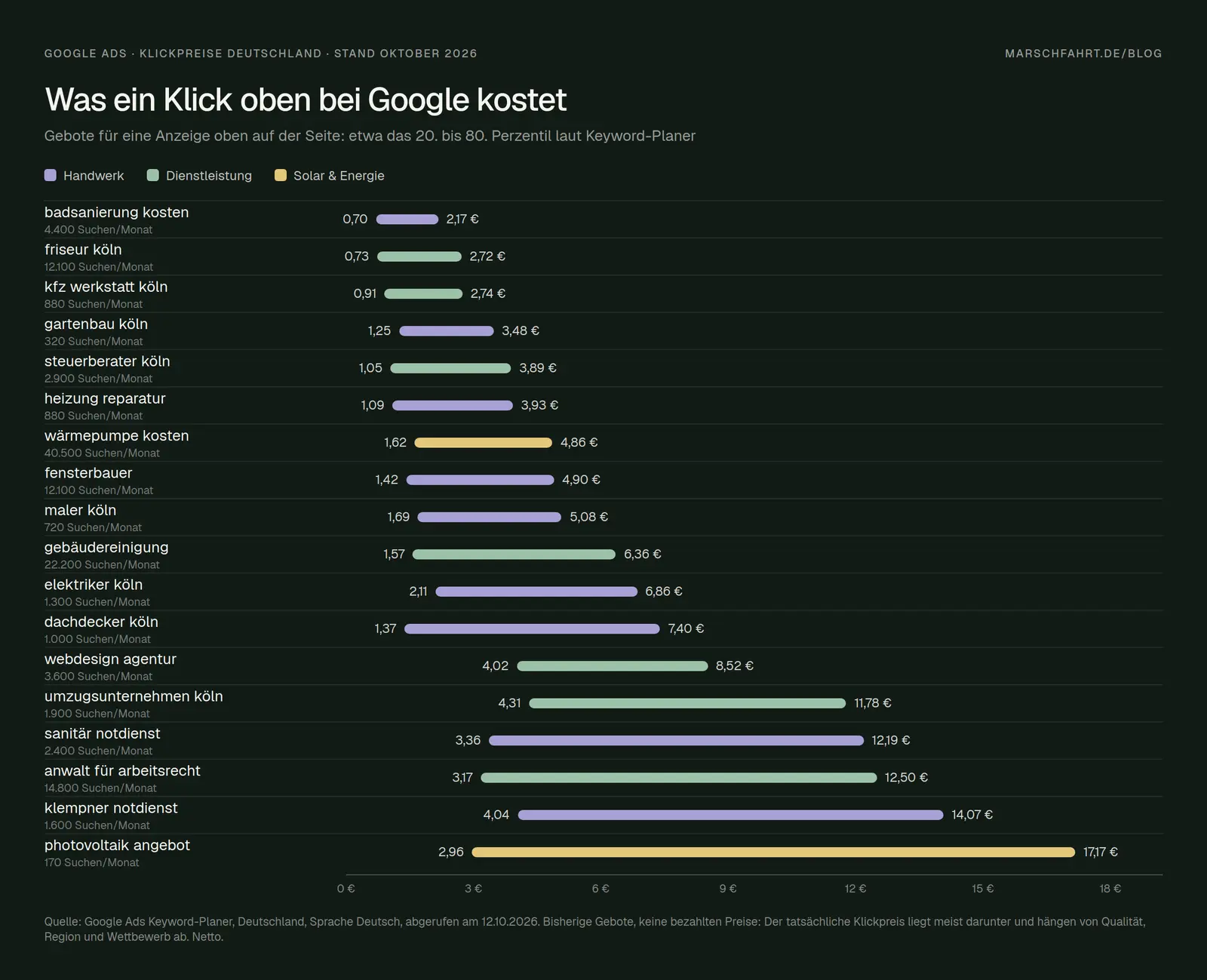
Bids for an ad at the top of the page, retrieved on October 12, 2026, from the Google Ads Keyword Planner (Germany, language: German, net). The location “Cologne” appears in the search term; the bids apply to all of Germany.
Think of these two values as a range of competition, not as a price tag. According to the English version of the help section, the lower value corresponds roughly to the 20th percentile, and the higher value to the 80th percentile of the bids advertisers have placed so far for a spot at the top of the page. (The German translation misleadingly refers to the “top 80%.”) These are bids, not actual prices paid. Since you only pay as much as you need to outbid others, your actual cost per click is usually lower than that.
It gets expensive when someone wants to hire someone right away. Anyone searching for “emergency plumbing service” has water in their basement and calls the first person who answers. Accordingly, bids range from €4.04 to €14.07. The situation is similar for “plumbing emergency service” (€3.36 to €12.19), “labor law attorney” (€3.17 to €12.50), and “moving company Cologne” (€4.31 to €11.78). “Photovoltaic quote” has the highest upper limit at €17.17, even though the term is searched only about 170 times a month: A single job there is worth many thousands of euros, so providers bid aggressively.
Searches where someone is first doing some research are cost-effective. “bathroom renovation costs” ranges from €0.70 to €2.17, while “heat pump costs” ranges from €1.62 to €4.86—even though, with 40,500 searches per month, it’s the most-searched term on our list. People who ask about costs aren’t ready to place an order yet. That doesn’t make these terms worthless, but you need a page that answers the question and then leads to an inquiry, rather than displaying a contact form right away.
Local trade-related keywords typically range from 1 to 7 euros. According to the Keyword Planner, “painter Cologne” costs €1.69 to €5.08, “roofer Cologne” €1.37 to €7.40, “electrician Cologne” €2.11 to €6.86, and “heating repair” €1.09 to €3.93. In its own article on costs, Google confirms the two patterns behind this: terms with a “specific intent to purchase” are more expensive than informational ones, as are regions with “higher demand or more competitors.”
Our own campaigns confirm the scale of these figures. In the Google Ads accounts we manage, the actual cost-per-click between October 2025 and October 2026 ranged from just over €2 to just over €9 for search campaigns, and from €0.26 to €2.39 for ads on the Display Network (banners on other websites). We excluded a very small search campaign with only 161 clicks from this analysis. These figures are drawn from multiple accounts—without specifying names or industries—and do not constitute a formal study. However, they demonstrate that the Keyword Planner figures are realistic and that banner clicks are significantly cheaper but also come from users who are less likely to make a purchase than those from search results.
U.S. averages are only useful as a conceptual model. The most frequently cited benchmark study, conducted by WordStream and LocaliQ, projects an average cost per click of $5.42, a conversion rate of 8.18%, and a cost per lead of $66.69 for 2026. For the “Home & Home Improvement” category, the figures are $8.33 per click and $90.92 per lead. The figures are based on 13,474 campaigns in the U.S., across Google and Microsoft combined, and include only the provider’s clients. There is no similarly comprehensive survey available for Germany. The study is still useful, however, because it shows the key calculation: cost per click divided by the conversion rate equals the cost per lead.
How much you should budget
You set a daily budget, but billing is done on a monthly basis. According to the help section, a campaign can spend up to twice the average daily budget on any given day to take advantage of peak days. The monthly limit is 30.4 times the daily budget, because a year averages 30.4 days per month. Google’s own example: €10 per day results in a maximum of €20 on any given day and a maximum of €304 per month. If the system spends more than that, Google covers the rest: “You’ll never pay more than the amounts you’ve set.”
Please note: If your ads run only on weekdays, the monthly target remains 30.4 times the daily budget. If a campaign runs on only five out of seven days, Google spreads the monthly budget over fewer days, and the cost per day will be higher than what you set.
Work backward from the request, not forward from the budget. Here’s a sample calculation for an electrical contractor in Cologne, with assumptions that you should replace with your own:
Sample calculation; not a forecast. Click-through rate and inquiry rate are estimates that vary significantly depending on the region, season, and landing page.
The key question is what a job brings in. €240 in advertising costs per job is too much for a meter cabinet replacement and ridiculously low for a complete electrical installation in a new construction. That’s why there’s no one-size-fits-all answer to “Is Google Ads worth it?”—only your own calculation: the average contribution margin per job versus the advertising costs per job.
A budget that’s too small is more expensive than having no budget at all. Google doesn’t require a minimum budget. But with €5 per day, in our example, you’ll get just one click a day, and after a month, you won’t know whether the campaign is working or if you were just unlucky. Two points from the Help Center also argue against tight budgets. First, regarding AI Max—the new automatic scaling feature for search campaigns—Google states explicitly: “AI Max isn’t effective when campaigns are constrained by budget.” Second, since August 2026, campaigns using the Target CPA or Target ROAS bidding strategies with tight budgets have been working closer to the target you set. Google’s example: If the target is set at €10 per query and the actual cost was recently €5, the campaign will now approach the €10 mark. So if you’ve set a generous target, you might end up paying more per query than before.
Give a change two weeks. Google recommends “waiting at least two weeks after making a change before evaluating performance.” If you adjust your bid every Monday, you’ll end up measuring mostly the effects of your own actions.
How Much Each Type of Campaign Costs
For local businesses, a search campaign is the best way to get started. You only pay when someone actively searches for your service and clicks on your ad, and you can see exactly which search terms led to the click. Clicks here are the most expensive, but they also come from users who are most likely to make a purchase.
Performance Max and Smart Campaigns allocate your budget automatically. According to Google, Performance Max accesses “the entire Google Ads inventory”—including YouTube, the Display Network, Search, Discover, Gmail, and Maps—through a single campaign. Smart Campaigns, which Google recommends to small businesses when they sign up, also run automatically across Search, Maps, YouTube, and partner sites. As a result, the average cost per click often looks low because it includes many inexpensive banner and video clicks. What really matters is how many inquiries this generates, and you can only assess that with accurate tracking.
Ads for local services are also available in Germany, billed per inquiry rather than per click. Google calls them “Local Services Ads.” They appear with a verification badge at the very top, and according to Google, you pay “only for relevant inquiries.” As of October 12, 2026, there are 29 categories to choose from in Germany, including electricians, plumbers, roofers, heating, ventilation, and air conditioning specialists, flooring installers, moving services, and general handymen. Solar and photovoltaics are not included. Google does not disclose how much an inquiry costs there. And unlike in the U.S., you do not receive a credit in Europe for irrelevant inquiries.
There are currently no ads within the AI overviews themselves in Germany. According to Google, ads can appear above and below the “AI overviews” in all of the more than 200 markets where the overviews are available. Within the overviews themselves, ads currently run only in English in twelve countries, including the U.S., Canada, and Australia. Germany is not among them. It is not possible to disable or specifically book this ad placement.
What Else Goes Into Advertising
Google doesn’t charge a base fee, but an agency does. You can set up an account yourself and run ads without a minimum contract term. If you outsource the management, you pay the agency a fee in addition to the advertising budget, which still goes directly to Google. A fixed monthly fee or a percentage of the advertising budget is standard. There is no reliable survey of what agencies in Germany charge for these services. The figures circulating online almost all come from the agencies themselves. Therefore, always ask what exactly is included in the flat fee: setup, ad copy, landing page, tracking, monthly reports, and how often someone actually checks the account.
A percentage-based model rewards higher spending, whereas a flat fee does not. With a fee of, say, 15% of the budget, the agency earns more if you spend more—regardless of whether you receive more inquiries. That doesn't have to be a bad thing, but it's worth being aware of the incentive.
The Google Partner badge is not a seal of success. According to Google, to earn the badge, an agency must have an optimization factor of at least 70%, at least $10,000 in ad spend across all clients over a 90-day period, and at least half of its account managers must be certified. The optimization factor measures how many of Google’s recommendations have been implemented or evaluated—not how many leads your ads generate. So the badge says something about experience and volume, but nothing about your results.
You are responsible for handling your own sales tax. The contractual partner for German advertisers is Google Ireland Limited. According to Google’s Help Center, Google only charges sales tax to accounts registered as “non-business.” Businesses are “responsible for the assessment and payment of sales tax … themselves,” pursuant to Article 44 of the EU VAT Directive—that is, under the so-called reverse-charge procedure. For this, Google needs your VAT ID number, not your tax ID number. According to Google, once the account is set up, the account type and payment purpose cannot be changed. Clarify this with your tax advisor beforehand, as Google itself states that it cannot offer advice on sales tax.
A 5% digital tax applies to ads in Austria; there is no surcharge for Germany. A Cologne-based business that advertises only in Germany does not pay a country-specific surcharge. If you also serve ads in Austria, Google has been adding a 5% surcharge to ads served there since November 2020.
Charges are processed as soon as a threshold is reached, and on the first of the month. With retroactive payment—formerly known as “automatic payment”—Google processes the charge when your costs reach a threshold amount. The Help Center gives €50 as an example, which can increase to €200 or more after being reached several times. So at first, you’ll see several small charges each month; this is normal.
There is a starting credit, but it comes with conditions. Google frequently promotes advertising credits to new customers. On October 12, 2026, for example, you could receive an €800 credit if you spent at least €400 within the first 60 days, with higher tiers available above that. According to the terms, the credit is “usually issued within 35 days” and expires 60 days after it’s credited. It applies only to new advertisers with a billing address in Germany and only toward future advertising costs. For testing purposes, this is a nice bonus—as long as you don’t spend money faster than you can analyze the results.
Where Money Slips Away Unnoticed
Without tracking, you’re paying for clicks, not for leads. Most accounts we take over don’t track conversions—or track the wrong ones: page views instead of submitted forms, or phone calls not tracked at all. Then Google optimizes for what it can measure, and that’s usually cheap clicks.
In Germany, consent is required for the measurement. Section 25 of the TDDDG permits the storage and retrieval of information on your visitors’ devices only if they have “given their consent based on clear and comprehensive information,” unless it is strictly necessary for the requested service. According to prevailing opinion, advertising tracking does not fall under this exception. For personalized ads and remarketing in the European Economic Area, Google itself requires that you transmit consent via what is known as Consent Mode v2 (using the signals ad_user_data and ad_personalization). According to Google, anyone using their own cookie banner must switch to this version. Without consent, data is missing, and the more data is missing, the less effectively the automated system manages your budget.
Broad keyword options can attract searches you don’t want. A painting company that bids on “painter,” for example, will also end up paying for “painter training salary” and “painting by numbers.” Check the search term report once a week and add any irrelevant terms as negative keywords. This is the cheapest optimization method available.
The location option determines whether travelers see your ads. By default, Google also shows ads to people who are merely “interested” in your area. For a business with a fixed catchment area, the “Local Presence” option is usually the better choice. Google itself describes it as a way to prevent unwanted clicks.
Google doesn't charge for invalid clicks, but not all of them are detected. According to Google's Help Center, Google automatically filters out duplicate, accidental, and fraudulent clicks, so they don't appear on your bill. In the reports, you can show the “Invalid Clicks” column. If something slips through, you may “under certain circumstances” receive a credit, and you can request a review using a click quality form. Google does not disclose what percentage of clicks in Germany are invalid.
The landing page is the most powerful tool that hardly anyone uses. Anyone who directs ads to the homepage is wasting money twice over: The user experience on the landing page affects the quality score—and thus the cost per click—and a page without a clear next step converts fewer visitors into inquiries. If you increase the inquiry rate from 5% to 8% in our example calculation, the cost per inquiry drops from about €80 to about €50—without spending a single cent more of your budget. We show you how to structure such a page in our article “Creating a Landing Page.”
The Pre-Flight Checklist
What Has Changed and What That Means for You
By 2026, Google Ads had become more automated, and small budgets were the first to notice this. Since June 2026, the bidding strategies have been shortened to “Target CPA” and “Target ROAS”; according to Google, the underlying behavior has remained the same. Since August 17, 2026 (fully rolled out worldwide on August 27), goal-based campaigns with tight budgets have been working more closely toward the specified goal. Therefore, check whether your Target CPA still aligns with your actual costs. AI Max automatically expands search campaigns to include new search queries and ad copy. Google reports a 14% increase in conversions based on its own data from 2025. However, according to Google, this doesn’t help when budgets are tight. And ads within the AI overviews aren’t available in Germany yet.
Date of this version: October 12, 2026. Click prices change constantly, so we regularly update the data from the Keyword Planner.
Google Ads or the website first?
Before you invest money in clicks, it’s worth taking an honest look at the page where visitors land: Does it load quickly? Is the offer clear within five seconds? And is there a way to submit an inquiry that also works on a mobile phone? We build landing pages that turn clicks into inquiries and ensure that you’ll be found even without ads. For advertising on Facebook and Instagram, we handle the entire channel. Related topics: SEO or Ads: Where Your Budget Should Go First · What Meta Ads Really Cost · Performance: SEO · Ad Management for Meta
Use our contact form to let us know what you want to advertise and what a campaign would mean for you. We'll give you an honest assessment of whether Google Ads is worth it for you and get back to you within 24 hours.
More Articles
© Marschfahrt Studio
Practical knowledge on web design, SEO, AI, and conversion optimization. Based on real projects, without any marketing spin.

