Website Relaunch: Process, Checklist, Costs, and How to Avoid Losing Your Google Rankings
A relaunch rarely causes a drop in rankings because of the new design, but rather because of missing redirects and changed URLs. Our guide outlines the process in ten steps, explains what Google itself says about moving a website, details the cost of a relaunch, and provides you with a checklist for going live.
Date
Category
Author

“Our website is getting a bit dated and needs a redesign. But what will happen to our Google rankings then?” Many businesses ask this question even before asking about the price. The concern is valid. A relaunch can cost you visibility. However, the causes are well known, and most can be avoided with careful planning.
This guide outlines the process in ten phases: what happens in each phase, who is responsible for what, and where common mistakes occur. It also covers the rules Google itself specifies for website migrations, legal obligations, a transparent cost breakdown, and a checklist for going live. We base our guidance on official Google documentation, legal texts, and our own analysis of tradespeople’s websites in the Cologne area.
We discuss whether a relaunch is even worth it for you in a separate post: Website Relaunch: When It’s Worth It and When It Isn’t. A brief overview of the most common pitfalls can be found in 5 Common Mistakes in Website Relaunches. This post covers the entire process: How do you do it right?
In a nutshell (as of October 23, 2026)
If you only have a minute, here are the key points from this guide:
The biggest avoidable risk isn't the new design, but missing or incorrect redirects. Every old address that has visitors or links needs a 301 redirect to the appropriate new page.
Redirects remain in place for a long time. Google advises keeping them “for at least one year, as a general rule.” We recommend keeping them permanently.
Don’t change everything at once. According to Google, if you’re moving to a new domain and also restructuring your content and URL structure, you “will likely” experience a drop in traffic. Google has to re-index every changed URL. Therefore, even on the same domain, only change what really needs to be changed.
Back up your data first. The export from Google Search Console serves as your baseline for comparison and, at the same time, as a list of pages that must not be lost.
Costs can be estimated. For a small company website, our sample calculation comes to approximately 3,100 to 6,200 euros net (30 to 60 hours at 103 euros). Publicly available quotes range from about 1,000 to over 80,000 euros.
Once the system goes live, the second phase begins. Plan for at least two to three months of close monitoring until the new addresses appear in the search results.
What a relaunch is and how you can tell when one is coming up
A relaunch is the relaunch of an existing website. It usually involves a new design and structure, often a new underlying system, and sometimes new content. The key word here is “existing.” Your old site has a history with Google. Its URLs are linked, individual pages are indexed, and regular visitors know their way around. That’s why a relaunch is more like a move than a new build.
We explain where the line is drawn between redesign, rebranding, and refactoring in “Redesign, Relaunch, Rebranding, and Refactoring: The Differences Explained.” For this guide, a rule of thumb suffices: As soon as addresses—that is, the URLs of your pages—change, the rules for a website migration apply. Google has two guides on this topic. One covers website migration with URL changes. The other covers website migration without URL changes—for example, when only the hosting provider or design is changed.
Typical events based on our survey in the Cologne area
On September 11, 2026, we analyzed 734 websites belonging to small businesses in the Cologne area using Google PageSpeed Insights and manually reviewed 752 accessible pages. The findings reveal typical reasons for a website relaunch:
Slow on mobile: The LCP—that is, the time it takes for the largest visible element to load—had a median of 6.0 seconds. The median is the middle value: half of the pages loaded faster, and half loaded slower. Google sets 2.5 seconds as the threshold for “good.” Only 12.5% of the pages fell below that threshold, while 36.1% took more than 8 seconds.
Hard to find: Only 43% had a clickable link for their phone number. Only 37% displayed it in the top third of the page, and we found a contact form on 31% of the sites.
Barriers: In 62.4% of cases, the automated check reported insufficient contrast; in 50.3% of cases, it found links without recognizable names; and in 39.4% of cases, it identified an incorrect order of headings.
Gaps in Google Fundamentals: 36.1% lacked a meta description—the short text that Google often displays below the page title.
Trust and the Law: 8% operated without HTTPS, and a cookie banner was visible on only 51% of sites. This does not mean that the rest are illegal, since a banner is not required for services that do not require consent.
System: 43% ran on WordPress. These sites had a median load time score of 64 out of 100, while all other systems combined scored 76.
Only 16 of the 734 pages (2.2%) were simultaneously fast on mobile devices, largely accessible, and featured a clickable phone number. The assessment has its limitations: The sample was drawn from OpenStreetMap and is not representative. It was a one-time laboratory test, and an automated check can only identify some of the accessibility barriers. All figures and the methodology are available in the 2026 Cologne Skilled Trades Website Report.
Some of these issues can often be resolved without a site relaunch. A missing meta description can be added in minutes. The article “Optimizing Your Website: A Step-by-Step Guide to More Leads” shows you how to do this step by step. A site relaunch is more worthwhile when several problems arise at once, when the site no longer aligns with your offerings, or when the system is no longer receiving security updates.
The Ten Phases of a Website Relaunch
In practice, the ten phases overlap. Nevertheless, the order is important. Anyone who starts with the design and then “quickly” puts together the handover plan at the end has already introduced an avoidable risk. The overview shows what happens when and who is involved.

The relaunch process at a glance. Duration: our rough estimate for a small- to medium-sized company website; not based on a study. Monitoring period: our recommendation; Google does not specify a fixed timeframe (Google Search Central, “Website Migration with URL Changes,” accessed October 23, 2026).
Phase 1: Assessment
The first step is to compile a complete list of all URLs from the old website and to identify which ones are important. Google lists several sources for this information in its migration guide. These include existing sitemaps and server logs, as well as Analytics data showing the most-visited pages. You’ll also need the report on links to your website in Search Console and an export of all URLs from the content management system. In practice, you’ll collect this data:
Search Console: In the Performance Report, export the pages and search queries along with their clicks and impressions over the longest available time period. Impressions refer to how many times a page appeared in search results. When the new Search Console was launched, Google announced 16 months of data. After the relaunch, this export will serve as your baseline for comparison.
Analytics: Which pages are visited most often? Which pages generate inquiries, if you track that?
Crawl: A crawl is an automated scan of all linked pages, similar to what Google does. Tools like Screaming Frog list every accessible URL along with its title, headings, and status code. The status code is the server’s three-digit response, such as 200 for “OK” or 404 for “not found.”
Backlinks: The “Links” report in Search Console shows which external websites link to which of your pages. These pages are particularly important for your redirect plan.
Load time: Use PageSpeed Insights to measure the homepage and the most important subpages. That way, you'll be able to see later whether the new page is actually faster.
Things That Are Easily Overlooked: PDFs, images with their own URLs, old campaign pages, job postings, and pages not listed in the menu.
Who does what: You provide access to Search Console, Analytics, the content management system, hosting, and the domain. The agency crawls, exports, and summarizes the data. Common mistake: No one has access to Search Console, or access is still tied to a previous agency. Sort this out first, because without access, you’ll be missing the comparative data. We show you how to read the reports correctly in “How to Use Google Search Console Effectively.”
Phase 2: Define Goals and Metrics
A relaunch without a clear goal often ends up just “looking more modern.” That’s not a bad result, but it’s not a measurable one. So define in advance how you’ll measure success, and document the current state. Useful metrics for small and medium-sized businesses include, for example:
Inquiries per month, broken down by form, phone, and email.
Mobile load time—for example, an LCP of less than 2.5 seconds for the most important pages.
Clicks from Google Search for your most important pages: maintain them at a minimum level and increase them in the medium term.
Maintenance: Who can edit text, images, and job postings on their own without calling the agency?
Accessibility: No errors related to contrast, link text, or headings were found in the automated check.
You need to have the tracking set up before you make any changes. If no one is tracking how many inquiries come in via the form today, no one will be able to tell after the relaunch whether things have improved. Who does what: You know your goals and your operational metrics. The agency translates them into tracking points—for example, form submissions as a quantifiable event. Common mistake: Setting “more traffic” as the sole goal. Visitors alone don’t pay the bill—inquiries do.
Phase 3: Content Inventory
A decision will now be made for each address from the inventory. There are four possibilities:
Keep: The content is appropriate and can be found. It will be retained, preferably at the same address.
Revise: The topic remains the same, but the text is updated, expanded, or organized more clearly.
Merge: Combine several thin pages on the same topic into one strong page. The old URLs will redirect to the new one.
Delete: The content is outdated and has neither visitors nor links. The page can simply be removed.
When deleting pages, here’s a helpful quote from the Search Console Help section on the Page Indexing report: “404 responses aren’t necessarily a problem if the page has been permanently removed.” In addition to 404, there’s the 410 status code for “permanently removed.” Both are fine for pages that have been intentionally deleted. You don’t need to redirect every old URL to another location.
Rule of thumb: Don’t delete pages with clicks, impressions, or external links without replacing them. Who does what: You decide, based on your expertise, what’s still relevant and what you’ll continue to offer. The agency provides the metrics for each page. Common mistake: Old how-to articles or project pages get axed because they “no longer fit the new design.” Yet it’s precisely these kinds of pages that can drive a significant portion of search traffic.
Phase 4: Structure and URLs
Now the new structure takes shape: navigation, page hierarchy, and URLs. This is where an important SEO decision is made. In the help section for the URL change tool—which is intended for moving to a new domain—Google states: “If you’re not just moving a website but also revising its content and URL structure at the new location, this will likely result in a drop in traffic, as Google may need to re-index and re-evaluate the individual pages.”
There’s no comparable rule for a relaunch on the same domain. But the same logic applies there as well: Only change URLs if there’s a valid reason. Good reasons include URLs that don’t convey any meaning, such as /index.php?id=37, or a system change that requires different paths. A site structure that doesn’t accurately reflect your services is also a good reason. A bad reason is personal preference. If /services/bathroom-renovation works and is easy to find, there’s no reason to change it to /offer/bathroom.
Changing domains is a major project in its own right. If you have to change your domain anyway—for example, after a name change—try to keep that separate from the structural overhaul. The numbers in the SEO section below explain why. We describe the technical steps involved with your provider in “Transferring a Domain Without Downtime.” Who does what: The agency proposes the structure; you check whether your customers can find what they’re looking for within it. A common mistake: The structure is sketched out on a whiteboard without any data, and the page with the most search traffic ends up three clicks deep in the menu.
Phase 5: Design and Copy
Design for mobile first, because your customers often search for you on their phones while on the go, and Google ranks the mobile version. Accessibility should be built into the design from the start: sufficient contrast, clear link text, and a logical order of headings. These were the three most common mistakes we found in our survey of the Cologne area. Contact information should also be prominently displayed at the top: a clickable phone number and a quick way to submit an inquiry.
When it comes to text, the rule is: Keep the essence of what works well. Be sure to carry over page titles, meta descriptions, and headings. This includes alt text—that is, image descriptions for screen readers and search engines—and structured data, such as machine-readable information like addresses or business hours. If a well-ranking piece of content is shortened to three sentences for the new layout, it may lose exactly what Google has been using to display it so far.
Who provides what: You provide photos, expertise, and approvals; the agency provides the design and copy. Common mistake: The design is approved using placeholder text, but the actual copy is added last and then doesn’t fit in the boxes.
Phase 6: Technology and Systems
The system behind the site determines how much maintenance it requires and how long it will run securely. Before making your choice, check how long security updates will be available. For example, free community support for TYPO3 12 ended on April 30, 2026. After that, only paid extended support will be available until April 30, 2030 (according to the manufacturer). Anyone currently using such a version has a compelling reason to update or relaunch their site.
The following questions are also important to consider when moving:
Redirects: Can the new system set true server-side redirects? Google advises using JavaScript redirects only “if server-side or meta refresh redirects are not possible” (Redirects and Google Search). A meta refresh is a redirect triggered by a tag in the page’s header. This issue primarily affects certain website builders.
Access and Ownership: The domain, hosting, and content management system should be registered in your name.
Embedded services— such as fonts, maps, videos, and measurement tools—determine what must be included in the consent form and privacy policy.
Maintenance: Who installs updates, and how much does it cost per year?
Who does what: The agency makes recommendations and explains why; you decide who will maintain the site later on. Common mistake: The system is chosen based on the agency’s preference rather than on who will be responsible for updating the content within your organization.
Phase 7: The Referral Plan
The redirect plan is the heart of every relaunch. It’s a table: Each row contains an old URL, followed by the new URL and the type of redirect. A 301 redirect is the server’s “permanently moved” response. Anyone who visits the old address is automatically redirected to the new one, and Google transfers the signals. This includes PageRank, Google’s assessment of a page based on the links pointing to it. Google states: “301 and other permanent redirects have no negative impact on PageRank.” The 308 status code also indicates a permanent move.
Here's what a section might look like. This is a hypothetical example for a plumbing company using an older modular system:
/services/bathroom-renovation.html → /bathroom-renovation (301)
/services/heating.html → /heating (301)
/news/heat-pump-incentives-2023 → /guide/heat-pump-incentives (301, content updated)
/team.html and /history.html → /about-us (301, merged)
/contact.php → /contact (301)
/summer-2021-promotion → no redirect, 410 response (removed without replacement, with no visitors and no links)
Each line links to the relevant page, not just to the homepage across the board. We’ll explain the rules behind this in the SEO section. Who does what: The agency creates the plan based on the data from the initial assessment, and you verify from a technical standpoint whether the assignments are correct. Common mistake: The plan exists only in a developer’s head or isn’t finalized until the day the site goes live.
Phase 8: Testing in a preview environment
The new site is being developed in a staging environment—that is, a private preview accessible via its own URL. This preview must not appear in Google’s search results, otherwise it will compete with your actual site. A block in the robots.txt file isn’t enough to prevent this. This is the file that tells search engines what they’re allowed to crawl. Google states: “If you want to exclude your site from search results, you should use another method, such as password protection or noindex.” (Introduction to robots.txt). “noindex” is a directive in the page code that instructs search engines not to include the page in the search index.
A preview should be password-protected and also set to "noindex." The risk arises when the site goes live: If the "noindex" tag is accidentally carried over to the live site, it will gradually disappear from Google. Use the preview to test:
Forms: Sending, ensuring they arrive in the correct inbox, confirmation for the sender, checking the spam folder.
Redirects: Google explicitly advises, “Test the redirects.” You can check individual URLs using Search Console’s URL Inspection Tool. For a large number of URLs, use a script against the list—that is, a small program that calls up all the URLs in the list and compares the destination.
Display on actual cell phones, not just in a scaled-down browser window.
Load times for the most important pages.
Tracking and Consent: Is tracking only done after consent is given? Is the number of form submissions counted?
Legal Notice and Privacy Policy: complete, up-to-date, and accessible from every page.
Internal links and canonical tags point to the new URLs. A canonical tag is a specification in the page code that indicates which URL is the authoritative version of a page.
Who does what: You test content and workflows from the customer’s perspective, while the agency tests the technology and redirects. Common mistake: Testing is done only on the office computer, and after the site goes live, the form sends submissions to an old email address.
Phase 9: Launch Day
In the English version of the migration guide, Google recommends scheduling the migration for a time when there are few visitors, if possible. Small and medium-sized websites should migrate all URLs at once rather than in sections. Only large websites should migrate in sections. We’d like to add: Choose a day when someone who can troubleshoot issues is available. So, it’s better to choose a Tuesday morning than a Friday afternoon right before the company’s vacation.
On the day itself, the redirects will be activated, password protection and the "noindex" tag will be removed, the sitemaps will be submitted, and the most important processes will be tested in a live environment. The complete list is included in the checklist below. Who does what: The agency handles the switchover and checks the technical aspects. You submit a test request via the form and visit the site on your own devices. Common mistake: The old site is deleted on the same day before the redirects have been tested.
Phase 10: Monitor the First Three Months
After going live, Google needs time. The migration guide states: “Generally, for medium-sized websites, it takes a few weeks or longer for Google to gradually start displaying the new URLs instead of the old ones.” And: “Expect temporary fluctuations in your website’s ranking.” Google does not specify a fixed timeframe. Therefore, plan for at least two to three months of close monitoring, with weekly checks during the first few weeks:
Page Indexing: Are new 404 errors appearing? These are usually caused by missing redirects.
Sitemaps: The number of indexed old URLs should decrease, while the number of new ones should increase.
Performance: Clicks and impressions for the most important pages, compared to the export from Phase 1.
Inquiries: Are forms and phone calls still coming through as before?
External Links: Google advises: “Try to contact the owners of websites that link to your site.” For associations, partners, or business directories, it’s worth sending a quick email with your new address.
Who does what: This must be clearly defined in the contract. The agency monitors and fixes issues; you report anything you notice in your day-to-day work. Common mistake: The project is considered complete once it goes live, and no one checks Search Console anymore.
SEO During a Relaunch: What Google Really Says
You’ll find the most reliable information about the relaunch primarily on Google’s own website. That’s why we’ve compiled here what Google says, including the source and the exact wording. The most important page is the guide “Moving a Website with URL Changes,” which, according to the page, was last updated on September 9, 2026.
How Long 301 Redirects Need to Remain in Place
Google Search Central states: “Keep the redirects in place for as long as possible—generally for at least one year.” The Search Console help article on domain changes, however, specifies “at least 180 days”—or longer, as long as visitors are still coming from search via the redirects. These two guidelines differ. We follow the stricter guideline and go even further: We keep redirects in place permanently. This costs nothing on the same domain, and old links in directories, emails, or bookmarks often remain active for many years. If you change your domain, Google also advises continuing to pay for the old domain for at least one year to prevent it from being purchased by third parties for malicious purposes.
Don't redirect everything to the home page
The easiest redirect strategy is this: Redirect everything that no longer exists to the homepage. Google advises against this: “If possible, avoid redirecting a large number of old URLs to a single irrelevant destination URL, such as the homepage of the new website.” It adds: “This can confuse users and be interpreted as a soft 404 error.”
A soft 404 is a page that technically reports “found,” but which Google treats as a missing page because the content doesn’t match the query. In this case, the signals from the old page can be lost despite the redirect. The better solution: Have every important old page redirect to its content counterpart. Pages that have been intentionally deleted end with a 404 or 410.
Avoid Forwarding Chains
A chain occurs when one URL redirects to a second one, which in turn redirects to another. This happens most often during the second or third relaunch: The redirects from 2016 still point to the 2020 URLs, which are now moving themselves. Google writes: “Avoid chained redirects.” Although Googlebot can follow up to 10 steps in a chain, the recommendation is “ideally up to 3 and at most 4.” Our approach: During a relaunch, rewrite all old redirect rules so that each old URL points directly to the final destination.
Canonical, hreflang, and Internal Links
Zum Canonical schreibt Google: „Jede Ziel-URL sollte das auf sich selbst verweisende Tag rel="canonical" <link> haben.“ Ein typischer Fehler nach dem Relaunch: Die neuen Seiten verweisen per Canonical noch auf die alten Adressen, etwa weil Vorlagen kopiert wurden. Dann widersprechen sich Weiterleitung und Canonical.
If you offer multiple languages, you must also update the hreflang attributes. These are tags in the code that indicate which language version belongs to which page. Google: “If the migrated website contains pages for different languages or countries that are marked with rel-alternate-hreflang annotations, update them to use the new URLs.” And finally: “Update internal links.” The menu, footer, and links in the text should point directly to the new URLs and not go through redirects.
Sitemaps: Submit Old and New Ones
A sitemap is a file that lists all the URLs on a website for Google. When moving a site, Google recommends submitting two of them—one with the old URLs and one with the new ones: “Submit the two sitemaps you created earlier during the link mapping process.” Google uses the old sitemap to specifically identify the redirects. Search Console will then display warnings because the old URLs are redirecting. According to the English version of the guide, this is normal and can be ignored.
The Sitemaps report also shows you the progress: “Over time, the number of indexed pages in the sitemap with the old URLs will drop to zero.” Then it says: “You can now remove your old sitemap, since Google will use the new sitemap going forward.” The redirects themselves will remain in place, however.
The Address Change Tool: Only for Domain Transfers
Search Console includes a tool for changing the domain. Many people believe it’s part of every relaunch. That’s not true. According to the Search Console Help Center, the tool “can only be used for domain-level properties.” A property is a website created in Search Console. This refers to switching from one domain to another or from one subdomain—such as shop.example.de—to another. The tool is explicitly not intended for switching from HTTP to HTTPS. It also doesn’t work for paths like beispiel.de/shop/. If your domain remains the same, you don’t need the tool.
Changing both content and addresses at the same time: the greatest risk
Google refers to the statement about “traffic disruption” from Phase 4 in the context of a site move that also involves revising content and the URL structure. There is no comparable statement for a relaunch on the same domain, but the same logic applies there as well: Google has to re-index every changed URL. Therefore, only make changes that you can justify.
Search Engine Journal analyzed how long domain migrations can take. In a study by Dan Taylor (updated on January 8, 2025), 892 domain migrations took an average of 523 days for the new domain to reach the organic traffic levels of the old one. Organic traffic refers to visitors coming from unpaid search results. 17% had not regained their previous traffic levels even after 1,000 days.
These limitations are important. The study only covers domain changes, not relaunches on the same domain. The sample was gathered in part through the SEO community. The traffic figures are estimates from SEO tools—primarily Ahrefs—not Analytics data. For you, this still means: Only change your domain if it’s truly necessary.
A case study from the tool provider SISTRIX illustrates the impact of missing redirects: For campaignmonitor.com, the SISTRIX Visibility Index dropped from just over 2 to 1.345 points in early 2021—a decline of about one-third, according to our rough calculation. According to SISTRIX, this was due to a new URL structure without 301 redirects, which caused the old, well-ranking URLs to return 404 errors. However, the visibility index is a metric generated by the tool, not actual measured traffic.
How long the fluctuations last
Google provides two timeframes: “a few weeks or longer” for medium-sized websites until the new URLs appear, and “a few weeks” for small to medium-sized websites until most pages have been migrated. Large websites take longer. Variations in this timeframe are normal. It’s only cause for concern if important pages are permanently missing after several weeks or if new 404 errors keep appearing in the page index.
Many agency blogs cite percentages indicating how many websites lose traffic after a relaunch. We have not found a primary source for these figures, nor have we found a reliable study on relaunches on the same domain. We therefore do not use such figures.
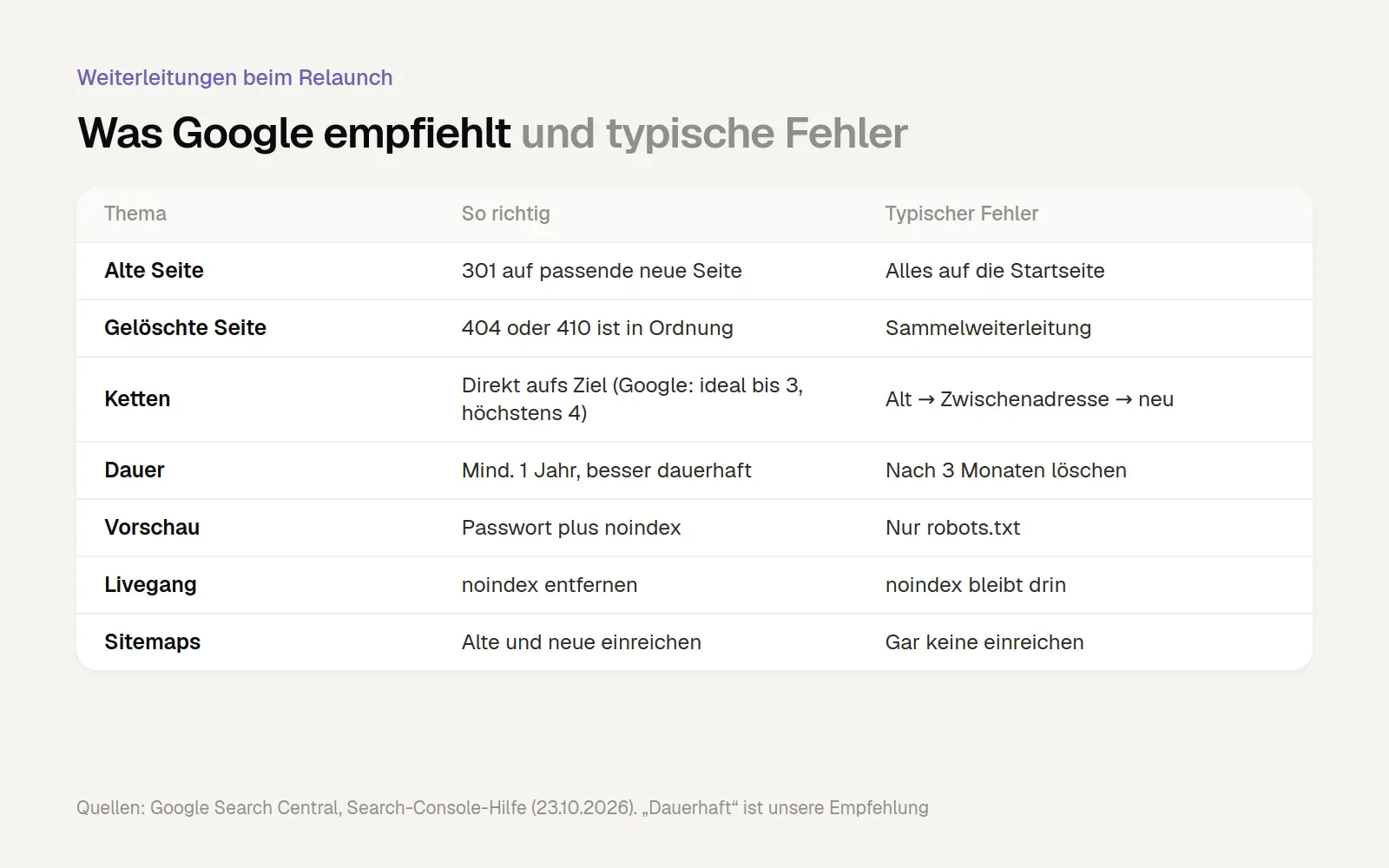
Redirects During a Relaunch: Google’s Recommendations and Common Mistakes. Sources: Google Search Central, “Moving a Website with URL Changes” and “Introduction to robots.txt”; Search Console Help, “Page Indexing” (all accessed October 23, 2026). We recommend “permanent” redirects; Google specifies at least one year.
Rights and Obligations During a Relaunch
A relaunch is a good time to get your legal affairs in order as well. The following points are an overview for businesses in Germany; they do not constitute legal advice. For your specific situation, consult a lawyer or your professional association.
Accessibility under the BFSG
The Act on Strengthening Accessibility has been in effect since June 28, 2025. Section 3(1) of the BFSG: “Products that a business entity makes available on the market and services that it offers or provides must be accessible.” This applies, among other things, to e-commerce services for consumers, such as online stores, online bookings, and the conclusion of contracts via a website (Cologne Chamber of Industry and Commerce). According to the prevailing interpretation by law firms, a website that is purely informational is generally not covered. We are not aware of any case law on this matter to date.
The exception in Section 3(3) is important: “Paragraph 1 does not apply to microenterprises that offer or provide services.” According to Section 2(17), microenterprises are businesses with fewer than ten employees and an annual turnover or balance sheet total of no more than 2 million euros. The Deutsche Handwerks Zeitung points out that skilled trades businesses may be affected “as soon as they offer an economically relevant service on a company website,” such as an appointment booking system (DHZ, July 28, 2025). According to the DHZ and the Cologne Chamber of Industry and Commerce (IHK Köln), fines of up to 100,000 euros may be imposed for violations.
For the relaunch, this means: Anyone building a new facility should design it to be accessible, even if they currently fall under the exception. Businesses grow, and features such as online appointments are added over time. In our experience, if accessibility is considered from the outset, it costs very little during the design phase but significantly more when retrofitted. The exact requirements of the BFSG are outlined in “Accessible Websites According to the BFSG: What Companies Must Actually Implement by 2026.”
Legal Notice pursuant to Section 5 of the German Data Protection Act (DDG)
Since May 14, 2024, the legal notice requirement has been set forth in Section 5 of the Digital Services Act (DDG); it was previously contained in the Telemedia Act. The required information must be easily recognizable, directly accessible, and permanently available. Many older websites still refer to “Section 5 TMG” in their legal notices. According to IT-Recht Kanzlei, such an outdated reference could be open to legal challenge. When relaunching a website, the legal notice should therefore be updated to reflect current requirements and should be accessible with a single click from every page.
Cookie Consent Pursuant to Section 25 of the TDDDG
According to Section 25 of the TDDDG, storing information on visitors’ devices and accessing that information is “permitted only if the end user has given consent based on clear and comprehensive information.” Exceptions are made for information that is “absolutely necessary” for the service. A relaunch often brings new features: analytics, maps, embedded videos, and tracking pixels. Each of these must be included in the consent tool and the privacy policy before the site goes live.
Google Fonts and Other Integrated Services
On January 20, 2022, the Munich I Regional Court ruled (Case No. 3 O 17493/20) that the dynamic embedding of Google Fonts transmits the IP address to Google without consent. It awarded a visitor 100 euros in damages. This was followed by a wave of cease-and-desist letters, which the same court ruled on March 30, 2023 (Case No. 4 O 13063/22) constituted an abuse of the law (Bergische IHK). The simple solution for a website relaunch: embed fonts locally on your own server. This also eliminates the need to connect to a third-party server.
Load Time and Security as Relaunch Goals
A relaunch is a great opportunity to get loading times and security right from the ground up.
Core Web Vitals: The Thresholds
Core Web Vitals are three metrics that Google uses to describe the user experience when loading and interacting with a page. The thresholds for “good” according to web.dev:
LCP (Largest Contentful Paint): The largest visible element loads within 2.5 seconds at most.
INP (Interaction to Next Paint): The page responds to clicks and input within a maximum of 200 milliseconds.
CLS (Cumulative Layout Shift): Content barely shifts while loading; the value is 0.1 or lower.
The benchmark is the 75th percentile of page views, broken down by mobile and desktop. This means that three out of four visits should meet this threshold. Lab tools like Lighthouse cannot measure INP because no one is clicking. Instead, they show the Total Blocking Time (TBT), which is the time during which scripts block the page from accepting user input.
How much do good metrics contribute to your ranking? Google says both: “Core Web Vitals are used by our ranking systems.” But it also says that good metrics “cannot guarantee that your pages will appear at the top of Google search results” (Page Usability). So page load time is a signal and, above all, a benefit for your visitors, but it’s not a guarantee of a high ranking.
In our test conducted in the Cologne area, page load time was the bigger problem, not content shifting: 82.8% of pages met the CLS threshold, but only 12.5% met the LCP threshold. The median page weight was 1.55 MB, and more than a quarter (26.6%) weighed over 3 MB. Common causes include large images and numerous embedded scripts. We explain how to interpret these values correctly in “How to Read PageSpeed Insights Correctly.” Our Speed Check provides a quick overview of your current page.
WordPress Security: Why Outdated Installations Are a Reason to Relaunch
An outdated WordPress installation with many plugins—some of which are no longer maintained—is a typical reason for a relaunch. In its report *State of WordPress Security in 2026*, security provider Patchstack counts a total of 11,334 new vulnerabilities in the WordPress ecosystem for 2025—42% more than in 2024. 91% of these were found in plugins. For 46%, no fix was available when the vulnerabilities were disclosed. For heavily exploited vulnerabilities, the weighted median time until the first attack was just 5 hours. Patchstack itself sells security solutions, so these figures should be viewed in light of that interest.
The lesson for the relaunch: fewer plugins, a system with a clear update schedule, and a fixed maintenance plan. Who will handle maintenance after the site goes live, how often, and what will it cost? This question should be addressed in the proposal, not when the first glitch occurs. We describe what our ongoing maintenance looks like under “Website Support.”
How much does a website relaunch cost, and how long does it take?
An honest answer starts with a caveat: We haven’t found any independent studies on relaunch costs for small and medium-sized businesses. All the price figures we found came from service providers. That’s why we’re showing the price ranges and then figuring out for ourselves how those prices are calculated.
Why Public Price Quotes Vary So Widely
Price ranges publicly cited by agencies and industry portals range from about 1,000 euros for very small projects to over 80,000 euros for large ones. For a typical corporate website, providers often quote prices ranging from 8,000 to 15,000 euros, with a duration of one week to twelve months. None of these figures specify a methodology.
These ranges aren't wrong, but they're not very helpful without an explanation. A website relaunch for a painting company with ten pages and one for an industrial supplier with 400 pages in three languages share the same name but have almost nothing in common.
Our sample calculation: Hourly rate multiplied by hours worked
Every price can be broken down into hourly rates. For the hourly rate, we use a neutral figure from the freelancermap Freelancer Compass 2026. According to that report, the average hourly rate for freelancers in Germany was 103 euros. In Austria, it was 101 euros, and in Switzerland, 133 euros. A total of 5,412 freelancers were surveyed between November 2025 and February 2026. This is not an agency rate, nor is it a separate category for web design, but it is a verified average.
The number of hours are our estimates, not actual measurements. Our sample calculation, at a net rate of 103 euros per hour:
Small company website (up to about ten pages, few redirects, most of the text already available): 30 to 60 hours, or about 3,100 to 6,200 euros.
Medium-sized website (20 to 50 pages, guides or testimonials, complete redirect plan, new content for the most important pages): 80 to 150 hours, or approximately 8,200 to 15,500 euros.
Large website (over 100 pages, multiple languages, interfaces to systems such as accounting or inventory management): 200 to 400 hours, or approximately 20,600 to 41,200 euros.
Based on the Swiss average of 133 euros, a small business website would cost between 4,000 and 8,000 euros. This calculation shows one thing above all: the price depends on the amount of work involved, and you can influence that.
What Drives the Price
Amount of content: Every page that is checked, transferred, and forwarded takes time.
New copy and photos: In our experience, professional copy and a photo shoot are often the single largest expense.
Languages: The provider Sellwerk quotes a surcharge of 20 to 40 percent for a second language (Sellwerk Guide, based on new creation).
Features: Store, online booking, customer portal, or integrations with other systems.
Accessibility: When incorporated from the very beginning, our experience shows that it costs very little during the design phase but significantly more when retrofitted.
Voting: Each additional round of revisions and each additional decision-maker extends the project.
Follow-up after the system goes live: Two to three months of monitoring is a lot of work. If this task isn't included in the proposal, there usually isn't any work either.
How Long a Relaunch Takes
There is also no neutral source regarding the duration. Providers cite a range of one week to twelve months, depending on the size of the project. If you add up the approximate phase durations from our overview above, a small- to medium-sized company website will take just under two to four months to go live, assuming content and approvals are provided promptly. This is a planning estimate, not a promise. In our experience, most delays do not stem from technical issues, but rather from text, photos, and approvals. Added to this is the time after the site goes live, during which Google indexes the new URLs.
When a Complete Rebuild Is More Cost-Effective Than a Relaunch
Not every old website needs a complete relaunch. If a small business has only a handful of pages, hardly any visitors from Google Search, and no significant backlinks, there’s little need to move everything over. In that case, a streamlined rebuild is often more cost-effective than a full relaunch involving an inventory and a redirect plan.
We have a fixed-price package designed specifically for these situations: the website for 999 euros. This is a one-page site with up to six sections, text, and a contact form. It costs 999 euros plus VAT and goes live within 48 hours of completing the questionnaire. This package is expressly not intended for websites with many subpages or for relaunches of large existing sites with redirects. If your old site has subpages with visitors or links, please let us know in advance. Since a one-pager has no content equivalent for these, a larger project is often the better choice.
The Website Relaunch Checklist
The checklist breaks down the process into three sections. You can go through it step by step with your agency.
Before the relaunch
Access details sorted: domain, hosting, content management system, Search Console, Analytics—all in your name.
Search Console export saved: Pages and search queries with clicks and impressions, longest time period.
A complete crawl of the old site, including PDFs and pages not listed in the menu.
List of pages with external links.
Measured the load time and requests for the old page.
Goals and metrics have been set in writing.
Content Inventory: Each address is marked as "keep," "revise," "merge," or "delete."
Limit URL changes to what is necessary; plan domain changes separately whenever possible.
Redirect plan complete: old address, new address, 301, no chains, no bulk redirect to the homepage.
Preview protected by a password and the "noindex" tag.
Forms, measurements, consent, legal notice, and privacy policy were tested in the preview.
Two sitemaps have been prepared: one with the old addresses and one with the new addresses.
On the day of the live launch
The chart shows the seven most important technical inspections. In addition:
Choose a time when there aren't many visitors, and make sure someone who can fix the problem is available.
Domain verification in Search Console still works.
A random sample of important old URLs in Search Console's URL Inspection Tool.
Do not deactivate the old page until all exams have been passed.
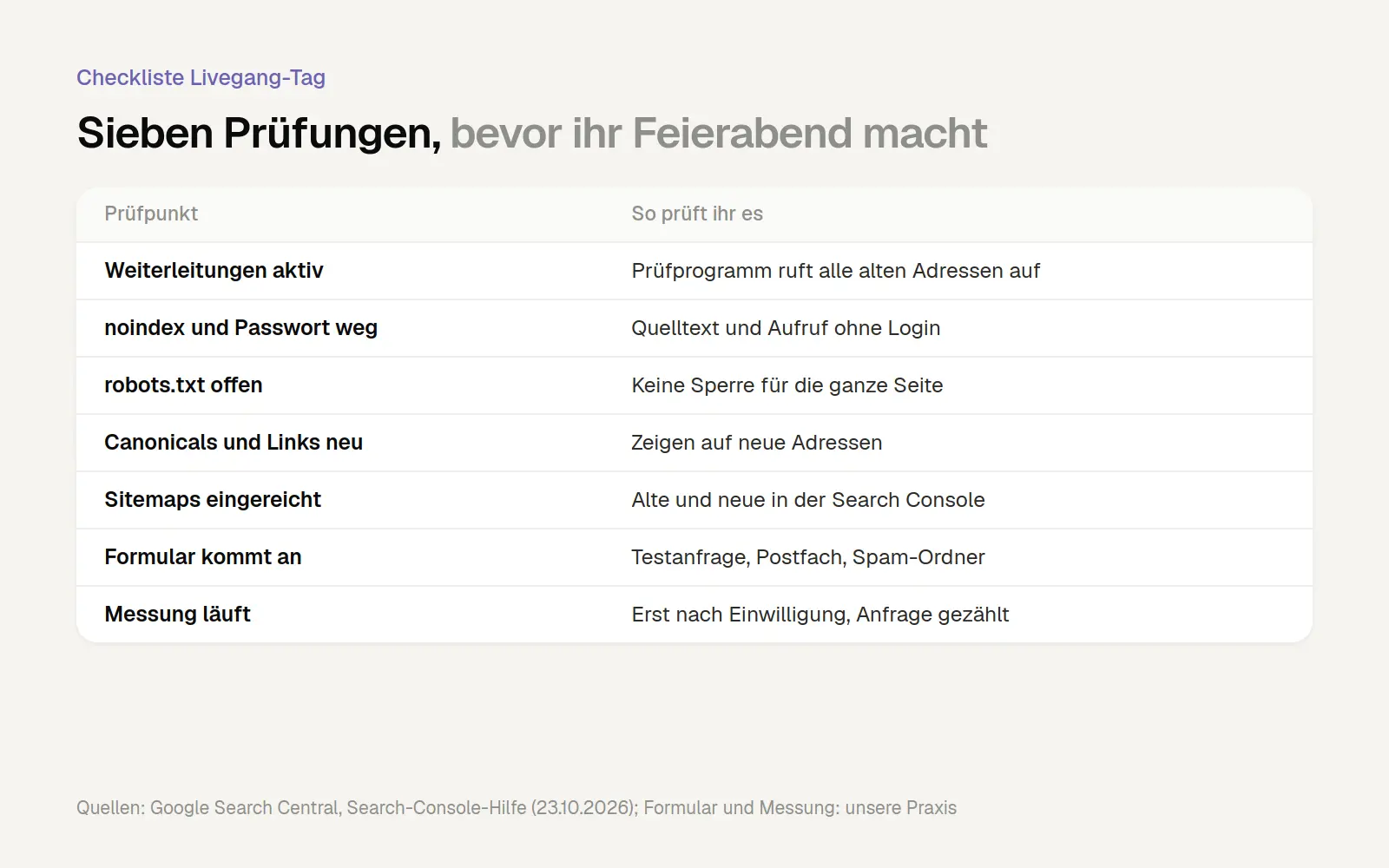
Checklist for the launch day of a website relaunch. Sources: Google Search Central, “Website Migration with URL Changes”; Search Console Help (accessed October 23, 2026); test requests and measurements as additional checkpoints from our project experience.
After going live
During the first few weeks, check the page indexing weekly for new 404 errors.
Track the Sitemaps report: old URLs are dropping toward zero, while new ones are increasing.
Compare the number of clicks on the most important pages with the previous export.
Count the queries and compare them to the baseline value.
Ask the operators of important linking sites to update the links.
Do not remove the old sitemap until it no longer shows any indexed pages. Redirects will remain.
Updates and maintenance according to a fixed schedule.
How to Spot a Good Relaunch Agency
Many agencies advertise “a relaunch without losing rankings.” No one can guarantee that. Google warns of fluctuations with every site move and expects that a domain change—especially when accompanied by changes to content and structure—will likely have a negative impact. What an agency can demonstrate, however, is a well-executed process. These questions will help you compare offers:
“Is there a failover plan, and can we see it before the system goes live?” A good answer will tell you who created it, what data it’s based on, and when.
"What data is backed up beforehand?" Search Console, Analytics, Crawl, and Backlinks should be mentioned without you having to ask.
"How is the preview protected, and who makes sure the 'noindex' tag is removed when the site goes live?"
"Who monitors the system after it goes live, for how long, and is that included in the price?"
"Who owns the domain, website, and access credentials?" The answer should be: you—in writing.
"Who will maintain the site going forward, and what can we change ourselves?"
“How do we measure success?” Anyone who only talks to you about design and never about inquiries is missing the mark when it comes to your goals.
"How do we handle accessibility, legal notices, and consent?"
"What happens if the project takes longer or if more pages need to be moved than expected?"
We describe how we handle website relaunches on our web design page. If you’re planning a relaunch, we’ll put together a list of your most important pages from Search Console for you beforehand. If you already have a redirect plan—even one created by another agency—we’ll review it and let you know where there are gaps. Just reach out to us via our contact form.
Frequently Asked Questions
How much does a website relaunch cost?
Publicly available price quotes from providers range from about 1,000 to over 80,000 euros; there is no independent survey on this topic. Based on our sample calculation of 103 euros per hour, the cost for a small business website would be approximately 3,100 to 6,200 euros net, and for a medium-sized one, approximately 8,200 to 15,500 euros.
How long does a website relaunch take?
Providers estimate a timeframe ranging from one week to twelve months; based on our rough planning estimate, it takes just under two to four months for a small- to medium-sized website to go live. After that, you should monitor the site for at least two to three months until Google has indexed the new URLs.
Will I lose my Google ranking if I relaunch my website?
Not necessarily: Google warns of “temporary fluctuations” every time a site moves. Common causes of permanent traffic loss include missing or incorrect redirects, deleted pages that had visitors, and a forgotten “noindex” tag.
How long do redirects need to remain in place?
Google Search Central says “generally at least one year,” while the Search Console help page on domain changes specifies at least 180 days. We keep redirects in place permanently because old links often remain active for years.
Do I need the address change tool if my domain stays the same?
No, the tool is only intended for switching to a different domain or subdomain—not for switching from HTTP to HTTPS, and not for new paths. If your domain remains the same, clean 301 redirects and up-to-date sitemaps are sufficient.
Does my new website have to be accessible?
The BFSG primarily applies to providers of online stores, online booking services, and similar consumer-facing services; microenterprises that provide services are exempt. We nevertheless recommend designing your website to be accessible when relaunching it; this is not legal advice.
How often should you relaunch a website?
There is no set schedule, and we haven't found any reliable figures on the typical lifespan of company websites. It makes more sense to look at specific triggers: no more security updates, slow loading on mobile devices, changes to the company's offerings, or the inability to maintain the site in-house.
What is the difference between a redesign and a relaunch?
A redesign primarily changes the appearance and structure; URLs usually remain the same. A relaunch is a comprehensive overhaul, often involving a new structure, a new system, and new content; for SEO planning, the most important factor is whether the URLs change.
Conclusion
A website relaunch is less of a design project and more like an organized move. Whether rankings are maintained depends less on the look and feel and more on four things: a thorough assessment, few changed URLs, a comprehensive redirect plan, and monitoring after the site goes live. Google describes these steps in quite some detail in its own documentation.
If there’s just one thing you take away from this: Export your most important pages from Search Console today, before you even start discussing design with any agency. This list will determine later on what absolutely must not be lost during the relaunch.
More Articles
© Marschfahrt Studio
Practical knowledge on web design, SEO, AI, and conversion optimization. Based on real projects, without any marketing spin.

