Optimize Your Website: A Step-by-Step Guide to Getting More Leads, with Free Checks
The order in which you should optimize your website to attract more inquiries: contact options, forms, page titles, Google profile, load time, and accessibility—with free checks, data from 734 Cologne-based websites, and an honest assessment of load time studies.
Date
Category
Author

When a website isn’t generating any leads, the first instinct is often to relaunch it. But in most cases, the problem lies in areas that can be fixed in a matter of days: a phone number you can’t tap on your cell phone, a form with ten required fields, or a page title that says “Home.” Before you invest money in a new design, it’s worth taking an honest look at what’s wrong with the existing site.
This guide provides a step-by-step breakdown of how to optimize your website, in what order, and using which free tools. It is based on Google’s guidelines, studies by the Nielsen Norman Group and WebAIM, our analysis of 734 Cologne-based tradespeople’s websites, and an audit of our own site. We verified all information on October 12, 2026. Where a frequently cited figure for inquiry-based websites does not hold true, we’ll point that out.
In a nutshell (as of October 12, 2026)
Optimizing a website means first ensuring accessibility, contact information, and page titles are in order, then addressing load time and content. Check your site using a free audit tool and Google Search Console, make the phone number at the top clickable, streamline the form to just a few fields, give each page a title that includes your service and location, and maintain your Google Business Profile. These steps take days, not months. Page load time is just one factor among many for Google and is important to visitors, but even the most well-known study on the subject doesn’t prove that faster pages automatically generate more inquiries. A site relaunch is only worth it if the fundamentals can no longer be fixed.
Step 1: Measure before you make any changes
Without a baseline, you’ll never know if a change has made a difference. Before you start, jot down three numbers: how many inquiries you receive per month through your website (forms, phone calls, emails), how often your site appears in Google search results and is clicked on, and how quickly it loads on a cell phone. Only you know the first number. Ask every new customer how they found you.
Google Search Console is a must-have and doesn’t cost anything. Google itself describes it as a “free service” that lets you monitor your website’s visibility in search results and fix errors. In the Performance Report, you can see which search terms your site appears for, how often it appears, and how often it’s clicked. Under “Page Indexing,” you can see which pages Google has indexed. Our article “How to Use Google Search Console Effectively” shows you how to set it up and interpret the data.
Don't expect complete data from Google Analytics for small websites. Because tracking requires consent in Germany (Section 25 of the TDDDG), you'll only see visitors who have given their consent via the cookie banner. According to Google's own help documentation, Google only extrapolates missing data once a site reaches 1,000 users per day—a threshold that very few business websites reach. Therefore, be sure to count requests manually as well.
Step 2: Check the page with free checks
An automated check takes just one minute—a task that would take a day to do manually. We’ve built four free tools for this purpose that work without requiring registration: the SEO Check for all pages on your website, the Speed Check for loading times, the Design Check for the first impression on mobile devices, and the BFSG Check for accessibility. You can also measure load times directly using Google PageSpeed Insights; to learn how to interpret the results, see “How to Read PageSpeed Insights Correctly.”
We tested the SEO check on our own website and then made some improvements ourselves. In the first run on October 12, marschfahrt.de scored 98 out of 100 points, with two recommendations: a page title that was too long and two very large pages. We shortened the title that same day and reduced the size of the images on the homepage. On the second run, the score was 99 out of 100, and the loading time score on mobile devices rose from 61 to 68. So even a technically sound site has areas for improvement, and a good check ranks them by impact.
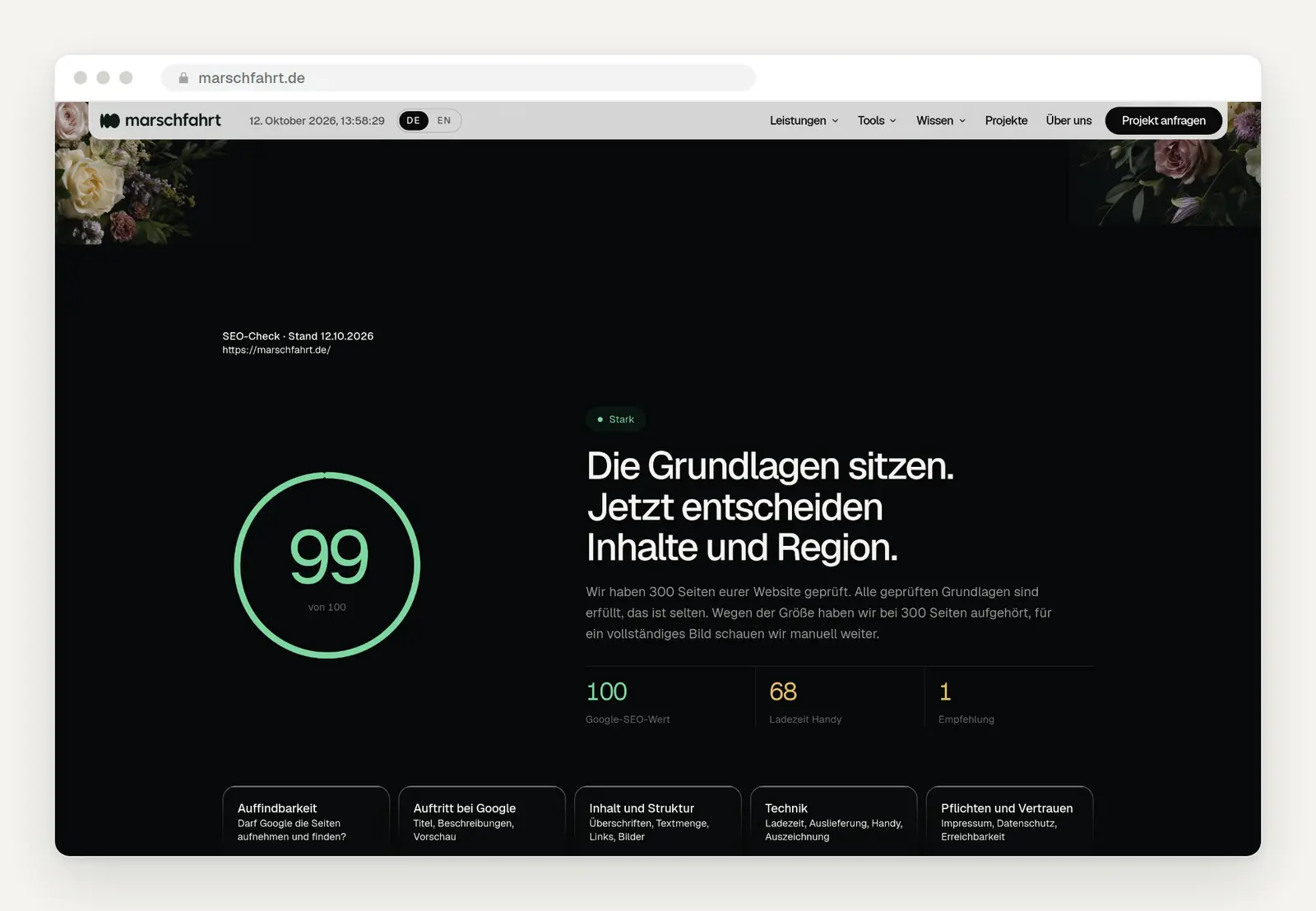
Our SEO check for marschfahrt.de following the updates on October 12, 2026: 99 out of 100 points; mobile load time score of 68, up from 61 previously.
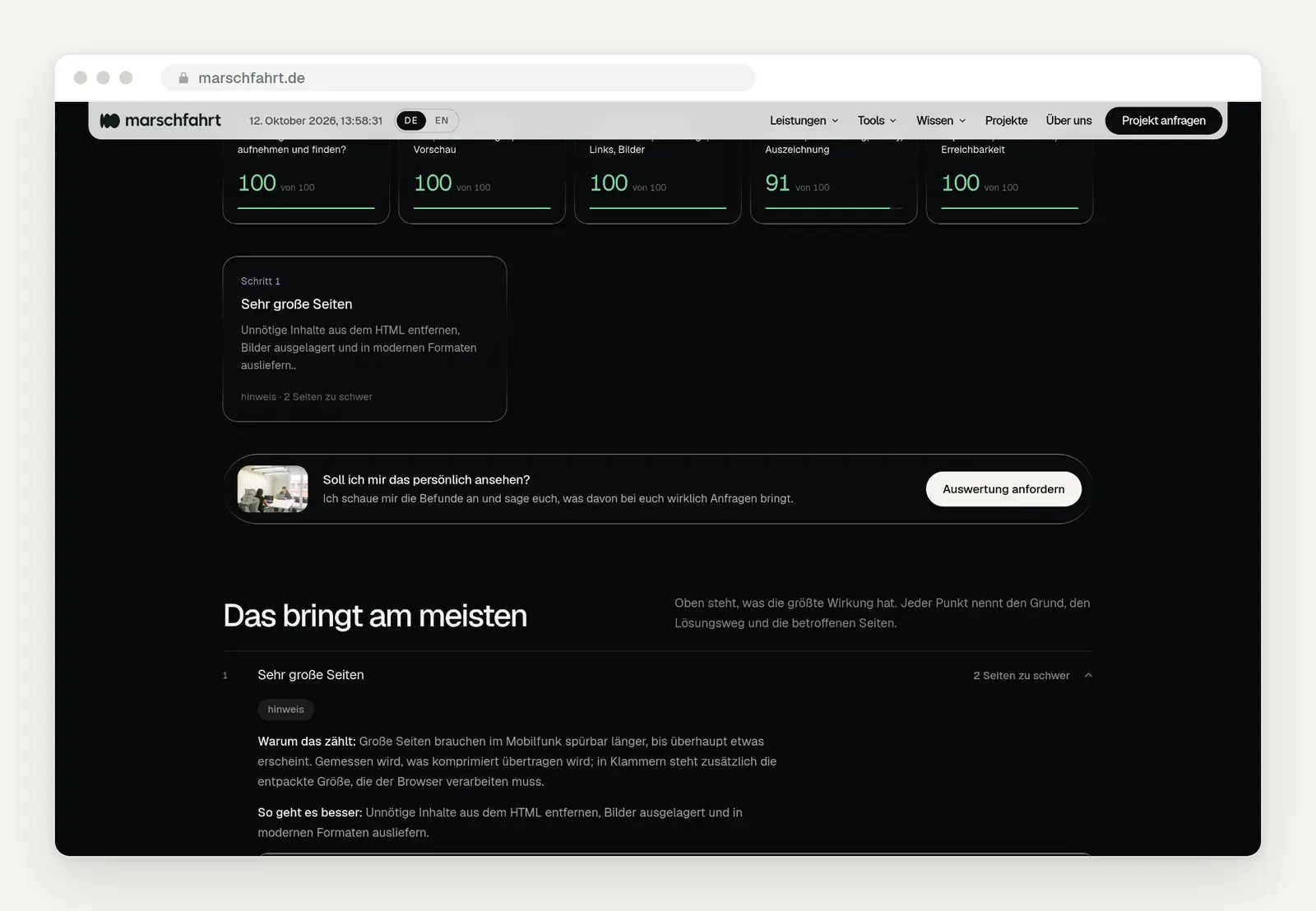
The recommendations are sorted by impact, each with a reason, a solution, and the affected pages. We still have one unresolved issue: two very large how-to pages, because our website system renders each of the more than 60 code blocks with its own style rules.
A test can’t replace a customer’s perspective. Tools measure technology. The only way to know whether a visitor understands what you do within five seconds—and whether they trust you—is to have someone from your target audience use the site on their phone while you watch.
The Correct Order
Start with what costs little but yields a lot. The chart ranks the most common measures by effort and expected impact on inquiries. It’s based on our experience with small businesses—not on any formal measurement—but it illustrates the principle.
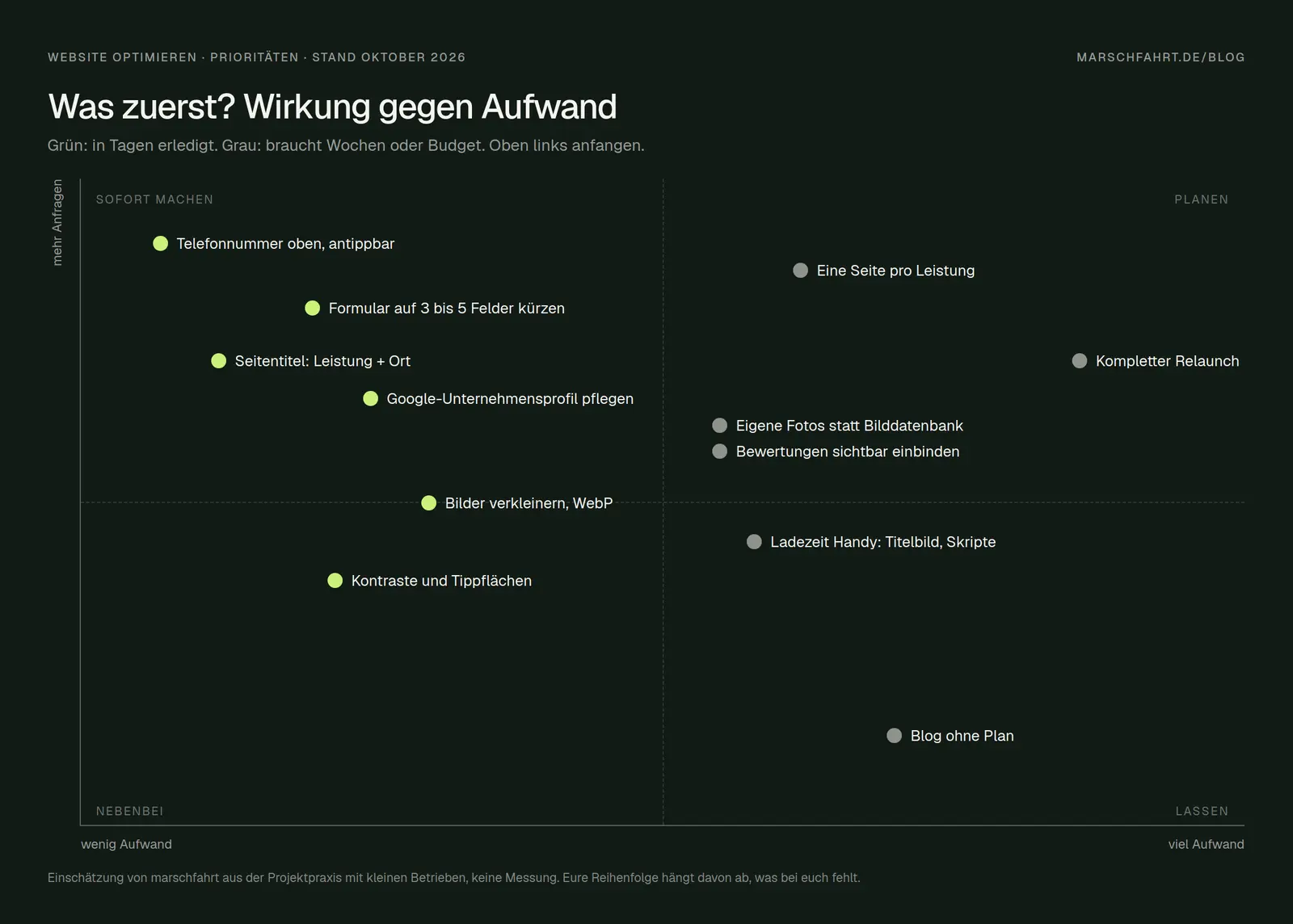
Impact vs. Effort: Green items are completed in a matter of days; gray ones take weeks or require a budget. Assessment by marschfahrt.
Step 3: The Contact Path
The phone number should be at the top and must be tappable on a cell phone. In our survey of 752 accessible Cologne-based tradespeople’s websites, only 43% had a number that users could tap, and only 37% had it located in the top third of the homepage. This is the simplest optimization of all: a link following the pattern tel:+492211234567 instead of just the numbers, visible in the header.
Hiding contact information erodes trust. In tests, the Nielsen Norman Group observed that users look for contact information in the upper-right corner or at the very bottom of a page. According to the study, companies that hide this information come across as “evasive and unreliable.” The recommendation: include at least a phone number and email address—not just a contact form. Most test participants said they’d rather speak to a person on the phone if they had questions. The study focuses on the business-to-business sector, but in our experience, this applies even more so to trades and service industries.
Clickable areas must be large enough. The WCAG 2.2 accessibility guidelines require control elements to be at least 24 by 24 pixels; Google has long recommended about 48 pixels. A phone link in small font between two other links is constantly missed on a cell phone.
Step 4: The Form
Every field you remove makes it easier to submit the form. The Nielsen Norman Group has found that forms that follow simple usability rules are submitted without errors on the first attempt 78% of the time, while forms that violate these rules are submitted without errors only 42% of the time. The researchers streamlined one of their own forms from six fields to two. For an initial inquiry, a name, phone number or email address, and a message are sufficient. You can clarify everything else during the conversation.
Mark required fields and provide clear error messages. Highlight every required field—for example, with an asterisk—rather than just the optional ones. An error message should appear directly next to the field and specify what’s missing, rather than a generic “An error has occurred” at the top of the page. And test the form yourself: Does the message get through, or does it end up in spam? We’ve compiled other reasons why you might not be receiving anything via your forms in “Why You’re Not Getting Inquiries Through Your Contact Form.”
Step 5: Page Title and Description
The page title is the first thing someone sees about you on Google. It should start with the service and include the location: “Bathroom Renovation in Cologne-Sülz | Company Name” instead of “Home” or “Welcome.” According to its own documentation, Google generates the title in search results “fully automatically” based on your page title, the page content, and links from other pages. If the title is incomplete, outdated, or inappropriate, Google will replace it with its own version. Keep it to about 50 to 60 characters; otherwise, it will be truncated.
The description plays a role in whether someone clicks. In our sample from Cologne, 36% of the websites lacked one. Google doesn’t always use it, but if it’s missing, Google will just grab a random snippet of text. Write two sentences for each important page: what you offer, where, and why someone should contact you.
Step 6: Get Noticed in the Region
For local businesses, the Google Business Profile is often more important than the website itself. Google states that local results are based “primarily on relevance, distance, and popularity.” You can increase relevance by providing complete information, and popularity through reviews and mentions of your business, among other things. You can’t change the distance. And: “A better local ranking on Google cannot be guaranteed, not even for a fee.” For instructions on how to fully set up your profile, see “Set Up, Verify, and Maintain Your Google Business Profile.”
The website and profile must contain the same information. The name, address, phone number, and hours of operation should appear on the website exactly as they do in the profile. Structured data of the LocalBusiness type can also help Google; the name and address are required fields. There is no guarantee, however: Google explicitly states that it does not guarantee that such information will appear in search results.
Step 7: Load Time, Ranked Honestly
Google measures three metrics: the Core Web Vitals. The largest visible content should load within 2.5 seconds at most (LCP), the page should respond to user input within 200 milliseconds (INP), and the layout should hardly shift at all while loading (CLS ≤ 0.1). These metrics are measured at the 75th percentile of actual page views, broken down by mobile and desktop. According to Web Almanac, in July 2025, 48% of all websites on mobile devices met all three metrics.
These metrics count toward the ranking, but they aren’t the only factor. Google states: “Core Web Vitals are used by our ranking systems.” At the same time, Google emphasizes that there is “no single signal,” that good metrics do not guarantee a top ranking, and that Google always displays the most relevant content, “even if the page experience is sub-par”—that is, even when the user experience is mediocre. A fast page with thin content won’t outrank a slow page that answers the question better.
The claim that faster pages generate more inquiries is less well-supported than what is commonly reported. The most frequently cited study, “Milliseconds Make Millions” by Deloitte on behalf of Google, found among 37 brands that a 0.1-second improvement in loading speed for online stores was associated with an 8.4% increase in purchases. For websites that collect inquiries, however, the same report states: “Conversion rates on both mobile and desktop decreased when site speed was seen to improve.” The only positive finding there was the step from the start of the form to submission. The study measures correlations, not causes. For you, this means: Improving load times is worth it because no one likes to wait on a mobile device, but don’t expect a surge in inquiries from that alone.
Images are almost always the biggest factor. According to the Web Almanac 2025, a mobile homepage weighs an average of 2.56 MB, of which 911 KB are images—the largest single component. Serve photos in modern formats like WebP or AVIF, resize them to the actual display size, and load the full-size image on the first screen without delay: Google explicitly advises against using lazy loading for the most important image; according to the Web Almanac, however, about 16% of all pages do so anyway. In our Cologne-based measurements, the largest piece of content on mobile devices appeared on average only after 6.0 seconds; only 12.5% of pages managed to load it within 2.5 seconds.
Here’s how it looked for us. During the first speed check, our homepage loaded 56 images totaling 1.65 MB. Many were several times larger than they appeared: client logos over 3,000 pixels wide for a 100-pixel display, and project images measuring 6,000 × 4,500 pixels for a 376-pixel tile. We resized them appropriately and re-embedded them as WebP files. After that, the total size was down to 670 KB, and in our lab tests, the largest content loaded on a smartphone in 9.7 seconds instead of 12.0 seconds, and on a computer in 1.7 seconds instead of 2.6 seconds. That’s still not good enough on a smartphone: the rest of the loading time is slowed down by a translation script that delays page rendering and by the JavaScript of our website system. This is exactly what optimization looks like in practice—step by step, with before-and-after measurements.
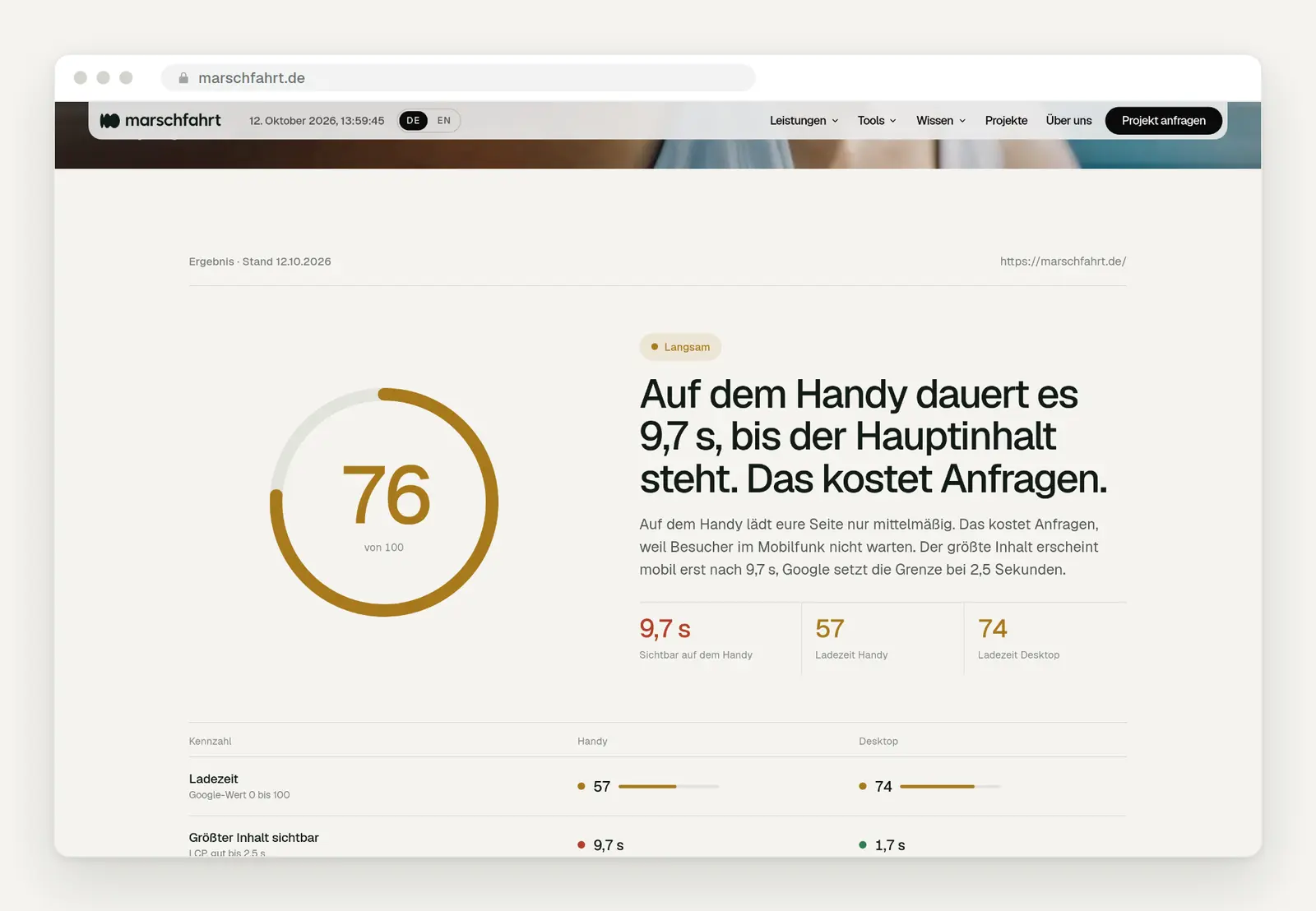
Our speed test for marschfahrt.de following the image optimization on October 12, 2026: On a cell phone, the main content loads in 9.7 seconds according to our lab measurements; previously, it took 12.0 seconds. On a computer, the time is 1.7 seconds, which is within the acceptable range.
Step 8: Accessibility That Everyone Notices
The most common barriers are also the most common annoyances. WebAIM automatically tests one million homepages every year. In 2026, 95.9% had detectable errors according to WCAG, averaging 56 per page. The most common: insufficient contrast on 83.9% of pages, missing image descriptions on 53.1%, unlabeled form fields on 51%, and empty links on 46.3%. Gray text on a light gray background is hard to read not only for people with low vision but also for anyone looking at their phone outdoors in the sun. A form field without a label confuses everyone as soon as the placeholder text disappears. According to WebAIM, automated tests only detect a fraction of the problems.
Step 9: Content That Sells
Explain each service as if the customer were standing right in front of you. What exactly do you do, how does the process work, what is the approximate cost, how long does it take, and what sets you apart? One page per key service helps both visitors and Google. Replace stock photos with real images of your work and your team, and prominently display verifiable reviews. We’ve explained why more visitors are rarely the actual goal in the article “More Inquiries Rarely Come from More Traffic.”
When Optimization Is No Longer Enough
Some websites can no longer be fixed—only replaced. If the system no longer receives updates, the site fundamentally doesn’t work on mobile devices, you can’t edit its content yourself, or every small change costs money through the service provider, building a new site from scratch is often more cost-effective than the tenth patchwork fix. To find out when a relaunch is worth it and when it isn’t, see “Website Relaunch: When It’s Worth It.” If your site runs on a website builder, there’s not much you can do technically anyway.
The Checklist to Check Off
What Has Changed and What That Means for You
The fundamentals have remained the same, but the bar has been raised. Since 2024, Google has been measuring response time using INP instead of the previous metric, FID, and the WCAG 2.2 accessibility guidelines have introduced new minimum sizes for clickable areas. At the same time, AI summaries in Google Search answer many questions directly—learn more in Google AI Mode and AI Summaries. This makes it all the more important that visitors who come to your site can quickly find their way around. And: The oft-cited claim that every tenth of a second brings more inquiries isn’t substantiated for inquiry-based websites. Optimize for people, not for a metric.
Date of this version: October 12, 2026. We review thresholds and studies on a regular basis.
Do you want someone to watch it with you?
Start by running one of our free checks. If you don’t want to tackle the loading time yourself, we offer our Speed Package at a fixed price starting at 95 € net. For everything else, we’ll review your site together with you and give you our honest opinion on whether optimization is enough or if a complete rebuild would be more cost-effective. Related: The 10 UX Mistakes That Cost Business Websites Leads · 2026 Cologne Trades Website Report · Services: Speed Check and Speed Package · Website Maintenance
Let us know what you'd like to optimize by filling out our contact form. We'll respond within 24 hours—personally and without any sales pitch.
More Articles
© Marschfahrt Studio
Practical knowledge on web design, SEO, AI, and conversion optimization. Based on real projects, without any marketing spin.

