One-Page Websites: Examples, Costs, and When a One-Page Website Is Enough for Your Business
Many small businesses don't need twenty subpages—they just need a good one-page website. We'll show you ten real-world examples of one-page websites, what Google actually says about them, how much a one-page website costs, and when it's no longer enough.
Date
Category
Author
"We're a small business; we don't need twenty subpages. Isn't a single page with everything on it enough? And how much does something like that actually cost?"
This is the kind of question we regularly get from small businesses. They’re referring to a “one-pager”: a website where all the content is displayed on a single, long page. This post has nothing to do with the document of the same name—that is, the one-page PDF summary used for job applications, projects, or investors. If you’re looking for a Word or PowerPoint template, you’ve come to the wrong place.
The short answer to the question above is: Yes, a one-pager is enough for many small businesses. But not for all of them. Whether it’s enough depends less on the size of the business than on how many different things you want people to be able to find individually on Google and how many locations you operate from.
We’ll show you when a one-pager is enough, what Google says about it, how it’s structured, how much it costs, and ten real-world examples—all verified on October 23, 2026 (you can also find a brief explanation of the term in our glossary).
In a nutshell (as of October 23, 2026)
A one-pager is a complete website on a single page that you navigate through using a menu with hyperlinks. It’s often the best choice for small businesses with a clear offering in one location. Here are the six most important points:
A one-pager is usually sufficient for small businesses offering one to three services, restaurants, cafes, medical practices, studios, salons, startups, and events. It is not sufficient if you offer many services that need to be found individually on Google, have multiple locations, an online store, a blog, or content in multiple languages.
For Google, a one-pager is a single page with a page title. According to Google's documentation, Search generally does not support parts of a URL that come after the hash symbol. Sections such as “#services” therefore do not count as separate pages.
According to Google, the most important factors in local search are relevance, distance, and popularity, as well as reviews. Google does not specify a minimum number of pages. A well-maintained Google Business Profile is therefore the most important asset for a one-pager.
The most important information should go at the top. According to a 2018 eye-tracking study by the Nielsen Norman Group, 57% of viewing time was spent on the first screen, and 74% on the first two screen heights.
To be on the safe side, even for a one-page website, the legal notice and privacy policy should be placed on separate subpages, linked from a location that is always clearly visible. According to expert reports, a higher regional court in 2025 ruled against a legal notice that appeared only after scrolling a long way down the page.
The costs: A website builder typically costs between €140 and €200 per year starting in the second year; you do the work yourself. Publicly listed starting prices for having a website built ranged from €490 to €1,850. Provider guides cite prices of around €1,000 to €4,000 for agencies. Our package costs a one-time fee of €999 (net).
What a one-pager is—and what it isn't
A one-pager is a website where all the content is displayed one below the other on a single page. Instead of clicking on “Services” and loading a new page, you scroll down or use the menu to jump directly to the relevant section. The page is divided into sections: at the top is the welcome message with the offer, followed by Services, Testimonials, Team, FAQs, and at the very bottom, Contact.
Technically, this works through what are called anchors. An anchor is an invisible bookmark attached to a heading. A menu item such as “Services” then links not to a new URL, but to the bookmark on the same page—for example, “eurebetrieb.de/#leistungen.” When someone clicks on it, the browser scrolls to the correct location. This type of menu is therefore also called anchor navigation.
A one-pager still has more than one page
Even the most streamlined one-pager should include two subpages: a legal notice and a privacy policy. The clearest layout is to have both as separate subpages, linked in the footer. We’ll explain why this is important later in the section on the legal notice. In practice, a one-pager almost always consists of three URLs: the main page and the two legal notices. This isn’t a contradiction, because “one-pager” describes how the actual content is structured: a story on a single page that you read from top to bottom.
A one-pager and a landing page are not the same thing
A landing page is a page designed for a single action, while a one-pager is your entire website. A landing page is usually created for a campaign or an offer; it often deliberately omits the menu, and a business can have many of them. A one-pager, on the other hand, introduces the entire business and is the page linked to the “Website” button in a Google Business Profile. We show you how to build a landing page in our article “Creating a Landing Page: Structure, Examples, and the UX Mistakes That Cost You Leads.”
When a one-pager Is Enough—and When It Isn't
A one-pager is sufficient if your offering can be summed up in a single sentence and you operate out of a single location. It’s not enough if you want to list many different items individually on Google, have multiple locations, or need features like a shopping cart.
A preliminary note: We have not found any independent studies that directly compare one-page sites and multi-page websites for small businesses—for example, in terms of inquiries or search rankings. We have derived the following rules of thumb from Google’s documentation, which we’ll present in the next section. They align with what other providers have written about the limitations of one-page sites.
A one-pager usually works well here
Small businesses offering one to three services in one location. An electrician in Pulheim or a painting company in Koblenz has a clear specialty and a clear service area. Both fit into a page title. When searching for “electricians nearby,” Google usually displays a map with business profiles first anyway.
Restaurants, cafes, and snack bars. Anyone looking for a restaurant wants to see the menu, opening hours, address, and a way to make a reservation—all of that, quickly and on their phone. Subpages tend to get in the way of that.
Medical practices, studios, and salons with appointment requests. Services, team, directions, and a button to book an appointment: That’s the typical order in which patients or customers ask their questions.
Founders and solo entrepreneurs. A one-pager quickly establishes your professional presence and can be expanded later as your offerings grow.
Events, weddings, trade shows, and festivals. They are time-limited and usually have one goal: registration or confirmation of attendance.
A single property or project. A property that’s for sale or a new product tells a story and needs a way for people to get in touch.
This is where a one-pager reaches its limits
There are many different services, each of which needs to be found. If you want to appear in Google search results individually for “bathroom renovation,” “heating system replacement,” “heat pump,” and “gutter cleaning,” we believe you need a separate page with its own title for each service. A one-pager has only one.
Multiple locations or cities. Each location needs its own company profile and, ideally, its own page that specifically showcases that location. This won't fit on a single-page website.
Online Store. The shopping cart, product pages, checkout, Terms and Conditions, and Return Policy are separate pages and features.
Blog or guide. Each post needs its own URL and its own title; otherwise, Google won't be able to display it individually.
Multiple languages. In its documentation on multilingual websites, Google recommends a separate URL for each language version. Strictly speaking, a bilingual website therefore consists of two one-page sites, one for each language.
Job postings, the customer portal, or the booking system. These are separate areas with their own technology.
Content that requires a lot of explanation. If it takes twenty screen heights to explain your offer, hardly anyone will read the bottom part. More on this in a moment when we discuss attention.
The table summarizes the information for the most common types of businesses.
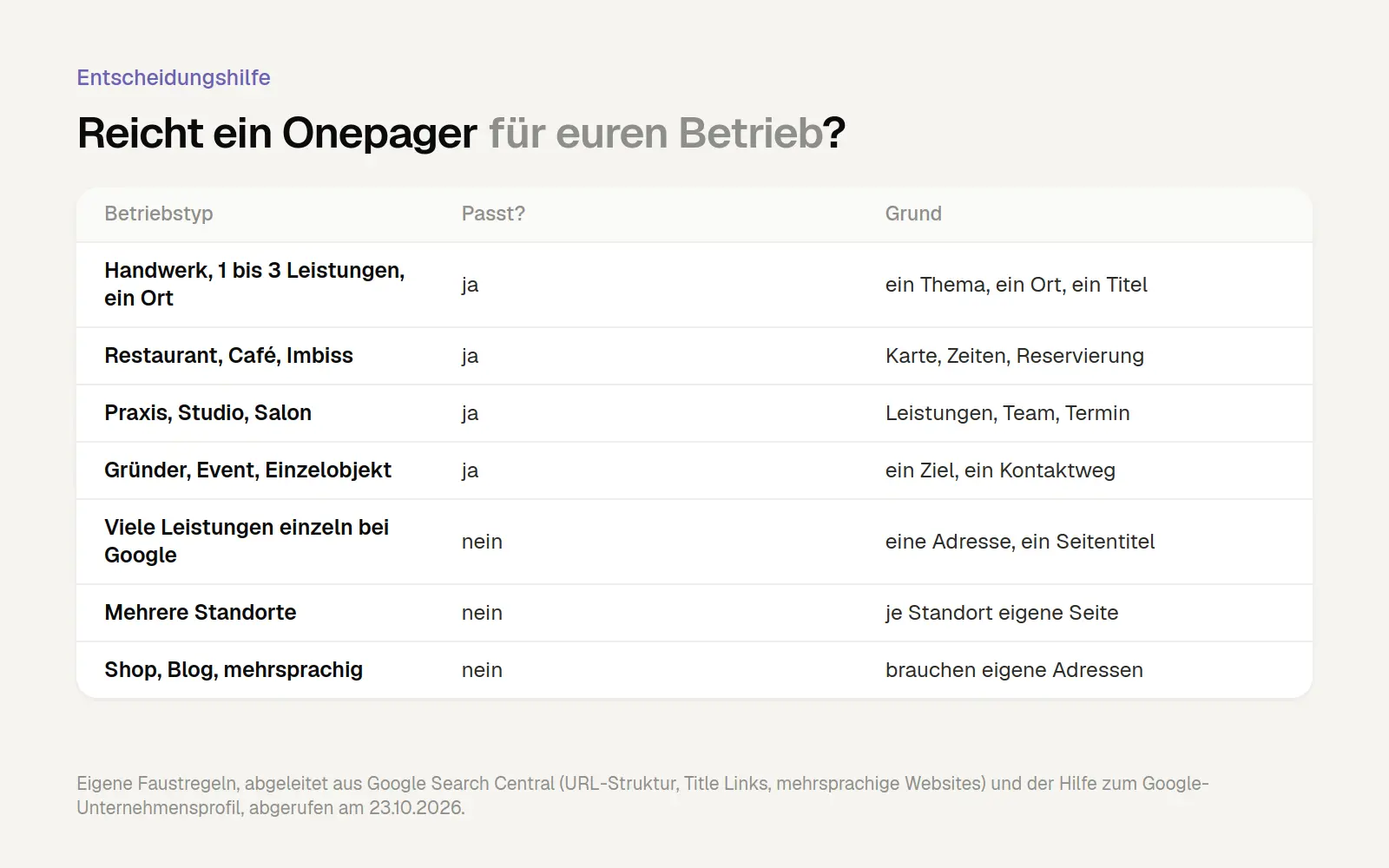
Whether a one-pager is sufficient depends on the number of topics and locations, not on the size of the business. Our rules of thumb, derived from Google's documentation, accessed on October 23, 2026.
The Middle Ground: A One-Pager with Few Subpages
A one-pager isn’t a dead end. Many sites start out as single-page websites and later add individual subpages—for example, for a particularly popular service, job openings, or frequently asked questions. The homepage remains long and tells the story from top to bottom; only individual topics are moved to their own pages. We’ve included an example of this below with the Beechhouse tattoo studio. Anyone starting with a one-pager should therefore choose a system that allows them to add pages later without having to rebuild the site from scratch.
Onepager and Google: What's Actually Documented
Google doesn't cite any disadvantages for one-pagers, but treats them as a single page. Many articles make the sweeping claim that one-pagers are "bad for SEO." This claim is rarely substantiated. We took a look at what Google itself has to say on the matter. The result is more nuanced.
Sections following the hash symbol are not separate pages
For Google, “eurebetrieb.de/#leistungen” is the same page as “eurebetrieb.de.” The part of a URL that comes after the hash symbol is called a fragment. In its recommendations on URL structure (as of October 21, 2026), Google advises against using fragments to change the content of a page. The reason: “Google Search generally doesn’t support URL fragments.” In other words, search generally does not support fragments.
For a one-pager, this means it appears in search results as exactly one page, with a title and a description. Your “Services” section will not be listed as a separate search result. Google doesn’t state this explicitly for one-pagers, but it follows directly from the quoted sentence.
Jump links in search results are still possible
Anchors can help you with your search, even if they aren’t pages in their own right. Google sometimes displays a link below a search result that takes you directly to a specific section of the page. In the documentation on snippets (as of April 20, 2026), these links are called “Read more deep links.” Google provides three recommendations there to enable such jump links:
Make the content visible right away. Content hidden behind collapsible elements or tabs is less suitable.
No forced scroll position. The page should not jump to a specific location using JavaScript when it loads.
Do not remove this fragment. If the page changes the address via a script, the part after the hash symbol must not disappear.
Google doesn't offer any guarantees. Still, there's a practical takeaway for you: Give each section a real heading and a descriptive anchor. This principle isn't new, by the way. As early as 2009, Google recommended on its own blog that sections of long pages be marked with descriptive anchors.
One page title for everything
The page title is the blue text that Google displays as a heading in search results. In the source code, it appears in the so-called title element and is otherwise only visible to visitors in the browser tab. In its Help section on Title Tags (as of December 10, 2025), Google recommends that each page have its own title—one that is descriptive and concise, and not stuffed with search terms. The SEO Starter Guide adds that a good title should be unique to the page, clear, and accurately describe its content.
From this, we derive a rule that Google doesn’t state quite so explicitly: An address should focus on a single topic. A title like “Electricians in Pulheim: Installation, E-Check, and Wall Boxes” works well . A title intended to cover both “Bathroom Renovation in Cologne” and “Gutter Cleaning in Bonn” will either be unreadable or overly cluttered. If you want to cover many such combinations, you’ll need multiple pages. If you focus on a single topic in one place, one page is enough.
At the same time, Google tempers exaggerated expectations regarding a website’s structure. The Starter Guide essentially states that search engines understand pages as they are, regardless of how the website is organized. A sophisticated folder structure only becomes important when there are more than a few thousand URLs. For a small business, the question of “one or five pages” is therefore less of an issue than some articles claim.
Several Cities: Beware of Doorway Pages
Copied city pages may violate Google's spam guidelines. If you start with a one-page site and then want to be found for ten neighboring towns, you might quickly come up with the idea of creating ten nearly identical pages where only the town name changes. Google calls these “doorway pages”—pages that are created solely to appear in search results for similar queries and then redirect visitors to the actual site.
In its spam guidelines (as of August 28, 2026), Google explicitly cites as examples several domains or pages that target specific regions or cities and redirect users to a single page. Therefore, if you want to be found in multiple cities, you need genuine websites with original content—such as information about an actual location or real local projects. By definition, a one-pager cannot achieve this. However, it’s also not necessary for a business with a single location.
The business profile is key for local search
According to Google, whether you appear at the top of the map search results has little to do with the number of subpages you have. In its help section on local rankings, Google states: “Local search results are primarily based on relevance, distance, and popularity.” Popularity, in this context, depends in part on how many websites link to your business. And: “The more reviews and positive ratings your business receives, the better its ranking in local search results can be.”
The tips on this page are: Verify your business, keep your information up to date, respond to reviews, add photos and videos, and add products. The number of pages on the website is not listed. The website still plays a role, for example, in determining relevance. Google does not disclose how heavily it weights this factor.
For a single-location business, this means: A well-maintained business profile with genuine reviews puts you on the map; the one-pager is the destination behind the “Website” button. In its guidelines for business profiles, Google recommends exactly that: listing a website that showcases the specific location, rather than redirects to social media pages, for example. We explain in detail how to set up your profile and generate leads from it in the article “The Google Business Profile: Set Up, Verify, and Generate Leads.”
How to Create a Good One-Pager, Section by Section
A good one-pager answers your customers’ questions in the order they ask them. First: Am I in the right place? Then: What exactly do you offer? Can I trust you? How does it work? Who are you? And finally: How can I reach you? This results in seven key sections. Not every one-pager needs to have all of them as separate sections. “How It Works” and “About Us” can easily be combined, as can “Frequently Asked Questions” and “Contact.” Six sections are usually sufficient.
First, let’s take a look at why the order is so important. The Nielsen Norman Group, a U.S.-based usability consulting and research firm, used eye-tracking in its 2018 study “Scrolling and Attention” to track where people look on websites. With 120 participants and over 130,000 recorded gaze points on a desktop screen, the study found that 57% of viewing time was spent on the area visible without scrolling. 74% was spent on the first two screen heights, and 81% on the first three.
So people do scroll, but their attention drops off significantly as they scroll down. The study is from 2018 and was conducted on desktop computers. It does not provide figures for mobile devices. Nevertheless, the trend is clear: What’s important belongs at the top, and contact information shouldn’t be relegated all the way to the bottom.
According to Statcounter, just under 60% of page views in Germany in September 2026 came from cell phones, with an average of about 46% over the last twelve months. The data tracks page views, not individual visitors, and only your own visitor data can show whether the percentage is higher in the skilled trades or the restaurant industry.
1. The first screen: Service, Location, Contact Method
The first screen should explain what you do, where you do it, and how to contact you. In web design, this top section is called the “hero.” A slogan like “Quality Driven by Passion” doesn’t answer any of these questions. “Electricians for Pulheim and West Cologne” with a “Call Now” button answers all three.
The pediatric dental practice in Böblingen did a great job with this, as shown in our examples below: The main headline reads “Your Pediatric Dentists in Böblingen,” and right next to it is a button for scheduling an appointment. The service and location are covered in a single sentence, with the contact information right next to it.
We measured for ourselves just how often this information is missing. For our Cologne Trades Website Report, we automatically analyzed 752 accessible websites of trades and small businesses in the Cologne area in September 2026. Only 37% had a phone number displayed in the top third of the page. Only 43% had the number set up as a link, so that users could tap it on their cell phones and call directly. The analysis was based on the source code and does not account for content that is loaded via a script. The figures are therefore likely to be on the low side.
2. Services: brief, listed individually, with their own heading
Each service should have its own short headline and two to three sentences. A one-pager can effectively showcase one to five services. Describe what the customer gets, not what you do from a technical standpoint. “New outlets and wiring, even in occupied rooms” says more than “Electrical installation in accordance with VDE standards.”
Real headings offer a twofold benefit. Visitors can find what they’re looking for more quickly when skimming the page. And, as described above, Google can—in the best-case scenario—link directly to a specific section. A block of continuous text that lists all services without any structure misses out on both of these benefits.
3. Trust: Reviews, Projects, Proof of Experience
Show evidence instead of making claims. Genuine customer testimonials, reference projects with specific locations, a master craftsman’s certificate, guild membership, or certifications carry more weight than any claim that “We’re reliable.” Pillmeier, a gardening and landscaping company based in Abensberg, illustrates this well: Its references list the locations where the projects were completed, such as Ingolstadt and Pfaffenhofen. Anyone living there can immediately see that the company also operates in their area.
The best place to collect reviews is on your Google Business Profile, because, according to Google, they also affect your local search ranking there. You can showcase a selection of them on your one-pager. This is how your profile and website work together.
4. Procedure: three to four steps
A brief outline helps ease any uncertainty before the first call. Many customers hesitate because they don’t know what happens after they make an inquiry. Three or four steps are enough: inquiry, site visit or callback, quote, and completion. If you want to be even more specific, mention how quickly you’ll get back to them—but only if you can actually stick to that timeline.
5. About Us: Our Team and History
A real photo of you or your team is worth more than three paragraphs on your company philosophy. Explain how long the business has been around, who’s behind it, and what sets you apart. People are more likely to believe specific details—such as the year the company was founded, master craftsman certifications, or photos of your own fleet—than they are to believe general promises. This section can easily be combined with the workflow description.
6. Frequently Asked Questions: Clearly Visible
Answer the five to eight questions you hear most often on the phone. Do you see patients on weekends? How much is the travel fee? Do I need a referral? The pediatric dental practice in Böblingen, for example, addresses the first visit and the issue of referrals—exactly what parents want to know beforehand.
Many pages hide the answers to make the page appear shorter. If you're hoping to use jump links on Google, it's better to leave them visible, as Google itself recommends.
7. Contact: brief, multiple channels
At the bottom, the phone number, form, address, and business hours are listed together. Anyone who has scrolled this far is interested. Now nothing should stand in the way.
The form should be brief. Name, phone number or email address, a message, and at most one drop-down menu labeled “What is this about?” are sufficient for an initial inquiry. There is evidence supporting this recommendation, but it is outdated or comes from a different context, so here is some context:
In an analysis of over 40,000 of its customers’ landing pages, HubSpot found that adding more fields results in fewer people submitting the form—though the effect was less pronounced than expected. Single-line text fields had little impact. In contrast, multiple large free-text fields and multiple dropdown menus were associated with significantly fewer inquiries. The page was last updated in June 2025, but the data itself is significantly older. No specific year of the survey is listed there.
The Baymard Institute analyzed 2,024 order forms in online stores: On average, they had 11.3 fields, but according to Baymard, most stores would only need 8. This refers to the checkout process in the store and not to contact requests. It’s still a useful comparison, though: Every field means more work for the customer.
Shorter forms are also in line with data protection regulations, as the GDPR requires that you collect only the data you truly need (Art. 5(1)(c) GDPR). Here, too, it’s worth taking a look at our Cologne survey: Only 31% of the websites surveyed had a recognizable contact form at all. We explain why a form might be present but still fail to generate any responses in the article “Why You’re Not Getting Any Inquiries Through Your Contact Form.”
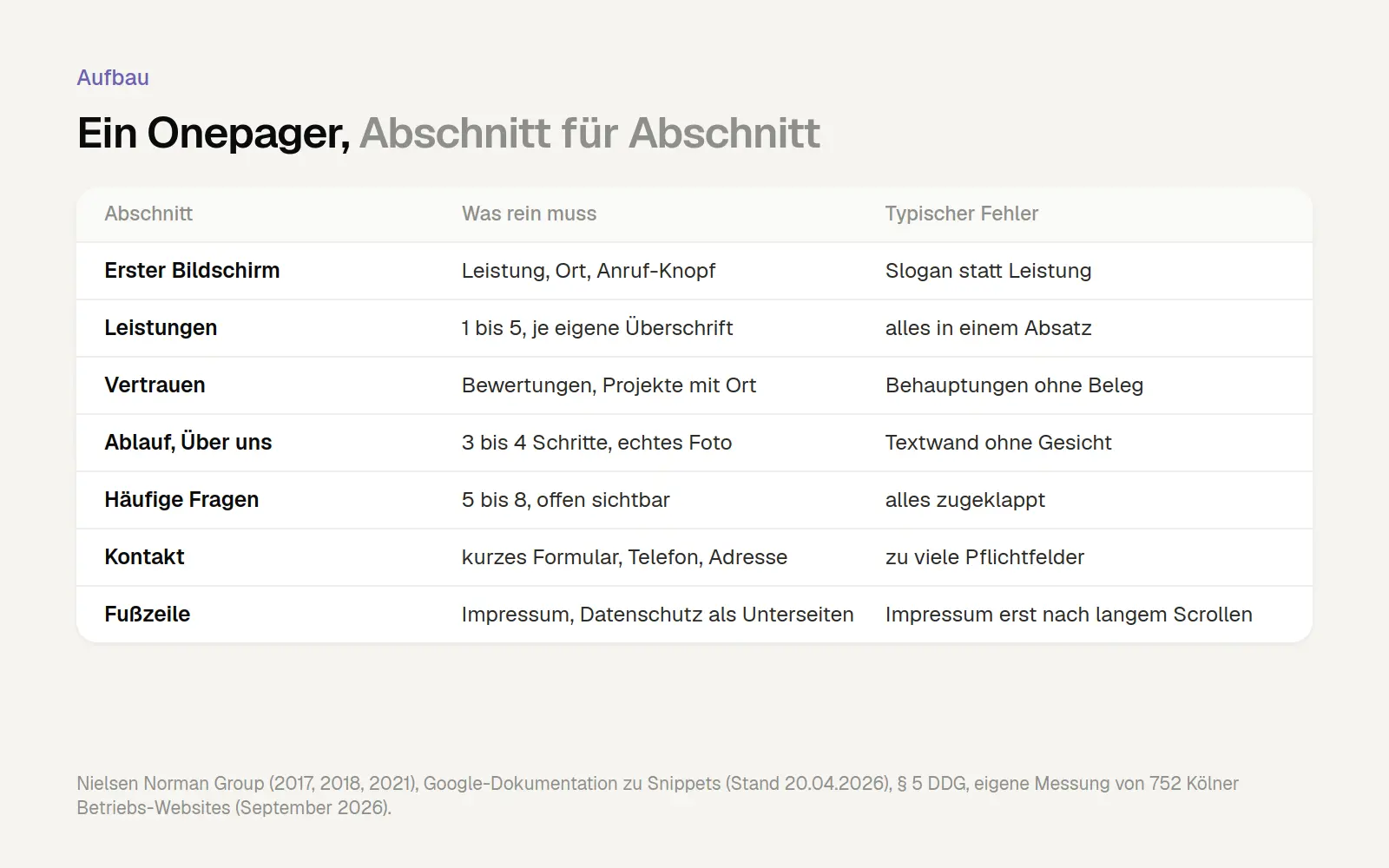
Six sections plus a footer, along with the typical errors associated with them. Sources: Nielsen Norman Group, Google, Section 5 of the DDG, our own measurements in Cologne (September 2026).
The Menu: Anchor Links You Can Understand
Anchor links are useful for long pages, especially on mobile devices. In a 2017 article on anchor links within a single page, the Nielsen Norman Group examined when they are helpful. One risk: Many people expect a link to open a new page and are briefly confused when the page simply scrolls. However, the benefits outweigh the drawbacks for long pieces of content because they take you directly to where you want to go. This benefit is even greater on mobile devices, because what fills one screen height on a desktop can easily span several on a mobile screen.
This leads to a few practical rules. Name the menu items using clear terms such as “Services,” “Process,” and “Contact,” rather than creative names. Make sure the heading doesn’t disappear beneath a fixed bar when the page loads. And check beforehand whether the page really needs to be that long. If there are only a few short sections, there’s no need for a jump menu.
The running bar: keep it small
A narrow bar with a phone icon and a contact button that remains visible as you scroll works well on a one-page website. This type of bar is called a “sticky header” because it “sticks” to the top of the screen. This way, the contact option is always just a tap away, no matter where you are on the page.
In its 2021 article on sticky headers, the Nielsen Norman Group lists five rules. For one-pagers, two of these are the most important: keep the bar small so there’s enough space for the content, and check beforehand whether a sticky bar is even necessary. A bar that takes up a quarter of the screen on a cell phone does more harm than good.
Load time: long page, but still fast
A long one-page website with lots of photos doesn't have to be slow, as long as the cover image loads immediately. The trick is called "lazy loading." With this technique, the browser doesn't load an image until it comes close to the visible area as you scroll. All major browsers now support this feature by default.
According to web.dev, Google's developer platform, Chrome begins loading 1,250 pixels before the visible area on a fast connection, and as early as 2,500 pixels before on a slow connection. In experiments conducted by Chrome on Android phones with 4G, 97.5% of the images that were loaded with a delay were fully loaded within 10 milliseconds of becoming visible. For visitors, the difference is therefore barely noticeable.
On the other hand, it’s a mistake to delay the loading of the large header image at the very top as well. web.dev explicitly advises against delaying the loading of images that are likely to be visible when the page opens. The header image is often the largest visible element. It therefore determines the Largest Contentful Paint, or LCP for short: the time it takes for the largest visible element to load. According to web.dev, this value should be no more than 2.5 seconds.
In our Cologne-based measurement using Google PageSpeed Insights, the median LCP on mobile devices was 6.0 seconds. “Median” means that half of the pages loaded faster, and half loaded slower. The measurement was conducted in a lab test, using a simulated mobile device rather than data from actual visitors. Only 12.5% of the 734 pages measured loaded in 2.5 seconds or less.
By the way, the argument that “modular platforms are slow” doesn’t hold water. According to the HTTP Archive’s Technology Report for September 2026, 98% of Jimdo websites in Germany accessed via mobile devices met Google’s Core Web Vitals metrics (measuring load time, responsiveness, and stability), compared to only 63% of WordPress websites. What matters is how the site is built, not what it’s built with. You can check how fast your own site loads on a mobile device for free with our Speed Check.
Legal Notice and Privacy Policy: Always Immediately Available
The legal notice must also be easily accessible on a one-pager. Section 5 of the Digital Services Act (DDG), which replaced the old Telemedia Act in May 2024, requires provider information to be “easily recognizable and directly accessible” and to be kept available at all times.
Courts have clarified what this means. In 2006, the Federal Court of Justice ruled that a legal notice accessible via two clicks—for example, via “Contact” and then “Legal Notice”—can satisfy this requirement (ruling of July 20, 2006, I ZR 228/03). On the other hand, anyone who places the legal notice at the very end of a long page is taking a risk. According to industry reports, in 2025 a Higher Regional Court objected to a legal notice that appeared only after scrolling through more than six screen pages. The case involved a long law firm website linked to from a lawyer’s profile. The Anwaltspraxis magazine and IWW reported on this. We have not reviewed the full text of the ruling.
The safe solution is simple: Create separate subpages for the legal notice and privacy policy and link to them in a footer that appears on every page, or additionally in the menu. In our survey in Cologne, a legal notice was visible on 88% of the pages, and a privacy policy on 83%. This means that on roughly one in ten pages, not even a legal notice was visible. Violations of the legal notice requirement can be penalized with fines of up to €50,000 under Section 33 of the German Data Protection Act (DDG); in practice, however, the more common risk is receiving a cease-and-desist letter. This is not legal advice. If in doubt, consult your professional association or a lawyer.
One-Pager Examples: Ten Real-Life Pages and What Makes Them Effective
The best examples of one-pagers come from real life, not from template collections. Many articles on this topic feature templates from website builders or screenshots without links. Instead, we’ve selected ten real websites—all found through the One Page Love gallery—and on October 23, 2026, we checked whether they were accessible and how their menus were structured. None of them are our clients. Websites change, so take a look for yourself to see what they look like today.
1. Kinder Praxis & Klinik, Pediatric Dentists in Böblingen
The pediatric dental practice's website is a textbook example of the first screen we described above. The "Schedule an Appointment" button appears at the top and again at the bottom. The menu links to "Services," "Team," and "Frequently Asked Questions," while the "Legal Notice" and "Privacy Policy" are on separate pages.
2. Deiterhaus, Single-Family Home in Essen
Deiterhaus demonstrates that a one-pager can also work for a single property. The page tells the story of the house, lists the facts, includes a customer testimonial, and repeats the “Request Information” button several times. It also provides a phone number along with the hours when someone can be reached. The legal notices are provided separately.
3. Pillmeier GmbH, Gardening and Landscaping in Abensberg
Pillmeier is one of the few examples of a trade business featured in the gallery. The opening line, “In Abensberg for over 50 years,” links experience with the local community, and five numbered services provide an overview. In addition, there are references that include place names and photos of the company’s own fleet—concrete evidence rather than general promises.
4. Beechhouse, Tattoo Studio in Bochum
Beechhouse is a prime example of a middle ground. The main heading lists the name, services, and location; the homepage is long and designed in the style of a one-pager. However, the artist, FAQs, and directions each have their own subpages. This is what a one-pager that has evolved over time looks like. Another well-executed feature is the clear note that work is done by appointment only.
5. The Devonshire, a pub and restaurant in London
The Devonshire shows what a restaurant website needs. The menu links to food menus, hours of operation, and frequently asked questions, and the "Reserve" button is always at the top. The hours of operation are listed separately for the pub and the kitchen—a detail many guests want to know before visiting. About 25 FAQs cover topics such as dogs, children, and accessibility. The menus are available as PDFs.
6. Madie, a café and pastry shop in Madrid
Madie places the address and opening hours for the entire week right at the top—exactly what café guests look for first. Below that is the menu organized by category, a separate section for catering with its own button, and a map showing the location at the bottom. The language selection is interesting: English and French each have their own addresses. This is exactly the solution Google recommends for multilingual websites.
7. Sarah & Matt, Wedding Page from Lancaster (USA)
Sarah and Matt's wedding website is a typical one-page event site. The reception, travel information, and gift registry each have their own sections with descriptive links. Guests RSVP through an external service. That's all an event website needs.
8. TAB Kitchen & Bakery, a bakery and café in Bangalore
TAB Kitchen & Bakery was built using Framer, the same system that powers our own website. The site has a lot of personality and features an interactive map. It shows that a one-page website doesn't have to look like it was made from a template.
9. Nowa, a restaurant in Allentown (U.S.)
Nowa is the polar opposite of TAB: very minimalist, with little text and a sense of calm. Seeing these two examples side by side shows just how different a one-pager for a restaurant can look, without either approach being wrong.
10. Builders Table, Hackathon in Cape Town
Builders Table started out as an event announcement and has since added separate subpages for the hackathon and for talks. Like Beechhouse, the site demonstrates that a one-pager can grow along with the project.
Our own example: the "Trattoria Rosa" sample page
The example page on our services page shows how we build a one-pager for a small business. “Trattoria Rosa” is a fictional restaurant in Cologne-Ehrenfeld—not an actual client. It illustrates the basic building blocks from the top: location and year founded above the headline, a headline describing the offering, a sentence providing context, a button for making reservations, and below that, today’s opening hours and the address. The menu contains only three items: Menu, About Us, and Contact.
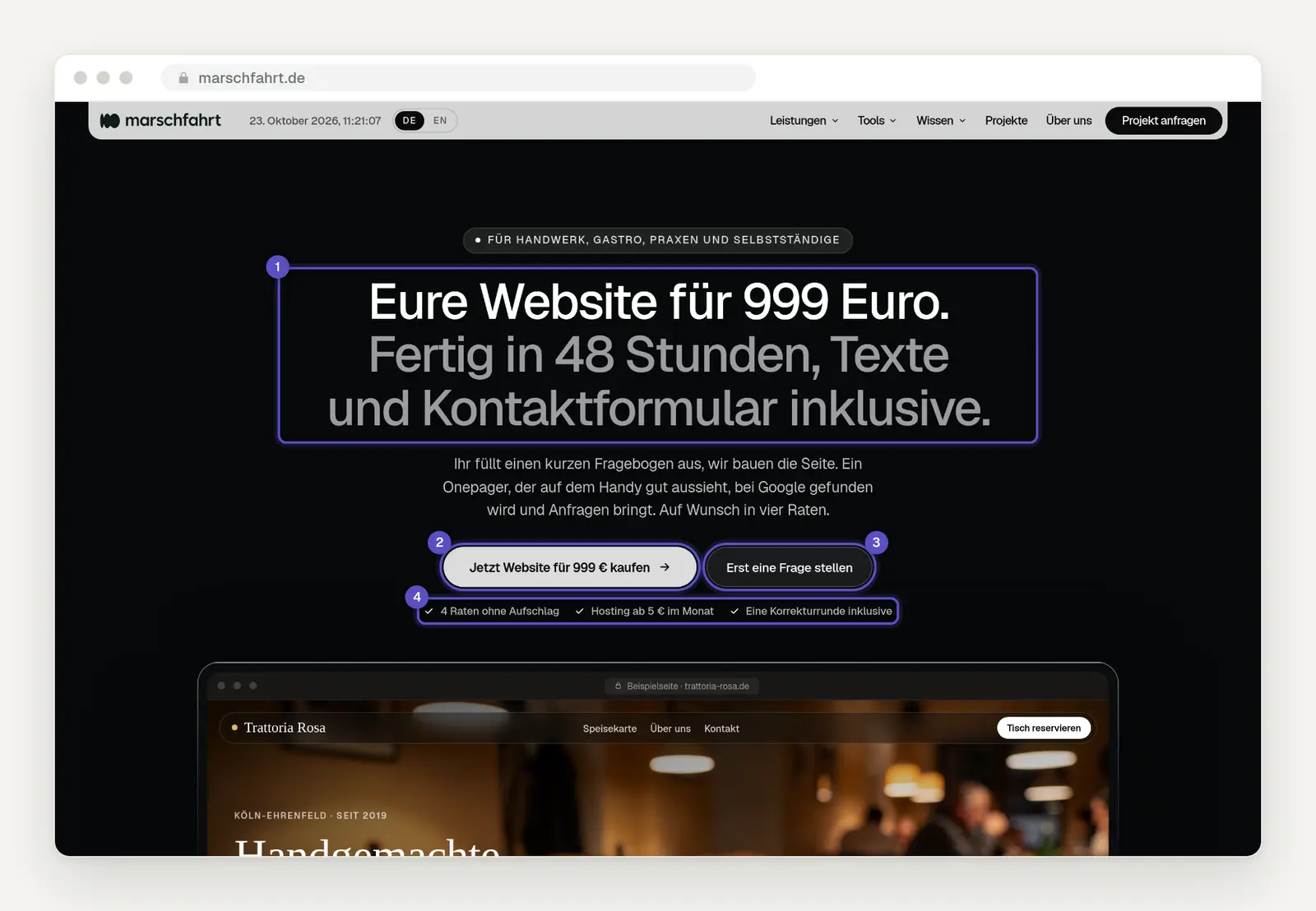
Our offer page featuring a sample page for a fictional trattoria in a browser mockup: location, offer, reservation button, and hours of operation are displayed on the first screen. Source: marschfahrt.de/website-fuer-999-euro, captured in October 2026.
The offer page itself is also a one-pager. On a cell phone, the headline and the "Buy" button appear on the first screen without having to scroll.
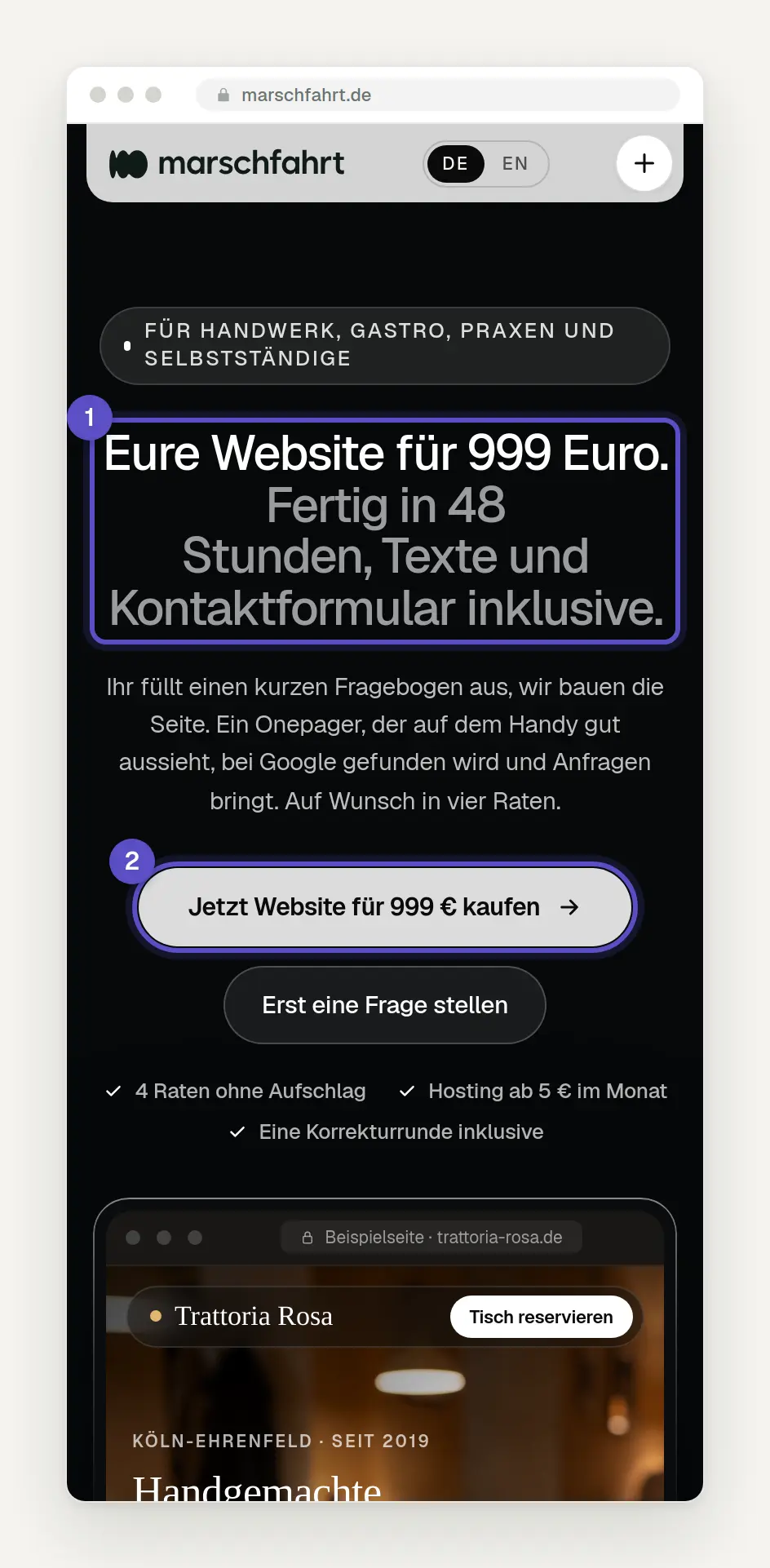
This is what the offer page looks like on a cell phone: the headline and "Buy" button are visible without scrolling. Source: marschfahrt.de/website-fuer-999-euro, captured in October 2026.
How much does a one-pager cost?
A one-pager costs anywhere from a few euros a month if you build it yourself using a website builder to several thousand euros if you hire an agency. We were unable to find an independent survey on one-pager prices in Germany. All figures below come from the providers themselves, pricing pages, and guides, as of October 23, 2026. They are examples, not market averages.
Build It Yourself with a Construction Set
With toy building sets, you spend little money but a lot of time. In early 2024, Stiftung Warentest tested sixteen toy building sets and found that the costs for the first year ranged “from 43 euros to 257 euros.” The testers warn: “In the second year, it often becomes significantly more expensive.”
Here are a few current entry-level plans, each including VAT: STRATO Plus costs €12 in the first year and €144 per year thereafter. Jimdo Start costs €144 per year, but legal documents are only included in the Grow Legal plan for €348 per year. Wix Light costs €199.92 per year, and legal documents are free only in the first year. Starting in the second year, most providers charge around €140 to €200 per year; with Jimdo and Wix, the domain fee is extra.
What’s not included in the bill: You’ll have to handle the layout, text, photos, legal notices, and basic Google settings yourself. For a business where the boss works on the website at the kitchen table in the evenings, that’s the real cost. You can read more about the pitfalls of website builders in our article “Website Builder or AI Website?”
Request a quote: publicly listed starting prices
On October 23, 2026, publicly listed starting prices for a one-pager ranged from €490 to €1,850. To determine this, we analyzed the pricing pages of five providers and a Google ad for the search term “create a one-pager.” Almost all prices are “starting at” prices, and it’s not always clear whether they’re net or gross. The lowest price comes from an ad with a limited number of slots. What’s included varies widely: Some providers list design, mobile view, a form, basic SEO, and rounds of revisions, while others charge based on the number of sections. It’s not always clear whether text, legal text, and hosting are included.
In guides, providers typically cite figures of €500 to €1,500 for freelancers and approximately €1,000 to €4,000 for agencies, plus €10 to €30 per month for hosting and maintenance—or €40 to €120 for small agencies. These ranges come from providers with a vested interest and without a disclosed methodology.
To put this in perspective: The 2026 Freelancer Compass from freelancermap lists an average hourly rate of €103 for Germany. Assuming ten hours for design, copywriting, forms, and setup, that comes to about €1,030 based on this average across all fields.
How to Tell if an Offer Is a Good Deal
A low price is only a good deal if it includes what's important. Before you accept an offer, ask about these points:
Text: Does the provider write the text, or do you provide it?
Legal Texts: Are the legal notice and privacy policy included, and are they up to date?
Hosting: How much does it cost per month, how long is the contract, and how do you cancel it?
Ownership: Do the domain, content, and access belong to you or to the provider?
Revisions: How many rounds are included, and how much does each additional change cost?
Caution is advised with subscription models. STRATO’s website service, for example, costs €30 per month for a single page under the “Homepage Design & Maintenance Basic” plan, plus a setup fee—totaling €1,800 to €2,000 gross over five years (the website lists the setup fee as €200 in one instance and €0 in another). The site does not specify who owns the website after that period. You can find a detailed breakdown of all options, including a five-year cost estimate, in our article “How to Have a Website Built Inexpensively.”
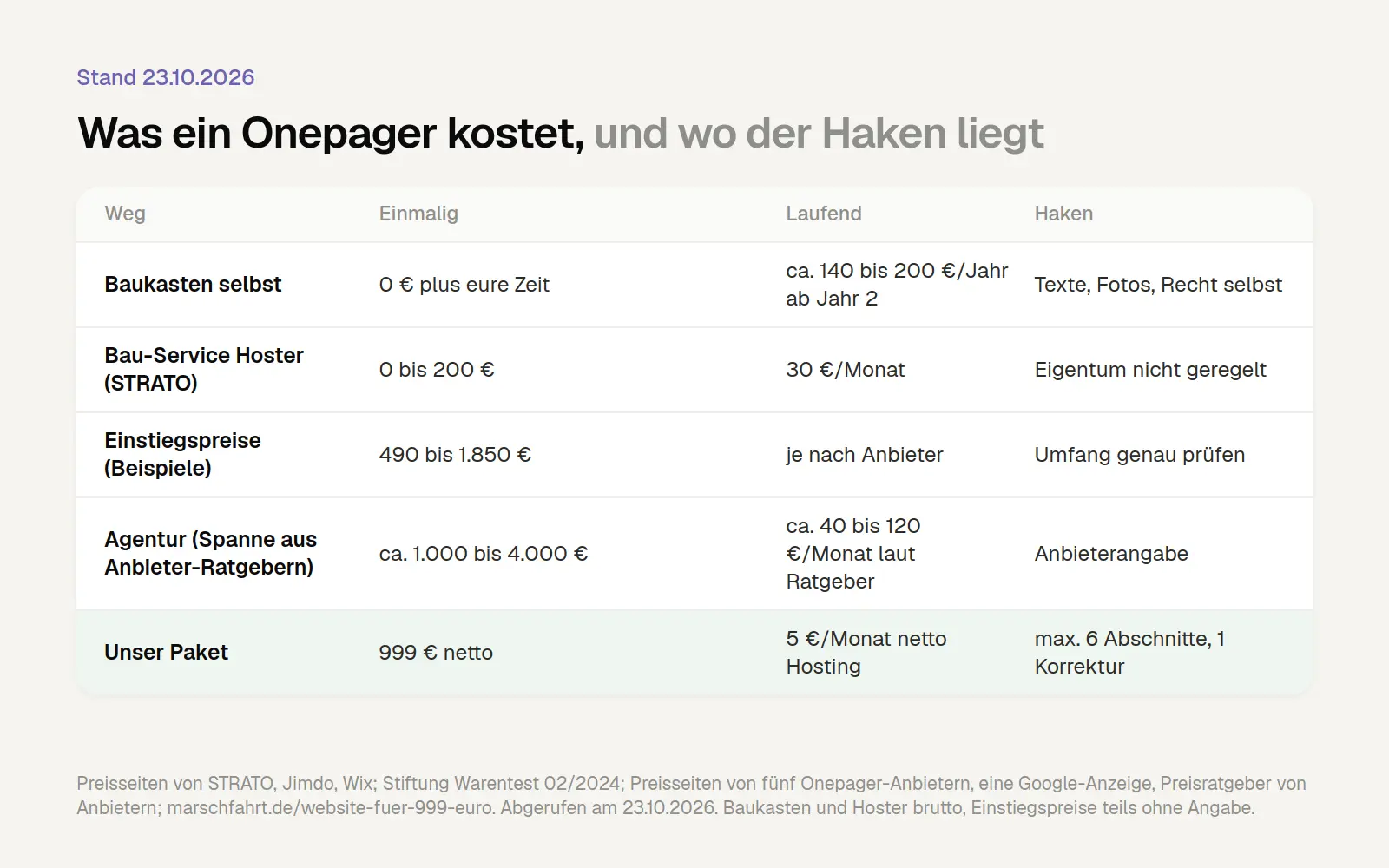
Five Ways to Create a One-Pager and Their Respective Drawbacks. All figures are provided by the vendors, retrieved on October 23, 2026; they are not market averages.
Should you create a one-pager yourself or have it created for you?
You can create a one-pager yourself using any website builder, but it takes more time than most people expect. If you enjoy writing, have a few good photos, and can invest two or three evenings, you can do it. People who are caught up in their day-to-day work often underestimate the amount of writing involved. Here’s the fastest way to do it, in this order:
1. Gather information. Write down what you offer, who your services are for, the areas you serve, how to contact you, and when. Collect reviews, references, certificates, and the questions you’re asked most often over the phone.
2. Define sections. Organize the content into five to six sections: First Screen, Services, Trust, Process, About Us, FAQs, and Contact.
3. Write your content. Use short sentences, specific details, and the language your customers use. The main headline should mention the service and location. Write a page title and a short description for Google that accurately reflect this information.
4. Choose images. Real photos of you, your team, and your work are better than any stock photo. Resize them before uploading to keep the page loading quickly, and enable lazy loading for all images except the top one.
5. Set up the form and phone number. A short form and the phone number as a clickable link, both at the top and bottom. Send yourself a test request and check to see if it goes through.
6. Create legal documents. Include the legal notice and privacy policy as separate subpages, linked in the footer. Be sure to list fonts and integrated services in the privacy policy.
7. Link it to your Google Profile. Enter the address of the one-pager in your business profile and make sure that the name, address, phone number, and hours of operation match on both.
If you’d rather have someone else handle it, you can have a one-pager created. In that case, the most important question isn’t the price, but whether the provider writes the text and whether you’ll own everything in the end. We explain how to recognize a good agency and what should be included in the contract in “Having a Website Created in 2026: Process, Contract, and How to Recognize a Good Agency.”
Our One-Page Website Package: Website for €999
Our Package “Website for €999” is specifically a one-pager for small businesses. It’s ideal for the scenarios we described above as “usually sufficient,” as well as for clubs and small shops with up to ten employees.
It includes a one-page website with up to six sections. We’ll write the text based on your answers to a questionnaire. It also includes a contact form and a design optimized primarily for mobile devices. We’ll set up the legal notice and privacy policy using a template that you’ll fill in with your information. This does not replace legal advice. We’ll also set up the basic Google settings: page title, description, and the link to your company profile. One round of proofreading is included. The site will go live 48 hours after you’ve completed the questionnaire.
The package costs €999 net as a one-time payment, or €1,188.81 gross. Payment is made via Stripe, for example, using a credit card or Apple Pay. If you’d like, you can pay in four installments of €249.75 net each, with no additional fees. Hosting costs €5 net per month and can be canceled at any time. If you don’t have a domain yet, you’ll receive a domain and web space—that is, storage space on the server—free of charge for the first six months. We’ll connect an existing domain for free. The domain, content, and access belong to you.
This package is not intended for online stores, multiple locations, or businesses with more than ten employees; it’s also not suitable for sites with many subpages, a customer portal, or a booking system, nor for the relaunch (i.e., complete redesign) of large existing sites or projects involving numerous rounds of coordination. If your business doesn’t fit within this framework, we’ll let you know and provide a quote tailored to your specific needs.
Frequently Asked Questions
Is a one-pager bad for SEO?
Not necessarily. Google treats a one-pager as a single page with one title because its search results generally do not list sections following the # symbol as separate pages. This isn’t a disadvantage for a business that focuses on a single topic in one location. It only becomes difficult when users are trying to find many different services or locations individually. According to Google, the most important factors in local search are relevance, distance, popularity, and reviews—in other words, the business profile.
How much does a one-pager cost?
If you build it yourself, you’ll only pay the website builder fee, plus your time. As of October 23, 2026, publicly listed starting prices for website creation ranged from €490 to €1,850; for agencies, provider guides cite prices of approximately €1,000 to €4,000. Our package costs €999 net (one-time fee) plus €5 net per month for hosting.
How many sections should a one-pager have?
Usually five to six: the first screen with services, location, and contact information; services; trust; process; “About Us”; frequently asked questions; and contact information. More sections are possible, but reader attention drops off significantly as you go further down the page.
Can a one-pager be expanded later?
Yes, if the system allows it. Many businesses start with a one-page site and later move individual topics to separate pages—such as a particularly popular service, job openings, or a guide. Before you start, ask whether pages can be added without having to build new ones.
Does a one-pager need a legal notice on a separate page?
The law does not require a separate page, but rather a legal notice that is “easily recognizable and immediately accessible.” Nevertheless, the safest approach is to have a separate subpage linked in a footer that is always visible or in the menu. According to expert reports, a higher regional court in 2025 ruled against a legal notice that appeared only after scrolling through more than six screen pages. If in doubt, consult your professional association or a lawyer.
One-pager or landing page—what's the difference?
A one-pager is your entire website on a single page; a landing page is a page designed for a specific action, often for a campaign.
Can I create a one-pager for free?
Many website builders offer free plans, but these usually display the provider’s ads and operate under the provider’s address rather than your own domain. This rarely comes across as professional for a business. At the latest when you get your own domain, there’s a fee—usually between €140 and €200 per year starting in the second year, plus the cost of the domain with some providers. Legal disclaimers often cost extra; with Jimdo, for example, they’re only included in the plan priced at €348 per year.
Conclusion: One topic, one place, one page
If you have a clear offering at a single location, a one-pager is usually a good choice. For an electrician offering three services, the café around the corner, a doctor’s office with an appointment request form, or a startup in its first year, it’s often the best option: quick to build, easy to navigate, and convenient to use on a smartphone. If you offer many services, have multiple locations, run a store, maintain a blog, or need to support multiple languages, you’ll need more pages.
Whether a page generates inquiries depends less on the number of pages and more on a few basic elements: services, location, and contact information on the first screen; short sections with clear headings; a short form; fast loading times; a legal notice and privacy policy accessible with a single click; and a well-maintained Google Business Profile that links back to the site.
If you want to know whether a one-pager is enough for your business, reach out to us via the contact form. We’ll give you an honest assessment of whether it’s a good fit or if you need more. If you already know you want a one-pager, you can find all the details and limitations of our package on the “Website for €999” page . We’ll respond personally—even if the answer is that you don’t need our package.
More Articles
© Marschfahrt Studio
Practical knowledge on web design, SEO, AI, and conversion optimization. Based on real projects, without any marketing spin.

