GPT-6 and Intelligent UI: ChatGPT Now Creates Calculators, Charts, and Recommendations. What This Means for Your Website
Since October 7, ChatGPT has been responding with calculators, charts, and business cards instead of text. We tested it with three customer questions and will show you what this means for your website.
Date
Category
Author

We asked ChatGPT a simple question, just as a master painter would: How much does a new website cost, and how many jobs does it take to make it worthwhile? The response wasn’t text, but a tool. A cost table, a calculation sheet, and a calculator with input fields and a slider that recalculates with every change. We’ve built exactly this kind of calculator on our own page about website costs. ChatGPT generated it on its own in 30 seconds.
This is Intelligent UI, the new way ChatGPT has been responding with GPT-6 since October 7, 2026. In this post, we’ll use real screenshots from three tests to show what ChatGPT is now generating, how good it is, and where the numbers come from. And we’ll explain what this means for your website, because the question is no longer just whether you’ll be found on Google, but whether your content will appear in the interfaces that AI builds for your customers.
In a nutshell (as of October 12, 2026)
ChatGPT now answers questions using calculators, charts, comparisons, and maps instead of blocks of text. This applies to all plans, including the free one. In our tests, the calculations were correct, but ChatGPT chose the underlying assumptions itself, and the sources were websites from other providers. For businesses, this means that simple calculators and general advice sites are losing value. The winners will be websites with their own, clear facts—such as actual prices, reviews, and specific services that AI can cite—and with a call to action that works when the customer arrives having already almost made a decision.
What Is Intelligent UI?
GPT-6 constructs its responses using text, images, and interactive elements, depending on what best fits the question. This is how OpenAI describes it in its October 7 announcement: Responses can include graphics, tappable buttons, forms, charts, and interactive elements that can be used directly within the conversation. A comparison is presented side by side, an explanation becomes a chart, and if a simple text response is most useful, it remains text. Upon request, ChatGPT can also build small tools; OpenAI cites examples such as a savings calculator, a bill-splitting tool for dining with friends, and a game.
Technically speaking, the model does not write code from scratch but rather assembles pre-built building blocks. To this end, OpenAI has built a library of its own components and a compiler that begins constructing the interface while the model is still writing. The library ensures a consistent look, while the model decides how the parts fit together. OpenAI itself acknowledges that the model’s design judgment still needs improvement. OpenAI articulates its guiding principle as follows: Instead of people learning to use software, software should adapt to people.
You’ll get it automatically—no special prompt is needed. GPT-6 with Intelligent UI has been available in Plus, Pro, Business, and Enterprise since October 7, and in Free and Go since October 8. The paid plans use GPT-6 Sol, while Free and Go use GPT-6 Luna. Intelligent UI is only available in chat, at thinking levels ranging from Instant to Extra High, in the browser, and in the latest apps—not in the older desktop apps. It does not have its own quota. It cannot be turned off completely: Under Settings, the “Layout and visuals” toggle reduces the number of elements, but according to OpenAI, it does not force a text-only response.
Our Test: Three Questions, Three Interfaces
We asked three questions that could just as easily have come from your customers. All tests were conducted on October 12 in a temporary chat without personalization, so that no saved preferences would influence the responses.
Test 1: “How much does a website cost, and when does it start paying for itself?”
ChatGPT responded with a cost table, a calculation sheet, and a payback period table. Our question: A master painter with four employees wants to know how much a website costs and how many jobs at 3,500 euros each it would take to make it worthwhile. The results included estimated costs ranging from 2,000 to 3,500 euros net, a sample calculation of 3,100 euros in the first year, and a table showing how many jobs are needed based on the contribution margin.
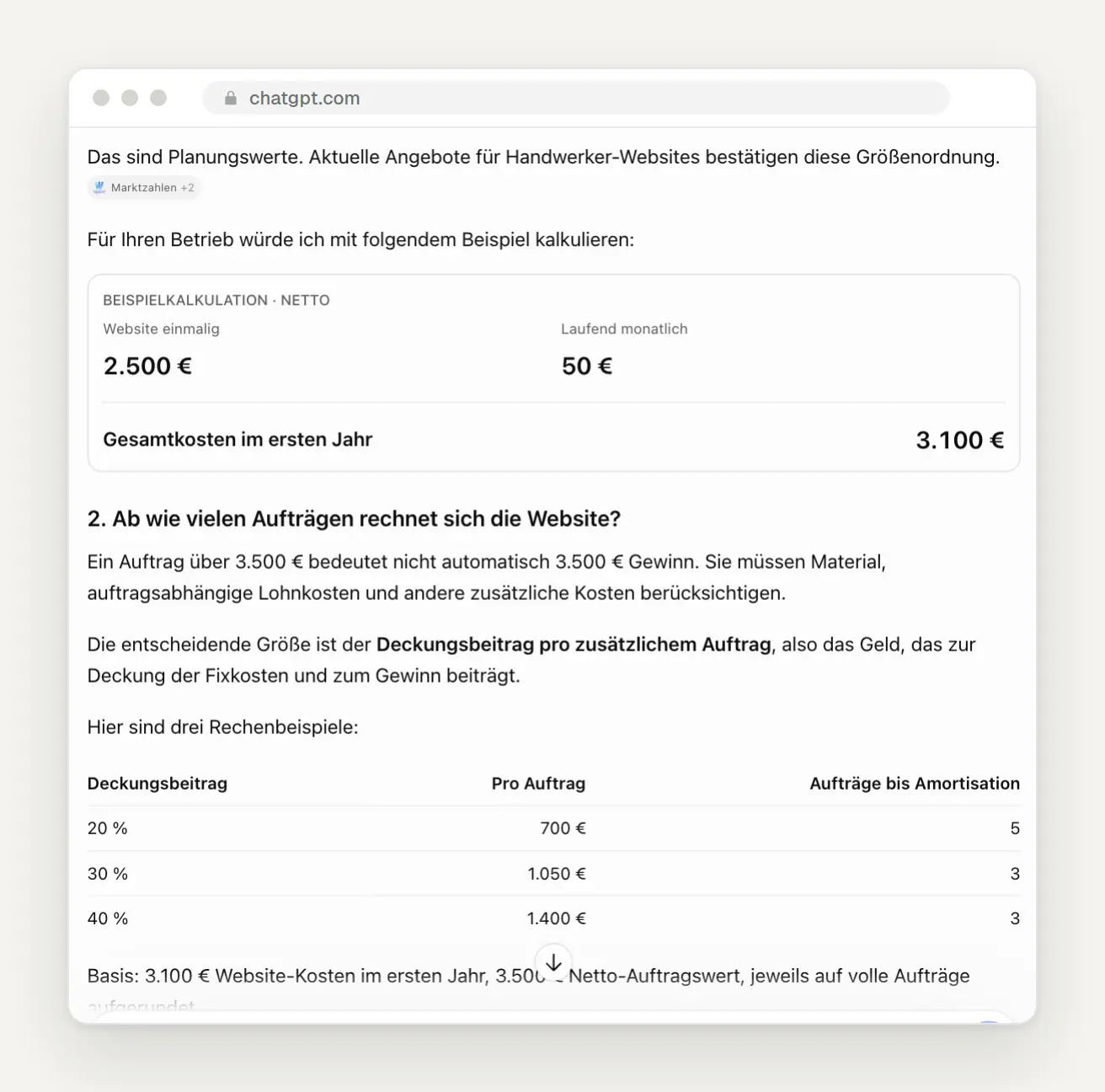
Cost table, cost estimate sheet, and payback period table in a single response. Below the table is the source citation “Market figures +2.”
Then ChatGPT built a calculator for users to try out for themselves. It has three input fields, a slider for the contribution margin, and a result that updates instantly. With a 30 percent contribution margin, the painting company needs three additional jobs in the first year.
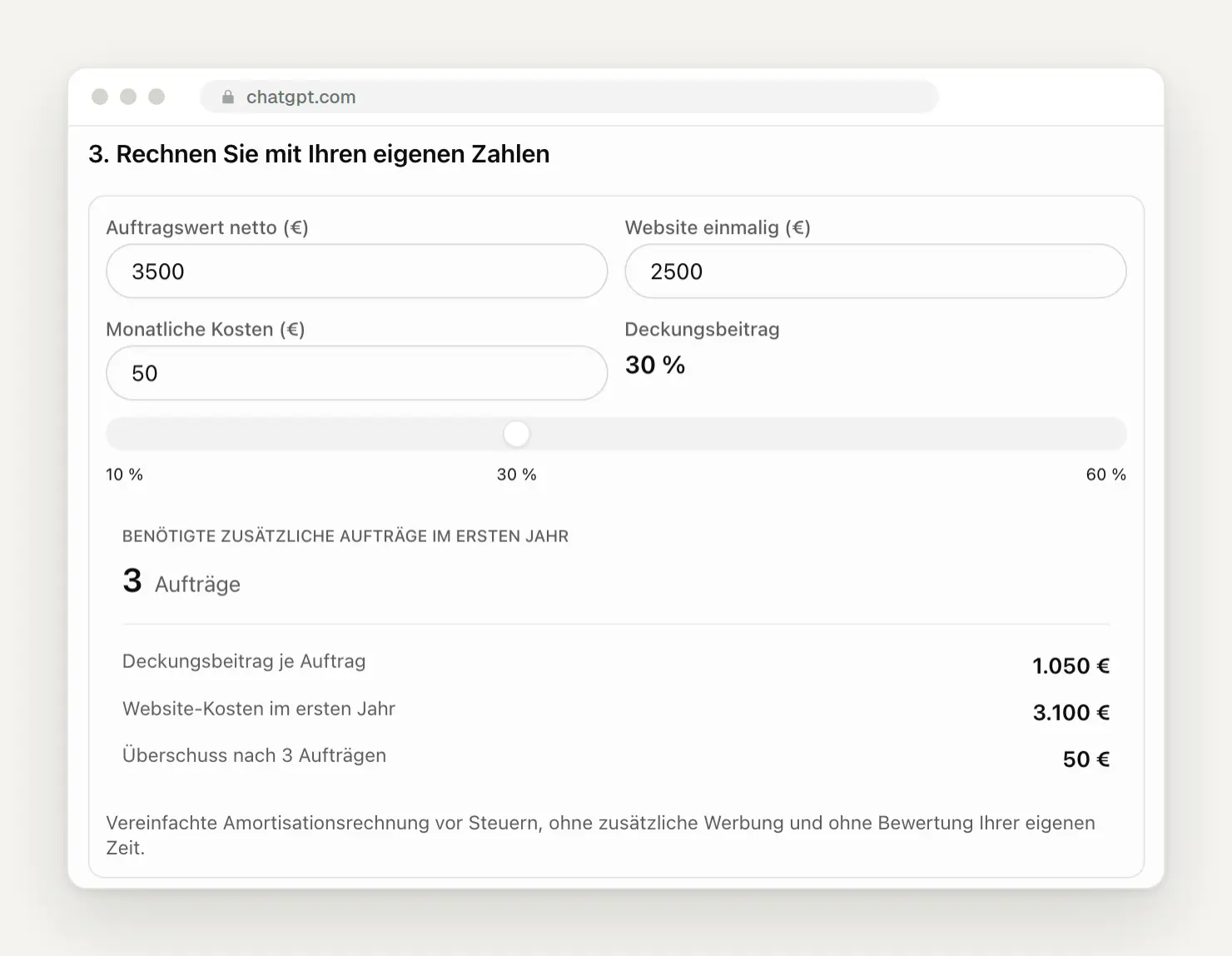
The calculator that ChatGPT built directly into the answer, with a contribution margin of 30 percent.
We set the slider to 20 percent, and the calculator did the math correctly. A contribution margin of 700 euros per order, five orders, and a surplus of 400 euros. The calculation is correct. But what a layperson might easily overlook is that ChatGPT itself assumed the 50 euros in monthly operating costs and the 30 percent as the baseline value.
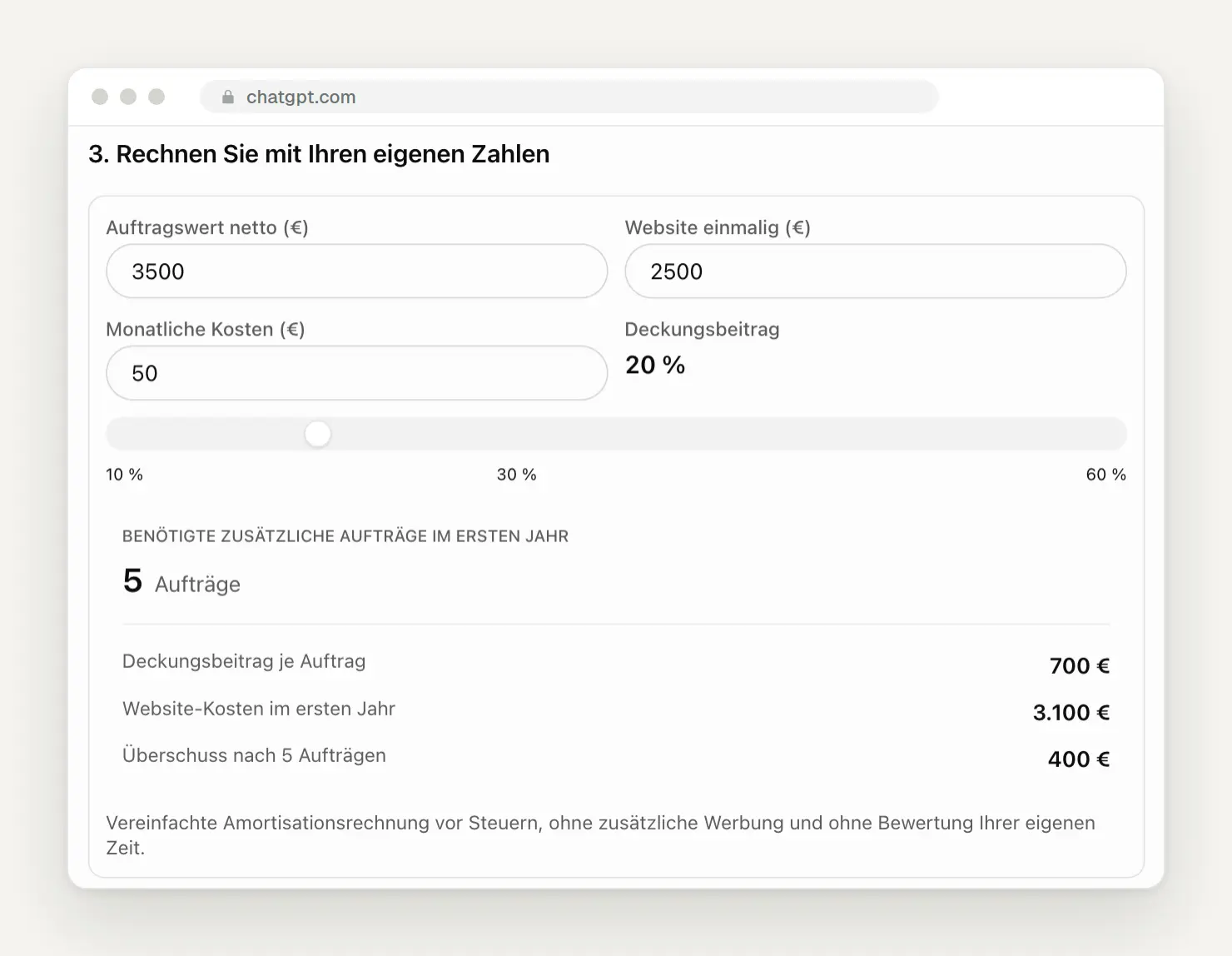
The same calculator after adjusting to 20 percent: five orders instead of three.
The most interesting part is hidden in the small source note. Clicking on “Market Figures +2” reveals where the prices come from: three advice pages from other web agencies with titles like “How Much Does a Website for Tradespeople Cost? Prices for 2026,” published in July 2026. Our own cost page wasn’t included. There’s no longer a link in the calculator itself; the sources are only referenced in a single sentence in the text above it.
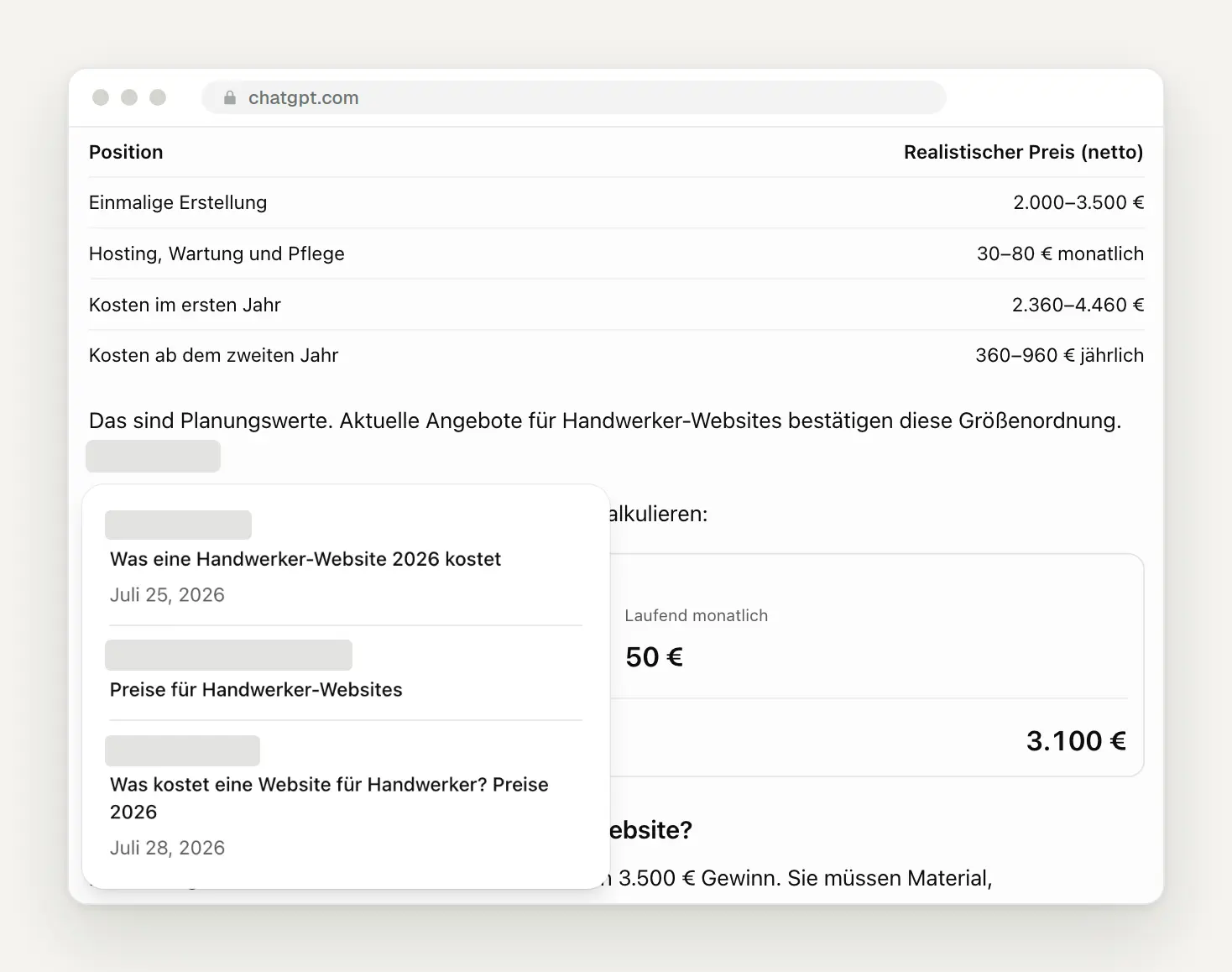
The sources behind the prices: three advice websites from other agencies. We have obscured the names and logos.
Test 2: “Is a solar power system with storage worth it?”
Right at the beginning were two key metrics cards. For a single-family home in Cologne with a consumption of 4,500 kilowatt-hours, ChatGPT estimated an 8-kWp system and calculated a payback period of 15.1 years without storage and 13.4 years with storage. Below that were the assumptions, a savings table, and a note stating that this was an example calculation.
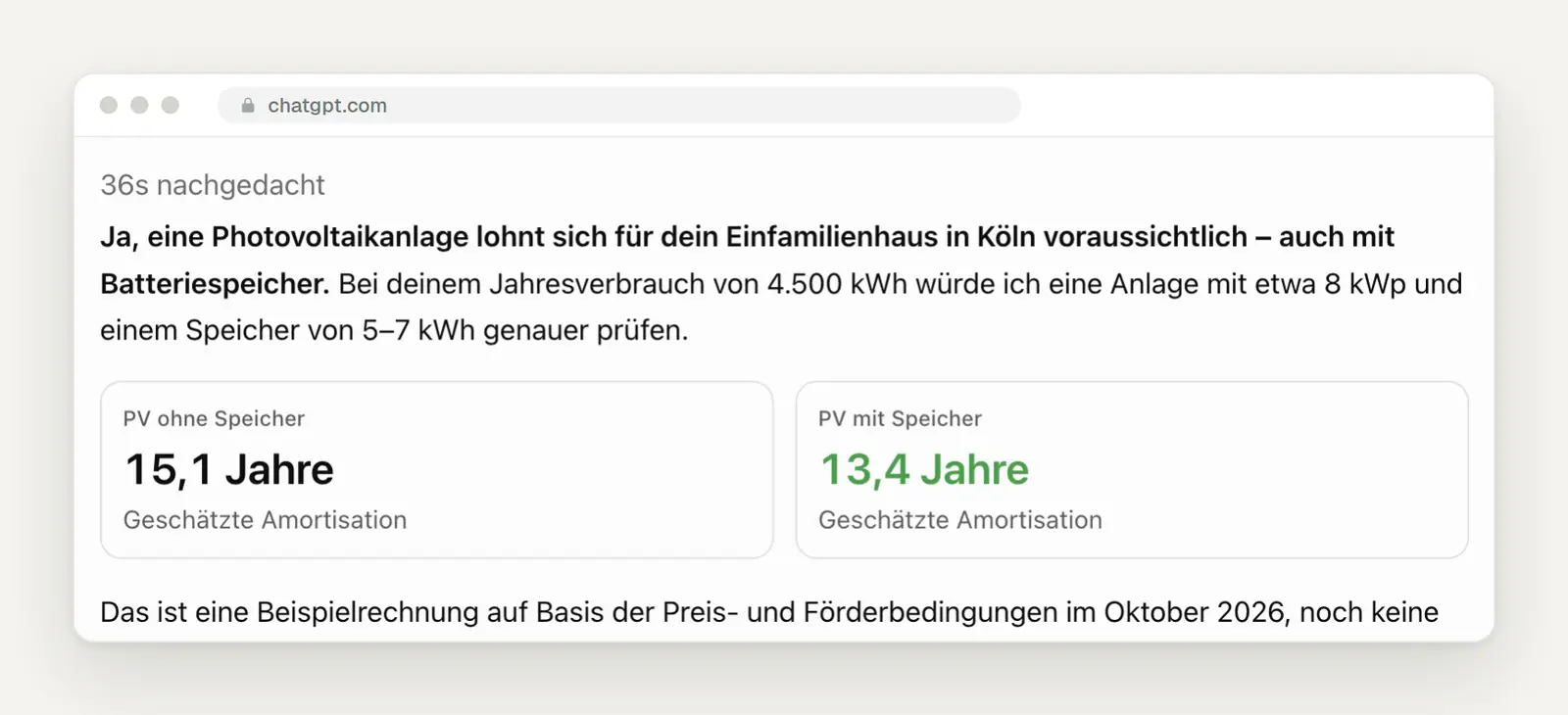
Two key metrics cards at the very top of the answer, with the "Memory" option highlighted in green.
In addition, there was an interactive chart covering 20 years. When you hover your mouse over the lines, it displays the values for each year. We did the math: The final values of plus 3,860 and plus 7,580 euros match the assumed investments and annual savings. ChatGPT itself lists the simplifications below the chart, such as no financing, no module aging, and no storage replacement. Solar system sellers will see here what figures customers will bring to initial consultations in the future.
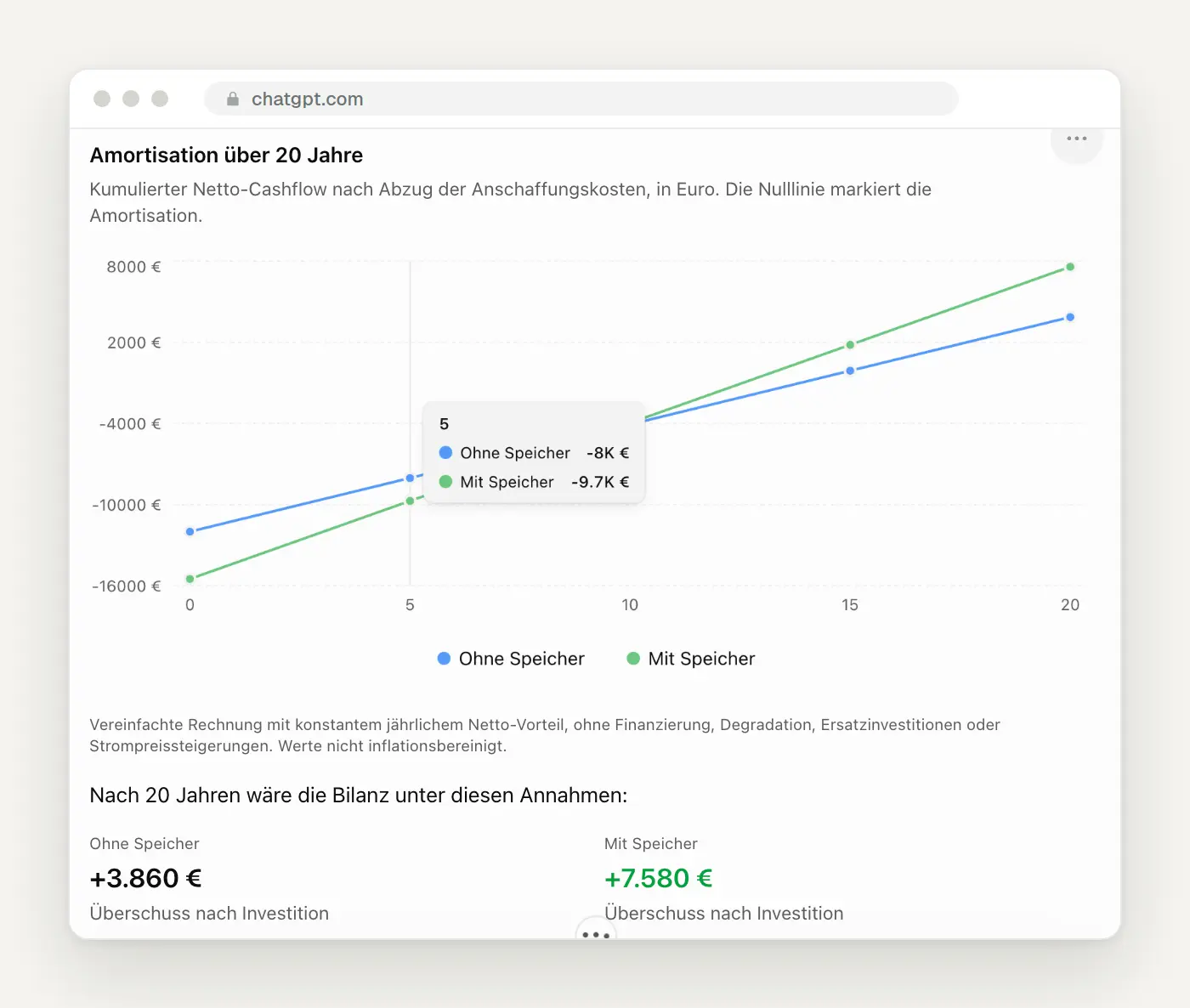
The payback chart showing values at the start and the balance after 20 years.
Test 3: “Which painting company in Cologne-Ehrenfeld would you recommend?”
For local businesses, this test is the most important one. ChatGPT displayed business cards with a photo, star rating, number of reviews, address, and phone number, and it named a favorite: “My favorite for the first inquiry,” citing the high rating and the relatively large number of reviews as reasons. The other businesses were categorized as alternatives and as a “third option for comparison.”
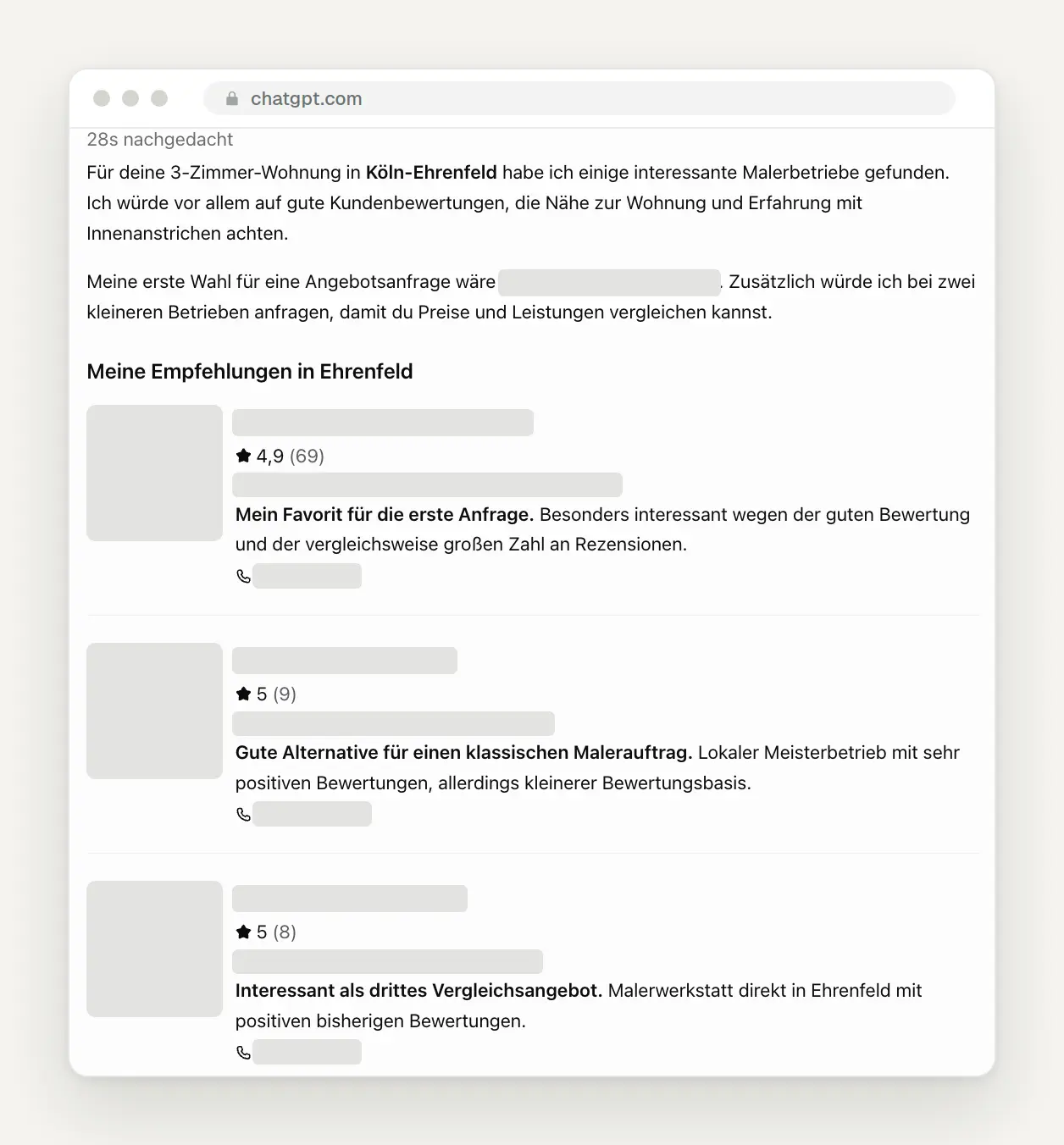
Recommendations in the form of business cards, including ratings and phone numbers. We have obscured the names, addresses, phone numbers, and photos of the businesses.
The customer calls without ever having seen your website. The phone number is listed right in the answer. Our test revealed what determined the order: rating and number of reviews. According to a brand expert quoted by the trade publication B&T, that is precisely what sets it apart from a traditional search: a search provides options, while AI provides a recommendation.
How good is that, really?
The visuals are impressive, but you still need to verify the numbers they contain. In our tests, the calculations were correct, but the assumptions were not our own. Other reviewers share this view: TechRepublic explicitly advises checking numbers, calculations, and assumptions, especially when comparing costs and making business decisions. TechRadar describes a bicycle diagram as a simplified model rather than an accurate representation. Gizmodo warns that visual elements open up a whole new realm for misinterpretation.
Designers face a fundamental question. WIRED praises the end of “text deserts,” but also notes that a shift toward generated interfaces could trigger an identity crisis for designers if AI determines what software looks like for each individual. We take a more relaxed view: In the future, design will focus less on individual pages and more on the system behind them—that is, the content, data, and rules that AI also draws upon.
It's Not Just OpenAI: Generated Interfaces Are Becoming the Norm
Google, Amazon, and the developer community are working on the same principle. In November 2025, Google presented a research paper in which Gemini programs a complete interactive page for each question. These generative interfaces are now also available in Google Search. With A2UI, Google has released an open standard that allows AI agents to send interfaces as descriptions, which are then displayed using an app’s own building blocks. In addition, there is AG-UI, which Amazon, among others, uses for its agent platform, and MCP Apps, through which ChatGPT displays third-party interfaces securely isolated within the chat.
Companies can integrate their own interfaces into ChatGPT, but not into Intelligent UI itself. Through plugins, ChatGPT displays companies’ interfaces within a sandboxed environment. The Radisson hotel chain, for example, built a plugin in six weeks that shows hotels on a map, compares prices, and directs users to its own website to make a reservation. According to Radisson, visitors coming from ChatGPT book about 1.5 times as often as those coming from organic search, the company reports. For local service providers, OpenAI is also testing a “Get Quote” button on business cards that allows customers to request a quote directly in the chat—so far, only with select partners.
What this means for your website
We'll be looking at six episodes, and we can prepare for all of them. What follows is our analysis based on the tests and sources; it is not a prediction by OpenAI.
1. Calculators based on general mathematics are losing their value. ChatGPT can now generate a cost, savings, or payback calculator on demand. Tools that use your own data—your actual prices, regional experience-based figures, delivery times, and availability—remain valuable. If you feed your calculator numbers that are unique to you, you’re providing something that AI can’t come up with on its own.
2. The website serves as the starting point for the customer journey, leading all the way to the point of purchase. Comparing and understanding products increasingly takes place via chat. The people who visit your site are those who have almost made up their minds. That’s why a clear path to contact, proof of trust, and fast loading times are at the top of the list. Our article “Creating a Landing Page” shows you how to structure a page like this.
3. Being cited is the new ranking. In our test, the prices came from pages with clear titles, years, and specific numbers. Clearly state your prices or price ranges, your services, your service area, and frequently asked questions—preferably using structured data. We’ve described in detail how you appear in AI responses in the article “Companies in AI Responses.”
4. For local businesses, reviews determine which ones are the favorites. ChatGPT based its recommendation on the rating and the number of reviews. This means that a well-maintained business profile and actively collected reviews are no longer important only for Google Maps. You can find instructions on how to do this in our posts about Google Business Profiles and Google Reviews.
5. Expectations for your website are rising. Anyone accustomed to sliders, comparisons, and calculators in chat will suddenly find a PDF price list and three paragraphs of continuous text on your site to be outdated. Interactive elements such as a configurator, online appointment booking, or a price range with selection options are becoming the baseline expectation.
6. Developing your own plugins is only worthwhile once you reach a certain size. A plugin like the one used by Radisson requires a budget and a data connection. For small businesses today, it’s more realistic to be easily found and referenced and to have a presence in the directories that ChatGPT uses to build its business cards.
What the Click Statistics Reveal
Summaries cost clicks—this is well documented by Google. In 2025, the Pew Research Center analyzed nearly 69,000 Google searches by 900 adults in the U.S. With AI summaries, users clicked on a traditional search result in 8 percent of visits, compared to 15 percent without them. They clicked on a link within the summary itself in 1 percent of cases. The agency Seer Interactive observed the click-through rate for searches with AI summaries drop by nearly two-thirds in 2025 and rise slightly again in early 2026. There are no reliable figures specifically for ChatGPT and Intelligent UI yet; it’s still too early for that.
Generated content takes it one step further. The industry portal Search Engine Journal sums it up this way: summaries compete with the pages people read, while generated content competes with the pages people use. That’s exactly what we experienced with the cost calculator. You can read more about the implications for Google in our article on AI mode and fewer clicks.
What You Can Do Now
Ask ChatGPT itself how it describes your business. It takes two minutes and reveals more than any analysis. Use a temporary chat without personalization and ask the questions just as a customer would:
Allow the OpenAI search bot to access your site. According to OpenAI, websites that block the OAI-SearchBot do not appear in ChatGPT’s search results. The bot used for training has a different name—GPTBot—and can be controlled separately. If you want to make your site available for search but not for training, add the following to your robots.txt file:
Go over these points for your most important pages. They're helpful for ChatGPT, Google's AI summaries, and regular visitors alike:
What Has Changed and What That Means for You
October 8, 2026: Intelligent UI is coming to the Free and Go plans. For you, this means that even your customers without a subscription will now see calculators and business cards instead of text lists.
October 7, 2026: GPT-6 with Intelligent UI launches in Plus, Pro, Business, and Enterprise. For you, that means: try it out for yourself to see how ChatGPT portrays your industry and your location.
October 5, 2026: OpenAI announces an image-based ad format; ads have been running in Germany on the Free and Go plans since late August. For you, this means ChatGPT is also becoming an advertising channel—though, according to OpenAI, this will not affect the responses.
September 29, 2026: At DevDay, OpenAI opens up the platform for custom plugin interfaces. For you, this means that brands can integrate their own tools into ChatGPT. You can find out what else was announced there in our overview of the DevDay updates.
Date of this version: October 12, 2026. All screenshots are from our own tests conducted on the same day. ChatGPT's responses vary from query to query, so your results may differ.
Want to know how your website ranks in AI responses?
We’ll analyze how ChatGPT and Google portray your business and redesign your website so that it’s featured in search results and helps close deals with customers who are almost ready to make a purchase. Related: Companies in AI Responses · Services: AI and Automation
Let us know what you have in mind by filling out our contact form. We'll respond within 24 hours—personally and without any sales pitch.
More Articles
© Marschfahrt Studio
Practical knowledge on web design, SEO, AI, and conversion optimization. Based on real projects, without any marketing spin.

